PNPM Catalog Codelens
简体中文 | English
一个管理 pnpm catalogs 的 VS Code 扩展:将 package.json 中的依赖版本移动到 pnpm-workspace.yaml 的 catalog: / catalogs: 区块,并替换为 catalog: 引用 — 通过每个依赖上方的 CodeLens 按钮操作。
A VS Code extension that manages pnpm catalogs: it moves dependency versions from package.json into the catalog: / catalogs: sections of pnpm-workspace.yaml and replaces them with catalog: references — driven by CodeLens buttons above each dependency.
简体中文
功能
- 在
package.json 的每个依赖上方生成 CodeLens 按钮:
+catalog — 将版本加入默认 catalog,并替换为 catalog:+catalogs:prod / +catalogs:dev / +catalogs:peer / +catalogs:optional — 根据依赖所在 section 显示对应按钮(dependencies → prod、devDependencies → dev、peerDependencies → peer、optionalDependencies → optional);写入 catalogs.<name> 并使用 catalog:<name>+catalogs:* — 下拉选择其他已有命名 catalog,或通过输入框新建(下拉第一项为“自定义分类”)
- 已是 catalog 引用? 对应按钮显示
✓ 状态,并提供 还原版本 按钮:移除 catalog 条目并回填真实版本。
- 版本冲突 — 目标 catalog 已存在不同版本时,弹窗三选一:使用 catalog 版本、使用当前
package.json 版本、取消。
- 孤儿引用 —
package.json 写了 catalog: 但 catalog 中没有对应条目时,提示输入版本(自动预填 node_modules 中已安装的版本)。
- 标题栏开关 — 编辑器右上角图标用于开启/关闭服务,状态按工作区记忆。默认关闭。
- 安全写入 — 两个文件通过单个
WorkspaceEdit 修改(一次撤销同时回退)并自动保存;yaml 中已有的注释与格式完整保留。
- 模板项目友好 — 仅使用 VS Code 工作区根目录的
pnpm-workspace.yaml(支持 multi-root),忽略嵌套的 workspace 文件;根文件缺失时先弹窗确认再创建。
使用方式
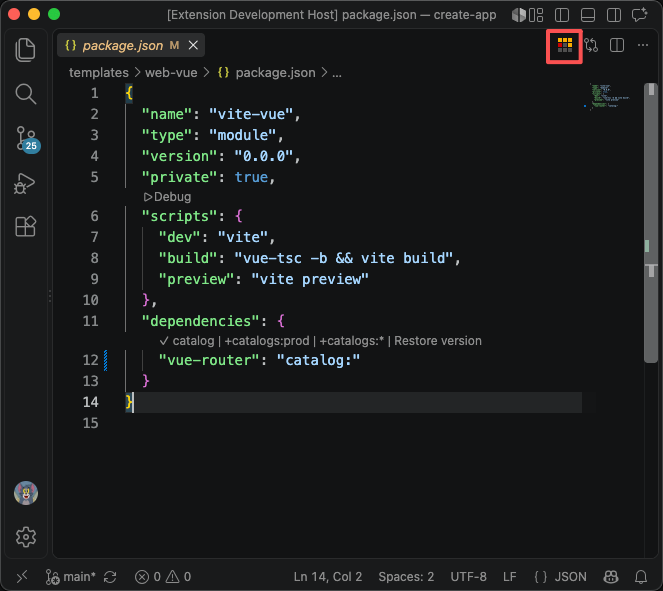
- 打开属于 pnpm workspace 的
package.json。
- 点击标题栏图标(或从命令面板执行 启用 pnpm catalog)开启服务。
- 悬停在依赖名称上,使用 CodeLens 按钮:
{
  "dependencies": {
    "react": "catalog:", // +catalog
    "vue": "catalog:ui" // +catalogs:* -> "ui"
  },
  "devDependencies": {
    "vitest": "catalog:dev" // +catalogs:dev
  }
}
pnpm-workspace.yaml(块之间自动加空行,注释保留):
catalog:
  react: ^18.2.0

catalogs:
  ui:
    vue: ^3.4.0
  dev:
    vitest: ^1.6.0
命令
| 命令 |
ID |
| 启用 pnpm catalog |
tomjs.pnpmCatalog.enable |
| 禁用 pnpm catalog |
tomjs.pnpmCatalog.disable |
| 添加到 pnpm catalog(仅 CodeLens) |
tomjs.pnpmCatalog.addToCatalog |
环境要求
- VS Code
^1.56
- pnpm workspace:项目根目录存在
pnpm-workspace.yaml(扩展可按需创建)。默认 catalog: 协议需要 pnpm ≥ 9.5;命名 catalog(catalogs:)需要支持该特性的 pnpm 版本。
English
Features
- CodeLens buttons above every dependency in
package.json:
+catalog — add the version to the default catalog and use catalog:+catalogs:prod / +catalogs:dev / +catalogs:peer / +catalogs:optional — one context button per section the package belongs to (dependencies → prod, devDependencies → dev, peerDependencies → peer, optionalDependencies → optional); writes to catalogs.<name> and uses catalog:<name>+catalogs:* — pick any other existing named catalog, or create a new one via an input box (first option in the dropdown)
- Already cataloged? The matching button shows a
✓ state, and a Restore version button removes the catalog entry and writes the version back.
- Version conflicts — if the target catalog already holds a different version, a picker lets you choose: catalog version, current
package.json version, or cancel.
- Orphan references — if
package.json says catalog: but the catalog has no entry, the extension asks for a version, pre-filled from the one installed in node_modules.
- Editor title bar toggle — an on/off icon (top-right of the editor) enables or disables the service; state is remembered per workspace. Disabled by default.
- Safe writes — both files are edited through a single
WorkspaceEdit (undo reverts both) and saved automatically; existing yaml comments and formatting are preserved.
- Template-project friendly — only the
pnpm-workspace.yaml at the VS Code workspace root is used (multi-root aware); nested workspace files are ignored. A missing root file triggers a confirmation dialog before it is created.
Usage
- Open a
package.json that belongs to a pnpm workspace.
- Click the title-bar icon (or run Enable pnpm catalog from the Command Palette) to turn the service on.
- Hover a dependency name and use the CodeLens buttons:
{
  "dependencies": {
    "react": "catalog:", // +catalog
    "vue": "catalog:ui" // +catalogs:* -> "ui"
  },
  "devDependencies": {
    "vitest": "catalog:dev" // +catalogs:dev
  }
}
pnpm-workspace.yaml (blank lines are added between blocks, comments are kept):
catalog:
  react: ^18.2.0

catalogs:
  ui:
    vue: ^3.4.0
  dev:
    vitest: ^1.6.0
Commands
| Command |
ID |
| Enable pnpm catalog |
tomjs.pnpmCatalog.enable |
| Disable pnpm catalog |
tomjs.pnpmCatalog.disable |
| Add to pnpm catalog (CodeLens only) |
tomjs.pnpmCatalog.addToCatalog |
Requirements
- VS Code
^1.56
- A pnpm workspace:
pnpm-workspace.yaml at the project root (the extension can create it on request). The default catalog: protocol requires pnpm ≥ 9.5; named catalogs (catalogs:) require a pnpm version that supports them.
Thanks
感谢并参考了 vscode-versionlens 项目,本扩展的 CodeLens 交互模式深受其启发。
Thanks to the vscode-versionlens project — this extension's CodeLens interaction pattern is heavily inspired by it.
License
MIT

