Commit Message Generator
AI 驱动的 Git Commit Message 自动生成工具。
功能特点
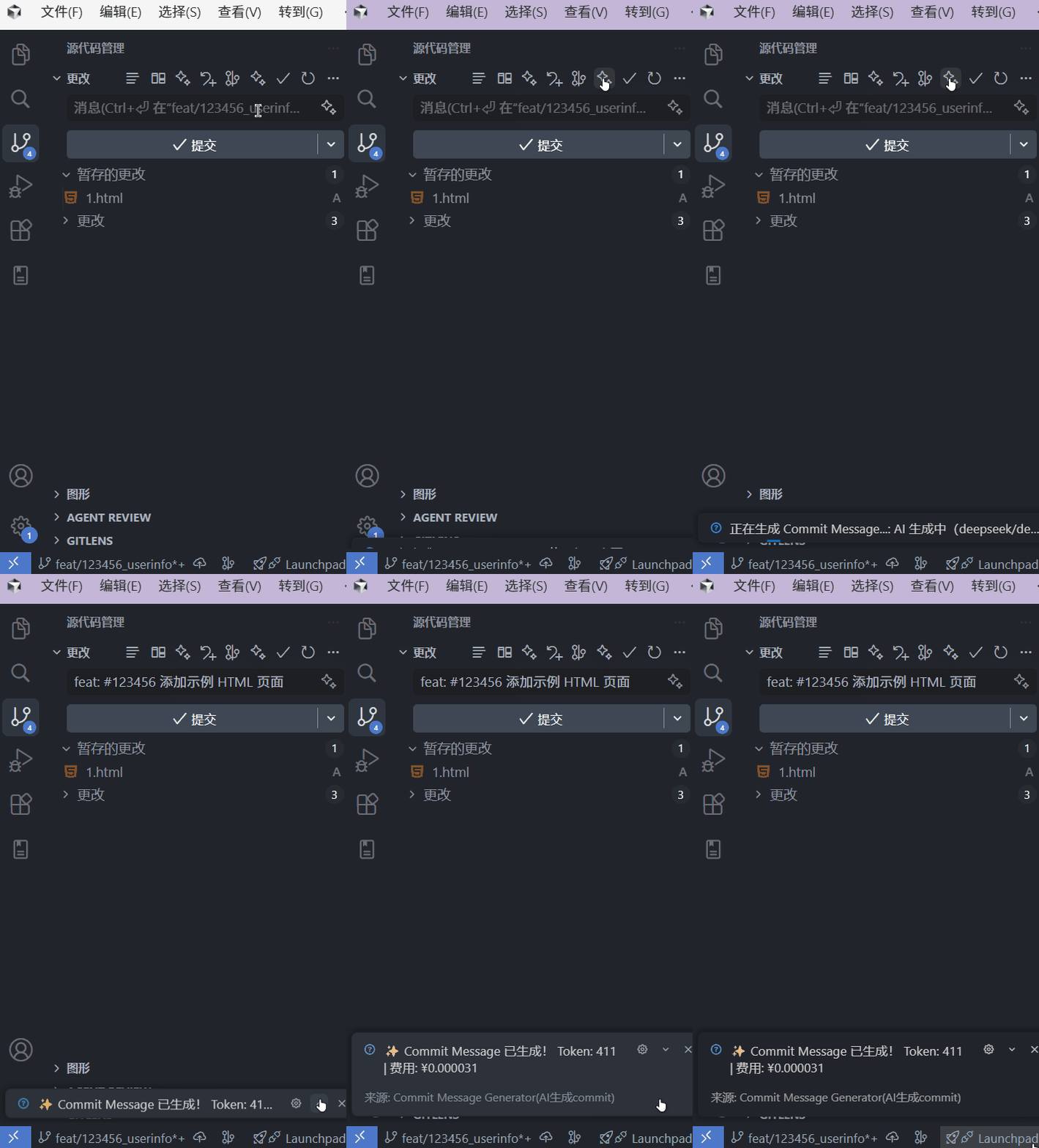
- 智能分析代码变更,生成规范的中文 commit message
- 一键生成,自动填充到提交输入框
- 支持自定义 commit type
- 可从分支名中自动提取 Issue ID(如
#123)
- 自动过滤压缩文件、二进制文件等无关内容
安装与快速开始
1) 安装扩展
在 VSCode 扩展市场搜索 Commit Message Generator 并安装。
2) 配置 API Key(必填)
只需要填写 API Key 就可以使用。
方式一:设置界面
- 打开 VSCode 设置(
Ctrl + , 或 Cmd + ,)
- 搜索
commitAiPro
- 在
Deepseek Api Key 字段粘贴你的 API Key
方式二:settings.json
{
  "commitAiPro.deepseekApiKey": "sk-your-api-key-here"
}
3) 开始生成 Commit Message
- 修改代码
- 打开源代码管理面板(
Ctrl + Shift + G)
- 点击 生成 Commit Message
- 等待生成并确认内容
- 提交代码
可选配置
自定义 Commit Types
在设置中搜索 commitAiPro.commitTypes,可自定义类型列表:
{
  "commitAiPro.commitTypes": [
    { "type": "feat", "description": "新功能" },
    { "type": "fix", "description": "修复" },
    { "type": "docs", "description": "文档" },
    { "type": "style", "description": "格式调整" },
    { "type": "refactor", "description": "重构" },
    { "type": "perf", "description": "性能优化" },
    { "type": "test", "description": "测试" },
    { "type": "build", "description": "构建" },
    { "type": "ci", "description": "配置" },
    { "type": "chore", "description": "杂项" },
    { "type": "revert", "description": "回退" }
  ]
}
Issue ID 自动提取
默认启用。如果分支名包含数字(如 feature/123-new-feature),生成结果会包含 #123。
关闭方式:
{
  "commitAiPro.includeIssueId": false
}
支持的分支名示例:
feature/123-add-login -> #123bugfix/456 -> #456123-new-feature -> #123fix-789-bug -> #789
更多配置见 CONFIGURATION.md。
Commit Message 格式
基础格式:
<type>: <subject>
带 Issue ID:
<type>: #<id> <subject>
默认 type:
feat 新功能fix 修复 Bugdocs 文档更新style 代码格式调整refactor 重构perf 性能优化test 测试相关build 构建相关ci CI 配置chore 杂项维护revert 回退提交
示例:
feat: 添加用户登录功能
fix: 修复列表页面数据显示错误
docs: 更新 API 文档
自动过滤文件类型
为了减少无效上下文,扩展会过滤以下内容:
- 压缩文件:
.min.js, .min.css, .bundle.js 等
- Source Map:
.map
- Lock 文件:
package-lock.json, pnpm-lock.yaml 等
- 图片:
.jpg, .png, .gif, .svg 等
- 字体:
.woff, .ttf 等
- 二进制:
.exe, .dll, .pdf 等
- Minified 内容(自动检测)
常见问题
Q: 提示“未配置 DeepSeek API Key”怎么办?
A: 点击提示中的“去配置”,或按上文在设置里填写 commitAiPro.deepseekApiKey。
Q: 显示“没有检测到代码变更”?
A: 请先修改文件。扩展会优先读取暂存区(staged)变更,若为空则读取工作区变更。
Q: 生成结果不满意怎么办?
A: 可手动编辑,也可以再次点击生成按钮重新生成。
Q: API Key 安全吗?
A: API Key 仅存储在本地 VSCode 配置中。请勿将其提交到仓库。
Q: 分支名没有 Issue ID 怎么办?
A: 不影响使用。检测不到 ID 时,不会在 message 中添加 #id。
License
MIT

