Skip to content
| Marketplace
Sign in
Visual Studio Code>Other>Code Review MarkerNew to Visual Studio Code? Get it now.
Code Review Marker

Code Review Marker

tintinweb

| (0) | Free
Right-click to mark files and folders reviewed, revisit or suspicious. Reads scope.txt to grey out what's out of scope and show how much of the review you've actually covered.
Installation
Launch VS Code Quick Open (Ctrl+P), paste the following command, and press enter.
Copied to clipboard
More Info

Code Review Marker

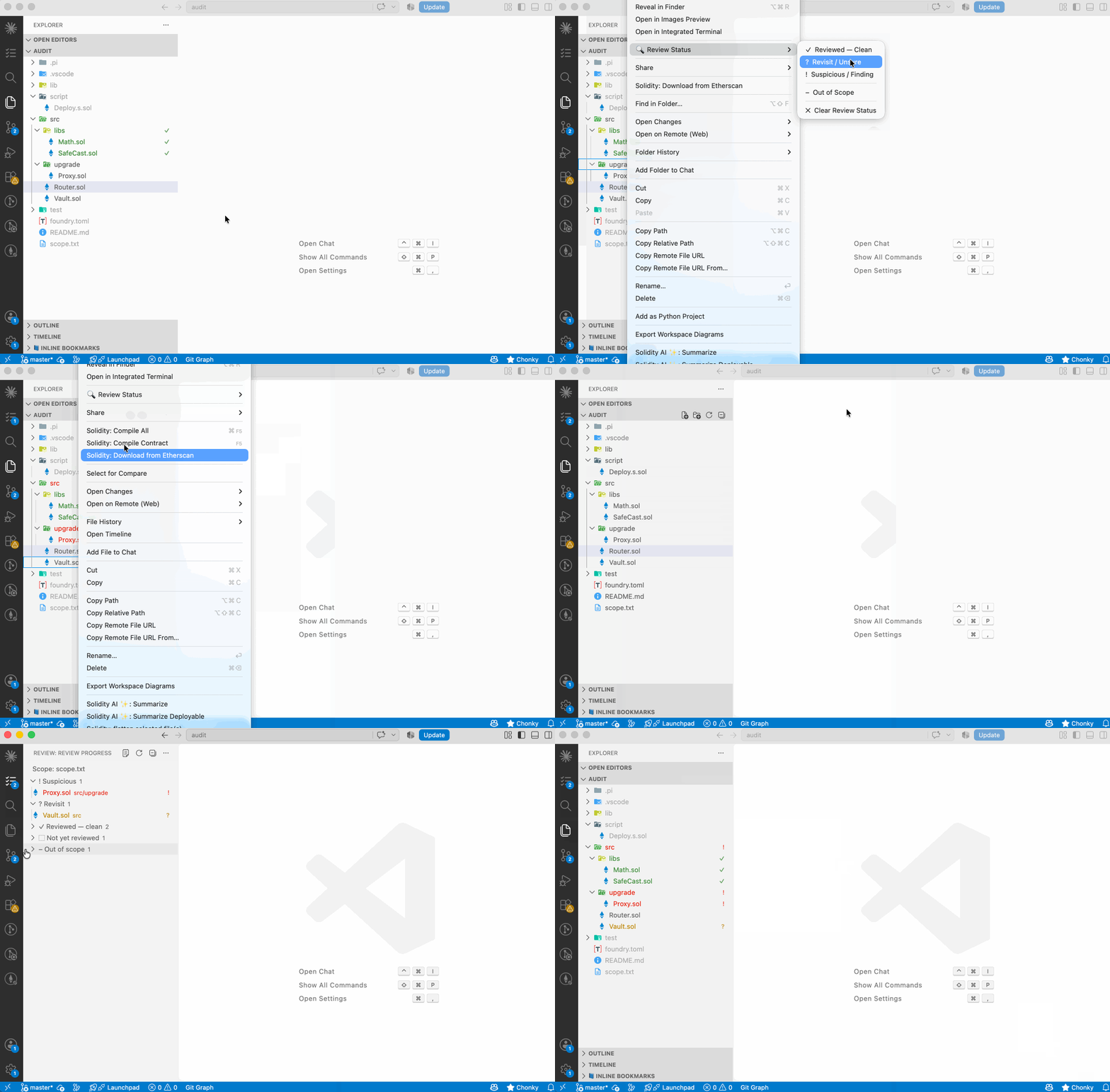
Track what you have reviewed, directly in the VS Code Explorer.

Marking files reviewed from the Explorer context menu

Right-click a file or a folder, pick a review state, and it colours in. Folders carry down to everything inside them, roll up whatever is worst below them, and turn green on their own once you have finished them. If the repo has a scope.txt, everything outside the audit scope greys out and you get real coverage numbers instead of a guess.

Built for multi-file security reviews, where the hard part is not reading a file — it is remembering which of three hundred files you have already read.


The model

Two things stack: whether a path is in scope, and what you have decided about it.

badge meaning
(nothing) In scope, not yet reviewed. This is the default — it is not a state you set.
Reviewed — clean ✓ green You read it, it is fine.
Revisit ? yellow Something to come back to.
Suspicious ! red There is something here.
In scope (nothing) Pulled back into the review by hand, past scope.txt. Looks like any unreviewed file, and counts as one.
Out of scope (grey label) Ruled out by scope.txt, or marked by hand.

A file changed since you reviewed it gets ✓* in orange — a green file that quietly moved underneath you is the one thing worse than an unreviewed file.

Folders

Marking a folder marks everything below it, stored as one entry — src/libs/ — not one per file. Two rules keep that honest:

  • A clean folder cannot hide a finding. Mark src/ clean, then flag one file inside it, and the folder shows ✓! in red. Folder-level marking is only safe because of this.
  • Folders finish themselves. Once every in-scope file below a folder is clean, the folder turns ✓ without you marking it. Working up a tree, you watch it go green.

To exclude one file from a folder you marked clean, use Clear Review Status on it: it writes an explicit "not reviewed" that stops the inheritance.


scope.txt

Drop a scope.txt at the repo root and everything not in it greys out. scope.md, audit-scope.txt and audit-scope.md are picked up too, and matching ignores case, so SCOPE.md and Scope.txt work as well.

If the client shipped their scope list under some other name entirely, don't rename it — right-click it in the Explorer and choose 🔍 Review Status → Use as Review Scope. It tells you straight away how many files it matched.

The parser takes scope files in the shape they usually arrive in — you should not have to reformat a scope list to use it:

# Audit scope

| Contract              | nSLOC |
|-----------------------|------:|
| `src/Vault.sol`       |   245 |

- [ ] `src/upgrade/Proxy.sol`  88
* src/libs/                       ← a bare directory means everything under it
src/**/*.sol                      ← globs work
!src/mocks/**                     ← and negation

Comments (#, //), markdown bullets, checkboxes, backticks, links, table cells and trailing nSLOC columns are all stripped. Prose lines are skipped rather than turned into a rule. Resolution is last-match-wins, like a .gitignore read inside out: listing a path puts it in scope, ! takes it back out, and anything no rule matches is out of scope.

Run Code Review Marker: Scope Diagnostics after adding a scope file. It shows every rule, how it was read, how many files it matched — and calls out any rule that matched nothing. A typo'd path in a scope file is invisible otherwise, and it silently drops a contract from the audit.

Without a scope.txt the scope layer is simply off: nothing greys out, and coverage is reported against a file glob and labelled as an estimate.

The estimate, when there is no scope file

An estimate that counts node_modules, generated bindings and build output is not worth reading, so the repo's own .gitignore is honoured for it: ignored files are left out of the denominator and reported as N files hidden by .gitignore in the panel, the report and Scope Diagnostics. Nested .gitignore files, ! re-inclusion and .git/info/exclude all work the way git reads them.

Nothing is greyed out by this — the Explorer looks exactly the same — and files you mark by hand are always counted, .gitignore or not. Two limits worth knowing: a tracked file that matches an ignore rule is hidden here where git would keep it (we cannot see the git index), and the global core.excludesFile is not read. Set reviewFlags.scope.respectGitignore to false to count everything again. With a scope file present, none of this applies — the scope file decides.

Overriding it, one path at a time

A scope file is usually the client's, and editing it to argue with it is the wrong move. So both directions are available as marks instead: + In Scope pulls a path back in, – Out of Scope takes one out, and Clear Review Status undoes either. They live in .vscode/review-flags.json alongside your review state; scope.txt is never written to.

+ In Scope on a folder covers everything below it, and those files join the coverage denominator — the number to watch when you add one. Worth knowing:

  • It renders as nothing. The path stops being greyed out and starts counting, which is the whole point; "in scope" is what every other file already is, so it gets no badge of its own.
  • A path is either in scope by hand or carries a review state, never both. Re-marking an included folder ✓ replaces the include, and the files below it leave the denominator again. Put the include on the folder and the review marks on the files inside it.
  • Folder includes reach only files VS Code searches. Anything hidden by files.exclude or search.exclude — node_modules/ by default — has to be added as an individual file.

The exported report lists everything added this way under In scope — added by hand, so the scope you actually reviewed is never just implied.


The Review Progress panel

In the activity bar, grouped worst-first, with a line at the top saying which scope file is in force — or that there isn't one, which is the difference between exact coverage and a guess:

Scope: audit-scope.md

▾ ! Suspicious                    3
▾ ? Revisit                       7
▸ ✓ Reviewed — clean             42
▸ ⬚ Not yet reviewed             66     ← in scope, untouched
▸ – Out of scope                  6
▸ ⌫ Missing                       1

The activity bar badge shows suspicious + revisit — what you still owe. The view header shows coverage, 42/118 · 36%.

Not yet reviewed is the group worth having. A list of what you have already read is an audit trail; the list of what nobody has opened is the one that tells you whether you are done.

Export Review Report writes all of it to a Markdown document — findings with notes, coverage, the full unreviewed list, and any broken scope rules. It opens unsaved, so nothing lands in your repo unless you save it.


Where state is stored

.vscode/review-flags.json, one per workspace folder, paths relative to that folder:

{
  "version": 1,
  "flags": {
    "src/libs/":         { "state": "clean", "at": "2026-08-10T12:00:00.000Z" },
    "src/libs/Math.sol": { "state": "none" },
    "src/Vault.sol":     { "state": "flagged", "note": "unchecked delegatecall",
                           "at": "2026-08-10T12:00:00.000Z", "hash": "9f2ad41c8b7e0355" },
    "test/":             { "state": "skip", "by": "copilot" }
  }
}

Sorted keys, two-space indent, one line per path — it diffs cleanly and merges by hand. Commit it to share review state across a team, or .gitignore it to keep it local. The file is watched, so pulling a colleague's marks updates the Explorer without a reload, and hand-editing the JSON works fine.

Keys are workspace-folder-relative POSIX paths. A folder key ends with / — src/libs/ is the folder, src/libs would be a file called libs. Keys containing .. are dropped on read.

Fields, all optional except state:

Field
state clean · revisit · flagged · include · skip · none — see below.
note Free text, shown in tooltips, the panel and the report. No editing UI yet — write it here.
by Who set the mark, when it wasn't a person. Written by the Copilot tool as copilot; shown in tooltips and called out in the exported report.
at ISO 8601, display only.
hash First 16 hex chars of the SHA-256 of the file's raw bytes — shasum -a 256 <file> \| cut -c1-16. Present, and the mark goes ✓* when the file changes; absent, and it never goes stale.

none is not "unreviewed". Unreviewed is the absence of an entry. none means "explicitly not reviewed, and don't inherit from the folder above me" — the only way to punch a hole in a folder you marked clean. Everywhere else, delete the entry instead.

version must be 1. A file claiming a higher version is displayed but never written to, so nothing a newer release recorded gets clobbered. The same applies to a file that doesn't parse: the extension says so, keeps what it could read, and refuses to save until you fix it.

A marked file that disappears is kept, not deleted: switching branches should not destroy review state. Missing files show up in the panel, where Prune Missing Files removes them deliberately.


Agents

Copilot

In agent mode the extension contributes one tool, Set Review Status, so Copilot can mark files as it reviews them. It shows up under Select Tools, and #reviewStatus forces it:

mark everything under src/libs reviewed clean, and flag src/Vault.sol — the delegatecall is unchecked

It writes the same marks the context menu does, hash included, and records "by": "copilot" so its marks stay distinguishable from yours in the exported report. Requires VS Code 1.99+.

Everything else

Any agent can edit review-flags.json directly — the file is watched, so marks appear as soon as it writes. .claude/skills/code-review-marker/SKILL.md is a skill covering the format, where the file lives and the handful of rules that bite (the folder trailing slash, none, what to do about the hash). Copy that folder into the repo you're auditing and the agent will pick it up.

An agent can write the scope file too — hand it the client's scope list, then Use as Review Scope on the result.


Settings

Setting Default
reviewFlags.scopeFile scope.txt, scope.md, audit-scope.txt, audit-scope.md Candidate scope file names, tried in order; first that exists wins. Use as Review Scope writes this for you.
reviewFlags.storagePath .vscode/review-flags.json Where marks are stored.
reviewFlags.folderRollup worst worst · own (only explicit marks) · off.
reviewFlags.outOfScopeBadge false Add a – badge to greyed files. Off by default — on a large repo the grey alone is much quieter.
reviewFlags.detectStaleMarks true Hash files when marked and flag them when they change.
reviewFlags.showBadges true Turn off for a colour-only look.
reviewFlags.panel.maxItems 2000 Cap per group in the panel.
reviewFlags.scope.fallbackExclude build dirs Coverage exclusions used only when there is no scope file.
reviewFlags.scope.respectGitignore true Leave .gitignored files out of the estimated coverage count. Nothing is greyed out. Used only when there is no scope file.

Colours are themable — override reviewFlags.clean, .revisit, .flagged, .outOfScope and .stale under workbench.colorCustomizations.

Decorations need explorer.decorations.colors and explorer.decorations.badges on (both are on by default). To see marks on editor tabs too, turn on workbench.editor.decorations.colors and workbench.editor.decorations.badges.

Keyboard

No keybindings ship by default. Every command is registered, so bind what you use:

{ "key": "alt+1", "command": "reviewFlags.mark.clean" },
{ "key": "alt+2", "command": "reviewFlags.mark.revisit" },
{ "key": "alt+3", "command": "reviewFlags.mark.flagged" }

With no Explorer selection these act on the active editor.


Known interaction with git decorations

VS Code merges decorations from every provider. On a file that is both reviewed and modified in git you will see the badges joined (✓, M), and the label colour goes to whichever provider VS Code weighs higher — see microsoft/vscode#187756. Nothing is lost, but the colour on a git-modified file may not be ours.


Development

npm install
npm test              # core logic, node:test, no VS Code needed
npm run test:integration   # real VS Code host against fixtures/audit
npm run watch         # then F5 to launch an Extension Development Host
npx vsce package      # -> code-review-marker-0.2.0.vsix

src/core/ has no vscode imports at all — the scope parser and the resolve/rollup logic are where the edge cases live, and keeping them pure means they are testable without an Electron host. Everything above it is thin adapters.

fixtures/audit/ is a small repo with a deliberately messy scope.txt, used by the integration tests and handy as a scratch workspace when developing.

  • Contact us
  • Jobs
  • Privacy
  • Manage cookies
  • Terms of use
  • Trademarks
© 2026 Microsoft