CAD Viewer
A VS Code extension for opening 3D CAD models directly inside the editor.
You can also open interactive examples in the browser: cad.thingraph.site/cad-viewer.
Features
- Open common 3D CAD formats in a custom read-only editor.
- Render models inside a VS Code webview with pan, zoom, orbit, screenshot, and viewer tools.
- Background follows the editor theme for a consistent look in VS Code and Cursor.
Examples
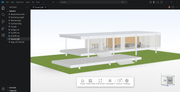
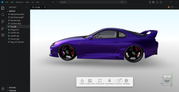
glTFGLBOBJFBXSTLIFCSTPSTEPIGSIGES
3D formats (glTF, GLB, OBJ, FBX, STL, IFC, STP, STEP, IGS, IGES) are not supported by this extension. Use  instead.
Usage
- Open a supported 3D model in VS Code.
- The extension opens the file with the CAD Viewer custom editor.
- Use the viewer controls to inspect the model.
Build
Default build produces CAD Viewer (3D):
pnpm install
pnpm run build
To package a VSIX:
pnpm run package:vsix
Notes
- The editor is read-only.
- Large files may take longer to load depending on file size and machine performance.
Support
Release Notes
See CHANGELOG.md.
Publishing
Marketplace packaging and publishing steps are documented in PUBLISH.md.
License
Proprietary, see LICENSE.

