
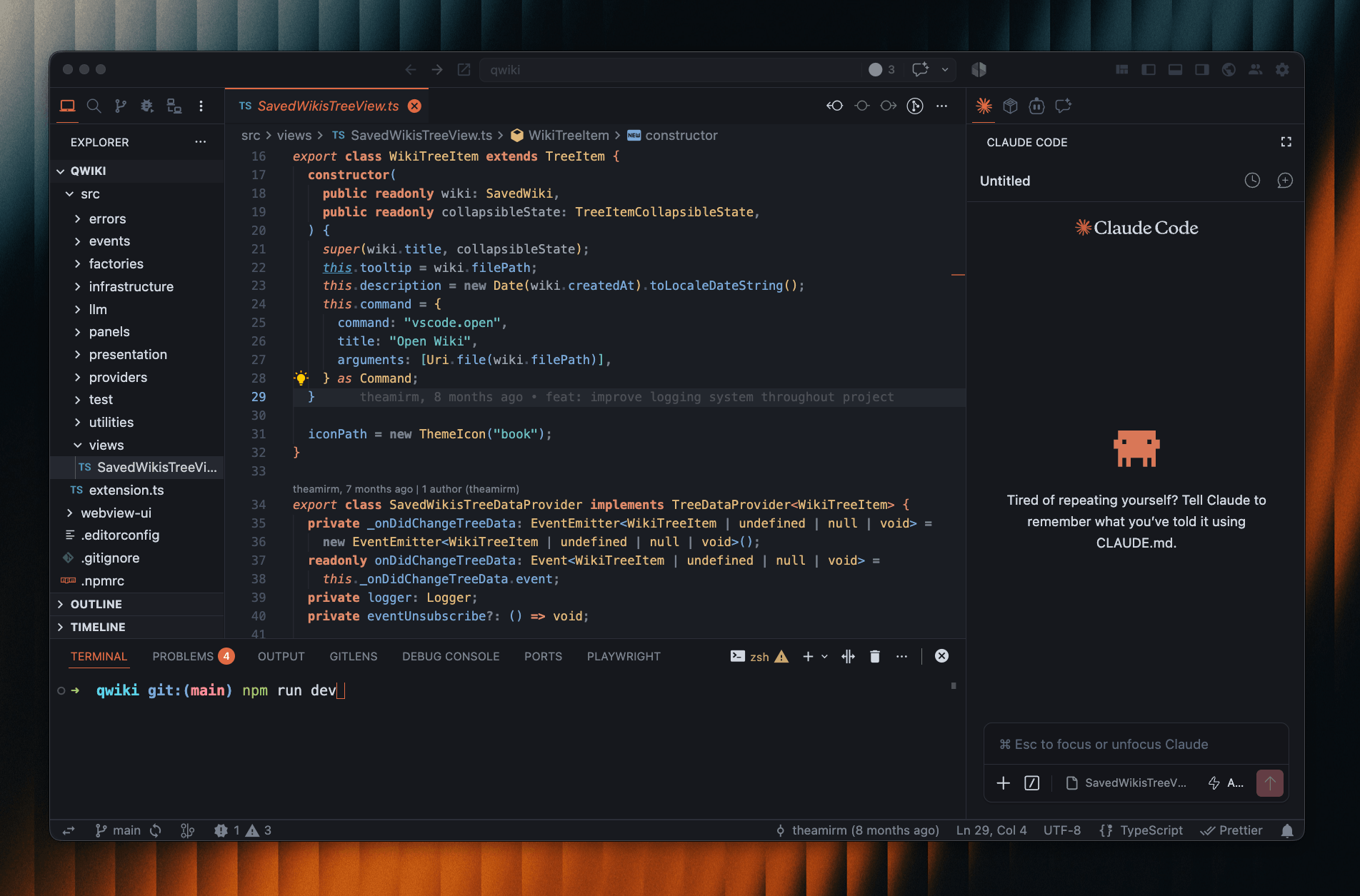
Quiet dark theme with hints from Claude. You can choose between terracotta, blue, purple, or green accents. It works with VS Code and editors like Cursor, Antigravity, Windsurf, and VSCodium.
by b-amir | github.com/b-amir/shannons-entropy

Features
- One accent for the cursor, active tab, activity bar, and headings. Pick Terra, Blue, Purple, or Green.
- Calm syntax. A small set of warm and cool tones with shades, not a rainbow.
- Layered dark backgrounds and thin borders.
- Quiet chrome. Hidden focus rings, soft scrollbars, muted buttons.
Palette
| Role |
Color |
Used for |
| Accent |
#e06a43 |
cursor, active tab, activity bar, headings |
| Coral |
#e08b6a |
keywords, control flow, tags |
| Amber |
#e0b87a |
types, classes, attributes |
| Cyan |
#6dc1c1 |
strings, numbers, constants |
| Blue |
#7aa8d8 |
functions, methods, properties, links |
| Foreground |
#d1d7e0 |
variables, text |
| Muted |
#9aa3af |
parameters, quotes |
| Punctuation |
#7a828f |
operators, brackets, separators |
| Comment |
#596578 |
comments, ghost text |
Backgrounds: editor #1a1d23, activity/title/status #181a1f, sidebar/panel #16181d. Borders #2b2e38.
Blue, Purple, and Green use the same surfaces and syntax. Only the accent changes (#5f93c6, #9f78c4, #5eb887).
Install
VSIX
Grab the latest .vsix from Releases. Each GitHub release packages the theme automatically and puts install steps in the release notes.
code --install-extension shannons-entropy-theme-1.4.2.vsix
Manual
Copy this folder into your editor's extensions directory, reload the window, and select a Shannon's Entropy theme.
| Editor |
Path |
| VS Code |
~/.vscode/extensions/ |
| Cursor |
~/.cursor/extensions/ |
| Antigravity |
~/.antigravity-ide/extensions/ |
| Windsurf |
~/.codeium/windsurf/extensions/ |
| VSCodium |
~/.vscode-oss/extensions/ |
Recommended settings
{
  "editor.fontLigatures": true,
  "editor.bracketPairColorization.enabled": true,
  "editor.guides.bracketPairs": "active",
  "workbench.colorTheme": "Shannon's Entropy",
  "editor.minimap.enabled": false,
  "editor.scrollbar.horizontalScrollbarSize": 8,
  "editor.scrollbar.verticalScrollbarSize": 8
}
Customize
The themes are JSON files in themes/. Edit the one for your variant.
- Change the accent by replacing its hex everywhere it appears.
- Bring focus rings back by setting
focusBorder and list.focusOutline to a visible color.
- Make the scrollbar brighter by raising the alpha on
scrollbarSlider.background.
- Go deeper by shifting
editor.background, sideBar.background, and panel.background together.
License
MIT License (c) b-amir

