

Skip to content
| Marketplace
Sign in
Visual Studio Code>Other>Explorer Open in GroupNew to Visual Studio Code? Get it now.
Explorer Open in Group

Explorer Open in Group

tettekete

|
2 installs
| (0) | Free
Open files from Explorer into a specific editor group without relying on the active group.
Installation
Launch VS Code Quick Open (Ctrl+P), paste the following command, and press enter.
Copied to clipboard
More Info

English / 日本語

Features

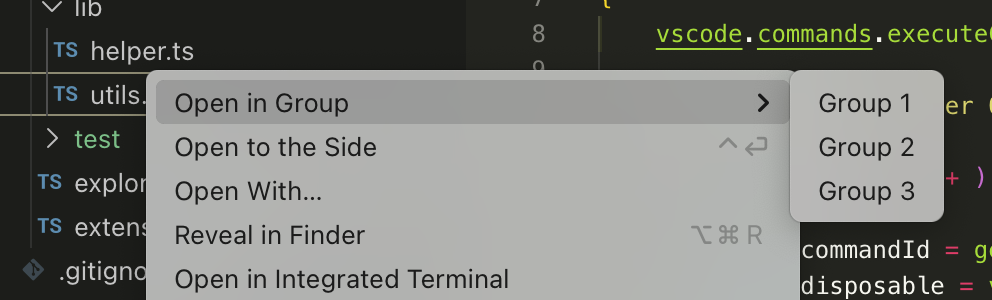
Adds a context menu that lets you choose which editor group to open a file from the Explorer.
Known Behavior and Workarounds

If you are annoyed that the Explorer view changes every time you switch the active editor group, search for Explorer: Auto Reveal (explorer.autoReveal) in settings and set it to false.

Even so, if you are annoyed that files opened from the Explorer do not land in the editor group you expected, this extension should help.

  • Contact us
  • Jobs
  • Privacy
  • Manage cookies
  • Terms of use
  • Trademarks
© 2026 Microsoft