Tetrate Agent Router Model Provider
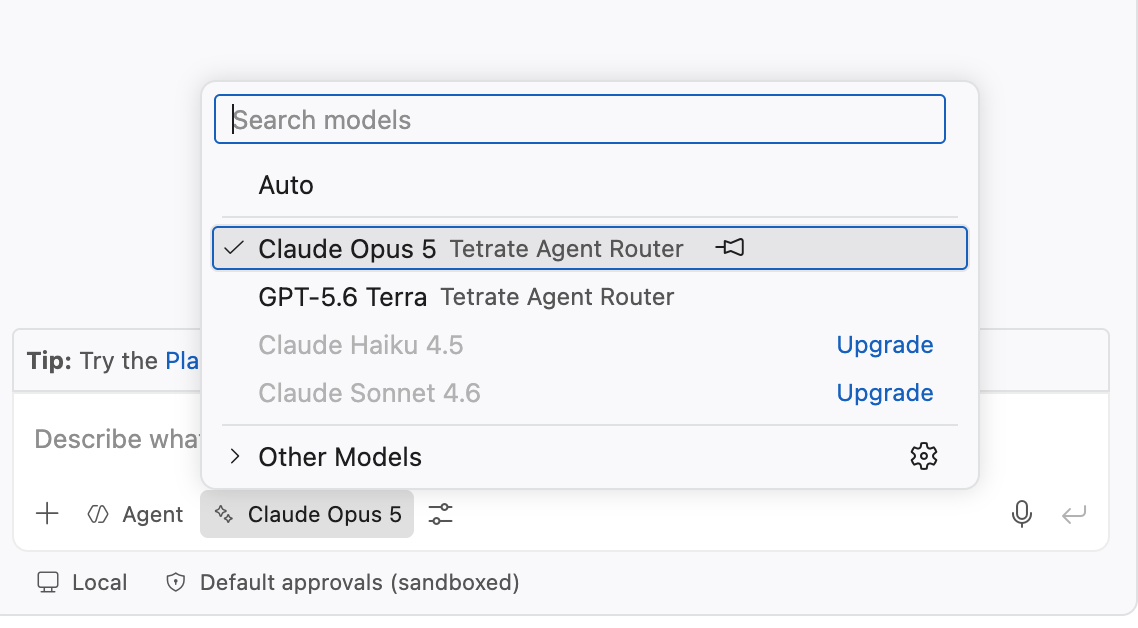
A VS Code language model provider for Tetrate Agent Router Service. It contributes every chat model an Agent Router API key can reach to the VS Code chat view, and to any extension that selects models through the vscode.lm API.
Models are discovered from the endpoint at runtime, so newly released models appear without an extension update.
Why use this
VS Code can already talk to an OpenAI-compatible endpoint through its built-in Custom Endpoint support. That path is limited to the chat view: other extensions calling vscode.lm.selectChatModels() cannot see those models.
Registering as a provider extension removes that limitation. One Agent Router key then serves:
- The chat view and agent mode
- Any third-party extension that selects models through
vscode.lm
- Anthropic, OpenAI, Google, xAI, Groq, and DeepInfra models behind a single endpoint and a single bill
Requirements
| Requirement |
Detail |
| VS Code |
1.106 or newer |
| API key |
An Agent Router API key from the Agent Router dashboard |
| Network |
Outbound HTTPS to the configured base URL, and to router.tetrate.ai for model metadata |
VS Code 1.106 is the floor because LanguageModelDataPart, which carries image input, first appears in that version. The provider registration API itself is stable from 1.104.
Installation
Option 1: Install from the Visual Studio Code Marketplace (recommended)
- Open Visual Studio Code.
- Open the Extensions view.
- Search for Tetrate Agent Router Model Provider, and install it.
Or from a terminal:
code --install-extension tetrate.tetrate-model-provider
Option 2: Install from a local VSIX
- Download tetrate-model-provider-0.6.0.vsix from the Github repo.
- Install from command line using
code:
code --install-extension tetrate-model-provider-0.6.0.vsix
Alternatively, open the Extensions view, choose Install from VSIX… from the ⋯ menu, and select the file.
Reload afterwards with Developer: Reload Window.
Option 3: Build from source, for development
- Check out the project's sources from GitHub:
git clone https://github.com/tetrateio/tetrate-model-provider.git.
- Open the project in VS Code
- Press F5. This builds the bundle and launches a second window with the extension loaded, which avoids reinstalling on every change.
Quick start
- Install the extension and reload VS Code.
- Run Tetrate Agent Router: Set Agent Router API Key from the Command Palette and paste the key.
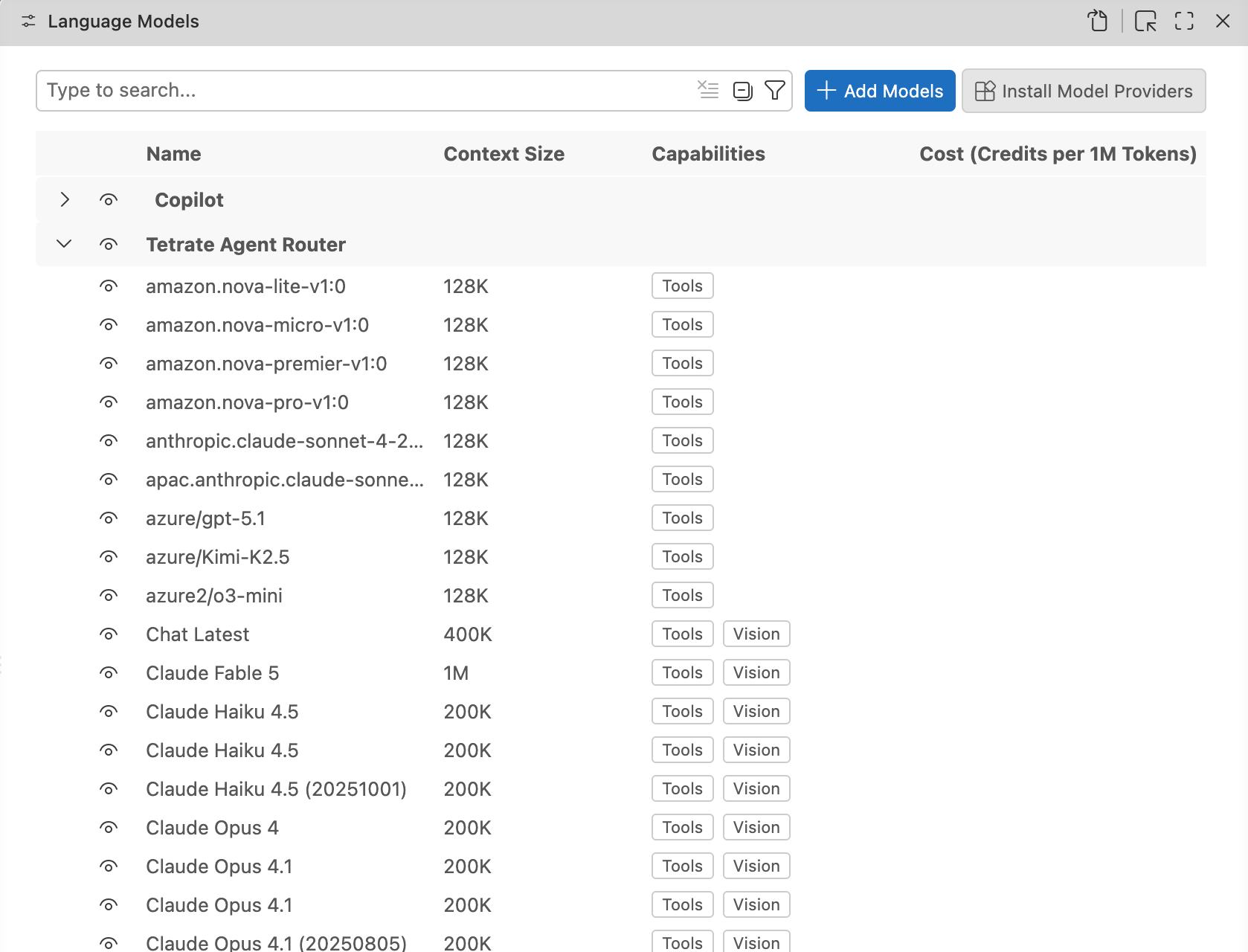
- Run Chat: Manage Language Models, select Tetrate Agent Router, and enable the required models.
Step 2 is optional. The first time VS Code resolves models interactively, for example when opening Chat: Manage Language Models, the extension prompts for the key.
Step 3 is not optional. Models contributed by an extension start out hidden in the chat model picker and do not appear until enabled there.
The same three steps are available as a walkthrough under Help → Get Started, titled Get started with Tetrate Agent Router.
Where the key is stored
The key is held in VS Code secret storage, scoped to the endpoint host: tetrate-model-provider.agentRouterApiKey:<host>. It is never written to a settings file, a log, or the output channel. On macOS that means the system Keychain.
Scoping by host keeps each credential with its endpoint. When the base URL is switched between the hosted service and a self-hosted deployment, each host keeps its own key, and a key entered for one host is never sent to another. A key stored by a version before scoping serves as a fallback for any host until a scoped key is saved.
Secret storage is per-machine and does not sync across Settings Sync.
Configuration
| Setting |
Type |
Default |
Scope |
Purpose |
tetrate-model-provider.baseUrl |
string |
https://api.router.tetrate.ai/v1 |
machine |
The OpenAI-compatible endpoint to call. |
tetrate-model-provider.modelFilter |
string[] |
[] |
window |
Glob patterns limiting which models are offered. Empty offers every chat model. |
tetrate-model-provider.modelOverrides |
object |
{} |
window |
Per-model budgets and request defaults, keyed by glob pattern. |
tetrate-model-provider.requestHeaders |
object |
{} |
machine |
Extra HTTP headers sent with every request. |
tetrate-model-provider.profiles |
object |
{} |
machine |
Named endpoints for the Switch Endpoint command. |
tetrate-model-provider.sessionAttribution |
boolean |
false |
window |
Send a per-window agent-session-id header, recorded by the gateway as a trace attribute. |
tetrate-model-provider.spendWarning |
number |
0 |
window |
Warn once the day's estimated cost reaches this many dollars. 0 disables it. |
tetrate-model-provider.passthrough.enabled |
boolean |
false |
machine |
Send Claude models in passthrough mode with your own Anthropic API key. See Passthrough mode. |
baseUrl, requestHeaders, and passthrough.enabled are machine-scoped, so they can be set in User settings but not in a workspace or folder settings.json. Both decide where the API key is sent, and a cloned repository must not be able to point it somewhere else. modelFilter only narrows the picker, so it stays settable per workspace.
Changing any of these reloads the model list. Tetrate Agent Router: Refresh Model List does the same on demand.
Pointing at another endpoint
The base URL is pre-configured for the hosted service and can be changed, either in Settings or with Tetrate Agent Router: Set Base URL. Use this for an Enterprise or self-hosted Agent Router deployment:
{
    "tetrate-model-provider.baseUrl": "https://router.tare-<tenantID>.tetrate.ai/v1"
}
Input is normalized before use. Surrounding whitespace and trailing slashes are stripped, and /v1 is appended when no version segment is present, so all three of these resolve to the same endpoint:
https://router.tare-<tenantID>.tetrate.ai
https://router.tare-<tenantID>.tetrate.ai/v1
https://router.tare-<tenantID>.tetrate.ai/v1/
A URL that already carries an explicit version segment, such as /v2, is left alone. Both http and https are accepted, which allows a local proxy on http://localhost:8080.
Endpoints that are switched between regularly belong in profiles, after which Tetrate Agent Router: Switch Endpoint changes between them from a quick pick. Each endpoint keeps its own API key, so switching never sends one host's credential to another:
{
    "tetrate-model-provider.profiles": {
        "Production": "https://api.router.tetrate.ai/v1",
        "Staging": "https://router.tare-staging.tetrate.ai/v1"
    }
}
Filtering the model list
The hosted catalog currently exposes more than 160 conversational models. To keep the picker manageable, restrict it by glob pattern:
{
    "tetrate-model-provider.modelFilter": ["claude-*", "gpt-5.6-*", "gemini-3.1-pro-preview"]
}
Only * is special and it matches within and across segments. Everything else, including . and -, compares literally, and matching is case-insensitive. A model is offered when it matches at least one pattern.
Tetrate Agent Router: Choose Models edits the same setting from a checkbox list of every model the key can reach, grouped by provider, with tool and vision support marked by icons and the context window shown alongside the price. Two title buttons select or clear everything at once. The selection is written as exact ids, replacing any glob patterns; selecting everything clears the filter, which keeps newly added upstream models appearing on their own.
Use requestHeaders for a routing hint or a tenant identifier required by a self-hosted deployment:
{
    "tetrate-model-provider.requestHeaders": {
        "X-Tenant-Id": "team-platform"
    }
}
Do not put the API key here. It belongs in secret storage, and settings files are frequently committed to source control. Authorization, x-api-key, and x-tars-api-key entries are discarded: those headers are always derived from the stored keys.
Per-model overrides
modelOverrides tunes individual models. Entries are keyed by the same * glob patterns as modelFilter; when several patterns match one model, later entries win field by field.
{
    "tetrate-model-provider.modelOverrides": {
        "claude-*": { "reasoningEffort": "high" },
        "in-house-llama": { "contextWindow": 1000000, "maxOutputTokens": 32768 }
    }
}
| Field |
Effect |
contextWindow |
Replaces the catalog's context window when the token budgets are computed. |
maxOutputTokens |
Replaces the catalog's output limit in the advertised budget. Nothing is sent with the request. |
maxTokens |
A hard output cap, sent as max_tokens with every request. Some OpenAI reasoning models reject max_tokens in favour of max_completion_tokens; for those, use modelOptions instead. |
temperature |
Sent with every request to matching models. 0 to 2. |
reasoningEffort |
Sent as reasoning_effort with every request. One of minimal, low, medium, high. Only meaningful for reasoning models. |
The budget fields exist for deployments the public catalog does not describe, where the conservative fallback limits would waste most of a large context window. The request fields take precedence over a calling extension's modelOptions, since a setting records the user's own choice.
Session usage and cost
The billed token counts are requested with every streamed response, accumulated per model, and combined with the public catalog's prices:
- The status bar shows the running session cost after the first completed request, or the token count when no price is known, and a spinner with the model and elapsed time while a request streams. Hovering it shows the per-model table, today's and the last seven days' totals, and links to the dashboard; clicking it opens a command menu with the dashboard, the model chooser, and the setup commands.
- Tetrate Agent Router: Show Session Usage opens the usage dashboard: a daily spend chart over the retained 62 days, a per-model breakdown switchable between 7, 30, and 62 days, and the session table, updating live as requests complete. A projection line estimates today's final spend from the intraday rate. The same lines are still written to the output channel.
- Each completed request is logged to the output channel with its counts, cost, time to first output, and total duration.
Daily aggregates are kept in extension storage for 62 days, so today's figure spans window reloads. When spendWarning is set, one warning per window is raised once today's estimated cost reaches the threshold, which puts a brake on a runaway agent session; the status bar item also takes the warning colour at 80% of the threshold and the error colour past it.
Models with known prices also show them in the model picker, as dollars per million input and output tokens.
Costs are estimates computed from the public catalog's current prices; the Agent Router dashboard is the billing authority. A model absent from the catalog is counted but reported as having no known price. Two windows recording at the same moment can undercount, since each writes its own copy of the day's totals.
Commands
| Command |
Description |
| Tetrate Agent Router: Set Agent Router API Key |
Store or replace the API key. |
| Tetrate Agent Router: Clear Agent Router API Key |
Remove the stored key for the configured endpoint. |
| Tetrate Agent Router: Set Base URL |
Change the endpoint, with validation. |
| Tetrate Agent Router: Refresh Model List |
Discard the cached model list and re-query the endpoint. |
| Tetrate Agent Router: Show Session Usage |
Open the usage dashboard with the daily spend chart and per-model breakdowns. |
| Tetrate Agent Router: Show Connection Status |
Check the endpoint, the key, and the catalog cache in one report. |
| Tetrate Agent Router: Switch Endpoint |
Change the base URL from the profiles quick pick. |
| Tetrate Agent Router: Choose Models |
Edit the model filter from a checkbox list of reachable models. |
| Tetrate Agent Router: Command Menu |
The status bar menu: dashboard, models, endpoint, and setup in one pick. |
| Tetrate Agent Router: Test Connection |
Send a one-token completion and report the round trip. |
| Tetrate Agent Router: Add Endpoint Profile |
Name and store an endpoint for the Switch Endpoint command. |
| Tetrate Agent Router: Remove Endpoint Profile |
Remove a stored endpoint profile. |
| Tetrate Agent Router: Set Anthropic API Key for Passthrough |
Store your own Anthropic API key for passthrough on the configured endpoint. |
| Tetrate Agent Router: Clear Anthropic API Key |
Remove the passthrough key; Claude models return to the Agent Router key. |
| Tetrate Agent Router: Turn On Passthrough |
Set passthrough.enabled to true. |
| Tetrate Agent Router: Turn Off Passthrough |
Set passthrough.enabled to false, keeping the stored key. |
The Overview view
A Tetrate Agent Router icon in the activity bar opens the Overview view, which gathers the moving parts in one place:
- Endpoint: the base URL with its profile name, the gateway's own health, per-provider health from the gateway's observation window, the key status, the catalog age, and the configured profiles with the current one marked. Each row is clickable and runs the matching command, and profiles are added and removed from here.
- Models: every model the key can reach, grouped by provider, with the id and context window on each row. The checkbox on each row edits the model filter in place, a family checkbox toggles the whole group, and once requests have been made a row shows its median time to first output. A provider the gateway reports failing is marked on its families and models. An inline action opens the chat view.
- Usage: the session, today, and the last seven days. Each row opens the dashboard.
A Recent Requests view below it lists the last 50 completed requests, newest first, with tokens, cost, duration, an icon marking truncated or filtered answers, and a via <backend> marker when fallback routing or a model-name override answered with a different backend. An inline action copies the request id, which finds the request in the Console's Request Logs. When a request fails, the output channel logs a triage verdict: whether the gateway itself, an upstream provider, or neither is the problem.
When no API key is stored for the configured endpoint, the view shows the setup buttons instead. Tetrate Agent Router: Test Connection confirms a fresh setup end to end by sending a one-token completion and reporting the round trip.
Passthrough mode
In passthrough mode, Claude models are paid for by your own Anthropic account instead of the Agent Router account. The gateway still routes the requests, applies the project's model grants, and records them in the Console's Request Logs with the label passthrough. Passthrough usage does not count toward Agent Router budgets.
The extension follows the gateway's passthrough contract: Claude requests go to the gateway's Anthropic Messages API (/v1/messages) with your Anthropic credential in x-api-key, which the gateway forwards upstream untouched, and the Agent Router key in x-tars-api-key, which the gateway uses only for routing and attribution. Every other model keeps using chat completions and the Agent Router key.
Requirements
| Requirement |
Detail |
| Agent Router Enterprise |
Passthrough is an Enterprise data-plane feature. The hosted endpoint may not offer it. |
| Administrator setup |
The project needs an Anthropic provider with authentication type API key, and the Claude models you use must be enabled and assigned to the project. See Enable passthrough. |
| Anthropic API key |
Your own key from the Claude Console, starting with sk-ant-api. Anthropic bills its usage to that key's account. |
| Agent Router API key |
Stored for the same endpoint, as for managed use. |
A Claude Pro or Max subscription cannot be used from VS Code. Anthropic allows subscription sign-ins only in its own applications, so the extension accepts API keys only and rejects subscription tokens (sk-ant-oat…).
Turn on passthrough
Passthrough takes two things: your Anthropic API key stored for the endpoint, and the passthrough.enabled setting turned on. Both can be done from the UI.
- Select the endpoint. Choose the project's gateway with Tetrate Agent Router: Switch Endpoint or Set Base URL, and make sure an Agent Router API key is stored for it. The key and the setting below apply to that endpoint.
- Store your Anthropic API key. Open the Tetrate Agent Router view in the activity bar and click the Passthrough row under Endpoint. The same command, Tetrate Agent Router: Set Anthropic API Key for Passthrough, is also in the Command Palette and under Setup in the status bar menu. Paste your key into the password prompt. It must start with
sk-ant-api; an empty value or a Claude subscription token (sk-ant-oat…) is rejected. The key is kept in VS Code secret storage, scoped to the endpoint host, like the Agent Router key.
- Turn passthrough on. When the key is saved, a notification offers Enable Passthrough; select it. Later, the Passthrough row itself carries the switch: hover it or select it, and use the Turn On Passthrough (play) button. Alternatively, open Settings, search for
passthrough, and tick Passthrough: Enabled. The setting is only available in User settings, because it decides which account pays for Claude requests. If passthrough was already on, the notification offers Test Connection instead.
- Test it. Run Tetrate Agent Router: Test Connection from the Command Palette or the status bar menu. With passthrough on, it sends a second one-token request through
/v1/messages with both keys and reports, for example, Passthrough answered via claude-opus-5 in 0.8s.
To replace the Anthropic key later, run the same command again; the new key overwrites the stored one.
Check that it works
The Passthrough row in the Overview view shows the current state:
| Row |
Meaning |
off |
The setting is off. Claude models use the Agent Router key. |
on, but no Anthropic key is stored (warning icon) |
The setting is on, but no key is stored for this endpoint, so Claude models still use the Agent Router key. Click the row to store one. |
on for Claude models (check icon) |
Claude requests go through passthrough. |
The row's inline buttons follow the state. Turn On Passthrough (play) appears when passthrough is off and a key is stored, Turn Off Passthrough (stop) whenever passthrough is on, and Clear Anthropic API Key (trash) whenever a key is stored. With no key and passthrough off, clicking the row is the way in.
Other places show it too:
- In the chat model picker, Claude models show
· passthrough in their detail line.
- Show Connection Status has a Passthrough line with the same state.
- After a request, its Recent Requests row shows
passthrough, and the output channel logs · passthrough.
- In the Console, Request Logs shows the request with the
passthrough label.
Usage and cost
Passthrough requests are counted with their tokens, but their cost is kept apart from Agent Router spend, the same way the gateway keeps it out of budgets. It is shown as an ≈ estimate at the catalog's API prices, labelled as billed by Anthropic, in the status bar hover, the dashboard, the Recent Requests view, and @tetrate /usage. It does not count toward the status bar total or spendWarning. Anthropic's own console is the billing authority for it.
Turn off passthrough
Either of these returns Claude models to the managed path with the Agent Router key immediately:
- Select Turn Off Passthrough (stop) on the Passthrough row, or untick Passthrough: Enabled in Settings. The Anthropic key stays stored, so turning passthrough on again resumes it.
- Select Clear Anthropic API Key (trash) on the Passthrough row, or run the command from the Command Palette. After a confirmation, it removes the key for the current endpoint; the row then shows the warning state if passthrough is still on.
Behaviour on the passthrough path
- Only Anthropic models. Models in the
anthropic family, or whose id contains claude or anthropic, take the passthrough path. Vertex, Bedrock, OpenAI, and other models keep the managed path.
- One provider. The gateway keeps a passthrough request on its Anthropic provider. Fallback steps on other providers are skipped.
max_tokens is always sent, because the Messages API requires it: the maxTokens override, else a caller's max_tokens model option, else the model's output budget capped at 32,000 tokens.- Temperature is capped at 1, the Messages API's maximum.
- Other
modelOptions are forwarded to the Messages API as they are, so they must be Messages parameters.
- Extended thinking is not requested. VS Code cannot return thinking blocks on later turns, which the API requires once tools are involved.
- Tool results with images are sent as native image blocks, without the managed path's workaround.
Troubleshooting passthrough
| Symptom |
Cause and fix |
| "Anthropic rejected the passthrough API key" |
The Anthropic key is invalid or revoked. Run Set Anthropic API Key for Passthrough with a fresh key. |
Claude models do not show · passthrough |
Passthrough is off, or no Anthropic key is stored for this endpoint. Check the Passthrough row in the Overview view. |
404 model_not_routed or model_not_found |
The model is not enabled or not assigned to the project. Ask an administrator to assign it. |
Requests are not labelled passthrough in Request Logs |
The gateway does not have passthrough set up for the project's Anthropic provider. Ask an administrator. |
404 Unsupported endpoint |
The gateway does not serve /v1/messages. Passthrough needs an Agent Router Enterprise data plane. |
The @tetrate chat participant
The extension registers a @tetrate participant in the chat view for operational questions:
@tetrate /usage                        today, the last seven days, and the session
@tetrate /models vision under $1       offered models by capability, price, or name
@tetrate /switch Staging               change to a named endpoint profile
Using the models from another extension
Consumers go through the VS Code API and need no dependency on this extension. Select by vendor:
const [model] = await vscode.lm.selectChatModels({
    vendor: 'tetrate-agent-router',
    // family: 'anthropic',
    // id: 'claude-sonnet-5',
});
if (!model) {
    return;
}

const response = await model.sendRequest(
    [vscode.LanguageModelChatMessage.User('Summarize this file.')],
    {},
    cancellationToken
);

for await (const chunk of response.text) {
    process.stdout.write(chunk);
}
The selector fields map onto the model list as follows:
| Selector |
Value |
Example |
vendor |
Always tetrate-agent-router |
tetrate-agent-router |
family |
The upstream provider name |
anthropic, openai, gemini, xai, groq |
id |
The model id as the endpoint reports it |
claude-sonnet-5, gpt-5.6-terra, xai/grok-4.5 |
version |
Derived from the id |
5.0, 4.5-20251101 |
VS Code asks the user for consent the first time an extension sends a request. Pass a justification in the request options to explain the need:
await model.sendRequest(messages, {
    justification: 'Generating a commit message from the staged diff.',
});
Pass tools in the request options and read LanguageModelToolCallPart values from response.stream rather than response.text:
const response = await model.sendRequest(
    messages,
    {
        tools: [
            {
                name: 'read_file',
                description: 'Read a file from the workspace',
                inputSchema: {
                    type: 'object',
                    properties: { path: { type: 'string' } },
                    required: ['path'],
                },
            },
        ],
        toolMode: vscode.LanguageModelChatToolMode.Auto,
    },
    cancellationToken
);

for await (const part of response.stream) {
    if (part instanceof vscode.LanguageModelToolCallPart) {
        // Invoke the tool, then send the result back as a
        // LanguageModelToolResultPart on a follow-up User message.
    }
}
LanguageModelChatToolMode.Required maps to tool_choice: "required"; Auto maps to "auto".
Passing provider-specific options
Values in modelOptions are forwarded to the endpoint unchanged, which allows any parameter the underlying model accepts:
await model.sendRequest(messages, {
    modelOptions: {
        temperature: 0.2,
        max_tokens: 4096,
        reasoning_effort: 'high',
    },
});
model, messages, stream, stream_options, tools, and tool_choice cannot be overridden this way. They are applied after modelOptions because replacing them would break response handling. A temperature or reasoningEffort set in the user's modelOverrides setting also takes precedence over modelOptions.
How it works
Model discovery
Discovery runs when VS Code asks for the model list, not at activation, so an unconfigured extension costs nothing at startup.
GET {baseUrl}/models with Authorization: Bearer <key> returns the ids the key can reach. This is the authoritative list.GET https://router.tetrate.ai/api/public/models?limit=500 returns metadata for the public catalog: display names, context windows, output limits, and capabilities. When the catalog spans more than one page, the remaining pages are fetched as well.- The two are joined by model id, non-conversational models are dropped,
modelFilter is applied, and the result is sorted by display name.
The result is cached against the base URL and filter. Changing the key, the base URL, or the filter clears the cache and fires onDidChangeLanguageModelChatInformation, prompting VS Code to re-query.
Step 2 is best-effort. If router.tetrate.ai is unreachable, for example behind a proxy that blocks it, discovery still succeeds using fallback limits.
Why two endpoints
The OpenAI-compatible /models route reports only ids, with no context window, output limit, or vision flag. VS Code needs all three to populate LanguageModelChatInformation. The public catalog supplies them.
Models absent from the catalog fall back to conservative values:
| Property |
Fallback |
Reasoning |
| Context window |
128,000 tokens |
An overstated window fails mid-conversation; an understated one only wastes headroom. |
| Max output |
16,384 tokens |
Same reasoning. |
| Tool calling |
Assumed supported |
An uncatalogued model is more likely capable than not. |
| Image input |
Assumed unsupported |
Sending an image to a text-only model is a hard error. |
Context window and output limit are reported separately to VS Code, so the output budget is subtracted from the context window to give maxInputTokens. The amount reserved for output is capped at half the window. A few catalog entries advertise an output cap as large as their whole context window, and reserving all of it would leave no room for the prompt. The output figure is informational in any case, since no token cap is sent with the request.
Which models are offered
The catalog's mode field decides. These modes are excluded because they cannot answer a chat request:
embedding, image_generation, rerank, moderation, audio_transcription, audio_speech
Every other mode is offered, including unrecognized future ones. mode: "responses" matters here: it records that the upstream provider's native API is OpenAI's Responses API, and every OpenAI model is listed that way. The Agent Router still serves those models over the OpenAI-compatible chat-completions route, so excluding them would drop the entire OpenAI line-up.
A model the catalog marks disabled is excluded as well, since /models can lag the catalog and requests to a disabled model fail.
For models the catalog does not describe, an id pattern filters obvious embedding and rerank models instead.
Request translation
VS Code and the OpenAI protocol disagree on where tool results live. VS Code attaches a LanguageModelToolResultPart to a user message; the OpenAI protocol expects a standalone tool message following the assistant turn that requested it. Tool results are therefore emitted before the remaining user content, preserving the assistant → tool → user ordering the API validates.
Other translation details:
- Only
User and Assistant roles exist in the provider API. A system prompt arrives as the first user message and is passed through as one.
- Assistant content is flattened to text, because the OpenAI protocol has no multi-part assistant content. Images in a replayed assistant turn are dropped rather than sent in an invalid shape.
- Images become
image_url parts carrying a base64 data URL.
- A tool result rendered with
@vscode/prompt-tsx, as VS Code's built-in tools produce, is serialized to JSON text, since the model cannot consume the element tree directly.
- An image returned by a tool cannot ride in a
tool message, which the protocol keeps text only. For a model that accepts image input it is attached to the user message that follows, with a note in the tool text marking where it went; for a text-only model it is named in place.
- An empty tool result is sent as
(no output), because the API rejects a tool message with empty content.
- Messages with no usable content are skipped, and an assistant turn that only calls tools omits
content rather than sending an empty string.
Streaming and cancellation
Responses stream over server-sent events. Text deltas are reported as they arrive. Tool calls are accumulated by index across chunks, since arguments arrive as string fragments, and are reported once the stream completes. Arguments that do not parse as a JSON object become an empty object so the tool itself can report a validation failure rather than failing the whole turn.
Two timeouts guard the stream. A response that produces no output for three minutes is reported as an error; the allowance is long because reasoning models stream nothing while they think. Once output has started, a gap of sixty seconds between chunks is reported as a stall. Both surface in the chat view and in the output channel.
The billed token counts are requested with stream_options.include_usage and arrive on a final chunk that carries no content. They feed the session usage tracking; a gateway that omits the block leaves the request uncounted rather than counted as zero.
Cancelling a request aborts the underlying HTTP request. An aborted request completes quietly instead of surfacing an error.
Token counting
Counts are estimated locally. The endpoint exposes no token-counting route, and the models behind it use at least three different tokenizers.
| Constant |
Value |
Meaning |
CHARS_PER_TOKEN |
3.5 |
Divisor for text |
TOKENS_PER_MESSAGE |
4 |
Per-message protocol overhead |
TOKENS_PER_IMAGE |
800 |
Flat cost for an image |
The divisor is deliberately pessimistic. Roughly 4 characters per token holds for prose but falls to about 2.5 on dense source code, and undercounting would let a caller overfill its budget and hit a hard API error. Overcounting only leaves some context unused.
Image cost is a flat estimate, since real cost scales with resolution and computing it would require decoding the image.
Behaviour and limitations
- Output length. No token cap is sent by default, so each model's server-side default applies. Sending
max_tokens unconditionally risks rejection on models that require max_completion_tokens instead. A per-model cap is set with maxTokens in modelOverrides, or either parameter through modelOptions.
- Images. VS Code offers image attachments only for models that report vision support. The provider forwards every image part it receives as a base64 data URL and does not check the capability itself, except for images inside tool results, which are forwarded only to models that report image input. Audio and PDF inputs are not forwarded, because the chat-completions content model this endpoint exposes has no place for them.
- Reasoning traces are not surfaced. The provider response part types have no thinking part in the supported VS Code versions. A default
reasoning_effort can be set per model through modelOverrides, and reasoning tokens are reported in the usage breakdown.
- Prompt caching is not configured explicitly. Where the upstream provider applies it automatically, it still takes effect.
- Retries follow the OpenAI SDK default of two retries on transient failures, for three attempts in total. A retry happens only before the stream opens, so a partially delivered answer is never re-requested.
- Passthrough changes the protocol, credential, and billing for Claude models only when it is turned on; see Passthrough mode.
- Rate limits and errors propagate as-is. A 401 or 403 becomes a
LanguageModelError.NoPermissions, a 404 becomes NotFound, and everything else surfaces with the status and the server's message.
Troubleshooting
| Symptom |
Cause and fix |
| No models in the picker |
Models start hidden. Run Chat: Manage Language Models and enable them. |
| No models after enabling |
Check the key with Set Agent Router API Key, then Refresh Model List. |
| Models missing after editing settings |
modelFilter may exclude them. An empty array offers everything. |
| A 401 on every request |
The key is invalid or revoked. Set a fresh one from the dashboard. |
| A 404 on every request |
The base URL is wrong. It must end in /v1 or another version segment. |
| Fallback limits on every model |
router.tetrate.ai is unreachable, so catalog metadata is unavailable. Discovery still works. Real budgets can be pinned through modelOverrides. |
| Usage reports "price unknown" |
The model is absent from the public catalog, so no price is known. Tokens are still counted. |
| No usage in the status bar |
The gateway did not return a usage block on the stream. Counting needs an endpoint that honours stream_options.include_usage. |
| "produced no output for 180s" |
The model sent nothing for three minutes. A reasoning model on a very long prompt can take this long; lower the reasoning effort through modelOverrides or modelOptions, shorten the prompt, or pick a faster model. |
| "stalled for 60s with no data" |
The stream stopped mid-answer. Usually a gateway or network interruption; retry the request. |
| Stale icon or old behaviour after reinstall |
Quit VS Code fully and reopen. Window reload does not clear the icon cache. |
| Claude models appear twice |
Another Claude provider extension is installed. Both contribute under separate vendors. |
The Tetrate Agent Router output channel logs the discovered model count, configuration changes, and failures with status codes. Open it from View → Output and pick the channel from the dropdown. It never logs the API key or message content.
Privacy
Prompts, file contents, and tool results are sent to the configured base URL, which forwards them to the upstream model provider. With the default base URL, that is Tetrate Agent Router Service and whichever provider serves the selected model. Their terms and retention policies apply.
One additional request goes to router.tetrate.ai/api/public/models to read model metadata. It is unauthenticated and carries no prompt content or API key.
The API key is sent as a bearer token to the configured base URL only. With passthrough on, the Agent Router key is sent in x-tars-api-key and your Anthropic API key in x-api-key on Claude requests, both to the configured base URL only; the gateway forwards the Anthropic key to Anthropic.
License
Apache-2.0. See LICENSE.
Usage is billed to the configured Agent Router account at that service's rates.

