parquet-viz
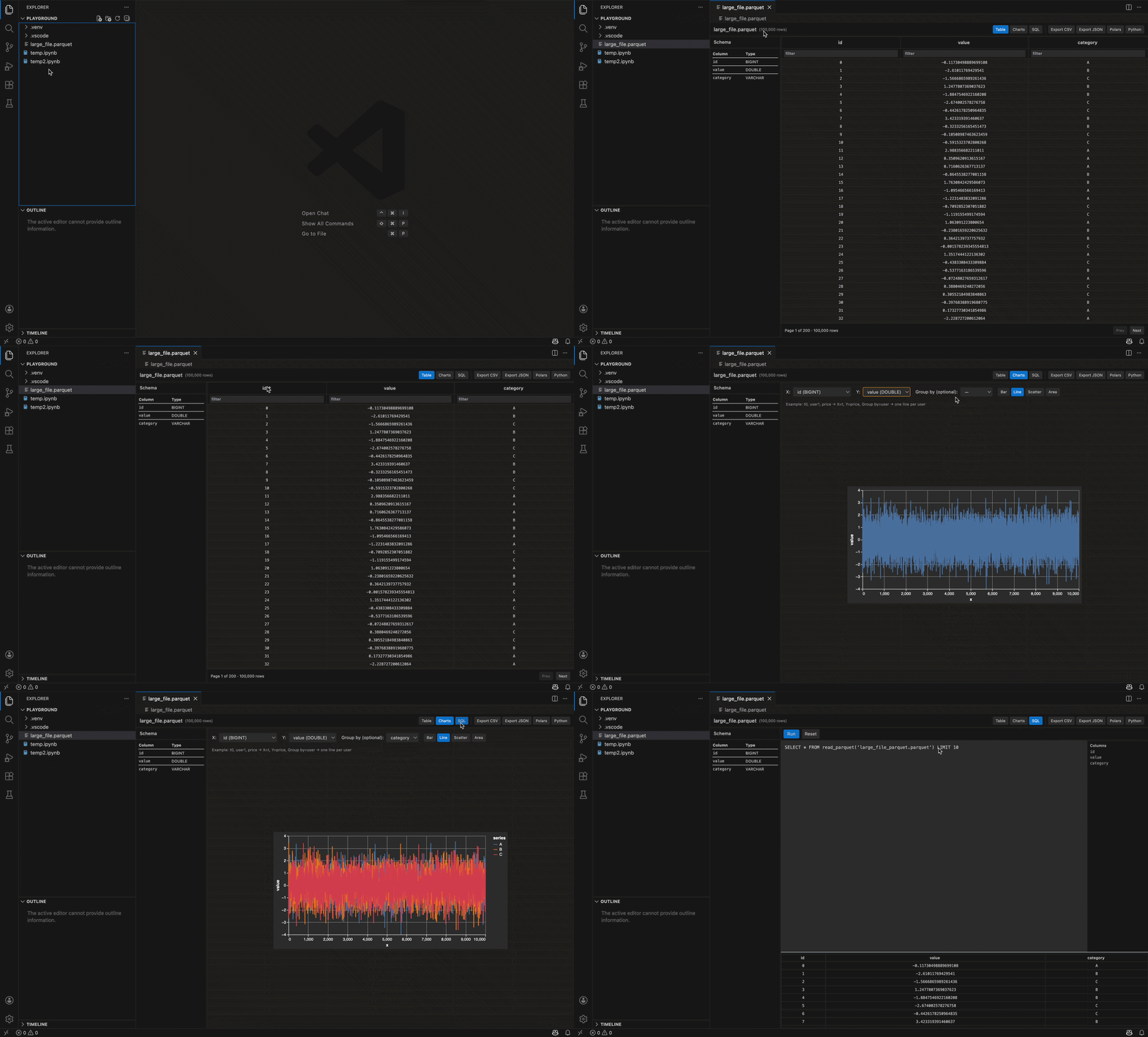
A fast Parquet viewer and lightweight data explorer inside VS Code. Open a .parquet file and instantly run SQL, page large tables, filter columns, and build interactive charts — all locally (no upload required).
Quick start
- Install from the VS Code Marketplace or build the
.vsix (see developer.md for build steps).
- Open any
.parquet file in VS Code — the custom editor opens automatically.
Main views
- Table: browse the dataset with pagination, click headers to sort, and use the filter row to search a column.
- Charts: build Vega-Lite charts (bar/line/scatter/area) by choosing X/Y and optional Group; drag handles resize the chart.
- SQL: run custom SQL against the file; queries persist per file and results are shown with a resizable pane.
Tips
- Click column headers in Table or SQL results to sort. SQL table sorting is backed by DuckDB; SQL-editor result sorting is applied client-side to the snapshot.
- Filters use SQL
LIKE under the hood (contains match). Press Enter in a filter input to apply immediately.
- Use the export buttons to save CSV/JSON or to copy ready-made Polars/Pandas snippets.
Privacy & security
- All processing runs locally in the webview using DuckDB-Wasm and Apache Arrow. No file data is sent to external services by default.
# Parquet Viz

Parquet Viz is a fast Parquet viewer and data exploration toolkit built for teams that work frequently with Python. Open a `.parquet` file in VS Code and run local SQL queries with DuckDB-Wasm, page and filter large datasets with a virtualized table, and construct Vega-Lite charts — all without sending data off your machine.
Quick start
- Install from the VS Code Marketplace or build the `.vsix` (see `developer.md` for build steps).
- Open any `.parquet` file in VS Code — the custom editor opens automatically.
Main views
- Table: browse the dataset with pagination, click headers to sort, and use the filter row to search a column.
- Charts: build Vega-Lite charts (bar/line/scatter/area) by choosing X/Y and optional Group; drag handles resize the chart.
- SQL: run custom SQL against the file; queries persist per file and results are shown with a resizable pane.
Why Parquet Viz helps Python-first teams
- Built for Python workflows: copy ready `pandas` and `polars` snippets, export query results to CSV/JSON for immediate use in notebooks, and iterate quickly between exploration and reproducible Python code.
- Local, fast analytics: DuckDB + Arrow powers ad-hoc SQL on Parquet without data movement or remote clusters.
- Ideal for data engineers, analysts, and data scientists who need fast iteration, reproducibility, and tight integration with Python tooling.
Tips
- Click column headers in Table or SQL results to sort. SQL table sorting is backed by DuckDB; SQL-editor result sorting is applied client-side to the snapshot.
- Filters use SQL `LIKE` under the hood (contains match). Press Enter in a filter input to apply immediately.
- Use the export buttons to save CSV/JSON or to copy ready-made Polars/Pandas snippets.
Privacy & security
- All processing runs locally in the webview using DuckDB-Wasm and Apache Arrow. No file data is sent to external services by default.
Where to get help
- Open an issue on the repository or contact the maintainer via the extension's Marketplace page.
Commands
- `parquetViz.exportCsv` — Export current dataset as CSV
- `parquetViz.exportJson` — Export current dataset as JSON
- `parquetViz.copyAsPolars` — Copy a Polars snippet to read this file
- `parquetViz.copyAsPython` — Copy a Pandas snippet to read this file
Screenshots & examples
- See the extension listing for screenshots. A hero image showing the Table view with filters and an example chart helps users understand value quickly.
If you'd like a polished Marketplace description, screenshots, and a `galleryBanner` image added to the repo, I can create those assets next.
```bash
cd webview
npm install
npm run build
cd ..
# compile the extension
npm run compile
```
cd webview
npm run build
Then reload the extension host window.

## Contributing

- Fork and open a PR. Keep changes focused and add tests where appropriate.
- Follow the existing styling and TypeScript conventions in `webview/src`.

## Git

A `.gitignore` has been added to exclude `node_modules`, webview build output, editor caches, and macOS artifacts.

---

If you'd like, I can:
- Run the webview build and fix any TypeScript or bundler errors.
- Add unit/integration tests for the table filtering and SQL persistence behavior.

