Skip to content
| Marketplace
Sign in
Visual Studio Code>Programming Languages>CinegramNew to Visual Studio Code? Get it now.
Cinegram

Cinegram

Preview

Tejas Panse

|
3 installs
| (0) | Free
Animated architecture diagrams in the Markdown preview, from ```dgm blocks.
Installation
Launch VS Code Quick Open (Ctrl+P), paste the following command, and press enter.
Copied to clipboard
More Info

Cinegram for VS Code

Architecture diagrams that play. Write a Mermaid diagram, describe what happens on it in a scenario block, and watch the request travel — inside the Markdown preview you already use, with a scrubber, narration and a Back button.

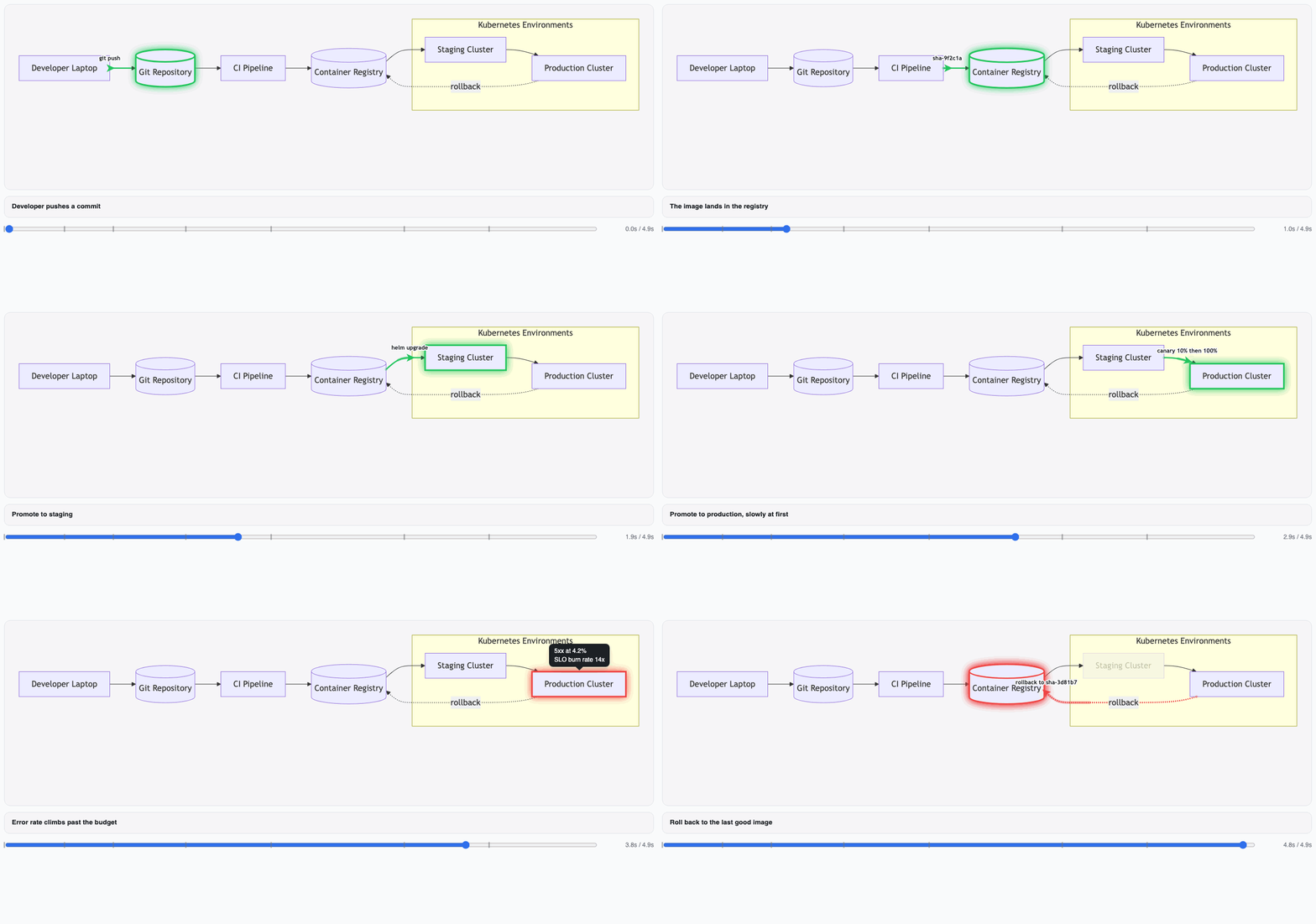
A release animating through a deploy pipeline: the image reaches staging, then production, the error rate climbs past its budget, and the change rolls back

A static diagram shows you the boxes. It cannot show you the order — which call happens first, what is still holding a lock when the timeout fires, which three of the eleven arrows a single request actually touches. Cinegram adds a timeline to a diagram you already know how to write.

Animated ```dgm blocks in Markdown

Tag a fenced block dgm and press Cmd+Shift+V (Ctrl+Shift+V on Windows/Linux). The block plays where the code was — in the built-in preview, with no separate window and no extra pane:

```dgm
flowchart LR
  client[Client]
  api[API]
  db[(Postgres)]
  client --> api --> db

scenario "A request"

  step call "The client calls the API" {
    flow client -> api { label: "GET /orders", dur: 700ms }
    highlight api { style: active }
  }

  step read "The API reads the order" {
    flow api -> db { label: "SELECT …", dur: 500ms }
    note db { text: "index scan", side: below }
  }
```

The diagram body is ordinary Mermaid — flowchart, graph and sequenceDiagram, with every node shape, link form and subgraph you already write. Everything Cinegram does not model round-trips verbatim, so classDef, click and future Mermaid syntax keep working.

.dgm files

A diagram that outgrows a code block gets its own file, with syntax highlighting and two ways to look at it:

  • Cinegram: Open Preview to the Side — on the editor title bar and the command palette. Source on the left, animation on the right.
  • Open With… → Cinegram Animation — right-click a .dgm in the explorer to open it as the animation. The text editor stays the default; this panel re-renders when you save.

Exporting a GIF

Cinegram: Export Animation… records one scenario and writes it beside the diagram — the pull request this was built for:

  1. It compiles first, so a typo fails in milliseconds rather than after a minute of recording.
  2. It asks which view and which scenario, but only when there is more than one.
  3. The save dialog's extension is the format. Name the file demo.gif, demo.mp4 or demo.webm; there is no second prompt.
  4. A progress notification counts the frames and can be cancelled. Cancelling kills the recorder's headless browsers along with it.
  5. When it lands, Copy Markdown puts ![scenario](demo.gif) on your clipboard, relative to the diagram's own directory.

Fenced ```dgm blocks inside Markdown cannot be exported: recording takes a path on disk, and a block has none.

Requirements

Rendering a diagram needs nothing installed. The compiler ships inside the extension, and VS Code installs the build matching your platform.

Exporting needs a little more:

To export You need
GIF Chrome or Chromium, for capturing frames. The encoder is built in.
mp4 or webm Chrome or Chromium, plus ffmpeg.

Both are found on your PATH, or named by cinegram.chromePath and cinegram.ffmpegPath. Every frame is a separate headless screenshot — which is what makes a recording look the same on any machine, and also what makes cinegram.record.fps the setting that decides how long an export takes.

Settings

Setting Default Meaning
cinegram.path "" Path to the cinegram binary. Empty uses the bundled one.
cinegram.blockLanguages ["dgm", "cinegram"] Fence languages rendered as diagrams.
cinegram.compileTimeout 5000 Milliseconds a block may take to compile.
cinegram.record.fps 12 Frames per second to export at, and so what an export costs.
cinegram.record.width 1280 Viewport width to record at, rounded up to even.
cinegram.record.height 720 Viewport height to record at, rounded up to even.
cinegram.chromePath "" The browser that captures frames, as CINEGRAM_CHROME.
cinegram.ffmpegPath "" ffmpeg, as CINEGRAM_FFMPEG. Only mp4 and webm need it.

cinegram.path exists for anyone working on Cinegram itself. Left empty, the extension uses the bundled binary, then a Bazel build in an open workspace (bazel-bin/cmd/cinegram/…), then cinegram on your PATH.

Known limitations

  • Exporting Markdown to HTML or PDF does not include the diagrams. Exporters run the markdown-it plugin but load none of the preview scripts, so they see an empty placeholder.
  • VS Code for Web is unsupported, because rendering spawns a native binary.
  • Markdown cells in notebooks need a separate notebookRenderer contribution, which this does not have yet.

Learn more

The Cinegram repository documents the whole language — scenarios, storyboards, variants, focus, deep links, clickable drill-down between diagrams, presenter mode and the cinegram CLI — and carries a folder of worked examples.

Found a bug, or want a diagram type that is not here yet? Open an issue.

License

MIT

  • Contact us
  • Jobs
  • Privacy
  • Manage cookies
  • Terms of use
  • Trademarks
© 2026 Microsoft