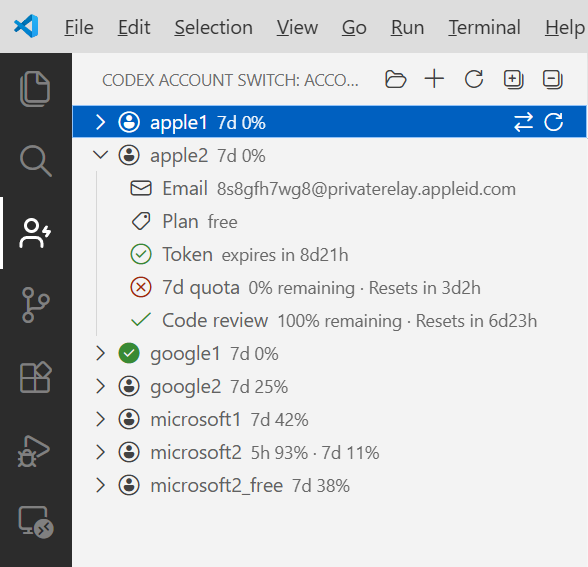
Codex Account Switch gives you a dedicated Activity Bar view for saved accounts, quick account switching, quota visibility, token refresh, and account import/export without leaving the editor.
Features
Add a new account from codex login
Add a provider profile from the Providers view
Switch the active account with one click
Switch the active provider with one click
Refresh expired tokens for saved accounts and auto-rotate near-expiry access tokens during background quota refresh
Inspect current quota usage in the account list and status bar
Refresh saved account quotas in the background one account at a time on a configurable interval
Reuse recent quota results from a shared local cache across VS Code windows
Unlock locked saved storage after entering the local storage password
Import and export account backups as JSON
Prompt to reload the window after account changes when the Codex extension needs to re-read auth state
View
Open the Codex Account Switch view from the Activity Bar to:
See all saved accounts
See saved providers
Identify the currently active account
Inspect account email, plan, and quota usage
Run inline actions such as switch and refresh
Commands
Available commands:
Codex Account Switch: Add Account
Codex Account Switch: Add Provider
Codex Account Switch: Switch Account
Codex Account Switch: Switch Provider
Codex Account Switch: Refresh Token
Codex Account Switch: Refresh Quota
Codex Account Switch: Import Accounts
Codex Account Switch: Export Accounts
Settings
Setting
Default
Description
codex-account-switch.quotaRefreshInterval
30
Automatic background quota refresh interval, in seconds; minimum 5; each interval refreshes one saved account quota in rotation
codex-account-switch.showStatusBar
true
Show the current account quota in the status bar
codex-account-switch.reloadWindowAfterSwitch
prompt
How window reload should be handled after switching accounts
codex-account-switch.authDirectory
""
Directory used to save and load auth_{name}.json; empty uses the default Codex config directory
Requirements
Codex CLI installed and available in your shell
A successful codex login flow for each account you want to save