Skip to content
| Marketplace
Sign in
Visual Studio Code>Themes>Circadia Color ThemeNew to Visual Studio Code? Get it now.
Circadia Color Theme

Circadia Color Theme

Tanmay Gandhi

|
7 installs
| (0) | Free
Perceptually uniform, circadian-aligned design tokens engineered in OKLCH (Warm Parchment, Warm Ember & Espresso, Plum Noir, Obsidian Pine)
Installation
Launch VS Code Quick Open (Ctrl+P), paste the following command, and press enter.
Copied to clipboard
More Info

Circadia Color Theme Logo

Circadia Color Theme

Perceptually uniform, circadian-aligned design tokens engineered in OKLCH for Visual Studio Code.

Circadia is an open color specification and multi-platform theme system engineered in OKLCH for cross-platform editors, terminal emulators, and document renderers. Built around human ocular biophysics, circadian light cycles, and strict mathematical accessibility, Circadia delivers 100% Strict WCAG 2.1 AAA contrast (>= 7.0:1) across all UI and syntax tokens with multi-dimensional Color Vision Deficiency (CVD) support.

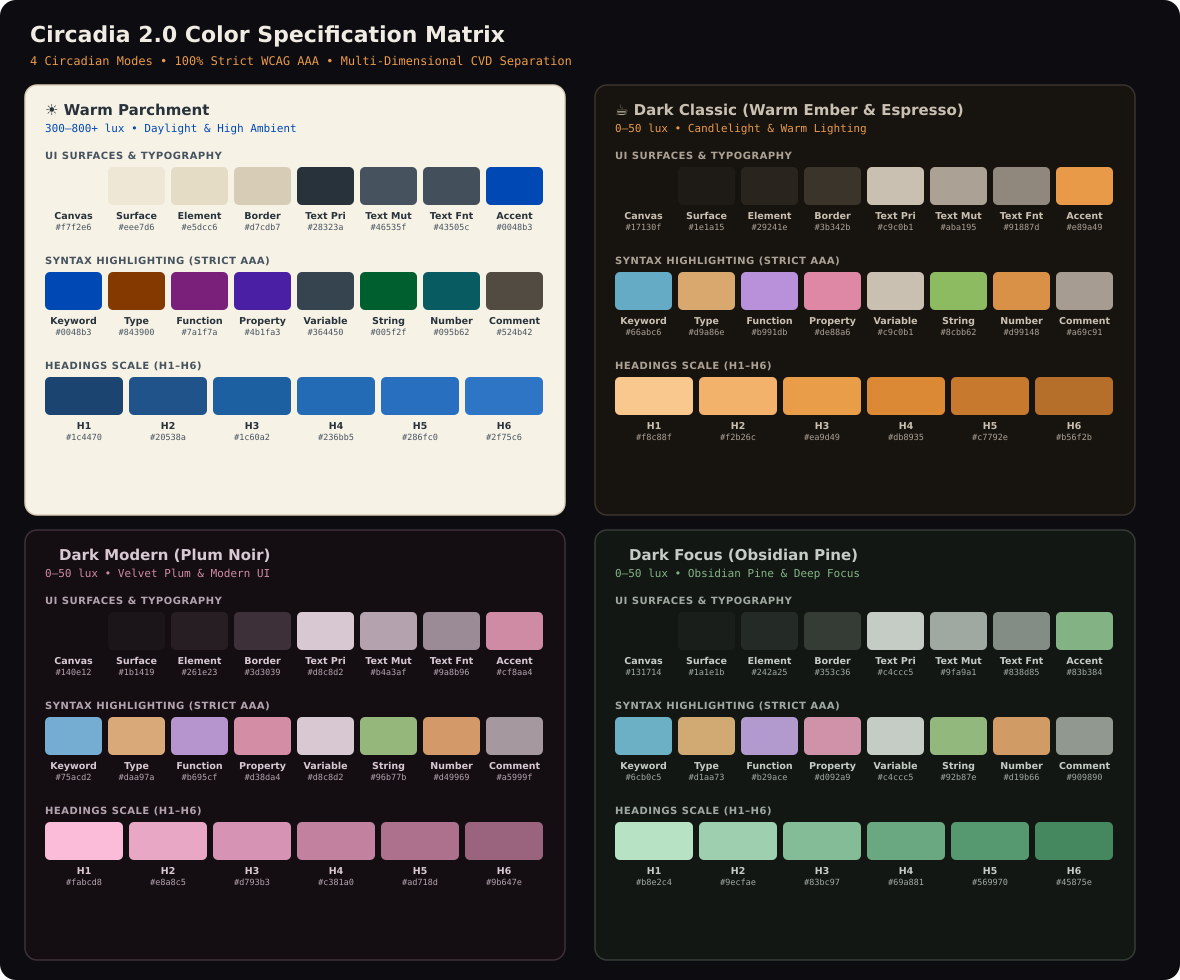
Circadia 2.0 Color Palette Matrix (4 Modes: Warm Parchment, Dark Classic, Dark Modern, Dark Focus)


🌓 The 4 Circadian Modes

Circadia provides 4 distinct modes calibrated for different ambient environments, monitor hardware, and developer workflows:

1. ☀️ Circadia — Warm Parchment (Light)

  • Target Environment: Daylight & bright ambient lighting (300–800+ lux).
  • Canvas Background: #f7f2e6 (oklch(96.0% 0.013 85) — Warm Cellulose Linen).
  • Character: Daylight / Reading / Editorial Warmth.
  • Optical Physics: Standard stark-white editor themes (#ffffff) blast excessive luminous flux into the user's dilated pupils, triggering squinting and photophobia. Warm Parchment uses a balanced warm cellulose paper base that diffuses ambient room light without glare, coupled with deep ink tones achieving 11.69:1 AAA body text contrast.

2. ☕ Circadia — Warm Ember & Espresso (Dark Classic)

  • Target Environment: Evening, night, and warm-lit rooms (0–50 lux / 2700K ambient).
  • Canvas Background: #17130f (oklch(19.0% 0.010 67) — Warm Espresso Charcoal).
  • Character: Candlelight Harmony / Earth / Halation-Free Editorial.
  • Optical Physics: Pitch black (#000000) on IPS monitors causes harsh backlight bleed and extreme contrast halation (glowing fuzzy edges around bright letters). Dark Classic grounds text on warm espresso charcoal with glowing ember and amber syntax accents that preserve melatonin levels and eliminate ocular fatigue.

3. 🍇 Circadia — Plum Noir (Dark Modern)

  • Target Environment: Low ambient light (0–50 lux) / Modern high-density workflows.
  • Canvas Background: #140e12 (oklch(16.5% 0.014 350) — Velvet Wine Noir).
  • Character: Sharp / Energetic / Velvet UI / Full-Stack & Frontend Development.
  • Optical Physics: Deep magenta/plum undertones create an exceptionally quiet canvas with high spectral distinction. Saturated pastel syntax tokens pop with crisp separation, maintaining 11.91:1 AAA contrast.

4. 🌲 Circadia — Obsidian Pine (Dark Focus)

  • Target Environment: Deep terminal sessions & night shifts (0–50 lux).
  • Canvas Background: #131714 (oklch(17.8% 0.010 145) — Obsidian Forest Moss).
  • Character: Restorative / Organic / Ultra-Low Eye Excitation / Data Science & Systems Engineering.
  • Optical Physics: Green/sage wavelengths correspond to the lowest perceptual eye excitation curve in human photopic vision. Obsidian Pine delivers a calm, organic workspace that minimizes retinal fatigue over marathon 12+ hour focus blocks.

📐 Mathematical Accessibility: 100% Strict WCAG 2.1 AAA

Every token in Circadia is engineered in OKLCH 32-bit perceptual color space and mathematically verified against WCAG 2.1 contrast formulas:

Token Role Light Parchment Dark Classic Dark Modern Dark Focus WCAG Tier
text_primary 11.69:1 10.26:1 11.91:1 11.02:1 Strict AAA
keyword 7.29:1 7.22:1 7.88:1 7.91:1 Strict AAA
type 7.32:1 8.60:1 8.48:1 8.69:1 Strict AAA
function 8.16:1 7.16:1 7.42:1 7.59:1 Strict AAA
property 9.29:1 7.20:1 7.55:1 7.48:1 Strict AAA
string 7.02:1 8.27:1 8.78:1 8.82:1 Strict AAA
number 7.00:1 7.12:1 7.99:1 7.92:1 Strict AAA
comment 6.45:1 (AA+) 7.16:1 7.35:1 6.68:1 (AA+) High Legibility
headings.h1-h6 11.00:1 -> 4.70:1 12.44:1 -> 5.27:1 12.65:1 -> 4.60:1 12.35:1 -> 4.88:1 Monotonic Hierarchy

👁️ Multi-Dimensional CVD Separation (Color Vision Deficiency)

Traditional syntax themes rely almost exclusively on hue differences. For developers with Color Vision Deficiency (Deuteranopia, Protanopia, Tritanopia), tokens collapse into confusable gray/brown shades.

Circadia enforces Multi-Dimensional Token Separation:

  1. Luminance Channel Separation (ΔL >= 8%): Tokens that could share confusable hues under color blindness are separated by lightness steps. Even in pure monochrome grayscale, type (L ~ 76%), function (L ~ 72%), and keyword (L ~ 70%) remain visibly distinct.
  2. Dual-Channel Typographic Encoding: Keywords and control-flow operators are systematically encoded with bold font weight for instant structural recognition independent of color perception.
  3. Quarantined Destructive Hue: Saturated red is strictly quarantined for syntax errors, merge conflicts, and linter warnings to eliminate cognitive alarm fatigue during code reading.

💻 Workbench & UI Precision Architecture

Circadia is engineered specifically for modern Visual Studio Code:

  • Active Tab Accent Strip: Clean top accent line (tab.activeBorderTop) with transparent bottom borders, matching VS Code Dark Modern layout.
  • Elevated File Selections: High-contrast explorer selection pills (list.activeSelectionBackground and list.inactiveSelectionBackground) ensuring the active file is always immediately visible.
  • High-Contrast Input Selections: Dedicated input.selectionBackground and selection.background accent highlights across Search, Find, Quick Open, and Settings text boxes.
  • Breadcrumbs & Navigation: Full support for breadcrumb bars, modern activity bar indicators, and tree indent guides.

🚀 Installation

Via VS Code Marketplace

  1. Open Visual Studio Code.
  2. Go to the Extensions view (Ctrl+Shift+X / Cmd+Shift+X).
  3. Search for Circadia Color Theme.
  4. Click Install.

Via Quick Open

Press Ctrl+P / Cmd+P and paste:

ext install tanmay-gandhi.circadia-color-theme

Via VSIX File

code --install-extension circadia-color-theme-2.0.1.vsix

🎨 Activating the Theme

  1. Open the Command Palette (Ctrl+Shift+P / Cmd+Shift+P).
  2. Type Preferences: Color Theme and press Enter.
  3. Select your preferred circadian mode:
    • Circadia — Warm Parchment (Light)
    • Circadia — Warm Ember & Espresso (Dark Classic)
    • Circadia — Plum Noir (Dark Modern)
    • Circadia — Obsidian Pine (Dark Focus)

⚙️ Recommended Settings

For the optimal typographical and circadian experience:

{
  "editor.fontFamily": "'JetBrains Mono', 'Fira Code', 'Cascadia Code', monospace",
  "editor.fontLigatures": true,
  "editor.fontSize": 14,
  "editor.lineHeight": 1.6,
  "editor.bracketPairColorization.enabled": true,
  "editor.guides.bracketPairs": true,
  "editor.renderWhitespace": "selection"
}

📄 License & Repository

  • Repository: github.com/tanmaymanojgandhi/circadia
  • License: MIT — Copyright (c) 2026 Tanmay Manoj Gandhi
  • Contact us
  • Jobs
  • Privacy
  • Manage cookies
  • Terms of use
  • Trademarks
© 2026 Microsoft