Favorite Command Tree
Organize your favorite VSCode commands into a custom tree view -- and run them with a single click.
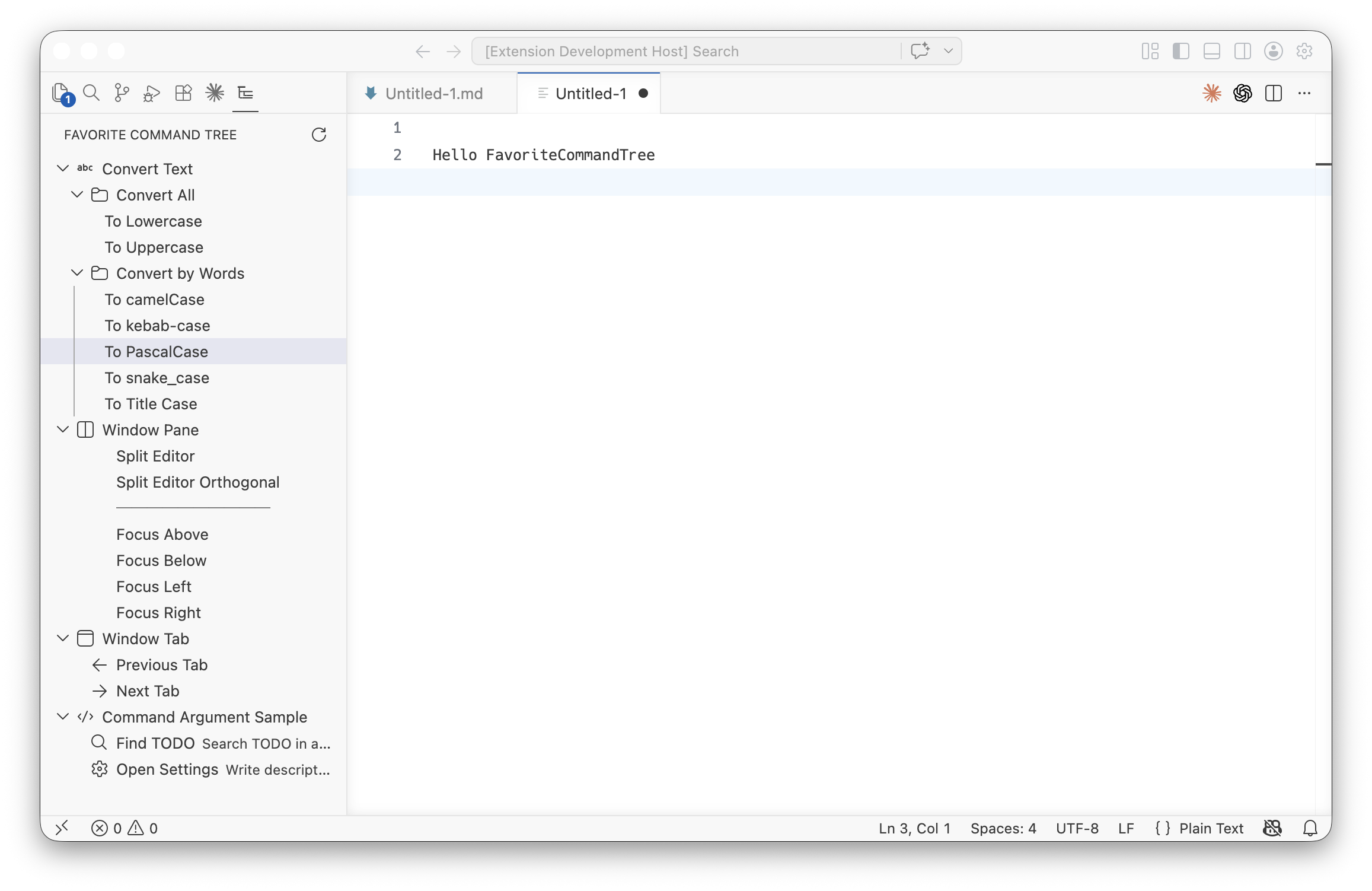
Features
- Build your own command menu from any VSCode command ID
- Unlimited nesting of groups
- Separators, icons (Codicon), and sub-text descriptions per item
- Pass arguments to commands (
args)
- Changes in
settings.json are reflected instantly
Getting Started
Add favoriteCommandTree.tree to your settings.json:
"favoriteCommandTree.tree": [
  {
    "label": "Convert Text",
    "icon": "symbol-string",
    "children": [
      { "label": "To camelCase",  "command": "editor.action.transformToCamelcase"  },
      { "label": "To kebab-case", "command": "editor.action.transformToKebabcase"  },
      { "label": "To snake_case", "command": "editor.action.transformToSnakecase"  },
      { "label": "To Title Case", "command": "editor.action.transformToTitlecase"  }
    ]
  },
  {
    "label": "Window Pane",
    "icon": "split-horizontal",
    "children": [
      { "label": "Split Editor", "command": "workbench.action.splitEditor" },
      { "type": "separator" },
      { "label": "Focus Above", "command": "workbench.action.focusAboveGroup" },
      { "label": "Focus Below", "command": "workbench.action.focusBelowGroup" }
    ]
  },
  {
    "label": "Find TODO",
    "icon": "search",
    "description": "Search TODO in all files",
    "command": "workbench.action.findInFiles",
    "args": { "query": "TODO", "isRegex": false }
  }
]
If the tree is empty, click Add Sample Configuration in the panel to insert a full example.
Configuration Reference
Group item
Has children. Can contain groups, commands, and separators.
| Field |
Type |
Required |
Description |
label |
string |
✓ |
Display name |
children |
array |
✓ |
Child items |
icon |
string |
|
Codicon name (default: folder) |
description |
string |
|
Sub-text shown to the right; also appears as tooltip on hover |
order |
integer |
|
Sort priority within the same level. Items with order come first; ties and unordered items follow config order. |
collapsed |
boolean |
|
Initial collapsed state. Falls back to favoriteCommandTree.defaultCollapsed. |
Command item
Has command. Executed on click.
| Field |
Type |
Required |
Description |
label |
string |
✓ |
Display name |
command |
string |
✓ |
VSCode command ID |
icon |
string |
|
Codicon name (default: blank -- empty, preserves alignment) |
description |
string |
|
Sub-text shown to the right; also appears as tooltip on hover |
args |
string / number / object |
|
Arguments passed to executeCommand |
order |
integer |
|
Sort priority within the same level |
Separator
| Field |
Type |
Required |
Description |
type |
"separator" |
✓ |
Renders a horizontal rule. Only valid inside children. |
Global settings
| Setting |
Type |
Default |
Description |
favoriteCommandTree.defaultCollapsed |
boolean |
false |
Default collapsed state for groups that do not set collapsed explicitly |
Icons
The icon field accepts any Codicon name (e.g. git-branch, play, terminal).
Sample -- with Markdown Doc Toolset
Requires the Markdown Doc Toolset extension.
"favoriteCommandTree.tree": [
  {
    "label": "Table",
    "icon": "table",
    "children": [
      { "label": "Align",                    "command": "markdownDocToolset.tableAlign"              },
      { "type": "separator" },
      { "label": "Paste as Table",           "command": "markdownDocToolset.tablePasteAsTable"       },
      { "label": "Paste as Cell (TSV)",      "command": "markdownDocToolset.tablePasteTsv"           },
      { "label": "Paste Multiline into Cell","command": "markdownDocToolset.tablePasteMultiline"     },
      { "type": "separator" },
      { "label": "Copy Table Values",        "command": "markdownDocToolset.tableCopyTableValues"    },
      { "label": "Copy Cell Values",         "command": "markdownDocToolset.tableCopyCellValues"     },
      { "label": "Clear Cell Values",        "command": "markdownDocToolset.tableClearCellValues"    },
      { "type": "separator" },
      { "label": "Move Columns Right",       "command": "markdownDocToolset.tableMoveColumnsRight"   },
      { "label": "Move Columns Left",        "command": "markdownDocToolset.tableMoveColumnsLeft"    },
      { "label": "Delete Column",            "command": "markdownDocToolset.tableDeleteColumns"      },
      { "label": "Insert Column Right",      "command": "markdownDocToolset.tableInsertColumnRight"  },
      { "label": "Insert Column Left",       "command": "markdownDocToolset.tableInsertColumnLeft"   },
      { "type": "separator" },
      { "label": "Align Header Style...",    "command": "markdownDocToolset.tableAlignHeaderSetting"    },
      { "label": "Separator Style...",       "command": "markdownDocToolset.tableSeparatorStyleSetting" },
      { "label": "Auto Align After Edit...", "command": "markdownDocToolset.tableAutoAlignSetting"      }
    ]
  },
  {
    "label": "Convert",
    "icon": "arrow-right",
    "children": [
      { "label": "TSV to Table", "command": "markdownDocToolset.convertTsvToTable" }
    ]
  },
  {
    "label": "Format",
    "icon": "indent",
    "children": [
      { "label": "Add Line Break (2-space)", "command": "markdownDocToolset.formatAddLineBreak" },
      { "type": "separator" },
      { "label": "Indent (2-space)",         "command": "markdownDocToolset.formatIndent"       },
      { "label": "Unindent (2-space)",       "command": "markdownDocToolset.formatUnindent"     },
      { "type": "separator" },
      { "label": "Tabify (from 4-space)",    "command": "markdownDocToolset.formatTabify"       },
      { "label": "Expand Tab (to 4-space)",  "command": "markdownDocToolset.formatExpandTab"    },
      { "label": "Insert Tab",               "command": "markdownDocToolset.formatInsertTab"    }
    ]
  },
  {
    "label": "Copy",
    "icon": "copy",
    "children": [
      { "label": "Copy with Quote Marks", "command": "markdownDocToolset.copyWithQuoteMarks" },
      { "label": "Copy Plain Text",       "command": "markdownDocToolset.copyPlainText"      }
    ]
  },
  {
    "label": "Toggle",
    "icon": "list-unordered",
    "children": [
      { "label": "Toggle List",      "command": "markdownDocToolset.toggleList"     },
      { "label": "Toggle Checkbox",  "command": "markdownDocToolset.toggleCheckbox" },
      { "label": "Toggle Done",      "command": "markdownDocToolset.toggleDone"     },
      { "type": "separator" },
      { "label": "Toggle Heading 1", "command": "markdownDocToolset.toggleHeading1" },
      { "label": "Toggle Heading 2", "command": "markdownDocToolset.toggleHeading2" },
      { "label": "Toggle Heading 3", "command": "markdownDocToolset.toggleHeading3" },
      { "label": "Toggle Heading 4", "command": "markdownDocToolset.toggleHeading4" },
      { "label": "Toggle Heading 5", "command": "markdownDocToolset.toggleHeading5" },
      { "label": "Toggle Heading 6", "command": "markdownDocToolset.toggleHeading6" },
      { "type": "separator" },
      { "label": "Toggle Quote",     "command": "markdownDocToolset.toggleQuote"    }
    ]
  }
]
| |


