
WGSL Preview
A VS Code extension that provides real-time preview for WGSL shaders with WebGPU rendering.


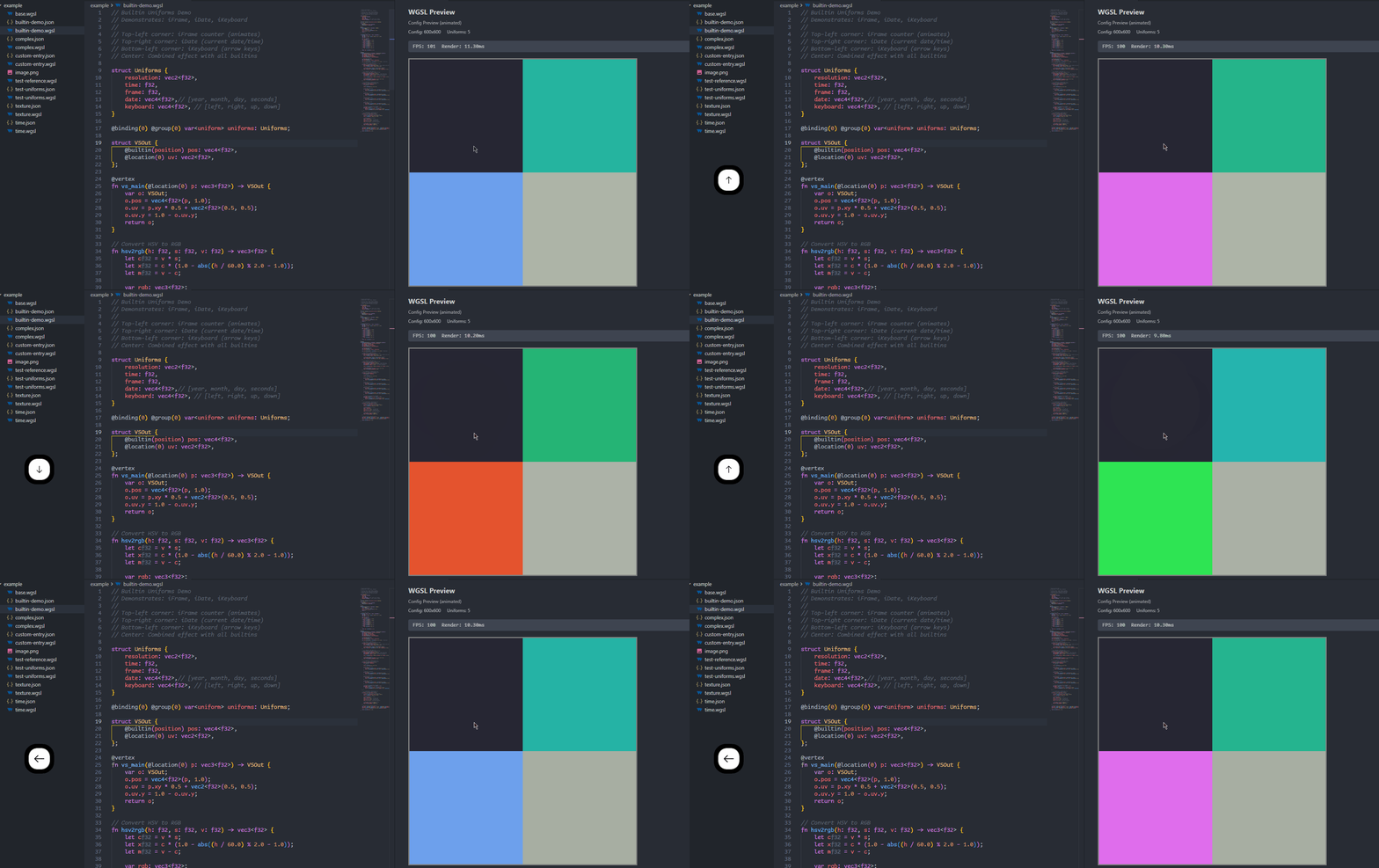
Features
- Real-time Preview - Live preview of your WGSL shaders as you type
- Texture Support - Load and sample textures in your shaders
- Custom Uniforms - Define custom uniform variables with automatic std140 layout
- Built-in Uniforms - Access handy built-in uniforms like
time, resolution, and mouse
- Performance Monitoring - Optional FPS and render time display
- Custom Entry Points - Configure custom vertex/fragment shader entry points
- Hot Reload - Automatic preview update when shader or config file changes
- Error Display - Friendly error messages with collapsible panels
Installation
- Install the extension from the VS Code Marketplace (search for "WGSL Preview")
- Or install the
.vsix file manually
- Or install via command line:
code --install-extension taiyuuki.vscode-wgsl-renderer
Usage
Opening Preview
- Click the preview icon in the editor title bar (right side of the tab)
- Or use the Command Palette (
Ctrl+Shift+P / Cmd+Shift+P) and run WGSL: Preview
The preview will open in a side panel, showing your rendered shader in real-time.
Basic Shader
A minimal WGSL shader without configuration:
struct VSOut {
    @builtin(position) pos: vec4<f32>,
    @location(0) uv: vec2<f32>,
};

@vertex
fn vs_main(@location(0) p: vec3<f32>) -> VSOut {
    var o: VSOut;
    o.pos = vec4<f32>(p, 1.0);
    o.uv = p.xy * 0.5 + vec2<f32>(0.5, 0.5);
    o.uv.y = 1.0 - o.uv.y;
    return o;
}

@fragment
fn fs_main(@location(0) uv: vec2<f32>) -> @location(0) vec4<f32> {
    let color = vec3<f32>(uv, 0.5);
    return vec4<f32>(color, 1.0);
}
Configuration
Create a JSON configuration file alongside your WGSL file (e.g., shader.wgsl → shader.json) to customize the preview.
Example Configuration
{
  "canvas": {
    "width": 800,
    "height": 600
  },
  "showStats": true,
  "entryPoints": {
    "vertex": "vs_main",
    "fragment": "fs_main"
  },
  "uniforms": [
    {
      "name": "time",
      "type": "f32",
      "builtin": true
    },
    {
      "name": "resolution",
      "type": "vec2<f32>",
      "builtin": true
    },
    {
      "name": "mouse",
      "type": "vec2<f32>",
      "builtin": true
    },
    {
      "name": "myColor",
      "type": "vec3<f32>",
      "value": [1.0, 0.5, 0.2]
    }
  ],
  "textures": [
    {
      "name": "myTexture",
      "path": "image.png"
    }
  ],
  "samplers": [
    {
      "name": "mySampler",
      "addressModeU": "clamp-to-edge",
      "addressModeV": "clamp-to-edge",
      "magFilter": "linear",
      "minFilter": "linear"
    }
  ],
  "bindings": [
    {
      "name": "uniforms",
      "type": "uniform",
      "binding": 0
    },
    {
      "name": "mySampler",
      "type": "sampler",
      "binding": 1
    },
    {
      "name": "myTexture",
      "type": "texture",
      "binding": 2
    }
  ]
}
Configuration Options
| Option |
Type |
Description |
canvas.width |
number |
Canvas width in pixels (default: 600) |
canvas.height |
number |
Canvas height in pixels (default: 600) |
showStats |
boolean |
Show FPS and render time (default: false) |
entryPoints.vertex |
string |
Custom vertex entry point name (default: "vs_main") |
entryPoints.fragment |
string |
Custom fragment entry point name (default: "fs_main") |
uniforms |
array |
Array of uniform definitions |
textures |
array |
Array of texture definitions |
samplers |
array |
Array of sampler definitions |
bindings |
array |
Array of binding declarations |
Supported uniform types follow WGSL syntax:
Scalars: f32, i32, u32
Vectors: vec2<f32>, vec3<f32>, vec4<f32>
Matrices: mat2x2<f32>, mat3x3<f32>, mat4x4<f32>
| Name |
Type |
Description |
time |
f32 |
Time in seconds since preview started |
resolution |
vec2<f32> |
Canvas resolution (width, height) |
mouse |
vec2<f32> |
Mouse position in pixels |
frame |
f32 |
Frame counter (increments each frame) |
date |
vec4<f32> |
Current date as [year, month, day, seconds_since_midnight] |
keyboard |
vec4<f32> |
Arrow key states as [left, right, up, down] (0 or 1) |
struct Uniforms {
    time: f32,
    resolution: vec2<f32>,
    mouse: vec2<f32>,
    frame: f32,
    date: vec4<f32>,      // [year, month, day, seconds]
    keyboard: vec4<f32>,  // [left, right, up, down]
};

@group(0) @binding(0) var<uniform> u: Uniforms;

@fragment
fn fs_main(@location(0) uv: vec2<f32>) -> @location(0) vec4<f32> {
    // Animate color over time
    let r = 0.5 + 0.5 * sin(u.time);
    let g = 0.5 + 0.5 * cos(u.time * 0.7);

    // Add frame-based animation
    let framePattern = step(0.5, fract(u.frame / 60.0));

    // Respond to arrow keys
    let keyboardEffect = u.keyboard.x * 0.2;  // Left arrow adds red

    return vec4<f32>(r + keyboardEffect, g + framePattern * 0.2, 0.5, 1.0);
}
Configuration:
{
    "uniforms": [
        { "name": "time", "type": "f32", "builtin": true },
        { "name": "resolution", "type": "vec2<f32>", "builtin": true },
        { "name": "mouse", "type": "vec2<f32>", "builtin": true },
        { "name": "frame", "type": "f32", "builtin": true },
        { "name": "date", "type": "vec4<f32>", "builtin": true },
        { "name": "keyboard", "type": "vec4<f32>", "builtin": true }
    ],
    "bindings": [
        { "name": "uniforms", "type": "uniform", "binding": 0 }
    ]
}
Note: The time, frame, date, and keyboard uniforms enable automatic animation/interaction. When these are used, the preview will continuously render.
Textures and Samplers
Loading Textures
Place your texture images in the same directory as your WGSL file and reference them in the configuration:
{
    "textures": [
        { "name": "myTexture", "path": "./image.png" }
    ],
    "bindings": [
        {
            "name": "mySampler",
            "type": "sampler"
        },
        {
            "name": "myTexture",
            "type": "texture"
        }
    ]
}
Supported formats: PNG, JPEG, WebP
Using Textures in Shaders
@group(0) @binding(0) var mySampler: sampler;
@group(0) @binding(1) var myTexture: texture_2d<f32>;

@fragment
fn fs_main(@location(0) uv: vec2<f32>) -> @location(0) vec4<f32> {
    let color = textureSample(myTexture, mySampler, uv);
    return color;
}
Automatic Sampler Creation
If you reference a sampler in bindings but don't define it in samplers, a default sampler will be created automatically with:
magFilter: linearminFilter: linearaddressModeU: clamp-to-edgeaddressModeV: clamp-to-edge
Bindings
The bindings array allows you to explicitly control the resource binding order:
{
    "bindings": [
        { "name": "uniforms", "type": "uniform", "binding": 0 },
        { "name": "mySampler", "type": "sampler", "binding": 1 },
        { "name": "myTexture", "type": "texture", "binding": 2 }
    ]
}
If bindings is omitted, resources are bound in the default order: uniforms → textures → samplers.
Enable FPS and render time display by setting showStats to true:
{
    "showStats": true
}
The stats panel displays:
- FPS: Current frames per second
- Render: Frame render time in milliseconds
Examples
The example/ directory contains several example shaders:
| Example |
Description |
base.wgsl |
Basic gradient shader |
texture.wgsl |
Texture sampling example |
complex.wgsl |
Advanced shader with mouse interaction, animation, and textures |
custom-entry.wgsl |
Custom entry point names |
builtin-demo.wgsl |
Demonstrates all built-in uniforms (frame, date, keyboard) |
Hot Reload
The preview automatically updates when:
- You modify the WGSL file (500ms debounce)
- You modify the configuration file
- You switch to a different WGSL file
License
MIT
Contributing
Contributions are welcome! Please feel free to submit a Pull Request.

