Telegram Emoji Preview for VS Code
Contact: https://t.me/syumer
Preview
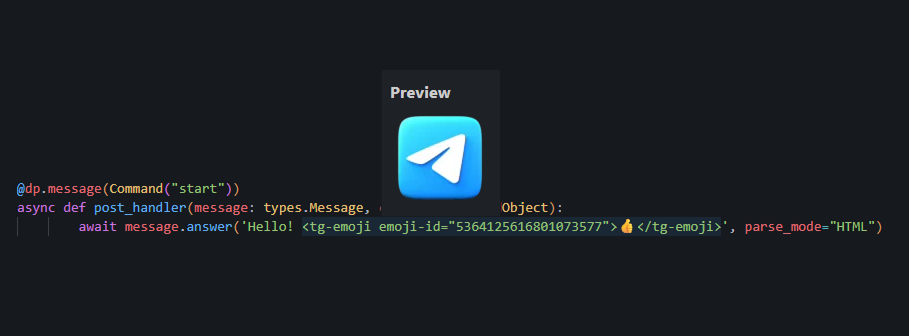
This extension lets you preview Telegram custom emojis directly in VS Code. Hover the tag (specifically emoji-id) to see the image.
Hover emoji-id to preview the emoji.
⚙️ Setup
The extension requires a Telegram bot token (Telegram API doesn’t provide file URLs without a token).
Create a bot (or use an existing one):
- Message @BotFather in Telegram
- Send
/newbot and follow the steps
- Copy the API Token
Add the token in VS Code:
- Open Settings:
Ctrl + , (or Cmd + , on macOS)
- Search for:
telegram
- Find Telegram Emoji Preview: Bot Token
- Paste your token there
🚀 Usage
The extension works with <tg-emoji> tags and icon_custom_emoji_id parameters.
1. Standard HTML Tag
<tg-emoji emoji-id="5368324170671202286"></tg-emoji>
2. Python / Aiogram (icon_custom_emoji_id)
button = InlineKeyboardButton(
    text="My Button",
    icon_custom_emoji_id="5368324170671202286"
)
3. Variables (ID taken from variable definition in the same file)
The extension can resolve variables if they are defined as string constants in the same file.
Python example:
MY_ICON_ID = "5368324170671202286"

# This works! Hover over MY_ICON_ID or icon_custom_emoji_id
button = InlineKeyboardButton(
    text="Button",
    icon_custom_emoji_id=MY_ICON_ID
)
JavaScript / React example:
const UPLOAD_ICON = "5368324170671202286";

// All these formats work:
const a = <tg-emoji emoji-id={UPLOAD_ICON} />;
const b = <tg-emoji emoji-id="UPLOAD_ICON" />;
const c = { icon_custom_emoji_id: UPLOAD_ICON };

