Claude Session Monitor
Browse, analyze and continue your Claude Code sessions — right inside VS Code.
Claude Code stores every session as a JSONL file under ~/.claude/projects/. This extension scans them and gives you a fast, themed way to explore what you've done across repositories → branches → sessions, with per-session token / cost / duration detail and a cross-session analytics dashboard.
New in 3.2 — one backend, every surface in step. The VS Code panel, the web UI and your phone now share a single backend: a message sent from one appears on the others straight away, an answered approval closes everywhere, and lists refresh on their own. When a session's context is nearly full, Continue in new session has Claude write a handoff from the full context and starts a fresh session with it. Search now finds sessions by the commands they ran and the text of their messages, the web UI has a memory page for CLAUDE.md and auto memory, and the sidebar sorts by tokens, duration or cost. Token and cost totals in the list and dashboard are corrected — they were counted several times over, so expect lower numbers.
In 3.1 — start a session from anywhere, copy any answer. The + button is no longer VS Code-only: the web UI can start a fresh session too, picking from the repositories already in your session history. A brand-new session's composer is now complete from the first keystroke — slash-command completion and @ file references no longer wait for you to send a message first. Every response carries a copy button in its top-right corner. The Claude Agent SDK is now the only driver: the silent CLI fallback is gone, so a startup problem is reported instead of quietly costing you half the features.
In 3.0 — interactive everywhere. The composer is no longer VS Code-only: the web UI now has the same slash-command completion, @ file references and permission-mode switching, and on a phone it becomes a bottom sheet that stays above the software keyboard. You can start a session from the sidebar instead of only resuming one, get notified when a turn needs your approval or finishes while you're elsewhere, and jump from a diff row straight to the real file on disk.
Since 2.0 — the panel is no longer read-only. Continue any session where you are reading it: send a message, approve tools inline, switch permission mode or model, and watch the reply stream into the same transcript. Powered by the Claude Agent SDK bundled with the extension — no terminal to switch to, no second copy of the conversation.
Install
Open the Extensions view, search “Claude Session Monitor”, and click Install — or via Quick Open (Ctrl/Cmd+P):
ext install super-coder-doctor.claude-session-monitor
📖 Documentation
Full step-by-step guides & live demo (English / 简体中文):
claude-session-monitor
Screenshots
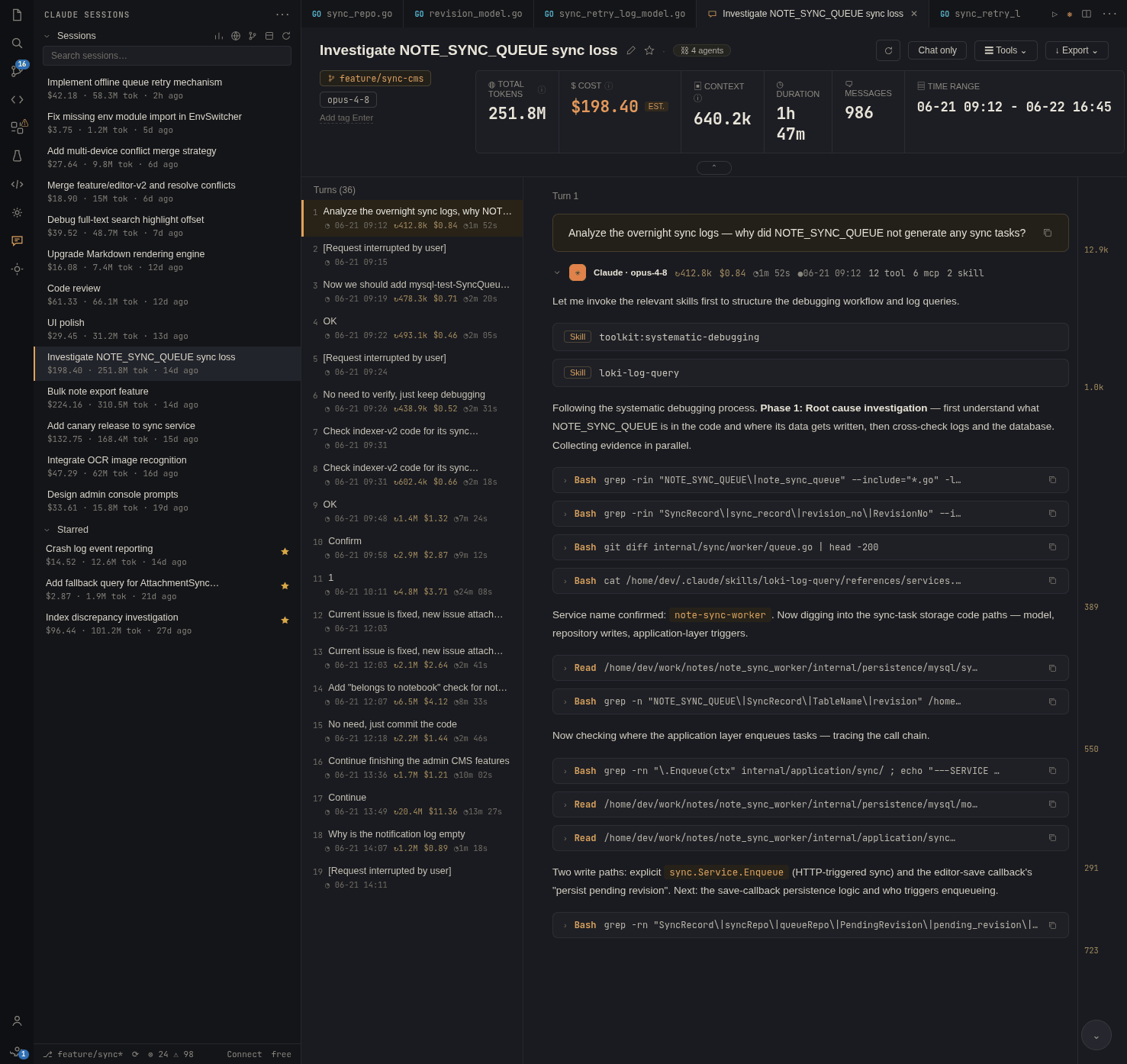
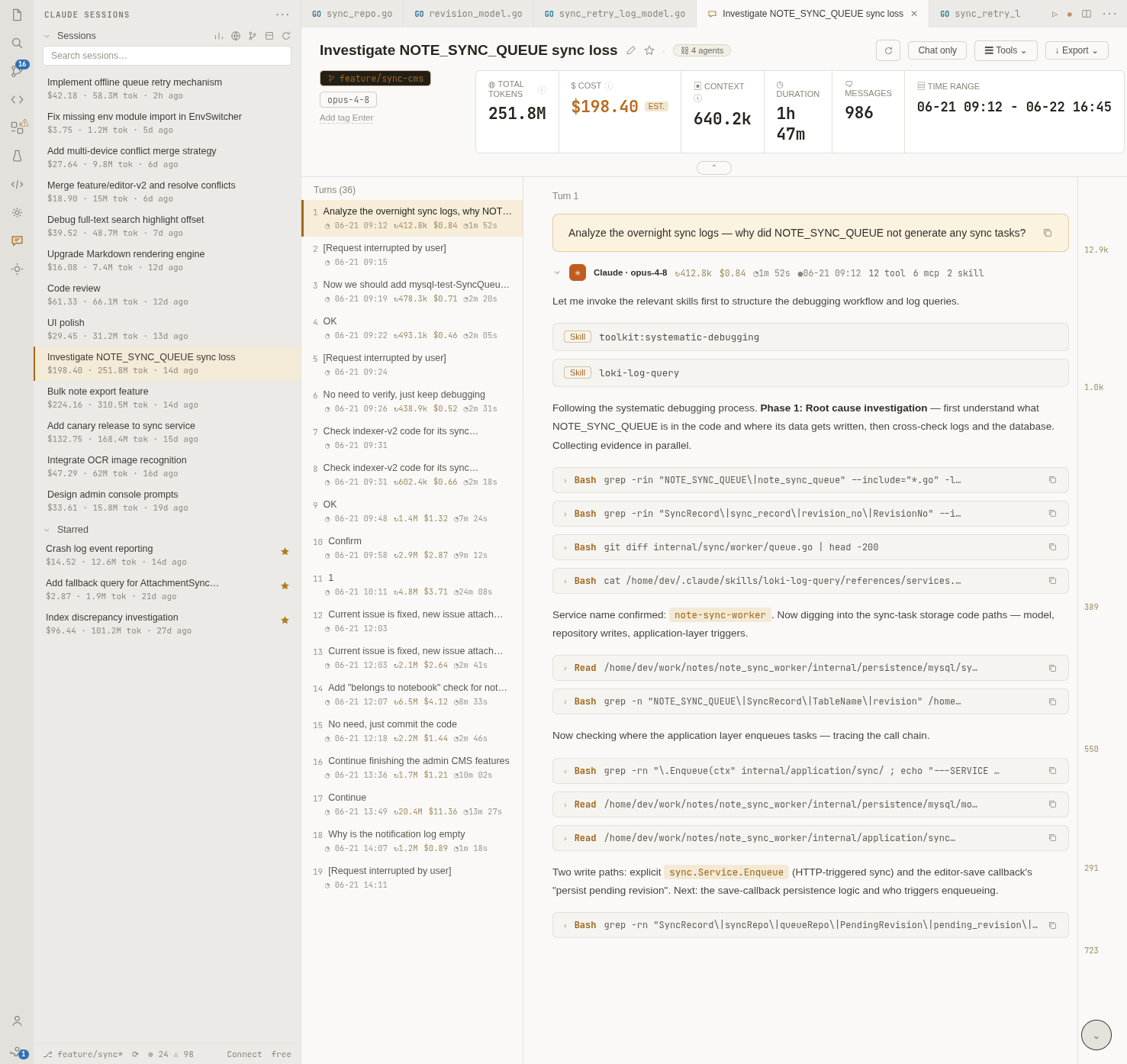
Session detail — dark / light · transcript, code-change badges and the built-in composer
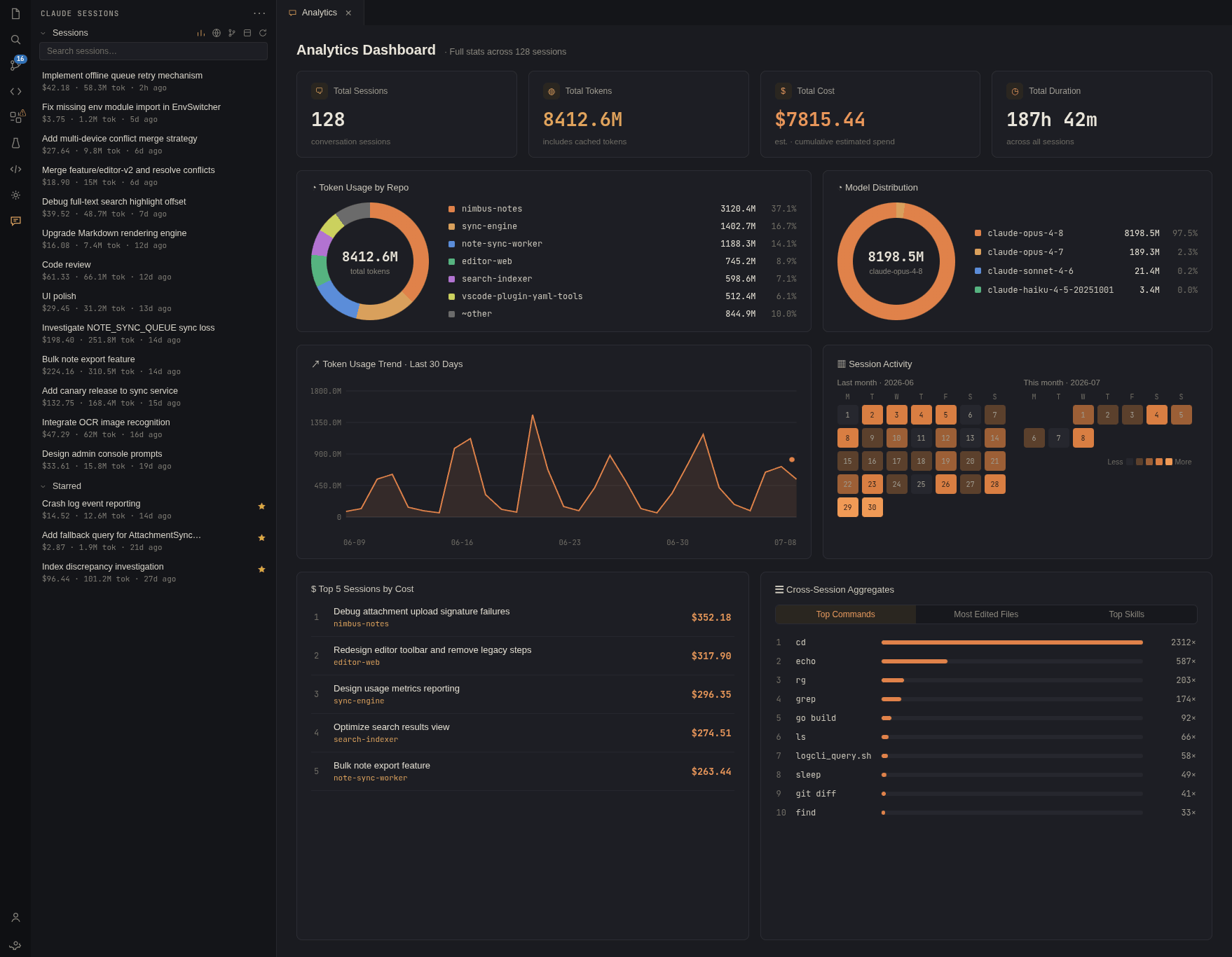
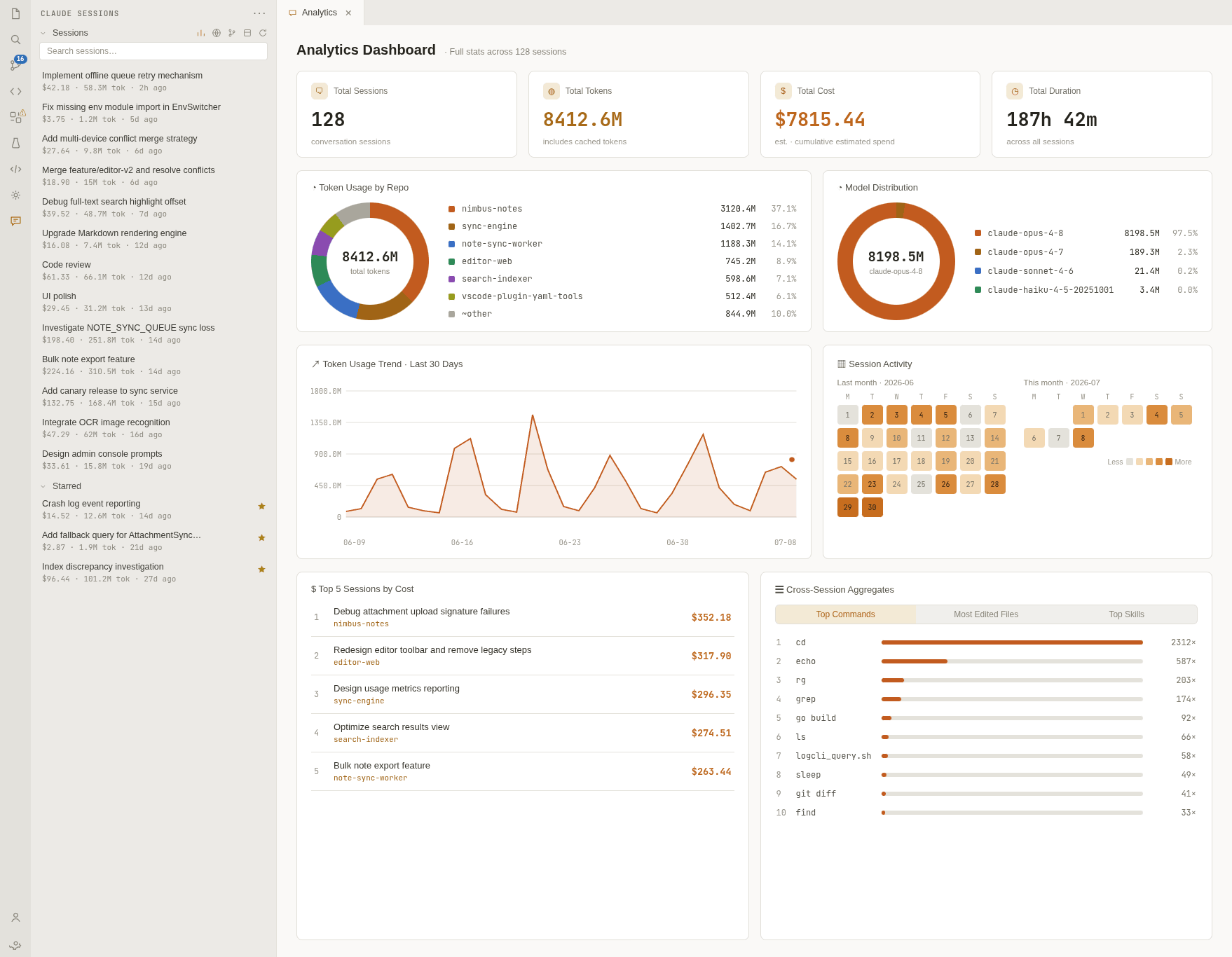
Analytics dashboard — dark / light
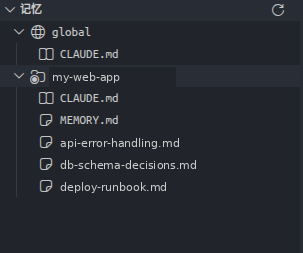
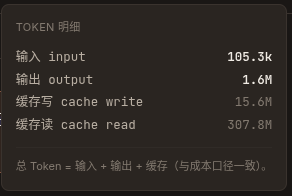
Memory view · Token breakdown
Features
Continue a session in the panel
- Chat inline — a composer at the bottom of the detail panel continues the session in place: your message goes in, the answer streams back token by token into the same transcript, with its tool calls and sub-agent cards.
- Tool approvals — when a tool needs your OK, an approval card appears with the tool and its input: Allow, Always allow, or Reject. Clarifying questions arrive as an inline questionnaire.
- Permission modes — Manual, Edit automatically, Plan mode, Auto (Claude classifies each call; safe ones pass, risky ones ask), Allow everything, Deny everything. Switching applies to the running session.
- Slash commands &
@ file references — fuzzy-matched completion for your skills / plugins / built-in commands (with their source, and same-name commands resolved the way Claude Code resolves them), and for paths in the session's repository.
- Images — paste, drag-drop or attach JPEG / PNG / GIF / WebP.
- Model & reasoning effort — switch model mid-conversation and pick one of five effort levels, even while a turn is running; both are remembered per session, and an effort level can be saved as your default. The output style can be switched from the same settings.
- Queue while it works — send Queue (after this turn) or Add context (without interrupting), or Interrupt the turn outright. Queued messages stay listed above the composer with their delivery mode, so they don't disappear into a black box.
- Start a new session — the + in the sidebar opens a fresh conversation in the panel without going back to a terminal; name it right away from the empty state. The web UI has the same button, offering the repositories already present in your session history (a browser has no workspace folders to pick from).
- Copy any response — every response card has a copy button in its top-right corner, next to the one your own messages already had. It copies the answer text only, leaving out thinking blocks and tool calls.
- Notifications — get told when a tool is waiting for approval, or when a turn finishes while you're elsewhere. Suppressed while the panel is focused, and configurable (see
csm.notifications).
- Continue in a new session — when the context is nearly full, Claude writes a handoff document from the session's full context; review and edit it, and it becomes the first message of a new session with the same working directory, permission mode and model.
- Stop background tasks — background sub-agents and workflows each get a stop button, and interrupting the current turn leaves them running.
- Every surface in step — the panel, the web UI and your phone share one backend: a message sent from one appears on the others immediately, an answered approval closes everywhere, and a notification appears only where it is meant to.
- Rewind files to a point in the conversation — preview exactly what would change, then confirm.
- Context usage & plan quota — a context pie with the SDK's exact per-category breakdown, plus 5-hour / 7-day rate-limit utilization for claude.ai subscriptions.
Browse, analyze, navigate
- Sessions sidebar — a dedicated activity-bar view listing your sessions, grouped by repository and git branch, or as a flat list sorted by time, tokens, duration or cost. Live counts, star/favorite, and a favorites group.
- Scope toggle — show sessions (and favorites) from all repositories or only the current workspace repository.
- Memory view — a dedicated view listing your Claude Code memory files: global (
~/.claude/CLAUDE.md, ~/.claude/memory/) and the current project (CLAUDE.md, ~/.claude/projects/<repo>/memory/), with CLAUDE.md and memory entries under distinct icons. Click any file to open it. The web UI and phone have a memory page where the same files can be viewed and edited.
- Session detail — open any session in a rich, themed panel: full transcript, tool calls, sub-agents, token/context and cost breakdown (hover a token stat for the input / output / cache split). Each response shows when it was produced, and thinking can be hidden from the tool filter. When you'd rather work in the CLI, Continue hands the session to
claude --resume in an integrated / external terminal or the Claude Code extension.
- Code changes, per response — every assistant response that touched code carries a
N files +X −Y badge. Click it to open the changes in VS Code's native multi-file diff editor. Edits are aggregated per file, so a file changed five times in one response shows as one net diff. The turn outline marks which turns touched code, and file paths are shown relative to the project. Each row points at the real file on disk, so Open File and the breadcrumb take you to the source — while both sides of the diff stay the historical snapshot of that turn.
- Clickable file paths — paths inside the current workspace, in tool cards, Read / Write / Edit headers and diffs, open in the editor at the relevant line.
- Find in the transcript —
Ctrl/Cmd+F searches the open session with match navigation and highlighting; View raw jsonl in the More menu opens the underlying .jsonl in the editor.
- Lands on the newest turn — opening a session starts at the bottom, since you're usually there to see what just happened. Your own scrolling is never overridden afterwards.
- Mermaid diagrams — copy the source, or open the diagram in Mermaid Live.
- Analytics dashboard — cost, token trends, tool distribution, activity heatmap and cross-session aggregation.
- Quick Open — fuzzy-search any session by title / repo / branch, or search inside sessions by the commands they ran and the text of their messages, and jump straight to its detail (
Ctrl+Alt+S / Cmd+Alt+S).
- Auto-refresh — the list updates automatically as sessions change on disk.
- Status bar — shows the current session count; click to open the dashboard.
- Native theming — follows your VS Code color theme (light / dark / high-contrast) and display language (English / 简体中文).
- Restores on reload — detail and dashboard panels come back after a window reload.
Requirements
- Claude Code installed, with at least one session recorded under
~/.claude/projects/.
Extension Settings
| Setting |
Default |
Description |
csm.scanDirectory |
"" |
Directory to scan for sessions. Empty uses ~/.claude/projects. Changing it requires a window reload. |
csm.autoRefresh |
true |
Automatically refresh the list when session files change on disk. |
csm.resumeMethod |
ask |
How the Detail Continue button opens claude --resume: ask (pick each time), internal (integrated terminal), external (system terminal), or cc (official Claude Code extension). |
csm.notifications |
all |
When to notify you: all (approvals and finished turns), asks (approvals only), or off. Notifications are suppressed while the panel is focused. |
csm.port |
8888 |
Port this extension uses when it has to start the shared backend itself. A backend that is already running (for example one started by the web version) is found through its discovery file regardless of this setting. |
Commands & Keybindings
| Command |
Keybinding |
Where |
CSM: Quick Open Session… |
Ctrl+Alt+S / Cmd+Alt+S |
anywhere |
CSM: Refresh Sessions |
Ctrl+R / Cmd+R |
when the Sessions view is focused |
CSM: Open Dashboard |
— |
Command Palette / view title |
The Sessions view title bar also offers scope, sort, collapse-all and refresh actions.
Support & Issues
Found a bug or have a feature request? Please open an issue:
claude-session-monitor/issues
Prefer a manual or offline install — or need a specific/older version? Download the packaged .vsix for each release from
Releases, then in the Extensions view use the ⋯ menu → Install from VSIX….
License
MIT
| |

