Leafwise
Predict what Claude Code will change while you wait, then review the surprises first.
While Claude Code works on your request, Leafwise shows a short card: which areas will change, how many files, whether tests or dependencies are touched. When Claude stops, the review compares your guesses with the real diff and puts the files you didn't expect at the top. Each correct guess and each review grows a private tree, so you can watch your understanding of the codebase grow.
Nothing leaves your machine. Leafwise makes no network calls and needs no account or API key.
Works in VS Code, Cursor and Windsurf, on Windows, macOS and Linux.
Get started
Install this extension.
Install the Claude Code plugin. It tells the extension when a run starts and ends. In Claude Code, run:
/plugin marketplace add SkayKapadia/leafwise-plugin
/plugin install leafwise@leafwise
Use Claude Code as usual in a git repository. About 30 seconds into a run, the predict card appears with two quick questions. Answer them, or ignore it. If the run is a long one, a card with new questions follows every 5 minutes while you keep answering.
When Claude stops, the review opens. Files in areas you didn't predict come first. Open each diff; Leafwise marks files as read as you go.
Until the first run arrives, an Leafwise setup item in the status bar lists anything missing (git, Node, or the plugin).
Requirements
- VS Code 1.74 or later, or a recent Cursor or Windsurf
- Claude Code
- git 2.31 or later (Git for Windows on Windows)
- Node 18 or later on your PATH (the Claude Code hook runs with it)
The tree
Open Leafwise → Tree in the activity bar.
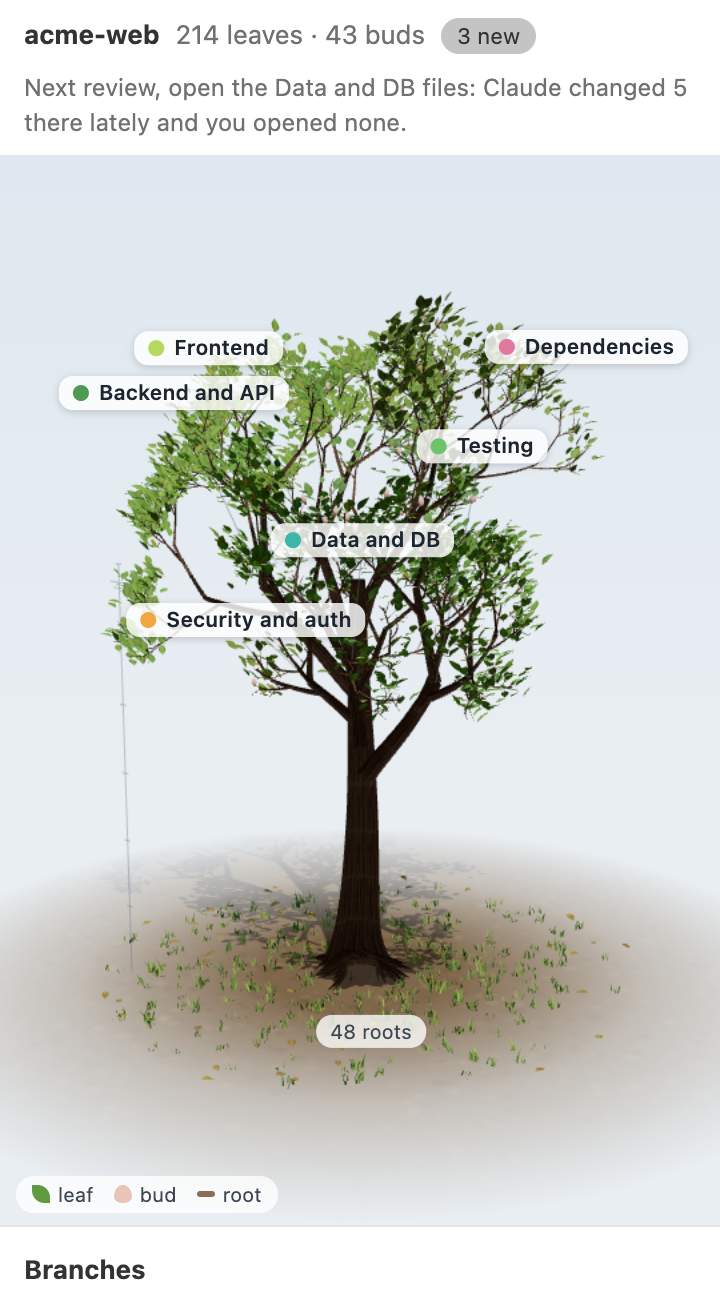
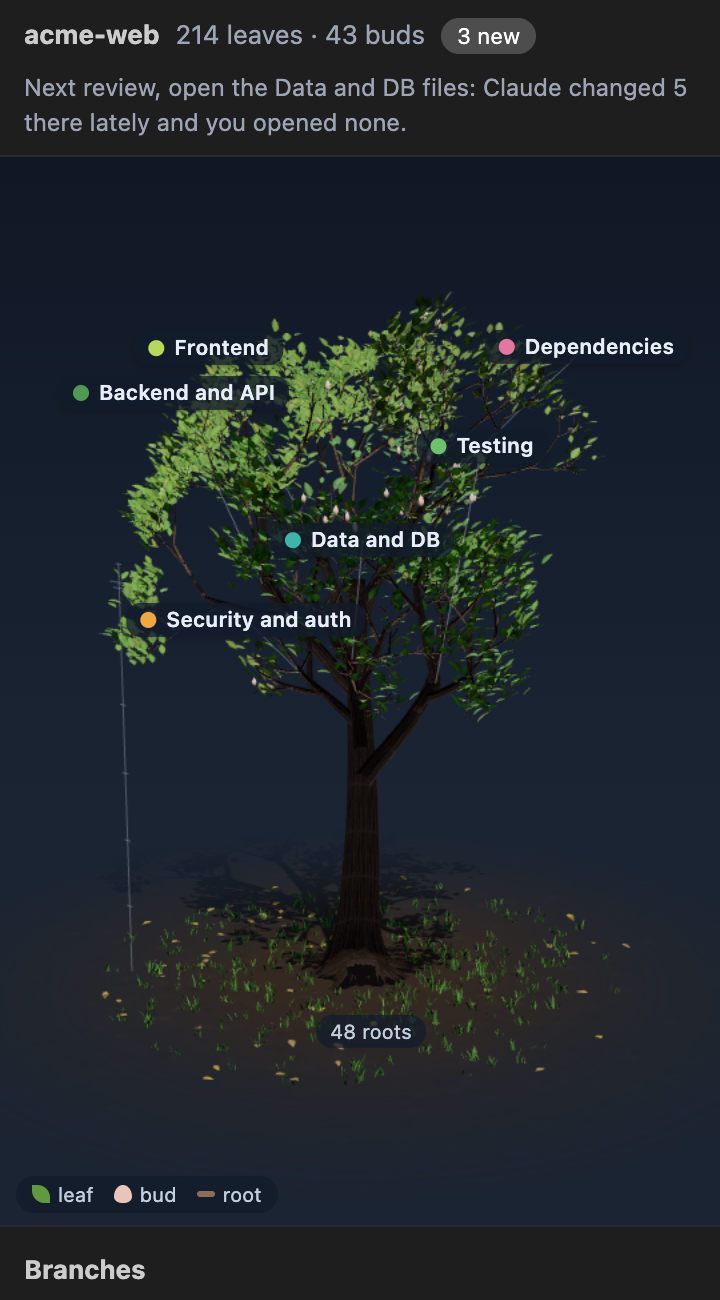
- One limb per area of your code: frontend, backend, data, testing, security, DevOps and dependencies. Each limb is labelled with its name; hover it for its leaves, buds and how often you predicted that area right.
- A bud grows when you predict an area correctly. Reviewing that area opens the bud into a leaf. A root grows when you guessed wrong and then reviewed the change.
- Breaks bring sunlight. After 45 minutes of work, a quiet line above the tree suggests a break. Step away for five minutes and the tree stands in warm sunlight for the next half hour, and the leaves you earned in that stretch grow by half again. No popups, no timer.
- The tree grows in size as you go: it starts as a sapling and gets taller, thicker and wider. A marker beside it shows its height now and a week ago.
- Drag to turn it, scroll to zoom, and click a limb to see what grew there and why. The icons in the view's title bar reset the view, hide the labels and export a PNG.
Privacy
- Your code never leaves your machine. Leafwise makes no network calls, so it has no way to push, upload or share your code or your prompts. Its tests fail if any code tries to connect.
- The plugin's script never opens your source files. It asks git, on your machine, for a snapshot, and the review shows you the diff between two snapshots in your own editor.
- The plugin's hook takes a snapshot of your working tree with a temporary git index and writes one line (session id, folder, snapshot id, time) to a private events file. It never stores your prompt.
- Events files live in
%LOCALAPPDATA%\leafwise on Windows and ~/.leafwise on macOS and Linux, are readable only by you, and are deleted after about 48 hours.
- Run history holds counts and outcomes, never file paths or code. For breaks, Leafwise keeps three times (when you started working, when you were last active, your last sunlight) and nothing about what you were doing. Leafwise: Export data and Leafwise: Delete all data cover all of it.
- Snapshots add git objects to your repo's
.git/objects, as git stash -u would. They include untracked files you have not added to .gitignore. Git never pushes them, and its normal garbage collection removes them later.
Commands
| Command |
What it does |
| Leafwise: Open tree |
Show your tree |
| Leafwise: Open review |
Reopen the latest review |
| Leafwise: Focus card / Close card |
Jump to or dismiss the predict card |
| Leafwise: Export tree as PNG |
Save the tree as an image |
| Leafwise: Export data |
Save all your Leafwise data as JSON |
| Leafwise: Delete all data |
Remove all Leafwise data |
| Leafwise: Show setup |
List what's missing for Leafwise to work |
Settings
| Setting |
Default |
Meaning |
leafwise.cardDelaySec |
30 |
Seconds into a run before the card can appear |
leafwise.cardMinGapMin |
10 |
Minimum minutes between cards |
leafwise.typingDeferSec |
5 |
The card waits until you've stopped typing this long |
leafwise.orphanTimeoutMin |
60 |
A run that never ends is dropped after this many minutes |
leafwise.tree |
true |
Show the tree view |
Feedback
Report problems at github.com/SkayKapadia/leafwise-plugin/issues.
| |

