Claude Task Notifier
Get a desktop notification and a sound when Claude Code finishes a task or needs your input, so you can work in another window while it runs.
This is an independent extension. It is not made or endorsed by Anthropic.
Features
- Task finished: a desktop notification and a sound when Claude Code finishes responding.
- Waiting for you: a notification that says what Claude Code is waiting for: an answer to a question, approval of its plan, or permission to use a tool. Turn each of the three on or off, and write your own message for each.
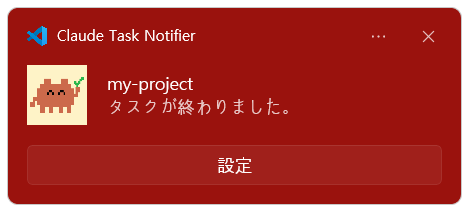
- Stays until you see it: the desktop notification appears on top of other windows and stays until you close it. On Windows, clicking it brings the editor window to the front.
- Only the right window: with several editor windows open, only the window whose workspace contains the Claude Code session notifies you. The notification title is the folder name.
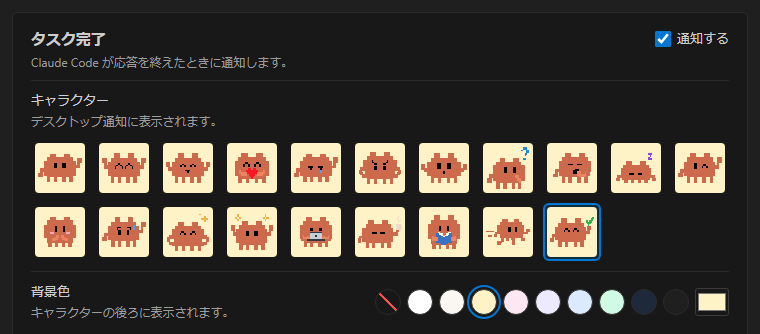
- Characters: choose one of 20 expressions for each kind of notification, with a background color of your choice, or use your own image (Windows).
- Sounds: three built-in sounds, or your own sound file.
- Settings window: change everything in one place, preview sounds, and send test notifications.
- Languages: English, Korean, Japanese, and Latin. By default the extension follows the language of the editor.
It works with Claude Code in the integrated terminal, in an external terminal, and in the Claude Code VS Code extension.
Screenshots
Desktop notification:
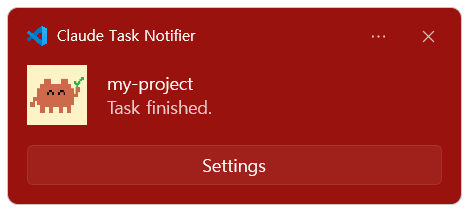
Choosing a character and a background color in the settings window:
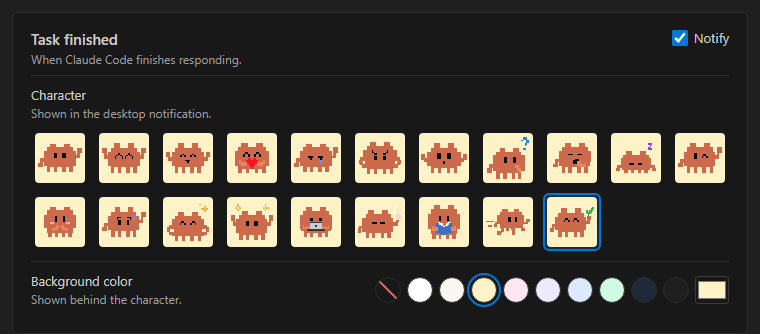
Setup
- Install the extension.
- When asked, choose Install hooks. You can also run Claude Task Notifier: Install Claude Code Hooks from the Command Palette.
While the hooks are not installed, the status bar shows Notifier: hooks not installed. Click it to install them.
- Restart any Claude Code session that is already running.
- Run Claude Task Notifier: Show Test Notification to check the sound and the desktop notification.
Commands
| Command |
What it does |
| Claude Task Notifier: Open Settings |
Opens the settings window. |
| Claude Task Notifier: Show Test Notification |
Shows a notification with the popup, the sound, and the desktop notification. |
| Claude Task Notifier: Install Claude Code Hooks |
Adds the hooks to your Claude Code settings. |
| Claude Task Notifier: Remove Claude Code Hooks |
Removes the hooks from your Claude Code settings. |
Settings
Run Claude Task Notifier: Open Settings to open the settings window. There you can preview sounds, pick characters and background colors, browse for your own sound and image files, send a test notification, and install or remove the hooks. Changes are saved right away.
The same settings are available in the standard Settings editor. Every name below starts with claudeTaskNotifier.
Task finished
| Setting |
Default |
Description |
notifyOnDone |
true |
Notify when Claude Code finishes a task. |
doneMessage |
empty |
Your own message. {folder} is replaced with the folder name. When empty, "Task finished." is shown. |
doneCharacter |
done |
Character shown in the desktop notification. One of 20 expressions. Windows only. |
doneBackground |
#fef3c7 |
Background color behind the character, as #rrggbb. Empty means no background. Windows only. |
doneImage |
empty |
Absolute path to your own image (PNG or JPG). It replaces the character. Windows only. |
doneSound |
chime |
Sound: chime, bell, pop, or none. |
doneSoundFile |
empty |
Absolute path to your own sound file. It replaces the built-in sound. Windows plays WAV files only. |
A finished-task notification is skipped while Claude Code still has background tasks running, because it will continue working when they finish.
Waiting for you
| Setting |
Default |
Description |
notifyOnAttention |
true |
Notify when Claude Code is waiting for your answer, approval, or permission. Turning this off turns off the three kinds below. |
notifyOnQuestion |
true |
Notify when Claude Code asks you a question. |
questionMessage |
empty |
Your own message for questions. |
notifyOnPlan |
true |
Notify when Claude Code is waiting for you to approve its plan. |
planMessage |
empty |
Your own message for plan approval. |
notifyOnPermission |
true |
Notify when Claude Code asks for permission to use a tool. |
permissionMessage |
empty |
Your own message for tool permission. {tool} is replaced with the tool name. |
attentionMessage |
empty |
Your own message for any kind that has no message of its own. When empty, the notification says what Claude Code is waiting for. |
attentionCharacter |
thinking |
Character shown in the desktop notification. Windows only. |
attentionBackground |
#fef3c7 |
Background color behind the character. Windows only. |
attentionImage |
empty |
Absolute path to your own image. It replaces the character. Windows only. |
attentionSound |
bell |
Sound: chime, bell, pop, or none. |
attentionSoundFile |
empty |
Absolute path to your own sound file. Windows plays WAV files only. |
{folder} is replaced with the folder name in every message.
General
| Setting |
Default |
Description |
language |
auto |
Language of the notifications and the settings window: auto (same as the editor), en, ko, ja, or la. |
osNotification |
always |
When to show the desktop notification: always, whenUnfocused (only when the editor window does not have focus), or never. |
notificationDuration |
untilDismissed |
How long the desktop notification stays: short (about 5 seconds), long (about 25 seconds), or untilDismissed. Windows only. |
notificationSize |
medium |
Size of the desktop notification: small (text only), medium (small picture), or large (big picture). Windows only. |
showPopup |
false |
Also show a popup inside the editor window. |
onlyWhenUnfocused |
false |
Notify only when the editor window does not have focus. No popup, sound, or desktop notification while you are using the window. |
What it changes on your computer
The extension cannot see Claude Code directly, so it uses Claude Code hooks. Installing the hooks does the following:
- Adds a
Stop hook and a Notification hook to your Claude Code user settings (~/.claude/settings.json). Your other settings and hooks are kept. The file is copied to settings.json.claude-task-notifier.bak before it is changed.
- Copies a small script to
~/.claude-notify/bin/. Claude Code runs it when a hook fires, and it saves the hook data as a file in ~/.claude-notify/events/. The extension reads that file, shows the notification, and deletes it.
Nothing is sent over the network. The hook data stays on your computer.
The extension also keeps two kinds of files in ~/.claude-notify/: the editor icon shown as the sender of the notification (icons/), and character pictures with your background color (images/).
On Windows, the first desktop notification adds one registry key for your user account for each editor you use, for example HKCU\Software\Classes\AppUserModelId\ClaudeTaskNotifier.VisualStudioCode.2. It holds the name and icon that Windows shows as the sender of the notification: "Claude Task Notifier" with the icon of that editor.
To remove the hooks, run Claude Task Notifier: Remove Claude Code Hooks. Uninstalling the extension removes the hooks, the ~/.claude-notify folder, and the registry keys.
Limitations
- Tested on Windows 11. macOS and Linux support is included but has not been tested yet. On Linux, sound needs
paplay or aplay, and desktop notifications need notify-send.
- Windows-only features: the character or image, the background color, the size and duration of the desktop notification, and bringing the editor window to the front when you click the notification.
- Do Not Disturb: your operating system may hide desktop notifications while Do Not Disturb is on or a full-screen app is running. The sound still plays.
- Remote workspaces (SSH, WSL, containers): only the popup inside the editor works. Sound and desktop notifications run on the remote machine, so you will not hear or see them. Turn on
showPopup there.
- Sessions outside any open workspace: if Claude Code runs in a folder that is not open in any editor window, no notification is shown.
- Windows script policy: the hook runs a PowerShell script. If your organization blocks PowerShell scripts by policy, the hook cannot run.
Troubleshooting
- No notification: restart the Claude Code session, then check the Claude Task Notifier channel in the Output panel. Each received event is logged there.
- Check the hooks: run
/hooks in Claude Code. Stop and Notification should each list a command that contains .claude-notify/bin/write-event.
- A setting is not saved: after you update the extension, reload the editor window, then open the settings window again.
한국어
Claude Code가 작업을 끝내거나 입력을 기다릴 때 바탕 화면 알림과 소리로 알려 주는 extension입니다. 작업을 시켜 두고 다른 창에서 일해도 끝난 시점을 놓치지 않습니다.
Anthropic이 만들거나 보증하는 제품이 아닌, 독립적으로 만든 extension입니다.
기능
- 작업 완료 알림: Claude Code가 응답을 마치면 바탕 화면 알림을 띄우고 소리를 재생합니다.
- 확인 요청 알림: Claude Code가 무엇을 기다리는지 알려 줍니다. 질문의 답, 계획 승인, 도구 사용 권한 세 가지를 구분하며, 종류별로 켜고 끄거나 문구를 따로 적을 수 있습니다.
- 볼 때까지 남는 알림: 바탕 화면 알림은 다른 창 위에 뜨고 직접 닫을 때까지 남습니다. Windows에서는 알림을 클릭하면 편집기 창이 앞으로 나옵니다.
- 해당 창에서만 알림: 창을 여러 개 열어도 Claude Code를 실행한 폴더가 열린 창에서만 알립니다. 알림 제목은 폴더 이름입니다.
- 캐릭터: 알림 종류마다 20가지 표정 중 하나와 배경색을 고르거나, 원하는 이미지를 쓸 수 있습니다 (Windows).
- 소리: 내장 소리 3종 또는 원하는 소리 파일을 씁니다.
- 설정 창: 모든 설정을 한곳에서 바꾸고, 소리를 미리 듣고, 테스트 알림을 보낼 수 있습니다.
- 언어: 영어, 한국어, 일본어, 라틴어를 지원합니다. 기본값은 편집기의 언어를 따릅니다.
통합 터미널, 외부 터미널, Claude Code VS Code extension 어디에서 실행한 Claude Code든 동작합니다.
화면
바탕 화면 알림:
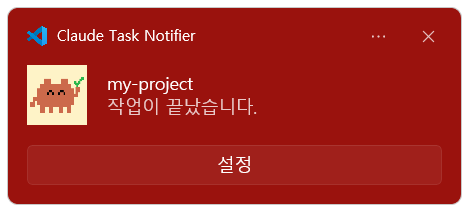
설정 창에서 캐릭터와 배경색을 고르는 화면:
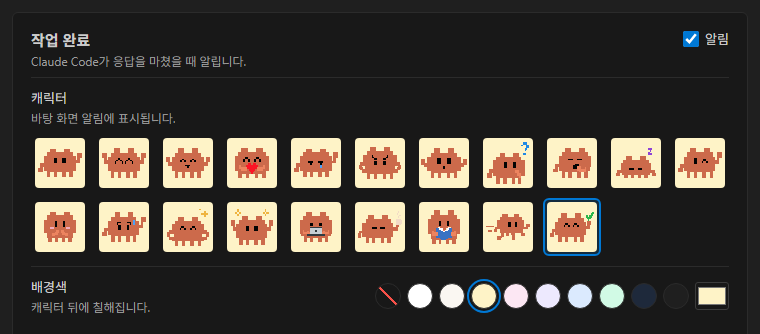
설치
- extension을 설치합니다.
- 안내가 뜨면 hook 설치를 선택합니다. 명령 팔레트에서 Claude Task Notifier: Claude Code hook 설치를 실행해도 됩니다.
hook이 설치되지 않은 동안에는 상태 표시줄에 알림: hook 미설치가 표시됩니다. 클릭하면 설치합니다.
- 이미 실행 중인 Claude Code 세션은 다시 시작합니다.
- Claude Task Notifier: 테스트 알림 표시를 실행해 소리와 바탕 화면 알림을 확인합니다.
명령
| 명령 |
하는 일 |
| Claude Task Notifier: 설정 열기 |
설정 창을 엽니다. |
| Claude Task Notifier: 테스트 알림 표시 |
팝업, 소리, 바탕 화면 알림을 모두 띄웁니다. |
| Claude Task Notifier: Claude Code hook 설치 |
Claude Code 설정에 hook을 추가합니다. |
| Claude Task Notifier: Claude Code hook 제거 |
Claude Code 설정에서 hook을 제거합니다. |
설정
Claude Task Notifier: 설정 열기를 실행하면 설정 창이 열립니다. 소리 미리 듣기, 캐릭터와 배경색 고르기, 소리·이미지 파일 찾아보기, 테스트 알림 보내기, hook 설치·제거를 한곳에서 할 수 있고, 변경한 내용은 바로 저장됩니다.
같은 설정을 VS Code 기본 설정 화면에서도 바꿀 수 있습니다. 아래 이름은 모두 claudeTaskNotifier.으로 시작합니다.
작업 완료
| 설정 |
기본값 |
설명 |
notifyOnDone |
true |
Claude Code가 작업을 끝내면 알립니다. |
doneMessage |
비어 있음 |
직접 적는 알림 문구입니다. {folder}는 폴더 이름으로 바뀝니다. 비워 두면 "작업이 끝났습니다."를 표시합니다. |
doneCharacter |
done |
바탕 화면 알림에 표시할 캐릭터입니다. 20가지 표정 중 하나를 고릅니다. Windows에서만 동작합니다. |
doneBackground |
#fef3c7 |
캐릭터 뒤에 칠할 배경색입니다. #rrggbb 형식으로 적고, 비워 두면 배경을 칠하지 않습니다. Windows에서만 동작합니다. |
doneImage |
비어 있음 |
캐릭터 대신 표시할 이미지(PNG, JPG)의 절대 경로입니다. Windows에서만 동작합니다. |
doneSound |
chime |
소리입니다. chime, bell, pop, none 중 하나입니다. |
doneSoundFile |
비어 있음 |
내장 소리 대신 재생할 소리 파일의 절대 경로입니다. Windows에서는 WAV 파일만 재생됩니다. |
백그라운드 작업이 남아 있는 동안에는 작업 완료 알림을 띄우지 않습니다. 작업이 끝나면 Claude Code가 이어서 처리하기 때문입니다.
확인 요청
| 설정 |
기본값 |
설명 |
notifyOnAttention |
true |
Claude Code가 질문의 답, 계획 승인, 권한 승인을 기다리면 알립니다. 끄면 아래 세 종류도 함께 꺼집니다. |
notifyOnQuestion |
true |
Claude Code가 질문에 대한 답을 기다리면 알립니다. |
questionMessage |
비어 있음 |
질문 알림에 쓸 문구입니다. |
notifyOnPlan |
true |
Claude Code가 계획 승인을 기다리면 알립니다. |
planMessage |
비어 있음 |
계획 승인 알림에 쓸 문구입니다. |
notifyOnPermission |
true |
Claude Code가 도구 사용 권한을 기다리면 알립니다. |
permissionMessage |
비어 있음 |
도구 사용 권한 알림에 쓸 문구입니다. {tool}은 도구 이름으로 바뀝니다. |
attentionMessage |
비어 있음 |
종류별 문구를 적지 않은 알림에 쓸 문구입니다. 비워 두면 Claude Code가 무엇을 기다리는지 표시합니다. |
attentionCharacter |
thinking |
바탕 화면 알림에 표시할 캐릭터입니다. Windows에서만 동작합니다. |
attentionBackground |
#fef3c7 |
캐릭터 뒤에 칠할 배경색입니다. Windows에서만 동작합니다. |
attentionImage |
비어 있음 |
캐릭터 대신 표시할 이미지의 절대 경로입니다. Windows에서만 동작합니다. |
attentionSound |
bell |
소리입니다. chime, bell, pop, none 중 하나입니다. |
attentionSoundFile |
비어 있음 |
내장 소리 대신 재생할 소리 파일의 절대 경로입니다. Windows에서는 WAV 파일만 재생됩니다. |
모든 문구에서 {folder}는 폴더 이름으로 바뀝니다.
공통
| 설정 |
기본값 |
설명 |
language |
auto |
알림과 설정 창의 언어입니다. auto(편집기와 같게), en, ko, ja, la(라틴어) 중 하나입니다. |
osNotification |
always |
바탕 화면 알림을 표시할 조건입니다. always(항상), whenUnfocused(편집기 창에 포커스가 없을 때만), never(표시 안 함) 중 하나입니다. |
notificationDuration |
untilDismissed |
바탕 화면 알림 유지 시간입니다. short(약 5초), long(약 25초), untilDismissed(직접 닫을 때까지) 중 하나입니다. Windows에서만 동작합니다. |
notificationSize |
medium |
바탕 화면 알림 크기입니다. small(글만), medium(작은 그림), large(큰 그림) 중 하나입니다. Windows에서만 동작합니다. |
showPopup |
false |
편집기 창 안에도 팝업을 표시합니다. |
onlyWhenUnfocused |
false |
편집기 창에 포커스가 없을 때만 알립니다. 창을 쓰는 중에는 팝업, 소리, 바탕 화면 알림을 모두 내지 않습니다. |
PC에서 바뀌는 것
extension은 Claude Code를 직접 볼 수 없어서 Claude Code의 hook을 사용합니다. hook을 설치하면 다음이 바뀝니다.
- Claude Code 사용자 설정(
~/.claude/settings.json)에 Stop, Notification hook을 추가합니다. 다른 설정과 hook은 그대로 두며, 변경 전에 settings.json.claude-task-notifier.bak으로 백업합니다.
~/.claude-notify/bin/에 작은 스크립트를 복사합니다. hook이 실행되면 이 스크립트가 hook 데이터를 ~/.claude-notify/events/에 파일로 저장하고, extension이 그 파일을 읽어 알림을 띄운 뒤 지웁니다.
네트워크로 보내는 데이터는 없습니다. hook 데이터는 PC 밖으로 나가지 않습니다.
~/.claude-notify/에는 파일이 두 종류 더 저장됩니다. 알림 발신자로 표시할 편집기 아이콘(icons/)과, 고른 배경색을 칠한 캐릭터 그림(images/)입니다.
Windows에서는 바탕 화면 알림을 처음 보낼 때 사용 중인 편집기마다 레지스트리 키를 하나 추가합니다(예: HKCU\Software\Classes\AppUserModelId\ClaudeTaskNotifier.VisualStudioCode.2). 알림 발신자로 표시할 이름("Claude Task Notifier")과 그 편집기의 아이콘이 들어 있습니다.
hook을 지우려면 Claude Task Notifier: Claude Code hook 제거를 실행합니다. extension을 제거하면 hook, ~/.claude-notify 폴더, 레지스트리 키가 모두 지워집니다.
제한 사항
- Windows 11에서 검증했습니다. macOS와 Linux용 코드는 들어 있지만 아직 검증하지 않았습니다. Linux에서는 소리에
paplay 또는 aplay가, 바탕 화면 알림에 notify-send가 필요합니다.
- Windows에서만 되는 기능: 캐릭터와 이미지, 배경색, 바탕 화면 알림의 크기와 유지 시간, 알림을 클릭했을 때 편집기 창이 앞으로 나오는 동작입니다.
- 방해 금지 모드: 방해 금지 모드가 켜져 있거나 전체 화면 앱을 쓰는 중에는 운영 체제가 바탕 화면 알림을 숨길 수 있습니다. 소리는 재생됩니다.
- 원격 workspace(SSH, WSL, 컨테이너): 편집기 안 팝업만 동작합니다. 소리와 바탕 화면 알림은 원격 컴퓨터에서 실행되므로 들리거나 보이지 않습니다. 원격에서는
showPopup을 켜서 쓰세요.
- 열려 있지 않은 폴더의 세션: 어느 편집기 창에도 열려 있지 않은 폴더에서 실행한 Claude Code는 알리지 않습니다.
- Windows 스크립트 정책: hook은 PowerShell 스크립트를 실행합니다. 조직 정책으로 PowerShell 스크립트 실행이 막혀 있으면 hook이 동작하지 않습니다.
문제 해결
- 알림이 오지 않을 때: Claude Code 세션을 다시 시작한 뒤, 출력 패널의 Claude Task Notifier 채널을 확인합니다. 받은 이벤트가 모두 기록됩니다.
- hook 확인: Claude Code에서
/hooks를 실행합니다. Stop과 Notification에 .claude-notify/bin/write-event가 들어간 명령이 각각 있어야 합니다.
- 설정이 저장되지 않을 때: extension을 업데이트한 뒤에는 편집기 창을 다시 로드하고 설정 창을 새로 엽니다.
日本語
Claude Code がタスクを終えたとき、または入力を待っているときに、デスクトップ通知とサウンドで知らせる拡張機能です。タスクを任せて別のウィンドウで作業していても、終わったタイミングを逃しません。
Anthropic が作成または保証する製品ではなく、独立して作られた拡張機能です。
機能
- タスク完了の通知: Claude Code が応答を終えると、デスクトップ通知を表示してサウンドを鳴らします。
- 確認待ちの通知: Claude Code が何を待っているかを知らせます。質問への回答、プランの承認、ツールの使用許可の 3 種類を区別し、種類ごとにオン・オフを切り替えたり、メッセージを個別に書いたりできます。
- 見るまで残る通知: デスクトップ通知はほかのウィンドウの上に表示され、自分で閉じるまで残ります。Windows では通知をクリックするとエディターのウィンドウが前面に出ます。
- 該当するウィンドウだけ: ウィンドウを複数開いていても、Claude Code を実行したフォルダーを開いているウィンドウだけが通知します。通知のタイトルはフォルダー名です。
- キャラクター: 通知の種類ごとに 20 種類の表情から 1 つと背景色を選べます。独自の画像も使えます(Windows)。
- サウンド: 内蔵サウンド 3 種類、または独自のサウンドファイルを使えます。
- 設定ウィンドウ: すべての設定を 1 か所で変更し、サウンドを試聴し、テスト通知を送れます。
- 言語: 英語、韓国語、日本語、ラテン語に対応しています。既定ではエディターの言語に従います。
統合ターミナル、外部ターミナル、Claude Code の VS Code 拡張機能のどれで実行した Claude Code でも動作します。
スクリーンショット
デスクトップ通知:
設定ウィンドウでキャラクターと背景色を選ぶ画面:
セットアップ
- 拡張機能をインストールします。
- 案内が表示されたら フックをインストール を選びます。コマンド パレットから Claude Task Notifier: Claude Code のフックをインストール を実行することもできます。
フックがインストールされていない間は、ステータス バーに 通知: フック未インストール と表示されます。クリックするとインストールします。
- すでに実行中の Claude Code セッションは再起動します。
- Claude Task Notifier: テスト通知を表示 を実行して、サウンドとデスクトップ通知を確認します。
コマンド
| コマンド |
内容 |
| Claude Task Notifier: 設定を開く |
設定ウィンドウを開きます。 |
| Claude Task Notifier: テスト通知を表示 |
ポップアップ、サウンド、デスクトップ通知をすべて出します。 |
| Claude Task Notifier: Claude Code のフックをインストール |
Claude Code の設定にフックを追加します。 |
| Claude Task Notifier: Claude Code のフックを削除 |
Claude Code の設定からフックを削除します。 |
設定
Claude Task Notifier: 設定を開く を実行すると設定ウィンドウが開きます。サウンドの試聴、キャラクターと背景色の選択、サウンド・画像ファイルの参照、テスト通知の送信、フックのインストール・削除を 1 か所で行えます。変更はすぐに保存されます。
同じ設定は VS Code 標準の設定エディターでも変更できます。以下の名前はすべて claudeTaskNotifier. で始まります。
タスク完了
| 設定 |
既定値 |
説明 |
notifyOnDone |
true |
Claude Code がタスクを終えたときに通知します。 |
doneMessage |
空 |
独自のメッセージです。{folder} はフォルダー名に置き換わります。空にすると「タスクが終わりました。」を表示します。 |
doneCharacter |
done |
デスクトップ通知に表示するキャラクターです。20 種類の表情から選びます。Windows のみ。 |
doneBackground |
#fef3c7 |
キャラクターの後ろに塗る背景色です。#rrggbb 形式で指定し、空にすると背景を塗りません。Windows のみ。 |
doneImage |
空 |
キャラクターの代わりに表示する画像(PNG、JPG)の絶対パスです。Windows のみ。 |
doneSound |
chime |
サウンドです。chime、bell、pop、none のいずれかです。 |
doneSoundFile |
空 |
内蔵サウンドの代わりに再生するサウンドファイルの絶対パスです。Windows では WAV ファイルのみ再生できます。 |
バックグラウンドのタスクが残っている間は、タスク完了の通知を出しません。タスクが終わると Claude Code が続きを処理するためです。
確認待ち
| 設定 |
既定値 |
説明 |
notifyOnAttention |
true |
Claude Code が回答・承認・許可を待っているときに通知します。オフにすると下の 3 種類もオフになります。 |
notifyOnQuestion |
true |
Claude Code が質問への回答を待っているときに通知します。 |
questionMessage |
空 |
質問の通知に使うメッセージです。 |
notifyOnPlan |
true |
Claude Code がプランの承認を待っているときに通知します。 |
planMessage |
空 |
プランの承認の通知に使うメッセージです。 |
notifyOnPermission |
true |
Claude Code がツールの使用許可を待っているときに通知します。 |
permissionMessage |
空 |
ツールの使用許可の通知に使うメッセージです。{tool} はツール名に置き換わります。 |
attentionMessage |
空 |
専用のメッセージがない種類に使うメッセージです。空にすると Claude Code が何を待っているかを表示します。 |
attentionCharacter |
thinking |
デスクトップ通知に表示するキャラクターです。Windows のみ。 |
attentionBackground |
#fef3c7 |
キャラクターの後ろに塗る背景色です。Windows のみ。 |
attentionImage |
空 |
キャラクターの代わりに表示する画像の絶対パスです。Windows のみ。 |
attentionSound |
bell |
サウンドです。chime、bell、pop、none のいずれかです。 |
attentionSoundFile |
空 |
内蔵サウンドの代わりに再生するサウンドファイルの絶対パスです。Windows では WAV ファイルのみ再生できます。 |
どのメッセージでも {folder} はフォルダー名に置き換わります。
全般
| 設定 |
既定値 |
説明 |
language |
auto |
通知と設定ウィンドウの言語です。auto(エディターと同じ)、en、ko、ja、la(ラテン語)のいずれかです。 |
osNotification |
always |
デスクトップ通知を表示する条件です。always(常に)、whenUnfocused(エディターのウィンドウにフォーカスがないときだけ)、never(表示しない)のいずれかです。 |
notificationDuration |
untilDismissed |
デスクトップ通知の表示時間です。short(約 5 秒)、long(約 25 秒)、untilDismissed(自分で閉じるまで)のいずれかです。Windows のみ。 |
notificationSize |
medium |
デスクトップ通知の大きさです。small(文字のみ)、medium(小さな絵)、large(大きな絵)のいずれかです。Windows のみ。 |
showPopup |
false |
エディターのウィンドウ内にもポップアップを表示します。 |
onlyWhenUnfocused |
false |
エディターのウィンドウにフォーカスがないときだけ通知します。ウィンドウを使っている間は、ポップアップ・サウンド・デスクトップ通知をすべて出しません。 |
コンピューターで変更されるもの
拡張機能は Claude Code を直接見ることができないため、Claude Code のフックを使います。フックをインストールすると次のものが変更されます。
- Claude Code のユーザー設定(
~/.claude/settings.json)に Stop フックと Notification フックを追加します。ほかの設定とフックはそのまま残し、変更前に settings.json.claude-task-notifier.bak へバックアップします。
~/.claude-notify/bin/ に小さなスクリプトをコピーします。フックが実行されると、このスクリプトがフックのデータを ~/.claude-notify/events/ にファイルとして保存し、拡張機能がそのファイルを読んで通知を出したあと削除します。
ネットワークに送信するデータはありません。フックのデータはコンピューターの外に出ません。
~/.claude-notify/ には、ほかに 2 種類のファイルが保存されます。通知の送信元として表示するエディターのアイコン(icons/)と、選んだ背景色を塗ったキャラクターの絵(images/)です。
Windows では、最初のデスクトップ通知を出すときに、使っているエディターごとにレジストリ キーを 1 つ追加します(例: HKCU\Software\Classes\AppUserModelId\ClaudeTaskNotifier.VisualStudioCode.2)。通知の送信元として表示する名前(「Claude Task Notifier」)とそのエディターのアイコンが入っています。
フックを削除するには Claude Task Notifier: Claude Code のフックを削除 を実行します。拡張機能をアンインストールすると、フック、~/.claude-notify フォルダー、レジストリ キーがすべて削除されます。
制限事項
- Windows 11 で検証しています。 macOS と Linux 用のコードは含まれていますが、まだ検証していません。Linux では、サウンドに
paplay または aplay、デスクトップ通知に notify-send が必要です。
- Windows だけの機能: キャラクターと画像、背景色、デスクトップ通知の大きさと表示時間、通知をクリックしたときにエディターのウィンドウを前面に出す動作です。
- 応答不可モード: 応答不可モードがオンのとき、または全画面のアプリを使っているときは、OS がデスクトップ通知を隠すことがあります。サウンドは鳴ります。
- リモートのワークスペース(SSH、WSL、コンテナー): エディター内のポップアップだけが動作します。サウンドとデスクトップ通知はリモートのコンピューターで実行されるため、聞こえず、見えません。リモートでは
showPopup をオンにしてください。
- 開いていないフォルダーのセッション: どのエディターのウィンドウでも開いていないフォルダーで実行した Claude Code は通知しません。
- Windows のスクリプト ポリシー: フックは PowerShell スクリプトを実行します。組織のポリシーで PowerShell スクリプトの実行が禁止されていると、フックは動作しません。
トラブルシューティング
- 通知が届かないとき: Claude Code セッションを再起動してから、出力パネルの Claude Task Notifier チャンネルを確認します。受け取ったイベントがすべて記録されています。
- フックの確認: Claude Code で
/hooks を実行します。Stop と Notification のそれぞれに、.claude-notify/bin/write-event を含むコマンドがあるはずです。
- 設定が保存されないとき: 拡張機能を更新したあとは、エディターのウィンドウを再読み込みしてから設定ウィンドウを開き直します。
Latina
Haec extensio te nuntiatione mensae et sono monet, cum Claude Code opus perfecit aut te exspectat. Ita in alia fenestra laborare potes, dum Claude Code opus facit.
Extensio sui iuris est. Ab Anthropic nec facta nec probata est.
Quae facit
- Opus perfectum: cum Claude Code respondere desinit, nuntiatio mensae ostenditur et sonus canitur.
- Te exspectat: nuntiatio dicit quid Claude Code exspectet: responsum ad quaestionem, probationem consilii, vel veniam instrumento utendi. Singula genera accendere vel exstinguere potes, et verba tua cuique scribere.
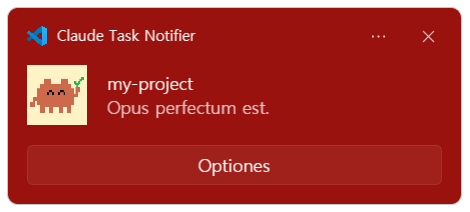
- Manet donec videas: nuntiatio mensae super alias fenestras ostenditur et manet donec eam claudas. In Windows, si eam premis, fenestra editoris in frontem venit.
- Fenestra recta tantum: si plures fenestrae editoris apertae sunt, ea sola te monet quae receptaculum sessionis Claude Code apertum habet. Titulus nuntiationis est nomen receptaculi.
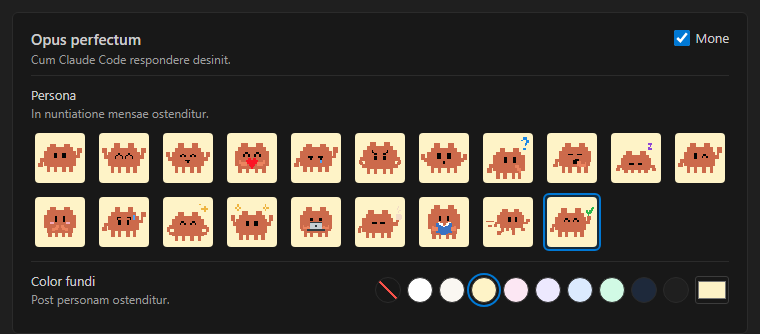
- Personae: cuique generi nuntiationis unum ex viginti vultibus et colorem fundi eligere potes, vel imagine tua uti (in Windows).
- Soni: tres soni insiti, vel filum soni tuum.
- Fenestra optionum: omnia uno loco mutas, sonos audis, nuntiationes probandi causa mittis.
- Linguae: Anglica, Coreana, Iaponica, Latina. Nisi aliter eligis, extensio linguam editoris sequitur.
Valet cum Claude Code in terminali editoris, in terminali externo, et in extensione Claude Code pro VS Code.
Imagines
Nuntiatio mensae:
Electio personae et coloris fundi in fenestra optionum:
Institutio
- Extensionem institue.
- Cum rogaris, elige Hamos institue. Etiam iussum Claude Task Notifier: Install Claude Code Hooks ex tabula iussorum dare potes.
Dum hami desunt, in linea status Nuntiator: hami desunt ostenditur. Preme ut instituantur.
- Sessiones Claude Code iam currentes iterum incipe.
- Iussum Claude Task Notifier: Show Test Notification da, ut sonum et nuntiationem mensae probes.
Iussa
| Iussum |
Quid facit |
| Claude Task Notifier: Open Settings |
Fenestram optionum aperit. |
| Claude Task Notifier: Show Test Notification |
Nuntium intra editorem, sonum, et nuntiationem mensae simul dat. |
| Claude Task Notifier: Install Claude Code Hooks |
Hamos optionibus Claude Code addit. |
| Claude Task Notifier: Remove Claude Code Hooks |
Hamos ex optionibus Claude Code removet. |
Optiones
Iussum Claude Task Notifier: Open Settings fenestram optionum aperit. Ibi sonos audire, personas et colores fundi eligere, fila soni et imaginis quaerere, nuntiationem probandi causa mittere, hamos instituere vel removere potes. Mutationes statim servantur.
Eaedem optiones in editore optionum solito inveniuntur. Omnia nomina infra scripta a claudeTaskNotifier. incipiunt.
Opus perfectum
| Optio |
Valor solitus |
Explicatio |
notifyOnDone |
true |
Monet cum Claude Code opus perfecit. |
doneMessage |
vacuum |
Verba tua. Pro {folder} nomen receptaculi ponitur. Si vacuum est, "Opus perfectum est." ostenditur. |
doneCharacter |
done |
Persona in nuntiatione mensae ostensa. Unus ex viginti vultibus. In Windows tantum. |
doneBackground |
#fef3c7 |
Color fundi post personam, forma #rrggbb. Si vacuum est, fundus non pingitur. In Windows tantum. |
doneImage |
vacuum |
Via absoluta ad imaginem tuam (PNG vel JPG). Pro persona ostenditur. In Windows tantum. |
doneSound |
chime |
Sonus: chime, bell, pop, vel none. |
doneSoundFile |
vacuum |
Via absoluta ad filum soni tuum. Pro sono insito canitur. Windows sola fila WAV canit. |
Dum Claude Code opera in recessu currentia habet, nuntiatio operis perfecti non datur; nam Claude Code, cum ea finita sunt, laborare pergit.
Te exspectat
| Optio |
Valor solitus |
Explicatio |
notifyOnAttention |
true |
Monet cum Claude Code responsum, probationem, vel veniam tuam exspectat. Si exstinguitur, tria genera infra scripta quoque exstinguuntur. |
notifyOnQuestion |
true |
Monet cum Claude Code te aliquid rogat. |
questionMessage |
vacuum |
Verba tua pro quaestionibus. |
notifyOnPlan |
true |
Monet cum Claude Code consilium suum a te probari exspectat. |
planMessage |
vacuum |
Verba tua pro probatione consilii. |
notifyOnPermission |
true |
Monet cum Claude Code veniam instrumento utendi petit. |
permissionMessage |
vacuum |
Verba tua pro venia instrumenti. Pro {tool} nomen instrumenti ponitur. |
attentionMessage |
vacuum |
Verba tua pro generibus quae verba propria non habent. Si vacuum est, nuntiatio dicit quid Claude Code exspectet. |
attentionCharacter |
thinking |
Persona in nuntiatione mensae ostensa. In Windows tantum. |
attentionBackground |
#fef3c7 |
Color fundi post personam. In Windows tantum. |
attentionImage |
vacuum |
Via absoluta ad imaginem tuam. Pro persona ostenditur. In Windows tantum. |
attentionSound |
bell |
Sonus: chime, bell, pop, vel none. |
attentionSoundFile |
vacuum |
Via absoluta ad filum soni tuum. Windows sola fila WAV canit. |
In omnibus verbis pro {folder} nomen receptaculi ponitur.
Generalia
| Optio |
Valor solitus |
Explicatio |
language |
auto |
Lingua nuntiationum et fenestrae optionum: auto (eadem ac editoris), en, ko, ja, vel la. |
osNotification |
always |
Quando nuntiatio mensae ostendatur: always (semper), whenUnfocused (tantum cum fenestra editoris non est in usu), vel never (numquam). |
notificationDuration |
untilDismissed |
Quam diu nuntiatio mensae maneat: short (circiter 5 secundas), long (circiter 25 secundas), vel untilDismissed (donec eam claudas). In Windows tantum. |
notificationSize |
medium |
Magnitudo nuntiationis mensae: small (verba tantum), medium (imago parva), vel large (imago magna). In Windows tantum. |
showPopup |
false |
Nuntium etiam intra fenestram editoris ostendit. |
onlyWhenUnfocused |
false |
Monet tantum cum fenestra editoris non est in usu. Dum fenestra uteris, nec nuntius nec sonus nec nuntiatio mensae datur. |
Quae in computatro tuo mutantur
Extensio Claude Code ipsum videre non potest; itaque hamis Claude Code utitur. Cum hami instituuntur, haec fiunt:
- Hamus
Stop et hamus Notification optionibus tuis Claude Code (~/.claude/settings.json) adduntur. Ceterae optiones et hami servantur. Filum, antequam mutatur, in settings.json.claude-task-notifier.bak describitur.
- Parvum scriptum in
~/.claude-notify/bin/ describitur. Claude Code id currit cum hamus agitur, et scriptum data hami in filo in ~/.claude-notify/events/ servat. Extensio id filum legit, nuntiationem ostendit, filum delet.
Nihil per rete mittitur. Data hami in computatro tuo manent.
In ~/.claude-notify/ duo alia genera filorum servantur: icon editoris, qui ut auctor nuntiationis ostenditur (icons/), et imagines personarum colore fundi tuo pictae (images/).
In Windows, prima nuntiatio mensae unam clavem registri pro quoque editore quo uteris addit, exempli gratia HKCU\Software\Classes\AppUserModelId\ClaudeTaskNotifier.VisualStudioCode.2. Ea nomen ("Claude Task Notifier") et iconem editoris continet, quae Windows ut auctorem nuntiationis ostendit.
Ut hamos removeas, iussum Claude Task Notifier: Remove Claude Code Hooks da. Cum extensio removetur, hami, receptaculum ~/.claude-notify, et claves registri delentur.
Fines
- In Windows 11 probata est. Codex pro macOS et Linux inest, sed nondum probatus est. In Linux sonus
paplay vel aplay requirit, nuntiatio mensae notify-send.
- In Windows tantum valent: persona vel imago, color fundi, magnitudo et duratio nuntiationis mensae, et fenestra editoris in frontem veniens cum nuntiationem premis.
- Modus "Noli turbare": systema tuum nuntiationes mensae celare potest, dum hic modus accensus est vel applicatio totum album occupat. Sonus tamen canitur.
- Spatia operis remota (SSH, WSL, continentia): solus nuntius intra editorem valet. Sonus et nuntiatio mensae in computatro remoto aguntur; itaque ea nec audies nec videbis. Ibi
showPopup accende.
- Sessiones extra receptacula aperta: si Claude Code in receptaculo currit quod in nulla fenestra editoris apertum est, nulla nuntiatio datur.
- Lex scriptorum in Windows: hamus scriptum PowerShell currit. Si institutum tuum scripta PowerShell vetat, hamus currere non potest.
Si quid non procedit
- Nulla nuntiatio venit: sessionem Claude Code iterum incipe; deinde canalem Claude Task Notifier in tabula Output inspice. Omnis eventus acceptus ibi scribitur.
- Hamos inspice: in Claude Code iussum
/hooks da. Stop et Notification singuli iussum habere debent quod .claude-notify/bin/write-event continet.
- Optio non servatur: postquam extensionem renovasti, fenestram editoris denuo onera et fenestram optionum iterum aperi.
| |

