Playwright Live Playground 🔍
🎯 Stop guessing your Playwright locators.
⚡ Interact, script, and validate locators instantly.
👀 See what your locator matches on the live browser.
Playwright Live Playground is a real-time locator validation, interaction, and scripting tool integrated directly into VS Code and Cursor as a sidebar extension. It helps automation engineers instantly write, debug, optimize, and test complex Playwright scripts against live web pages.
🚀 Key Features
🔎 Tab 1 — Locator
Type any Playwright locator expression and see matching elements highlighted on the live browser in real time.
- Real-time Highlights: Instant visual feedback — matching elements are outlined and labelled on the page.
- Match Navigation: Step through multiple matches (e.g.,
3 of 22) while viewing element metadata for the focused match.
- Interact Button: Opens the Element Interaction card with two sub-tabs:
- Quick Actions — One-click
Click, Hover, Focus, Check/Uncheck, Clear, Scroll To, plus input fields for Fill, Select Option, and Press Key.
- Element Scripting — Write multi-line async scripts using the
e variable (the matched locator) and run them with ▶ Run Script.
- Failure Diagnosis: When a locator matches nothing, the tool walks the chain step-by-step to show you exactly where it broke.
- Diagnostics & Alternatives: Shows alternative recommended selectors sorted by confidence score.
🌐 Tab 2 — Browser Scripts
Run free-form Playwright scripts against the connected page — no test framework needed.
- Script Editor: Write async code using the global
page variable (Playwright Page instance).
- Timeout Control: Adjust the execution timeout per run.
- Expandable Output Panel: View
console.log output and script results in a resizable output panel (click ⤢ to expand).
- Secure Sandbox: Scripts execute inside a sandboxed context within the extension host — no
eval, no vm escape vectors.
🖥️ Tab 3 — Run in Workspace
Execute test files and standalone scripts directly in your project workspace using your local Node.js environment.
- Runner Modes:
- Playwright Test Runner — Runs via
npx playwright test with full support for fixtures, config, and expect assertions.
- Standalone TS Script — Runs via
npx tsx for quick scripts without the test framework.
- Connect to Live Browser Tab: Toggle this checkbox to have the tool wrap your script with a CDP connection, injecting a pre-connected
page object. Uncheck it to run scripts that launch their own browser.
- Smart Import Resolution: The tool detects the directory depth of your active file (or scans your workspace), placing the temporary spec alongside your existing tests so that relative imports resolve correctly.
- Custom Command: Optionally override the default runner command.
- Expandable Output Panel: Full stdout/stderr streaming with expand/collapse support.
📐 Pick Locator, UI Scanner & Code Export (Beta)
- Pick Locator: Interactively pick elements from the live browser page with 40+ pattern detectors, multi-pick POM generator, framework detection, and semantic trust scoring.
- UI Scanner: Generate full Semantic UI Trees of the current page.
- Accessibility Audits: Audit missing labels, dynamic IDs, duplicate descriptors.
- POM Export: Export element structures to Page Object Model (POM) classes.
🔗 Supported Locators & Chaining
Playwright Live Playground supports evaluating the full spectrum of Playwright selectors:
Core Locators
page.locator(selector) (CSS or XPath)page.getByRole(role, options)page.getByLabel(text, options)page.getByPlaceholder(text, options)page.getByText(text, options)page.getByAltText(text, options)page.getByTitle(text, options)page.getByTestId(id)
Complex Chaining & Filtering
- Chaining:
page.locator('form').locator('input')
- Filter by Text:
page.locator('tr').filter({ hasText: 'John Doe' })
- Filter by Element:
page.locator('div').filter({ has: page.locator('span.badge') })
- Logical OR:
page.locator('button.submit').or(page.locator('input[type="submit"]'))
- Logical AND:
page.locator('input').and(page.locator('[required]'))
- Index:
.first(), .last(), .nth(index)
🏗️ Architecture Overview
The project is structured as a multi-package monorepo with NPM Workspaces:
PlaywrightLivePlayground/
├── packages/
│   ├── extension/          # IDE extension host & Webview sidebar UI
│   ├── engine/             # Execution engine, code wrappers & diagnostics
│   ├── locator-parser/     # Tokenizer and AST parser for locator expressions
│   ├── browser-agent/      # Client-side agent injected into Chrome via CDP
│   ├── pick-locator/       # Interactive element picking, pattern matching & trust scoring
│   └── shared/             # Common TypeScript interfaces & schemas
└── README.md
Package Responsibilities
| Package |
Role |
| extension |
Manages the Webview sidebar, spawns Chrome with --remote-debugging-port=9222, handles user actions and renders results. |
| engine |
Parses & evaluates locator expressions safely (secure method whitelist, no eval), runs failure diagnostics, generates CDP-connected script wrappers. |
| locator-parser |
Custom recursive-descent parser: tokenizes locator strings into AST steps for incremental evaluation and diagnostics. |
| browser-agent |
Injected into the browser page via CDP. Queries bounding rects, generates highlight overlays, and runs accessibility audits. |
| pick-locator |
Interactive element picking, 40+ pattern matching, framework detection, and semantic trust evaluator. |
| shared |
TypeScript interfaces (EvaluationResult, ElementDetails, UiNode) shared across all packages. |
🛠️ Configuration & Beta Features
Configure in IDE Settings (Settings > Extensions > Playwright Live Playground or settings.json) across VS Code and Cursor:
| Setting Key |
Default |
Description |
playwright-locator-toolkit.browserPath |
Auto-detect |
Optional custom path to Chrome/Chromium executable |
playwright-locator-toolkit.debuggingPort |
9222 |
Chrome DevTools Protocol port (default 9222) |
playwright-locator-toolkit.enableBetaFeatures |
false |
Master toggle to enable all experimental Beta features |
playwright-locator-toolkit.beta.enableVariablesAndHelpers |
true |
Parameter extraction & helper code generation snippets |
playwright-locator-toolkit.beta.enableScanUi |
false |
UI Hierarchy Scanner, Accessibility Audits & POM generator |
playwright-locator-toolkit.beta.enableStabilityTest |
false |
Locator flakiness & stability test runner |
playwright-locator-toolkit.cleanBrowserProfile |
false |
Delete temporary browser profile on exit |
💡 Cursor & VS Code Compatibility: All settings seamlessly appear in the Cursor Settings UI (Ctrl+, / Cmd+, and search Playwright or Beta) as well as in settings.json.
🌐 Supported Languages & Frameworks
- First-Class Support: Fully supports JavaScript and TypeScript out of the box. The tool automatically detects whether the active file or project uses JS or TS, and generates sandbox/playground files with the matching extension (
.js or .ts), stripping type assertions if JavaScript is used.
- Other Languages (Python, Java, C#): Playwright Live Playground's interactive validation and visual highlighting work against any live page regardless of what language you use to write your test suite. However, the Workspace Runner and Playground Editor execution currently support Node.js-based test runners (JavaScript and TypeScript).
🎬 Demonstration
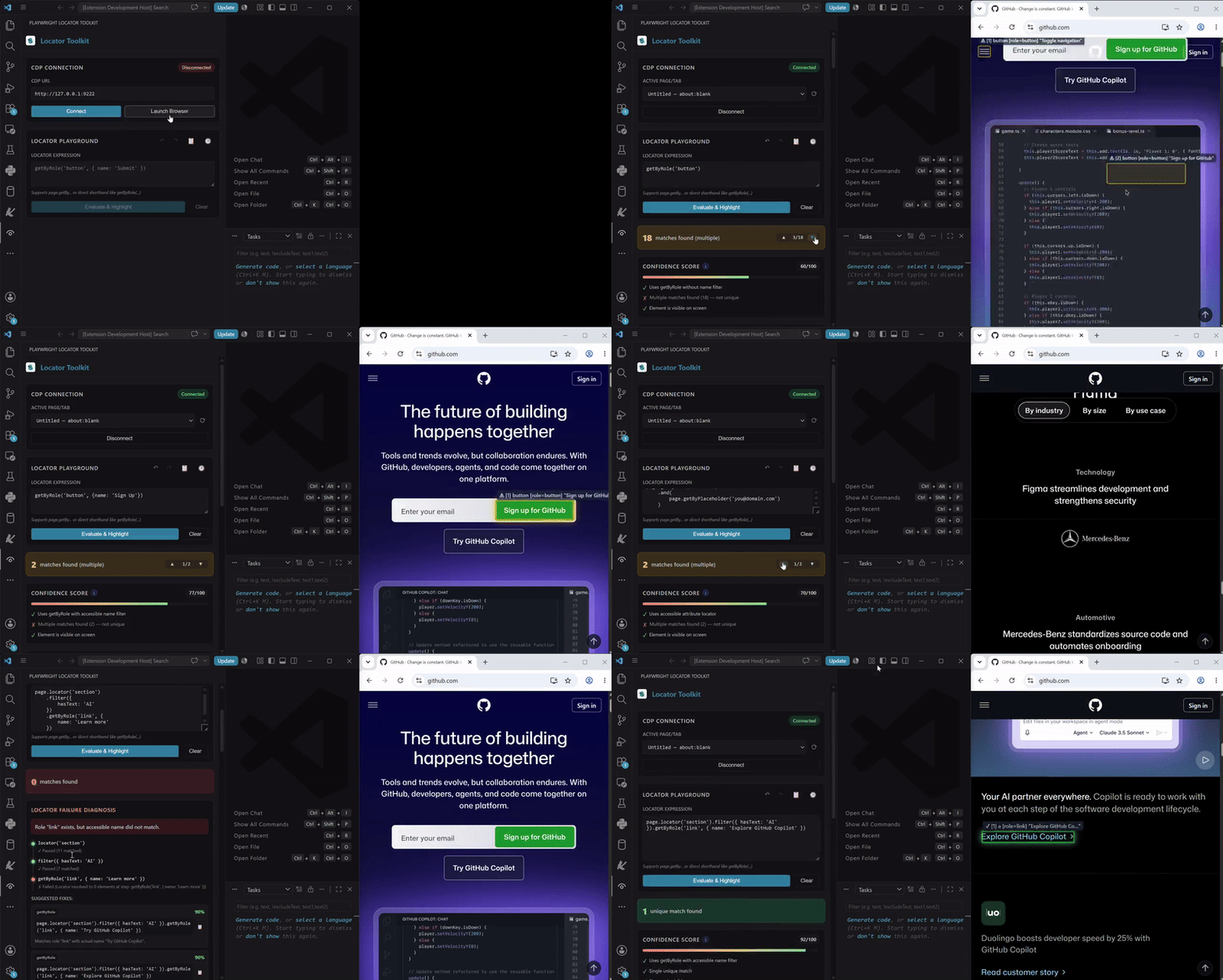
▶ Watch Video
| |

