AI Merge Request Reviewer
AI-powered GitLab Merge Request reviewer with a guided, step-by-step walkthrough — right inside VS Code.
Stop reading diffs line by line. Let AI understand the change for you, then walk through it like a structured story.
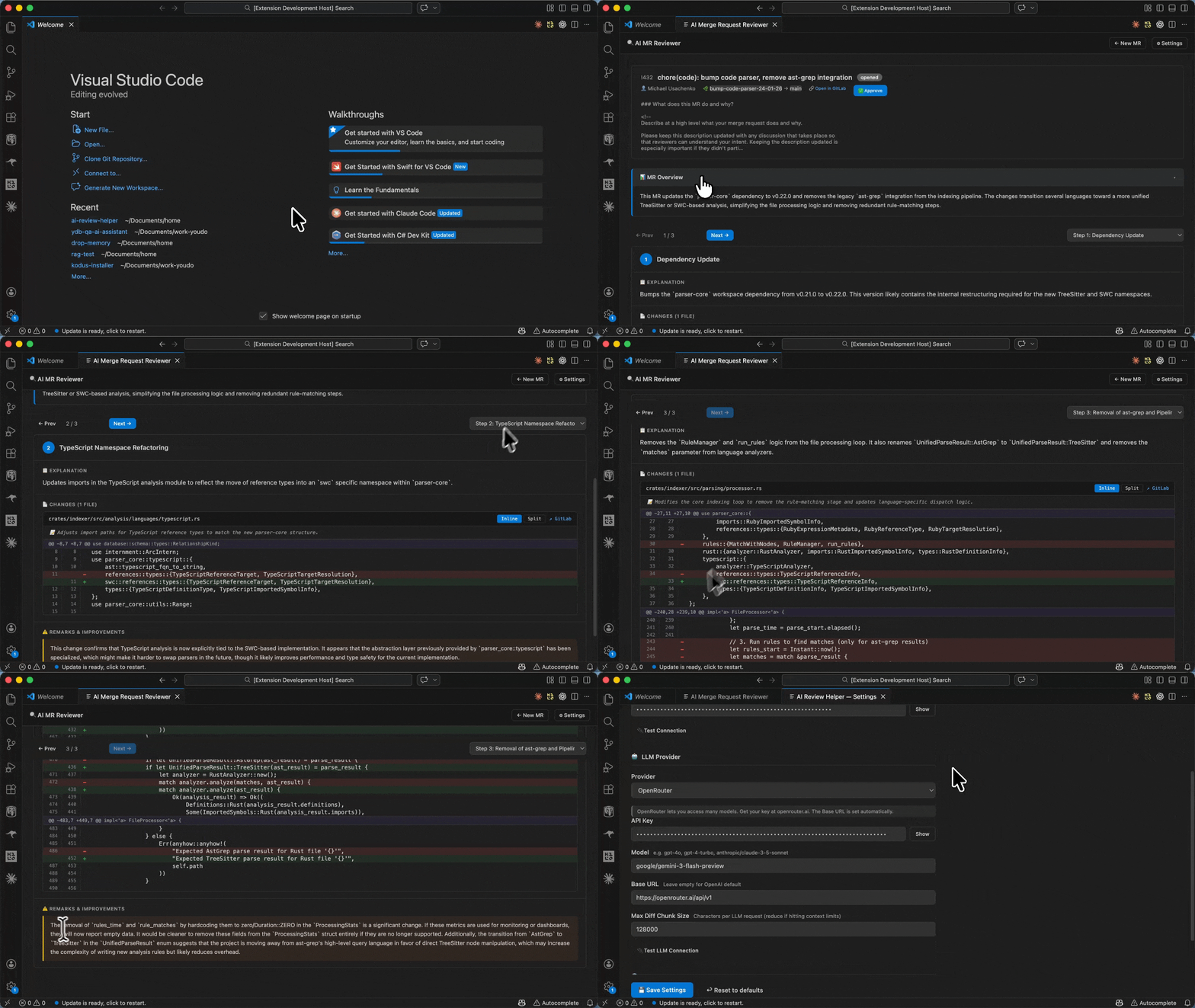
Features
Guided Review Walkthrough
The extension groups related changes into logical narrative blocks — instead of jumping between files, you follow a curated sequence of "what changed and why." Each block includes:
- A plain-English title and explanation
- The relevant diff highlighted in context
- A critical analysis note from the AI
Inline & Split Diff Viewer
View diffs in inline or side-by-side mode directly in the review panel. Added and removed lines are color-coded for quick scanning.
Add inline comments on specific diff lines, just like in the GitLab web UI. Delete your own comments without leaving VS Code.
Approve / Revoke Approval
Approve or unapprove the MR with a single click from the review toolbar.
Post and delete general MR-level comments from within the panel.
Multi-Language UI
The entire interface — including AI-generated review text — supports 8 languages: English, Russian, German, French, Spanish, Portuguese, Chinese, and Japanese.
Flexible LLM Support
Works with OpenAI, OpenRouter, or any custom OpenAI-compatible endpoint (e.g. a self-hosted LLM or corporate proxy). You choose the model.
Getting Started
1. Install the Extension
Search for AI Merge Request Reviewer in the VS Code Extensions panel and click Install.
Open the Command Palette (Ctrl+Shift+P / Cmd+Shift+P) and run:
AI Review: Open Settings
Fill in:
| Setting | Description |
|---|---|
| GitLab URL | Your GitLab instance URL (e.g. https://gitlab.com) |
| GitLab Token | Personal Access Token with api scope |
| LLM Provider | openai, openrouter, or custom |
| LLM API Key | Your LLM provider API key |
| LLM Model | Model name (default: gpt-5.1, recommended: gpt-5.1 or claude-opus-4-6) |
| LLM Base URL | Required for OpenRouter or custom endpoints |
| Language | UI and review language |
3. Review a Merge Request
Run:
AI Review: Review Merge Request
Paste a GitLab MR URL (e.g. https://gitlab.com/owner/repo/-/merge_requests/42) or enter a project path + MR IID.
The extension will:
- Fetch the MR metadata and full diff from GitLab
- Send the diff to your configured LLM
- Open the guided review panel
Requirements
- VS Code
1.85.0 or later
- A GitLab account with a Personal Access Token (
api scope)
- An API key for one of the supported LLM providers:
Extension Settings
All settings are under the ai-review-helper.* namespace:
| Setting |
Default |
Description |
ai-review-helper.gitlabUrl |
https://gitlab.com |
GitLab instance URL |
ai-review-helper.gitlabToken |
— |
GitLab Personal Access Token |
ai-review-helper.llmProvider |
openai |
LLM provider: openai, openrouter, custom |
ai-review-helper.llmApiKey |
— |
LLM API key |
ai-review-helper.llmModel |
gpt-5.1 |
Model name (e.g. gpt-5.1, anthropic/claude-opus-4-6) |
ai-review-helper.llmBaseUrl |
— |
Base URL for OpenRouter or custom endpoints |
ai-review-helper.maxDiffChunkSize |
128000 |
Max characters per diff chunk (tune for your model's context window) |
ai-review-helper.language |
en |
UI and review language |
How It Works
- Diff Parsing — The MR diff is parsed into structured blocks (one per file).
- Chunking — Large diffs are split into chunks that fit within the LLM's context window.
- AI Review Generation — Each chunk is sent to the LLM with a structured prompt. The model returns a JSON narrative: an overview of the MR and a sequence of logical blocks, each referencing specific diff files.
- Narrative Validation — The extension validates that all diff blocks are referenced and fills in any gaps.
- Interactive Panel — The React-based WebView panel renders the narrative as an interactive walkthrough with full diff viewing and GitLab actions.
Privacy & Security
- Your GitLab token and LLM API key are stored in VS Code's settings (standard
settings.json). Consider using VS Code Secret Storage or environment variables for sensitive environments.
- Diff content is sent to the LLM provider you configure. Make sure this is acceptable under your project's confidentiality policies before reviewing private or proprietary code.
- No data is collected or sent anywhere by this extension itself — all communication is directly between your machine and your configured GitLab instance and LLM provider.
Known Limitations
- GitLab only — GitHub and Bitbucket are not currently supported.
- Large MRs — Very large MRs may produce less coherent narratives due to chunking. Adjust
maxDiffChunkSize to match your model's context window.
- Model quality — Review quality depends on the LLM model used. GPT-5.1 and Claude Opus 4.6 produce the best results.
Release Notes
See CHANGELOG.md for the full release history.
0.1.0
Initial release with guided review walkthrough, inline comments, approval, and multi-language support.
Contributing
Issues and pull requests are welcome. Please open an issue first for significant changes.
License
MIT

