Arazzo Debugger
Step-through debugging for Arazzo 1.0 API workflow specifications — set breakpoints, inspect variables, and trace execution in VS Code.
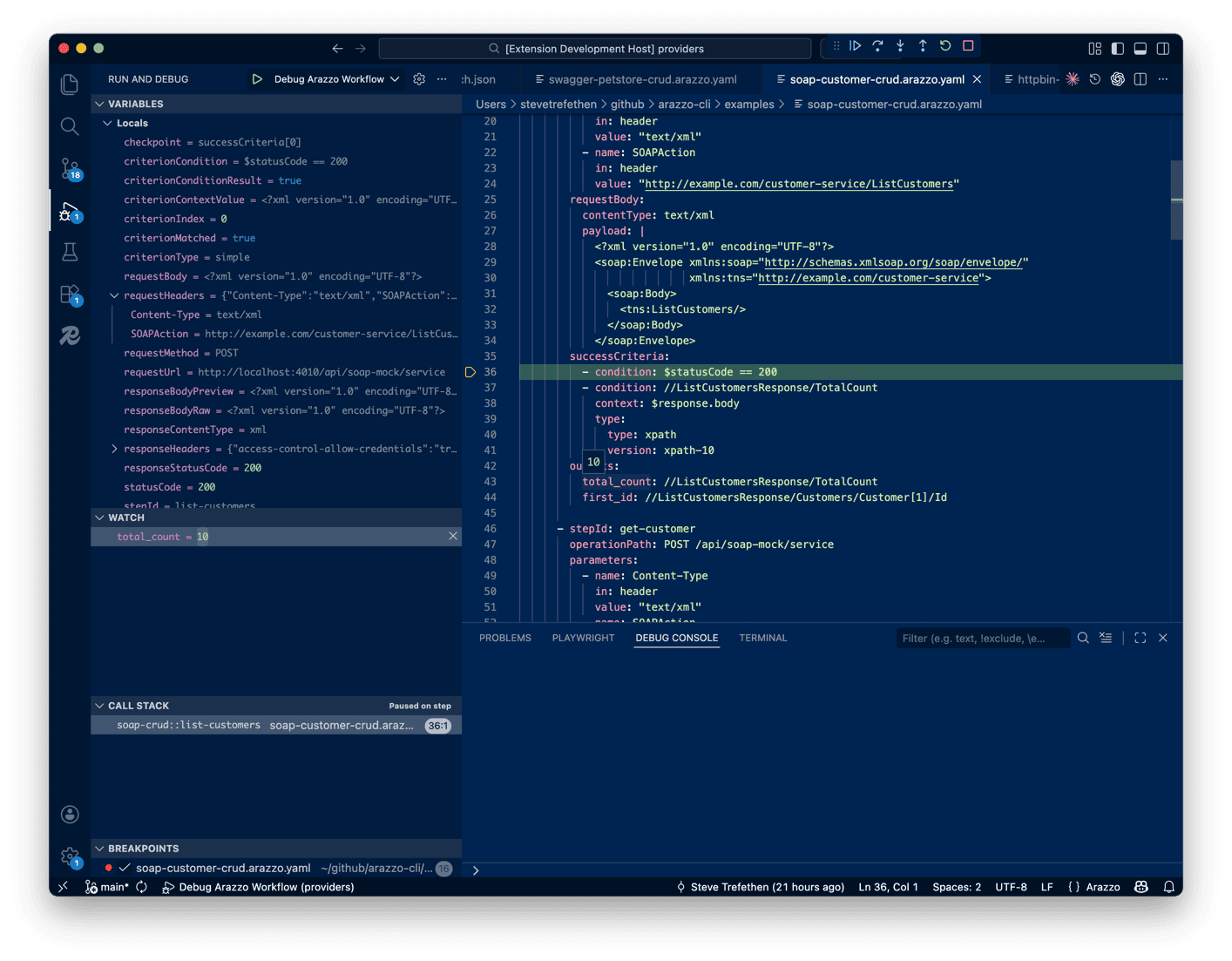
Features
- Breakpoints on workflow steps, success criteria, and actions
- Variable inspection — view Locals, Request, Response, Inputs, and Steps when paused
- Watch expressions using full Arazzo expression syntax (
$steps.login.outputs.token, $response.body.id)
- Step controls — Step Over, Step In, Step Out, Continue, Pause
- Stop on entry — pause at workflow entry before the first step
- Conditional breakpoints — break only when an expression evaluates to true
- Sub-workflow tracking — call stack follows
workflowId references across workflows
Getting Started
- Install the Arazzo Debugger extension from the VS Code Marketplace
- Open a folder containing
.arazzo.yaml files
- Open the Run and Debug panel (
Ctrl+Shift+D / Cmd+Shift+D)
- Click "create a launch.json file" → select Arazzo: Debug Workflow → fill in your workflow ID
Launch Configuration
Add to .vscode/launch.json:
{
  "type": "arazzo",
  "request": "launch",
  "name": "Debug My Workflow",
  "spec": "${file}",
  "workflowId": "my-workflow-id",
  "inputs": {
    "baseUrl": "https://api.example.com"
  },
  "stopOnEntry": false
}
| Option |
Type |
Description |
spec |
string |
Path to the .arazzo.yaml file. Use ${file} for the active editor. |
workflowId |
string |
ID of the workflow to execute. |
inputs |
object |
Key/value map passed as workflow inputs. |
stopOnEntry |
boolean |
Pause at workflow entry before the first step. Default: false. |
Breakpoints
Set breakpoints by clicking the gutter in any .arazzo.yaml or .arazzo.yml file. Breakpoints can be placed on:
- Workflow steps — pause before a step executes
- Success criteria — pause before criteria evaluation
- Action definitions — pause before an action runs
Conditional breakpoints are supported — right-click a breakpoint and enter an Arazzo expression.
Note: Breakpoints only appear in files with .arazzo.yaml or .arazzo.yml extensions.
Variable Inspection
When paused at a breakpoint, the Variables panel shows:
| Scope |
Contents |
| Locals |
Current step ID, workflow ID, status |
| Request |
Method, URL, headers, body of the pending/completed HTTP request |
| Response |
Status code, headers, body of the last HTTP response |
| Inputs |
Workflow input values |
| Steps |
Outputs from previously completed steps |
Watch Expressions
Add any Arazzo expression to the Watch panel:
$steps.getUser.outputs.userId$response.body.data[0].name$response.header.Content-Type$statusCode$inputs.baseUrl
Requirements
- VS Code 1.90 or later
- Target APIs must be accessible from your machine
Known Limitations
This is a preview release. Some features are still in development:
- Breakpoint positions are mapped by YAML line index — complex multi-document specs may have offset issues
- No hot-reload when the spec file changes during a debug session
Links

