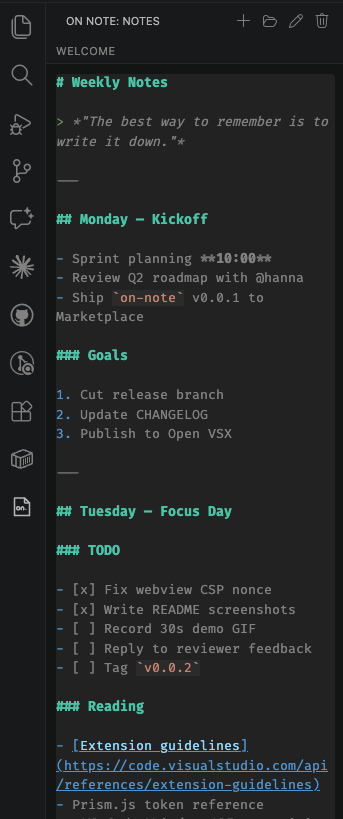
Fast and easy note taking, right in the VS Code sidebar.
On Note adds a dedicated activity bar view where you can jot down Markdown notes without ever leaving your editor. Notes are stored per-user (not per-workspace), so the same notes follow you across every project.
Features
Sidebar note editor — a Markdown textarea lives in the activity bar, always one click away.
Markdown syntax highlighting — headings, code fences, links, lists, and more are colored in real time via Prism.
Autosave — changes are persisted ~500ms after you stop typing. No save button, no lost edits.
Multi-window sync — open the same note across multiple VS Code windows and edits propagate automatically. Cursor position is preserved and in-progress typing is protected.
Note management — create, open, rename, and delete notes from the view title bar or the Command Palette.
Global storage — notes live under the extension's globalStorageUri, so they persist across workspaces and VS Code sessions.
Usage
Click the On Note icon in the activity bar.
Use the toolbar buttons (or run On Note: New Note from the Command Palette) to create your first note.
Start writing. Changes save automatically.
Commands
Command
ID
On Note: New Note
on-note.newNote
On Note: Open Note
on-note.openNote
On Note: Rename Note
on-note.renameNote
On Note: Delete Note
on-note.deleteNote
Requirements
VS Code 1.116.0 or newer.
Known Issues
Only Markdown highlighting is active; fenced code blocks are not individually re-highlighted per language.
Notes are stored in VS Code's global storage directory and are not synced across machines unless you use Settings Sync with the global storage opt-in.