Launchpad Merge Proposals for VS Code (deprecated)
Review Launchpad merge proposals without leaving your editor.
[!IMPORTANT]
This extension is deprecated. Install Launchpad Merge Proposals instead.
Launchpad Merge Proposals for VS Code brings Launchpad's review workflow into your editor. Browse merge proposals, view diffs, leave inline comments, and submit reviews without switching to the browser.
Features
Browse merge proposals
The Launchpad Merge Proposals view in the Activity Bar lists proposals for the upstream of your checked-out branch (the remote branch it tracks), in both directions:
- Outgoing: the tracked branch is the source.
- Incoming: the tracked branch is the target.
When the workspace holds several git repositories, the branch is read from the one currently selected in the Source Control view, not from the active editor.
Filter the visible MPs by status (Needs review, Approved, Work in progress, Merged, and more) to focus on what matters.

Read the diff natively
Open Files Changed to review changes in VS Code's familiar side-by-side diff editor. Files are decorated to show where comments live, so you can quickly see what has already been discussed.
You must be signed in to Launchpad to view diffs, including for public repositories. See Getting started.

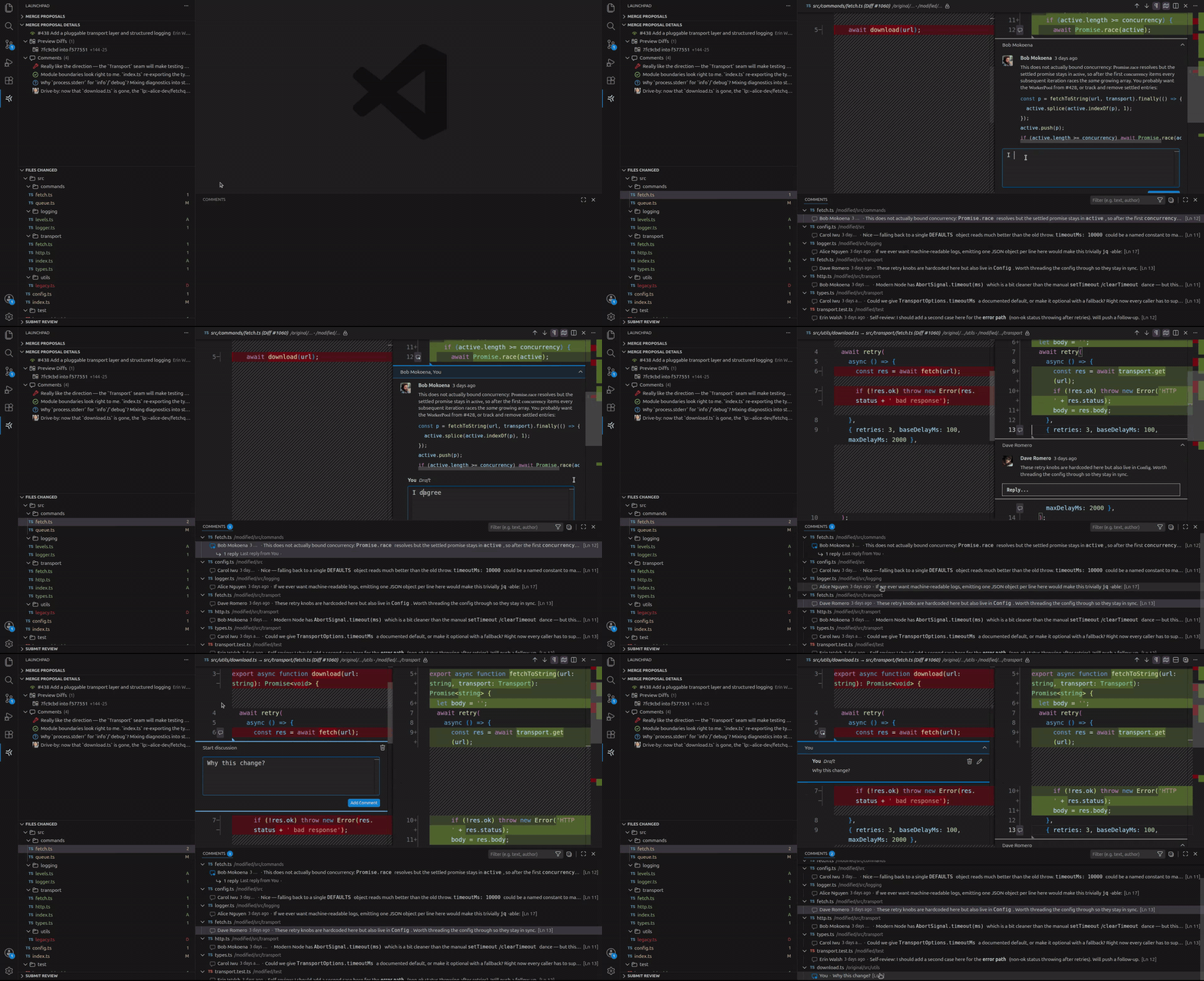
Read published inline comments right next to the code and draft your own as you review. Comment threads appear in VS Code's native Comments panel, allowing you to browse every comment on the diff in one place. Drafts are kept until you submit them as part of a review.
Drafts need Change access, both to write them and to load your existing ones back, because Launchpad only exposes drafts to a token that can also write them. See Authentication and permissions for the full breakdown.
[!NOTE]
Threads containing drafts are marked Unresolved and the rest as Resolved, as a stand-in for distinguishing drafts until VS Code's draft-state API stabilizes.
The Comments panel can filter by Resolved/Unresolved. You can choose to only view threads with draft comments or focus on what you still haven't reviewed.

[!TIP]
A thread collapses when its draft is submitted or discarded, i.e., when its status changes to Resolved. Turn off comments.collapseOnResolve to keep threads expanded.
Submit a review
Pick a Merge Proposal vote, add a Markdown comment, and submit. Your pending inline drafts are published together with the review.

Requirements
Getting started
- Install the Launchpad Merge Proposals VS Code extension and open a project that has a Launchpad git remote.
- Check out a local branch that tracks a Launchpad remote branch:
- Tracking a branch you already pushed:
git branch --set-upstream-to=<remote>/<branch>.
- Publishing a new local branch with tracking configured:
git push -u <remote> <branch>.
- Open the Launchpad Merge Proposals view from the Activity Bar.
- Sign in when prompted, or run Launchpad Merge Proposals: Sign In from the Command Palette. Approve access in your browser, return to VS Code, and click Continue.
- Select a merge proposal, then pick a preview diff to see changed files and comments.
[!IMPORTANT]
Signing in is required to view diffs, even for public repositories.
Authentication and permissions
Sign-in uses Launchpad's OAuth flow. Your token is kept in VS Code's SecretStorage. Sign out with Launchpad Merge Proposals: Sign Out or from the Accounts menu.
When authorizing, Launchpad asks what level of access to grant.
| Access level |
What it unlocks |
| Signed out |
View non-private proposals, published reviews and comments |
| Read Non-Private Data |
…plus open preview diffs to view non-private diff content and published inline comments |
| Change Non-Private Data |
…plus draft inline comments and submit reviews/comments on non-private proposals |
| Read Anything |
Extends Read Non-Private scope to private data |
| Change Anything |
Extends Change Non-Private scope to private data |
Inline comments live in the diff, so viewing them needs at least Read. Drafting them needs Change because Launchpad only exposes drafts to a token that can also write them.
[!IMPORTANT]
The extension doesn't yet detect which level you granted, so a too-narrow grant isn't flagged up front. Lower-tier actions work, but anything needing more (such as publishing or loading drafts) fails with an error notification. If you hit one, sign out and back in with a higher access level.
Extension Settings
Git URL rewrites
If you rewrite remote URL prefixes with Git's url.<base>.insteadOf, the affected remotes aren't recognized as Launchpad ones: the extension reads remote URLs as they are stored in your Git config, before those rewrites are applied.
Declare the rewrites you use, mapping each prefix to its expansion (for example lp: to https://git.launchpad.net/), in VS Code Settings.
Alternatively, add the setting directly to your settings.json:
{
  "launchpad.mergeProposals.git.urlRewrites": {
    "lp:": "https://git.launchpad.net/"
  }
}
Whole diff reconstruction (experimental)
A Launchpad preview diff carries only the changed lines. To give you the surrounding code to review against, the extension rebuilds the complete contents of each changed file, on both sides of the diff, from the Git history in your local clone.
The feature is experimental and needs the relevant history to be present locally. When the rebuild fails, the extension falls back to showing the changed lines on their own (see Known issues and limitations).
If reconstruction causes problems, you can turn it off in VS Code Settings, or by adding the setting directly to your settings.json:
{
  "launchpad.mergeProposals.reconstructWholeDiffs": false
}
Commands
Commands are available from the Command Palette under the Launchpad Merge Proposals category. The contextual ones only show up when they apply:
| Command |
Description |
Launchpad Merge Proposals: Sign In |
Authorize the extension with your Launchpad account. |
Launchpad Merge Proposals: Sign Out |
Remove the stored session. |
Launchpad Merge Proposals: Refresh Merge Proposals |
Reload the list of merge proposals. |
Launchpad Merge Proposals: Filter Merge Proposals |
Filter the list by proposal status. |
Launchpad Merge Proposals: Open Merge Proposal in Browser |
Open the selected proposal on launchpad.net. |
Launchpad Merge Proposals: Refresh Selected Merge Proposal |
Reload details for the open proposal. |
Launchpad Merge Proposals: Refresh Comments |
Reload comments for the current diff. |
Launchpad Merge Proposals: Reconstruct Complete Diff Again |
Retry whole diff reconstruction for the open diff. |
Launchpad Merge Proposals: Show Log |
Open the extension's output log. |
Known issues and limitations
- This is a preview release, so expect rough edges.
- When whole diff reconstruction is disabled or unavailable, unchanged portions are shown as empty lines so the diff matches the source code's line numbers.
- The granted OAuth scope isn't detected yet, so a too-narrow grant isn't caught up front. Write actions fail with an error instead (see Authentication and permissions).
- The MP list follows the upstream of the checked-out branch, so a branch with no upstream shows nothing at all, even when a proposal exists for a branch of the same name on Launchpad. Not seeing a proposal? Check that:
- the right repository is selected in the Source Control view;
- you're on the right local branch (
git branch --show-current);
- that branch has an upstream (
git rev-parse --abbrev-ref '@{upstream}'). If it doesn't, set one with git push -u <remote> <branch>, or with git branch --set-upstream-to=<remote>/<branch> when the remote branch already exists;
- the upstream's remote is a recognized Launchpad remote (
git remote -v). Remotes written with a rewritten prefix such as lp: need Git URL rewrites configured, and remotes with different fetch and push URLs are resolved from the fetch URL.
- Submitting or discarding a draft turns its thread to the Resolved status, which VS Code collapses by default. Disable
comments.collapseOnResolve to keep it expanded (see Comment inline).
Contributing
Bug reports, feature requests, and merge proposals are welcome on Launchpad.
Release notes
See the CHANGELOG for the full history.
License
Licensed under GPL-3.0-only. Copyright 2026 Canonical Ltd.

