English |
日本語
Snowflake SQL
Focused Snowflake SQL syntax highlighting and formatting for Visual Studio Code, backed by the
same engine used by sql-dialect-fmt.
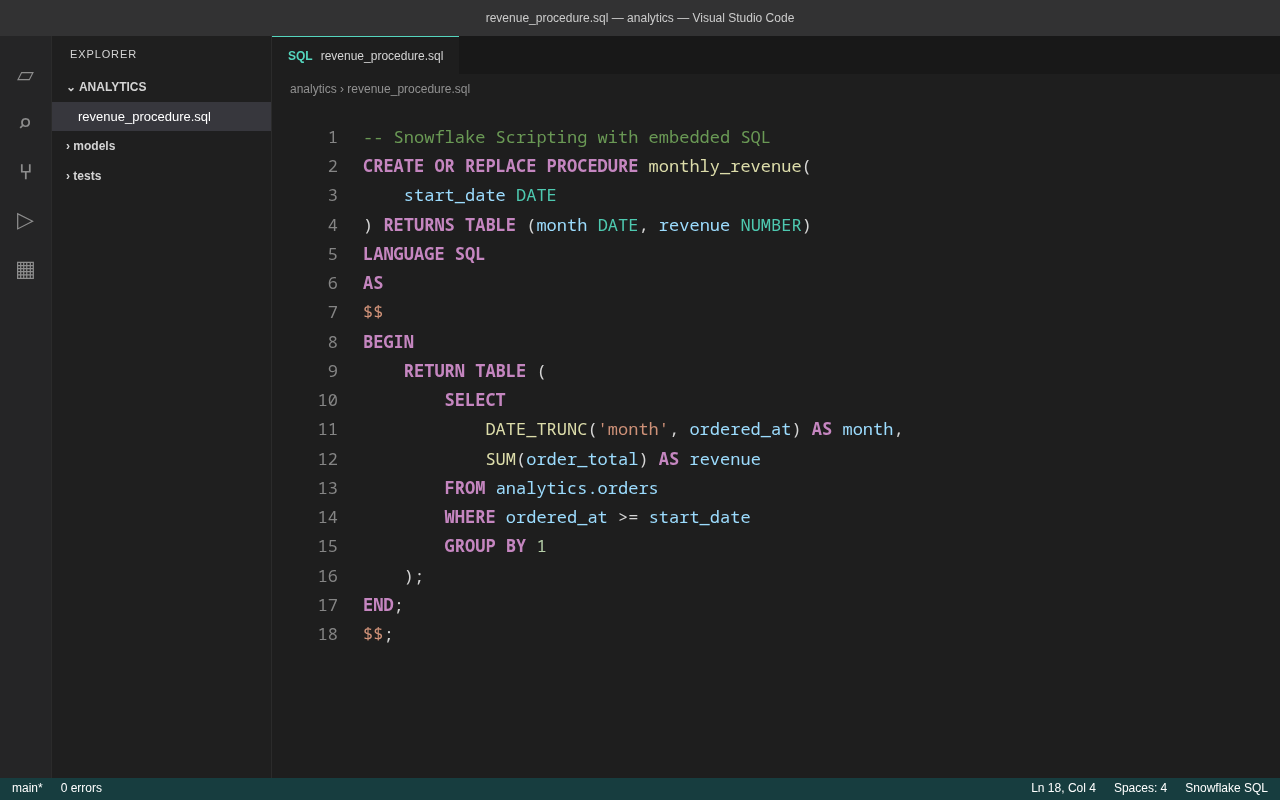
Features
Document and selection formatting (Format Document / Format Selection), with format-on-save
optional, opt-in language server integration — diagnostics, hover, completion, semantic
highlighting, outline, folding (see Language server)
Snowflake SQL keywords and the built-in types from the official data-type reference, with
distinct scopes for control flow, constants, and Snowflake Scripting status variables
the 900 built-in functions from the official Snowflake function reference, plus generic
function-call highlighting for UDFs
CREATE / ALTER / DROP object names highlighted as entities
Snowflake Scripting and $$ ... $$ routine bodies — LANGUAGE SQL, EXECUTE IMMEDIATE,
and AS $$ bodies highlight as SQL instead of an opaque string
native JavaScript, Python, Java, and Scala highlighting inside
LANGUAGE JAVASCRIPT / PYTHON / JAVA / SCALA ... $$ ... $$ routine bodies
line (--, //) and block (/* ... */) comments
strings, quoted identifiers, numeric literals, and operators
positional $1, session $name, bind :name, and ? variables
@stage, @~, @%table, and namespaced stage references
.sql, .snowsql, and .sfsql file associations
Language ID: snowflake-sql
Scope name: source.snowflake-sql
File types: .sql, .snowsql, .sfsql
The extension registers a formatter for snowflake-sql documents, so Format Document,
Format Selection, and "editor.formatOnSave" all work out of the box. Formatting runs entirely
on your machine through a bundled WebAssembly build of the same formatter used by the CLI and LSP.
Nothing is sent over the network.
Formatting is mechanically lossless and idempotent — input that cannot be parsed is passed
through unchanged, and format(format(x)) == format(x).
To make it the default formatter for these files, add to your settings:
"[snowflake-sql]": {
  "editor.defaultFormatter": "sql-dialect-fmt.snowflake-sql-sql-dialect-fmt",
  "editor.formatOnSave": true
}
Settings
| Setting |
Default |
Description |
sqlDialectFmt.dialect |
snowflake |
SQL dialect (snowflake or databricks). |
sqlDialectFmt.lineWidth |
80 |
Target line width before wrapping. |
sqlDialectFmt.useEditorIndentation |
true |
Use the active editor's tabSize. |
sqlDialectFmt.indentWidth |
2 |
Spaces per indent level when editor indentation is disabled. |
sqlDialectFmt.keywordCase |
upper |
upper, lower, or preserve recognized SQL keywords. |
sqlDialectFmt.selectItemLayout |
vertical |
One SELECT item per line, or auto for width-aware layout. |
sqlDialectFmt.commaStyle |
trailing |
Use trailing or leading commas when lists wrap. |
sqlDialectFmt.lineEnding |
auto |
Preserve input line endings, or force lf / crlf. |
sqlDialectFmt.lsp.enabled |
false |
Opt in to the sql-dialect-fmt-lsp language server (see below). |
sqlDialectFmt.lsp.path |
"" |
Path to sql-dialect-fmt-lsp; empty looks it up on PATH. |
The keyword and type word lists are kept in lock-step with the formatter's own
lexer/highlighter by tests in sql-dialect-fmt-highlight (tests/textmate.rs): every word the
grammar scopes as a keyword or type must be classified the same way by
sql_dialect_fmt_highlight::classify, so the grammar can't drift from the rest of the toolchain.
Language server (optional)
Everything above works out of the box with no external binary. For the features beyond
formatting — lint diagnostics, hover documentation, completion, semantic highlighting, document
symbols (outline), folding ranges, and on-type formatting — the extension can also drive the
sql-dialect-fmt-lsp language server. This is
opt-in and off by default:
- Install the server:
cargo install sql-dialect-fmt-lsp.
- Set
"sqlDialectFmt.lsp.enabled": true. If the binary is not on PATH, point
sqlDialectFmt.lsp.path at it.
While the server is running it also serves Format Document / Format Selection / format on
save (layering the nearest sql-dialect-fmt.toml under your editor settings), and the built-in
WebAssembly formatter is unregistered so the two never compete. If the server is enabled but the
binary is missing or fails to start, the extension logs the reason to the sql-dialect-fmt
output channel and quietly keeps the bundled WebAssembly formatter — installing the binary is
never required for the extension to work.
The sqlDialectFmt.* settings are forwarded to the server, which additionally honors the
sqlDialectFmt.lint.* toggles for individual diagnostics. Like the bundled formatter, the server
is a local process speaking LSP over stdio; it never touches the network.
Use
- Install the extension.
- Open a
.sql, .snowsql, or .sfsql file.
- If needed, choose Change Language Mode and select Snowflake SQL.
- Run Format Document (
Shift+Alt+F) or Format Selection.
This extension contributes syntax highlighting, language metadata, and a local formatter. It does
not execute SQL against Snowflake or connect to any account. For CLI formatting and other
integrations, see the main project README.
Privacy
The extension runs no telemetry or analytics, makes no network requests, and performs no remote
formatting. Formatting is done locally by a bundled WebAssembly module; your SQL never leaves the
machine. The extension only contributes static language configuration, a TextMate grammar, the
local formatter, and — only if you opt in — a client for the local sql-dialect-fmt-lsp process,
which also runs entirely on your machine. See the
privacy policy.
Other editors
This directory also carries integrations for other editors, all driven by the same
sql-dialect-fmt-lsp language server (cargo install sql-dialect-fmt-lsp):
nvim/ — a small Neovim plugin: snowflake-sql filetype, LSP setup, and
conform.nvim/null-ls recipes for CLI-based formatting.zed/ — a paused Zed integration that still depends on the retained Tree-sitter sources.helix/ — a documented languages.toml snippet for Helix (no plugin system).
Support and source

