Functional Cursors
This extension allows you to evaluate any JavaScript on the fly to generate text with an arbitrary number of cursors.
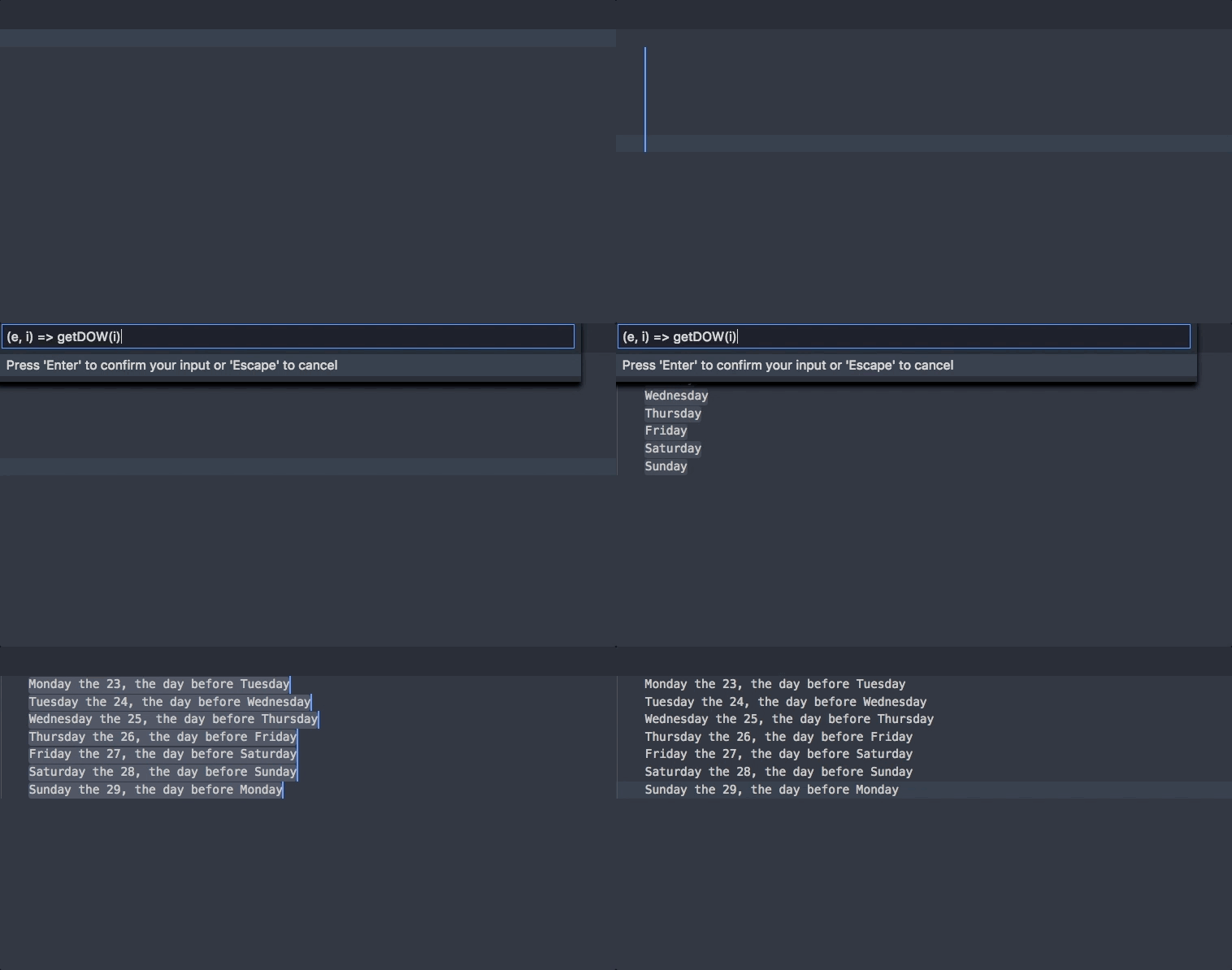
Usage
Ctrl+Shift+P or Cmd+Shift+P and type 'jscursor.'
If the function cannot be parsed, throws, or returns something that is not a string or a number, an error message says which cursor and why (nothing is changed in that case). Numbers are written as text, so (e, i) => i numbers your cursors 0, 1, 2, …
An input field will appear in which you input a function in JS, namely
(e, i, values) => // javascript that gives you the text you want at cursor i
(Though the third argument is not shown by default because you probably won't use it in your expressions most of the time)
e is the expression that a given cursor is currently highlighting.
i is the index of the cursor in question, and is coherent with the order in which the cursors appear in the document. (for example, for 5 cursors, the topmost one would have index i = 0, and the bottommost one would have index i = 4)
The third argument, values, is an array of the values highlighted by all of the cursors, also in order. So e == values[i] is a true statement. In other words, for a cursor at index i, values[i] will be the expression at that cursor.
Configuration
In the example given, I have also implemented a custom function (getDOW) in the extension's configuration (functional-cursors.functions). Custom functions will be included alongside any JavaScript which gets evaluated on the fly, so you can implement the ones that you might use frequently. For example, getting the day of the week from an index, as shown above, could be implemented in your own configuration with
"functional-cursors.functions": {
    "getDOW": "i => ['Monday','Tuesday','Wednesday','Thursday','Friday','Saturday','Sunday'][(i % 7)]"
}
Security
The expression is ordinary JavaScript compiled with new Function and run inside the VS Code extension host (strict mode, this undefined). It is not a sandbox: only run expressions you wrote or understand.
Known Issues
An infinite loop in your expression will hang the extension host; reload the window if that happens.
Development
npm install, then npm test runs the node unit tests for the selection logic and npm run lint runs eslint. Press F5 in VS Code to launch the extension in a development host.
Release Notes
0.1.0
Fixes #1: errors are shown instead of swallowed, numbers are coerced to text, array returns work again, safe-eval replaced by new Function. Requires VS Code 1.75+.
0.0.6
Returning an array is now interpreted as what the new set of selections' content should be. Ideas like in-text sorting are now possible (for example, (e, i, content) => content.sort((a,b)=>a-b) with numbers)
Other Minor Changes Added
0.0.1
Initial Release

