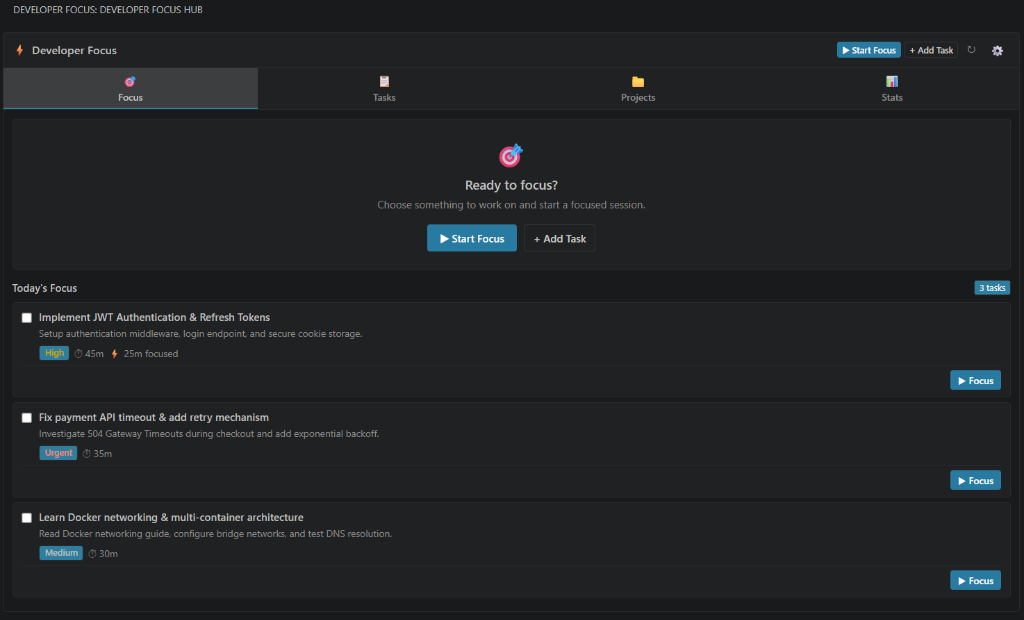
📖 What is Know?
Know is an all-in-one developer productivity workspace built directly into Visual Studio Code. It unifies daily task planning, focus timers, project management, GitHub repository cloning, and coding activity analytics inside your editor so you can work without switching between browser tabs and external apps.
🚀 Key Capabilities
- 🎯 Smart Focus Timers: Countdown presets (
25m, 45m, 60m, 90m), custom durations, or count-up stopwatch mode with live status bar feedback. Learn more
- 📋 Frictionless Task Management: Single-key Inbox capture, prioritized Today queue, work categories, estimated minutes, and active editor file linking. Learn more
- 📁 Project Organization: Group tasks by project, track completion percentages, link local workspace folders, and launch projects in one click. Learn more
- 🐙 GitHub Integration: Clone and import GitHub repositories directly with automatic folder collision safety checks. Learn more
- 📊 52-Week Activity Heatmap: GitHub-style 365-day calendar grid tracking daily focus minutes, streaks, and category breakdowns. Learn more
💡 Why Know?
- 🚫 No Context Switching: Manage tasks and timers directly in the VS Code sidebar or editor tab.
- 📄 Context-Aware File Linking: Associate open editor files directly with tasks (
📄 File) for one-click resumption.
- 🎨 100% Native Theme Adaptive: Seamlessly matches your active VS Code theme (Dark+, Light+, High Contrast).
- 🔒 100% Private & Offline: Zero telemetry, no cloud accounts, and all data stored locally on your machine. Read privacy policy
📦 Installation
- Open VS Code.
- Open the Extensions view (
Ctrl+Shift+X or Cmd+Shift+X on macOS).
- Search for Know by sonisuryansh.
- Click Install.
- Click the Know icon in your Activity Bar to open your workspace.
📚 Detailed Documentation
Explore the complete multi-document guides:
| Guide |
Description |
| 🎯 Focus Sessions |
Timers, presets, stopwatch mode, HUD controls, and status bar integration |
| 📋 Task Management |
Quick Inbox capture, Today's queue, priorities, and editor file linking |
| 📁 Project Management |
Grouping tasks by project, local folder links, and Git branches |
| 🐙 GitHub Integration |
Cloning repositories, collision safety, and workspace association |
| 📊 Productivity Statistics |
52-week activity heatmap, day streaks, and time distributions |
| ✨ Features Overview |
Complete feature inventory and capabilities |
| ⌨️ Commands Reference |
Full list of 14 Command Palette actions and context menus |
| ⚙️ Configuration |
Extension settings and customization options |
| 🔒 Privacy & Security |
100% local-first architecture and data export/import |
| 🏗️ Technical Architecture |
Internal system architecture, engine design, and IPC protocols |
| 🤝 Contributing Guide |
Local development setup, build scripts, and contribution guidelines |
🤝 Support & Feedback
📄 License
This project is licensed under the MIT License.
| |


 Know
Know