
CarryContext
By Mayur Sonawane · GitHub repo · MIT License



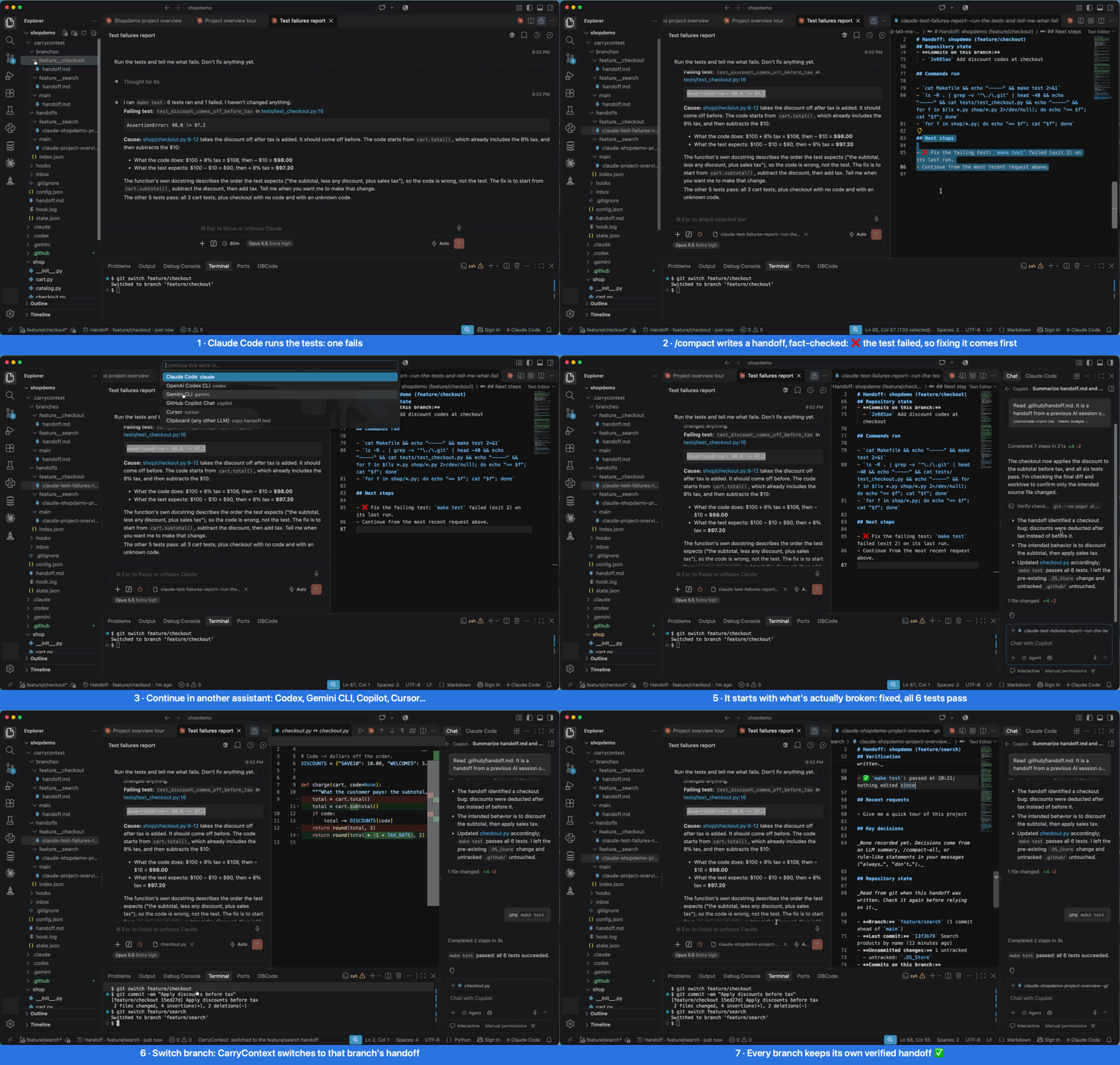
Compact your AI coding sessions into one portable handoff.md, then pick up the work in a new session or in another provider's assistant (Claude Code, Codex, Gemini CLI, Copilot, Cursor, or any chat via the clipboard).
Install
In VS Code, open the Extensions view (Cmd+Shift+X / Ctrl+Shift+X), search for CarryContext and click Install, or open it on the VS Code Marketplace. The rocket icon appears in the Activity Bar.
Or from a release file:
- Download
carrycontext-<version>.vsix from the latest release.
- In the Extensions view, click … at the top, choose Install from VSIX… and pick the file.
- Reload the window.
From a terminal: code --install-extension carrycontext-<version>.vsix. To check the download, compare shasum -a 256 carrycontext-<version>.vsix with SHA256SUMS.txt from the same release.
Run it from source
No build step and no dependencies. Open this folder in VS Code and press F5 to start an Extension Development Host. In that window, open a project and run commands from the Command Palette (CarryContext: …).
To package it: npx @vscode/vsce package, then install the .vsix file.
Commands
| Command |
What it does |
| Compact All |
Reads the newest session of each source provider (default: claude, codex, gemini) from the last 24h, merges them in time order, and writes the handoff everywhere |
| Create Handoff From a Specific Session… |
Pick one or more sessions by hand |
| Start Stories in Their Own Folders… |
A branch from the story's base, a folder next to the project (a git worktree) and a new window with a new chat, for each story (see Working on several stories at once) |
| Back Up Now / Restore From Backup… |
Copy this project's handoffs and usage to your backup folder, or put a backup back (see Backups) |
| Move a Question to Another Chat… |
Take a question, and the replies to it, out of the chat you asked it in: to a new chat, into another branch's handoff, or nowhere (see Moving a question) |
| Switch To Provider… |
Optionally refreshes the handoff, writes it where the chosen provider looks, then opens that tool with a "resume from handoff" prompt |
| Install Claude Code Hooks |
Refreshes the handoff on compact and session end, and loads it into new sessions |
| Select Summarizer LLM… / Set API Key… |
Choose which LLM writes the handoff (or none) |
| Find Handoff… |
Search saved handoffs by title, branch, description or any text inside them (also the 🔍 at the top of the panel) |
| Copy Resume Prompt |
Copies a prompt that tells any assistant to read the handoff and continue |
| Show Usage Report / Export Usage as CSV… |
Tokens, models, active time and estimated cost by branch, session, model, day and question, from the logs on your computer (see Usage stats) |
The status bar shows how long ago the handoff was updated. Click it to switch provider.
The panel
The CarryContext icon in the Activity Bar opens a panel:
- Latest handoff: what every assistant reads now, with its ✅/⚠️/❌ verification counts.
- One folder per branch, the checked-out one first and open. Inside it, one row per session: its title, what it was working on, and when. Hover for the goal, next steps, verification and the handoff's size; click to open it. Earlier versions are inside the row.
- Older branches: branches with no handoff for 2 weeks, folded away.
- Usage: opens the usage report. Hover a branch or session for its tokens, active time and cost at API prices.
- Handoff size: a session's hover shows how many tokens its handoff is, next to what continuing that session re-sends with every message, for example "~2.1k tokens, vs ~197.0k per message to continue the session". That gap is what starting a new session from the handoff saves on every message. A handoff over 4k tokens is flagged, since the next session reads it with every message.
- Recent conversations: each assistant's newest sessions; click one to create a handoff from it.
At the top: Find Handoff (🔍), Compact All, Switch To Provider, a filter that shows only the current branch, and refresh.
Usage stats
Usage in the panel (or CarryContext: Show Usage Report) shows what your AI work used, by feature, branch, session, model, day and question: replies, tokens, active time, estimated cost and electricity. Your branches are usually features or stories, so a branch's total is roughly what that feature cost to build.
- By feature. A feature is the story ID in a branch name, so
feature/24114362 and bugfix/24114362-x count together; a branch without one is its own feature. Each feature shows its tokens and cost per LLM, active time, the span from first to last activity, and energy. The per-branch figures stay too.
- Local only. Everything comes from the assistants' own logs on your computer (Claude Code's
~/.claude/projects, Codex's ~/.codex/sessions). Nothing is sent anywhere, and prices come from a table built into CarryContext, never from the internet.
- Exact token counts. Each reply counts once (Claude Code logs one reply as several lines), sub-agents included.
- Estimated cost at Anthropic API list prices (built in, as of October 2026). On a Claude subscription you don't pay per token, so read it as what the same work would cost through the API. Models without a built-in price show "no price": add them, or your own rates, in
carrycontext.usage.prices, or hide cost with carrycontext.usage.showCost.
- Active time adds up the gaps between replies and skips breaks longer than 5 minutes.
- Questions: a request's cost includes the replies that follow it, and a reply like "sure" counts toward the request before it.
- Electricity: your machine's, during active AI time: active time ×
carrycontext.usage.machineWatts (default 15 W, a typical laptop while you develop). Set carrycontext.usage.electricityPrice (per kWh) to see what it cost. The AI's own data-center energy isn't included: it isn't published per request.
- Machine: the report names the computer by model and chip ("Mac17,7 · Apple M5 Max · 18 cores"), never by its name, which often contains yours.
- Export: Export Usage as CSV… writes one row per session, branch, model and day, with the feature and machine. Text a spreadsheet would run as a formula is neutralized.
- A ledger that keeps up. Totals per session are kept in
.carrycontext/usage.json (git-ignored, no paths) and recomputed only when a log changes. A session whose log is gone keeps the totals it was recorded with, so a feature's cost stays complete even after Claude Code deletes old logs (after about 30 days by default). Delete the file to start over.
- Other LLMs: Codex usage is included; OpenAI models have no built-in price, so set yours in
carrycontext.usage.prices. Not included yet: Gemini CLI. Copilot and Cursor keep no usage logs on your computer.
Where the handoff goes
| Location |
Read by |
.carrycontext/handoff.md |
Handoff for the checked-out branch; the provider copies below are made from it |
.carrycontext/branches/<branch>/handoff.md |
Each git branch's own handoff (see Branch-aware handoffs) |
.carrycontext/handoffs/<branch>/<provider>-<session-name>--<short-description>.md |
A named copy of every handoff. Each session keeps its newest carrycontext.handoffLimit (default 10) |
.claude/handoff.md |
Claude Code, injected at session start by the SessionStart hook |
.codex/handoff.md + block in AGENTS.md |
Codex CLI |
.gemini/handoff.md + block in GEMINI.md |
Gemini CLI |
.github/handoff.md + inlined in .github/copilot-instructions.md |
Copilot Chat |
.cursor/rules/handoff.mdc (alwaysApply) |
Cursor |
Named copy examples:
.carrycontext/handoffs/claude-vs-code-compact-all-handoff-utility--add-named-handoff-files-per-session.md
.carrycontext/handoffs/codex-add-a-readme-to-carrycontext--write-usage-section.md
.carrycontext/handoffs/claude-codex-gemini-compact-all--fix-failing-tests.md
- Session name: the session's title in Claude Code (your
/rename title, otherwise Claude Code's generated one), otherwise the session's first prompt. When Compact All merges several sessions, it is compact-all.
- Short description: at most 8 words on what was being worked on. An LLM summarizer writes it; the built-in summary uses the most recent request that says what the work is, skipping replies like "sure" or "send it".
- Versions: another handoff with the same session and description replaces that file; a new description creates a new file. The panel shows each session once, with its earlier files inside, and Find Handoff… searches them all.
- Index:
.carrycontext/handoffs/index.json caches each file's title, branch and date for the panel and search. It's checked against the files on every read and rebuilt if it's deleted.
carrycontext.targets decides which of the provider copies are written. Instruction files only get a block between <!-- carrycontext:start --> and <!-- carrycontext:end --> markers; nothing else in them is changed.
Working on several stories at once
A folder can have only one branch checked out, so two chats in one folder working on two branches would edit the same files. For stories in parallel, each story gets its own folder, a git worktree next to your project, on its own branch, in its own VS Code window with its own chats.
Start them with Start Stories in Their Own Folders…, or just say so in a Claude Code chat ("starting the sprint: 24173551 Outlook export, 24180000 invoice PDF off release/2026.11"). The start-story skill, installed with the Claude Code hooks, shows you each story's branch, base and folder and asks before creating anything. Then, for each story:
- A branch named by
carrycontext.stories.branchPattern (default feature/{id}-{title}), from its base: your repo's default branch unless you name another. The base is fetched from origin first, so the story starts from the latest. The new branch doesn't track its base, so a plain git push never pushes into develop. An existing branch is checked out as it is.
- A folder next to your project,
myapp-24173551, made with git worktree add. An existing folder is left alone.
- A handoff saying which story it is, with its base branch's context as background: not your current work's.
- A new window with a new Claude Code chat, which starts from that handoff.
Nothing in the folder you're in is switched, stashed, committed or deleted.
One CarryContext for the project. Every story folder shares the main folder's handoffs per branch, their versions and the usage ledger. The main window's panel shows every story, the Usage report covers all of them, and deleting a story folder loses nothing: when a story is done, git worktree remove ../myapp-24173551 is safe for CarryContext's data. Each folder keeps its own active handoff for its assistants. Story folders made with 0.8 move their data into the shared store once, backed up first.
Backups
Once a day, the first time CarryContext runs, it copies the project's handoffs per branch, their versions and the usage ledger to ~/.carrycontext/backups/<project>-<id>/<date>/, a folder only you can read, and keeps the newest 7. Back Up Now makes one any time. Restore From Backup… puts one back after backing up what's there now, so a restore can be undone. Claude Code's own chat logs aren't copied; the handoffs and the ledger keep what CarryContext needs.
Set carrycontext.backup.folder to choose another folder (CarryContext warns if it syncs to iCloud, Dropbox, OneDrive or Google Drive, which would upload conversation summaries) and carrycontext.backup.keep for how many to keep (0 turns them off). Both are user settings, so a cloned repo can't redirect your backups.
Moving a question
Asked something in the wrong chat? Move a Question to Another Chat… lists your recent questions in this folder's chats (each with the replies up to your next question) and moves the one you pick:
- A new chat: saves it as a handoff of its own and copies a prompt to paste into a new chat.
- Another branch: adds it to that branch's handoff under Side questions (the newest 5), with a link to the full question and answer. That branch's own goal and state are left alone, and its next chat sees it.
- Nowhere: just leaves it out.
The chat it came from is saved again without it, versions saved since it was asked are removed, and later saves keep it out. Claude Code's own chat history isn't changed, so that chat still remembers the question until you run /clear there: it then restarts from the cleaned handoff.
Branch-aware handoffs
In a git repo, every branch keeps its own handoff, so switching branches never leaves an assistant talking about the other branch's work.
- Switching: when you
git checkout a branch, CarryContext makes that branch's handoff the active one and copies it to every assistant. In VS Code this happens within about 2 seconds; for Claude Code it also happens when a session starts, even with VS Code closed.
- New branches: a branch made from the previous one (
git switch -c) starts with a Background section carrying over that branch's goal, decisions and gotchas. It's kept until the branch's own work replaces it. A branch with no handoff that wasn't made from the previous one, such as main when you come back from a feature branch, starts empty instead, so no assistant reads the other branch's context as its own.
- Sessions that span a switch: Claude Code records the branch on every message, so if you switch branches partway through a session, each part goes into the right branch's handoff. Codex sessions use the branch in their metadata; messages with no branch, such as Gemini CLI's, go to the branch that was checked out when they were sent.
- Several sessions on one branch: the handoff is written from the session saved last. Up to 5 other sessions saved on the same branch within
lookbackHours are listed under Other recent sessions, one line each with where it stopped and a link to its full handoff, so a short side question can't hide earlier work.
- Saved before you move on: when you switch branches, every conversation with unsaved work is saved to the branch it happened on. No hook fires on a switch, so this covers Claude Code too. A conversation saved after the switch has no Verification section, because git only describes the checked-out branch; compact before switching for a verified one.
- Where you see it: the status bar shows the branch (
Handoff · feature/payments · 5m ago), and the panel groups saved handoffs by branch with the current one first.
Branch folders replace / with __, so feature/payments is stored as branches/feature__payments/. Worktrees and detached HEADs (detached-<sha>) are supported. Messages Claude Code records with no branch (HEAD, for example mid-rebase) stay with the branch the session was on. Outside git, everything works as a single handoff, as before.
Not handled yet: merging a branch doesn't merge its handoff into the target branch's.
Decision log
The Key decisions section only grows. Each handoff adds new decisions to the end, tagged with the date and branch, and never re-summarizes or drops earlier ones, so they survive any number of compactions.
- With an LLM summarizer, the LLM is asked for new decisions only; repeats are skipped by comparing text.
- Without one, CarryContext picks up rule-like statements from your messages, such as "don't publish my email" or "use pnpm instead of npm", tagged
user request.
- Reversals are recorded as new entries ("Reverted: use Postgres instead of SQLite"), so the history stays readable.
- Use pnpm instead of npm. _(2026-10-25 · main · user request)_
- Store handoffs per branch, so contexts never mix _(2026-10-25 · main)_
Verified handoffs
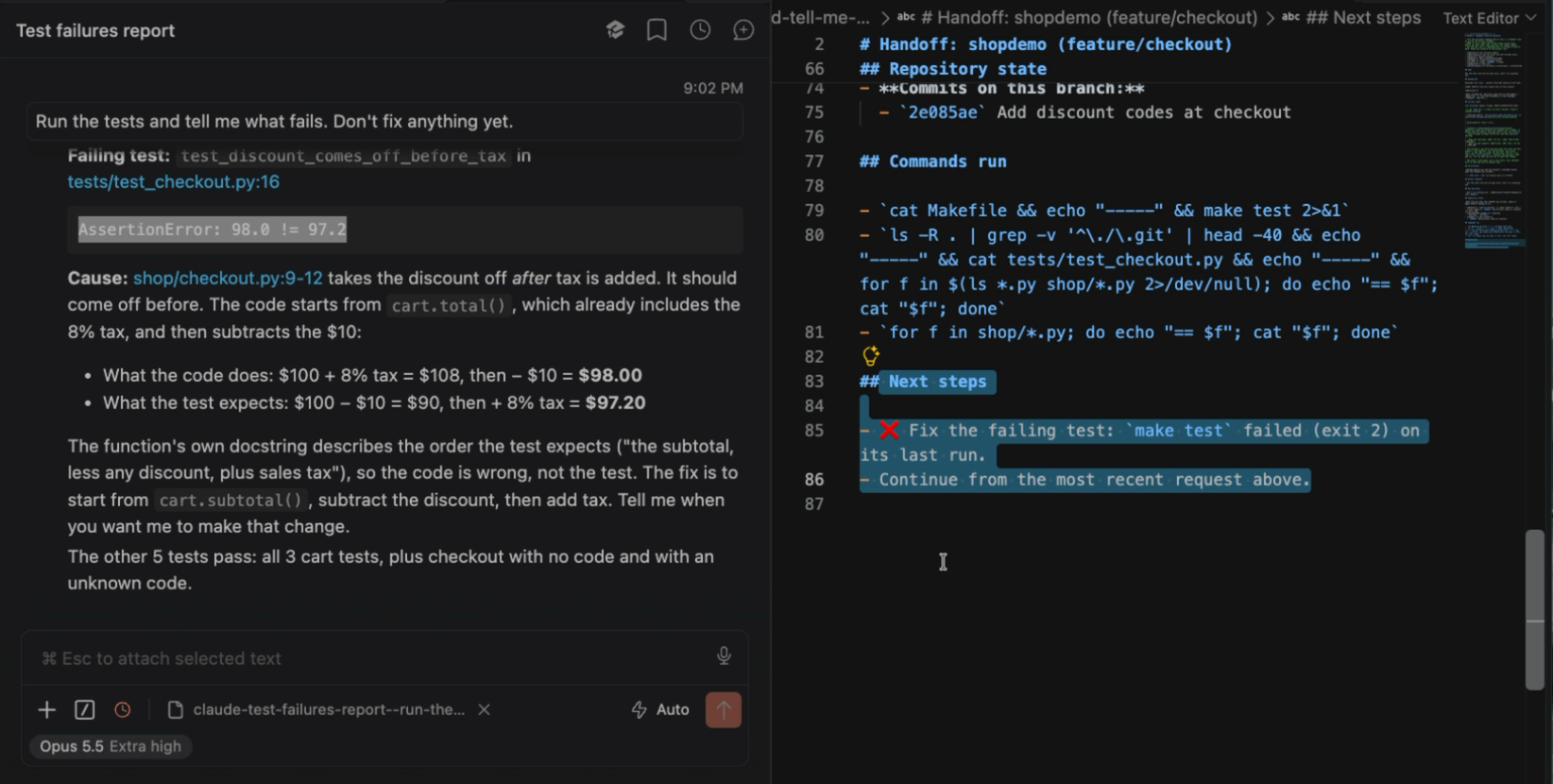
A summary can be wrong: a session may say it edited a file it never wrote, or that tests pass when the last run failed. Every handoff checks what the session claims against git and the session's own recorded results, and says what it found:
- **Verification:** 36 verified, 4 unverified, 0 contradicted

## Verification
- ❌ `src/webhook.js` edited: reported as edited, but the file doesn't exist
- ⚠️ `npm test`: passed at 11:05, but 2 files were edited afterwards
- ✅ `src/pay.js` edited: uncommitted change (modified)
- ✅ commit `4a09a1a` mentioned in the session: exists in this repo
| Checks |
✅ verified |
⚠️ unverified |
❌ contradicted |
| File edits (failed edits are ignored) |
git shows a change, or a commit touched the file after the edit; outside git, the file changed after the edit |
no change visible |
the file doesn't exist |
Tests and builds (npm test, pytest, go test, cargo test, tsc, npm run build, …): the last run of each |
passed, nothing edited since |
passed but files changed afterwards, or no result recorded |
the last run failed |
| Commits the session mentions |
the commit exists |
not in this repo (another repo, or an example?) |
(not used) |
Story on the branch: when the branch name has a story ID (feature/24114362, bugfix/ABC-123-…) |
(not used) |
your messages mention another ID of the same kind, and never the branch's own: the work may be on the wrong branch |
(not used) |
Each ❌ also becomes the first item under Next steps, so the next assistant fixes it instead of building on it, and an LLM summarizer is told not to describe it as done. The sidebar shows the counts next to Latest handoff.
Verification only reads git, the file system and the transcript; it never runs your project's code. Turn it off with carrycontext.verify.enabled. Claims made only in prose ("I migrated the database") aren't checked yet.
Repository state from git
Every handoff includes a Repository state section read from git, not from the conversation, so the next assistant gets facts it can check:
- the branch, and how many commits it is ahead of
main (or origin's default branch)
- the last commit
- uncommitted changes, without CarryContext's own files
- this branch's commits
- Check these: files the session reports editing that git shows no change for, which is a sign the summary may be wrong
The LLM summarizer gets the same facts and is told to trust git where it disagrees with the transcript. Git is only run when it's actually installed: on a Mac without the developer tools the section is skipped instead of triggering an install popup. A branch you aren't on keeps the snapshot from its last handoff.
Claude Code integration
Install Claude Code Hooks adds three hooks to .claude/settings.local.json. When a folder has Claude Code chats but no hooks, CarryContext offers to install them; Not now asks again a week later, Don't ask again stops for that workspace.
- PreCompact (manual
/compact and auto-compact) → refresh the handoff
- SessionEnd (exit,
/clear, logout) → refresh the handoff
- SessionStart (
startup, clear and compact) → print the current branch's handoff, so a new session starts with it and a compacted one gets it back right after the summary
The command also adds a /compact-all slash command (.claude/commands/compact-all.md). It has Claude write the handoff itself, which gives the best summary, and then copies it to every provider's location. A useful sequence is /compact-all, then /compact or /clear.
Hooks run .carrycontext/hooks/claude-hook.sh. That script runs bin/carrycontext.js with node if it's on your PATH, otherwise with the Node runtime bundled in VS Code. If neither is available, it leaves the hook payload in .carrycontext/inbox/, and the extension processes it the next time it runs.
Saving without hooks
While VS Code is open, the extension checks every 30s for conversations in this folder with unsaved work. Once one has been idle for carrycontext.autoUpdate.idleSeconds (default 120), it's saved, each conversation on its own, so starting another conversation never leaves the last one unsaved. Claude Code's newest conversation is left to its hooks when they're installed; its earlier ones are saved this way. With an LLM summarizer, each save is one request; the default summary is free.
Summarizers
carrycontext.summarizer.provider |
Notes |
none (default) |
Free and offline. Pulls the goal, latest state, recent requests, files touched, commands run, and todos from the transcript. Keeps the decisions and gotchas from an earlier LLM-written handoff instead of discarding them |
anthropic, openai, gemini |
API keys entered with Set API Key go into VS Code secret storage. Hooks run outside VS Code, so they read ANTHROPIC_API_KEY, OPENAI_API_KEY or GEMINI_API_KEY from your environment |
The summarizer is chosen in your user settings (Select Summarizer saves it there); workspace settings for it are ignored on purpose, see SECURITY.md. Without VS Code, set it in ~/Library/Application Support/carrycontext/config.json (macOS) or ~/.config/carrycontext/config.json (Linux), for example {"summarizer": {"provider": "ollama", "model": "llama3.1"}}.
| ollama | Local model, no key |
| apple | Apple's on-device model (Apple Intelligence). Free and private: it runs on your Mac inside a macOS sandbox with no network, no file writes and no access to your home folder. Needs an Apple-silicon Mac with macOS 26, Apple Intelligence turned on, and the Xcode Command Line Tools for a one-time 5-second build. Small context (4,096 tokens), so it's best for short sessions; long ones are condensed |
| openai-compatible | OpenRouter, Groq, Mistral, DeepSeek, LM Studio… Set summarizer.baseUrl and OPENAI_COMPATIBLE_API_KEY |
LLM summaries update the previous handoff rather than rewriting it from scratch. If the LLM call fails, the heuristic summary is used and the failure is noted in the handoff.
Apple on-device model
Choose Apple on-device in Select Summarizer. CarryContext first checks that the model is ready: the first check builds a small helper from the Swift source shipped with the extension (about 5 seconds, once per version). If something's missing, it tells you the fix, such as turning on Apple Intelligence or running xcode-select --install, and keeps your current summarizer.
The helper runs inside a macOS sandbox with no network, no file writes and no reads in your home folder, and with an empty environment, so API keys in your shell never reach it. If the sandbox can't be applied, CarryContext refuses to run it. Prompts are redacted first and passed through stdin, not the command line. Details: SECURITY.md.
carrycontext doctor shows whether the model, and every other summarizer, is usable right now.
CLI
node bin/carrycontext.js compact-all --cwd /path/to/project
node bin/carrycontext.js sync          # copy .carrycontext/handoff.md to all targets
node bin/carrycontext.js show
node bin/carrycontext.js activate     # make the checked-out branch's handoff active
node bin/carrycontext.js doctor       # which summarizers are usable; never prints key values
node bin/carrycontext.js usage        # tokens, models, time and estimated cost (--csv for CSV)
node bin/carrycontext.js prompt codex  # print a resume prompt for codex
Extending
New assistant. Write an adapter (shape in src/providers/types.js) and register it in src/providers/index.js:
registerProvider({
  id: 'aider',
  label: 'Aider',
  listSessions: async (cwd, { limit = Infinity } = {}) => [/* { provider, id, path, updatedAt } newest first, at most limit */],
  readSession: async (ref) => [/* { role, text, tools, ts, provider } */],
  target: {
    handoffFile: (cwd) => path.join(cwd, '.aider', 'handoff.md'),
    instructionsFile: (cwd) => path.join(cwd, 'CONVENTIONS.md'), // optional pointer block
  },
  launch: { terminal: (prompt, quote) => `aider --message ${quote(prompt)}` },
});
Leave out listSessions/readSession for a target-only provider (like Copilot and Cursor): context can be handed to it, but its sessions can't be read.
New summarizer LLM. Call registerLlm(id, { label, defaultModel, envKey, needsKey, complete }) in src/llm/index.js.
Security and privacy
- Secrets are redacted before anything is written or sent to a summarizer: API keys (Anthropic, OpenAI, GitHub, AWS, Google, Slack, Stripe), private keys, JWTs, passwords and URL credentials become
[REDACTED:<kind>]. Add your own formats with carrycontext.redact.extraPatterns.
- No personal paths: handoffs use
./ and ~ instead of absolute paths, and <user> instead of your username.
- Local by default: nothing leaves your machine unless you pick an LLM summarizer, and then only the redacted transcript goes to that provider.
- API keys live in VS Code's secret storage (or your environment for the CLI), never in project files.
- Repos can't redirect your data: the summarizer, its URL and redaction are user-only settings, so a cloned repo's
.vscode/settings.json or .carrycontext/config.json can't send your conversation or API key elsewhere. Summaries go over https only (http only to localhost).
- Usage stats stay local: read from the logs on your computer and priced from a built-in table, with no network call. Question text in the report is redacted like a handoff, and the cache stores no paths.
Details, and how to report a vulnerability privately: SECURITY.md.
Development
No dependencies; Node 22+ and git are all you need.
npm test               # the full suite, about a minute
npm run test:coverage  # with the coverage minimums CI enforces
npm run check          # syntax and manifest checks
The tests run in a sandbox with a temporary HOME, so they never touch your real assistant data. Providers, LLM clients and secret patterns have contract tests: register a new one and the shared tests check it automatically. See CONTRIBUTING.md for how to extend CarryContext, and CHANGELOG.md for what changed.
Layout
bin/carrycontext.js        CLI, also the entry point for Claude Code hooks
src/extension.js           VS Code commands, status bar, idle polling
src/sidebar.js             the panel
src/core/handoff.js        gather sessions → summarize → write per branch and mirror (no vscode import)
src/core/catalog.js        saved handoffs by branch and session, the index cache, search
src/core/usage.js          usage stats from local logs: tokens, active time, estimated cost (no network)
src/core/git.js            current branch from .git/HEAD; Repository state section from git
src/core/summarize.js      heuristic + LLM summaries, transcript condensing
src/core/claudeHooks.js    hook script, settings.local.json merge, /compact-all, inbox
src/providers/*.js         transcript readers and handoff targets per assistant
src/llm/index.js           Anthropic, OpenAI, Gemini, Ollama, OpenAI-compatible clients
src/core/sanitize.js       cleaning pipeline for everything written or sent (secrets, paths)
src/security/secrets.js    secret patterns (registry)
test/                      node:test suites; test/helpers/ has the sandbox, session writers, mock LLM, VS Code stand-in
.github/                   CI, CodeQL, Dependabot, issue and PR templates
Caveats
- Codex and Gemini transcript formats aren't documented and change between versions. Their readers are best-effort and tested against synthetic sessions in their known formats. Claude Code's reader was also tested against real transcripts.
- The panel (
src/sidebar.js) is tested against a stand-in for the VS Code API. The rest of the VS Code glue (src/extension.js) isn't covered by automated tests yet; everything it calls is.
.carrycontext/.gitignore excludes handoff.md, handoffs/, the inbox, state, usage and logs. In a git repo, the provider copies (.claude/handoff.md, .codex/handoff.md, ...) are added to .git/info/exclude, git's local ignore list, which is never committed and leaves your .gitignore alone. A copy you committed before stays tracked until you run git rm --cached on it. The Copilot target also writes the handoff into .github/copilot-instructions.md, which is your file and not ignored. Handoffs can contain anything from your conversations, so check that file before committing.
Author
Mayur Sonawane (@SonawaneMayur) created and maintains CarryContext. Issues and pull requests are welcome at github.com/SonawaneMayur/carrycontext.
Citation
If you use CarryContext in research, a write-up, or a derived project, please credit it. The repository includes CITATION.cff, so GitHub's "Cite this repository" button gives APA and BibTeX formats.
@software{sonawane_carrycontext_2026,
  author  = {Sonawane, Mayur},
  title   = {CarryContext: AI Session Handoffs},
  year    = {2026},
  version = {0.9.0},
  url     = {https://github.com/SonawaneMayur/carrycontext},
  license = {MIT}
}
License
MIT © 2026 Mayur Sonawane

