
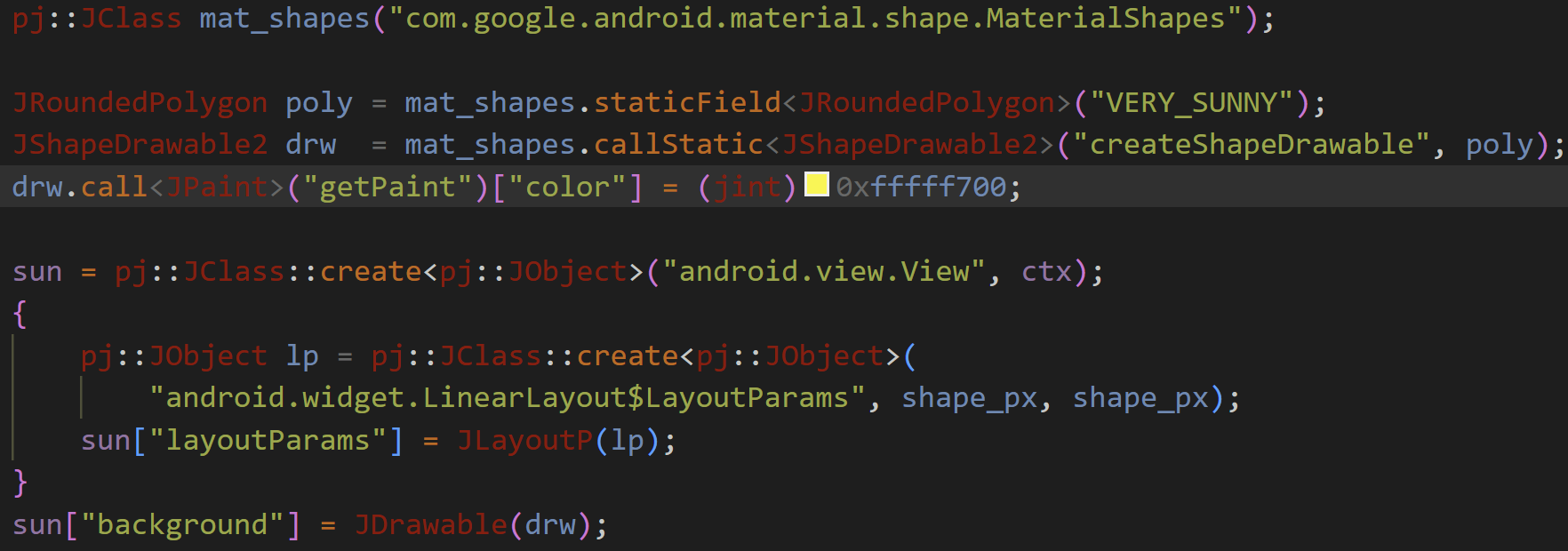
RegEx Color PanelInline color swatches and picker for any color format — hex, decimal, or float. Configure the regex pattern, channel order, value types, and output template per language. Installation Launch VS Code Quick Open ( Ctrl+P), paste the following command, and press enter.Copied to clipboard |

RegEx Color PanelInline color swatches and a native VS Code color picker for any hex color format — with full control over byte order. Configure the regex pattern, channel order (ARGB, RGBA, BGR, RGB, …), and output template independently per language.
Features
Default formats
Customizing formats (
|
| Field | Required | Description |
|---|---|---|
name |
no | Human-readable label (ignored at runtime, shown in IntelliSense) |
pattern |
yes | JavaScript regex string. Each capture group captures one channel value. |
channels |
yes | String mapping capture groups (left to right) to channels: letters A, R, G, B. Missing channels default to 255. |
channelTypes |
no | String, same length as channels. Each char sets the value type per group: h = hex 2-digit (default), d = decimal 0–255, f = float 0.0–1.0. Omit to treat all groups as hex. |
template |
yes | Output template. {X} or {Xh} = hex, {Xd} = decimal, {Xf} = float — where X is A, R, G, or B. E.g. 0x{A}{R}{G}{B}, rgb({Rd}, {Gd}, {Bd}). |
languages |
no | Array of VS Code language IDs to restrict this format to. Empty array or omitted = all languages. |
How pattern + channels work
The regex captures one pair of hex digits per channel. The channels string assigns a meaning to each capture group positionally:
pattern:  "0x([0-9a-fA-F]{2})([0-9a-fA-F]{2})([0-9a-fA-F]{2})([0-9a-fA-F]{2})"
           group 1 ──────────┘ group 2 ────────┘ group 3 ────────┘ group 4 ────────┘
channels: "ARGB"
           A ─────────────────┘ R ──────────────┘ G ──────────────┘ B ──────────────┘
When the user picks a new color, the token values are substituted into the template:
template: "0x{A}{R}{G}{B}" → "0xFF3F51B5"
Case is auto-preserved: if the original literal was all-uppercase the output is uppercase; if exclusively lowercase, lowercase.
Examples
ARGB 32-bit (default)
// .vscode/settings.json
{
  "regexColorPanel.formats": [
    {
      "name": "ARGB 32-bit",
      "pattern": "0x([0-9a-fA-F]{2})([0-9a-fA-F]{2})([0-9a-fA-F]{2})([0-9a-fA-F]{2})",
      "channels": "ARGB",
      "template": "0x{A}{R}{G}{B}",
      "languages": ["c", "cpp", "java", "kotlin", "objc", "swift"]
    }
  ]
}
Matches: 0xFF1A237E → A=FF R=1A G=23 B=7E
CSS/HTML RGBA 32-bit (default)
{
  "name": "CSS RGBA",
  "pattern": "#([0-9a-fA-F]{2})([0-9a-fA-F]{2})([0-9a-fA-F]{2})([0-9a-fA-F]{2})(?![0-9a-fA-F])",
  "channels": "RGBA",
  "template": "#{R}{G}{B}{A}",
  "languages": []
}
Matches: #1A237EFF → R=1A G=23 B=7E A=FF
OpenGL / GLSL — RGBA floats packed as hex
{
  "name": "GLSL packed RGBA",
  "pattern": "0x([0-9a-fA-F]{2})([0-9a-fA-F]{2})([0-9a-fA-F]{2})([0-9a-fA-F]{2})u",
  "channels": "RGBA",
  "template": "0x{R}{G}{B}{A}u",
  "languages": ["glsl", "cpp"]
}
Matches: 0x1A237EFFu
CSS rgb(r, g, b) (default)
{
  "name": "CSS rgb(r, g, b)",
  "pattern": "rgb\\(\\s*(\\d{1,3})\\s*,\\s*(\\d{1,3})\\s*,\\s*(\\d{1,3})\\s*\\)",
  "channels": "RGB",
  "channelTypes": "ddd",
  "template": "rgb({Rd}, {Gd}, {Bd})",
  "languages": ["css", "scss", "less", "html", "javascript", "typescript"]
}
Matches: rgb(26, 35, 126) → R=26 G=35 B=126
CSS rgba(r, g, b, a) (default)
{
  "name": "CSS rgba(r, g, b, a)",
  "pattern": "rgba\\(\\s*(\\d{1,3})\\s*,\\s*(\\d{1,3})\\s*,\\s*(\\d{1,3})\\s*,\\s*(\\d*\\.?\\d+)\\s*\\)",
  "channels": "RGBA",
  "channelTypes": "dddf",
  "template": "rgba({Rd}, {Gd}, {Bd}, {Af})",
  "languages": ["css", "scss", "less", "html", "javascript", "typescript"]
}
Matches: rgba(26, 35, 126, 0.75) → R=26 G=35 B=126 A=75%
GLSL vec4 — float components
{
  "name": "GLSL vec4 float",
  "pattern": "vec4\\(\\s*([\\d.]+)\\s*,\\s*([\\d.]+)\\s*,\\s*([\\d.]+)\\s*,\\s*([\\d.]+)\\s*\\)",
  "channels": "RGBA",
  "channelTypes": "ffff",
  "template": "vec4({Rf}, {Gf}, {Bf}, {Af})",
  "languages": ["glsl", "hlsl"]
}
Matches: vec4(0.102, 0.137, 0.494, 1.0) → full RGBA from floats
Windows COLORREF — 0x00BBGGRR (BGR byte order)
{
  "name": "Win32 COLORREF BGR",
  "pattern": "0x00([0-9a-fA-F]{2})([0-9a-fA-F]{2})([0-9a-fA-F]{2})",
  "channels": "BGR",
  "template": "0x00{B}{G}{R}",
  "languages": ["c", "cpp"]
}
Matches: 0x007E231A → B=7E G=23 R=1A (displayed as #1A237E)
Uppercase-prefixed constants — COLOR_PRIMARY = 0XFF…
The pattern is case-insensitive by default (gi flag is always applied), so 0X and 0x both match without any change to the pattern.
Restricting a format to specific file types
Use the languages array with VS Code language identifiers:
{
  "name": "CSS only",
  "pattern": "#([0-9a-fA-F]{2})([0-9a-fA-F]{2})([0-9a-fA-F]{2})(?![0-9a-fA-F])",
  "channels": "RGB",
  "template": "#{R}{G}{B}",
  "languages": ["css", "scss", "less", "html"]
}
Omit languages (or set it to []) to match in every file type.
Combining multiple formats
regexColorPanel.formats is an array — list all the formats you need. When two patterns match at the same position, the longer match wins. When they start at the same position with the same length, the first entry in the array wins.
{
  "regexColorPanel.formats": [
    { "name": "ARGB 32-bit", "pattern": "0x([0-9a-fA-F]{2})([0-9a-fA-F]{2})([0-9a-fA-F]{2})([0-9a-fA-F]{2})", "channels": "ARGB", "template": "0x{A}{R}{G}{B}", "languages": ["cpp"] },
    { "name": "RGB 24-bit",  "pattern": "0x([0-9a-fA-F]{2})([0-9a-fA-F]{2})([0-9a-fA-F]{2})(?![0-9a-fA-F])",  "channels": "RGB",  "template": "0x{R}{G}{B}",     "languages": ["cpp"] }
  ]
}
The 8-digit ARGB entry is longer than the 6-digit RGB entry, so 0xFF1A237E is always recognised as ARGB, not as RGB 0xFF1A23 followed by 7E.
Requirements
VS Code 1.75 or later. No other dependencies.
License
MIT