Dispatch
Session monitor for Claude Code.
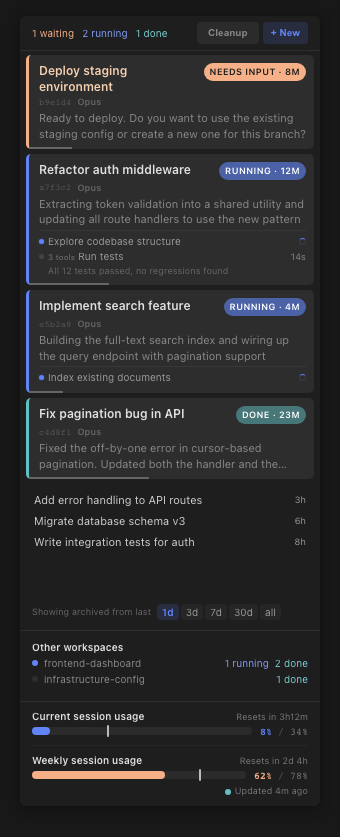
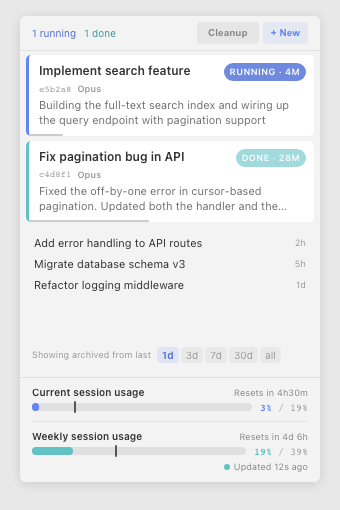
Dispatch is a VS Code sidebar extension that shows all your Claude Code sessions as colour-coded status cards. Built for multi-session workflows where you need to know which agent needs attention, which is finished, and which is blocked.
Panel layout
The sidebar is organised into vertical zones, top to bottom:
- Top bar — status summary counts (running, waiting, done) with colour-coded dots. Refresh, Cleanup, and + New buttons.
- Active session cards — one card per running, waiting, or recently completed session. Colour-coded left border (blue = running, peach = waiting, teal = done). Each card shows session name, status pill, elapsed time, context usage bar, and subagent tree.
- Archive section — dismissed sessions in a compact list with time-range filter (1d / 3d / 7d / 30d / all).
- Usage quotas — current session and weekly usage bars showing consumption against your plan limits. Sourced from the Anthropic OAuth API.
- Other workspaces — summary of Claude Code sessions running in other VS Code windows, with running/waiting/done counts per workspace.
How to use
Starting a new session
Click + New in the top bar. This opens a fresh Claude Code editor panel. The session card appears in Dispatch when you send your first message.
Focusing a session
Click any active session card to open that Claude Code session in the editor. The card highlights briefly to confirm focus.
Dismissing and archiving
Hover over a session card to reveal action buttons on the right. Click the × button to dismiss the session. Dismissed sessions move to the archive section below. Dismissed sessions can be filtered by age using the time-range pills (1d, 3d, 7d, 30d, all).
Restoring an archived session
Click any row in the archive section to restore it to the active list and open it in the editor.
Viewing a transcript
Hover over a session card or archive row to reveal the transcript button (scroll icon). Click it to render the full session log as readable markdown in a new editor tab.
Cleanup
Click Cleanup in the top bar, then click Confirm? within 3 seconds. This closes all Claude Code editor tabs except the one you're currently viewing. Useful when you've accumulated many open session tabs.
Refresh
Click the refresh icon in the top bar to force an immediate rescan of all sessions. Dispatch also polls automatically (500ms when sessions are active, 2s when idle).
Features
Session tracking
- Automatic discovery — finds all Claude Code sessions in your workspace by scanning
~/.claude/projects/. No configuration needed.
- Status inference — determines session state (running, waiting, done) from JSONL records using a state machine with idle timers, permission detection, and process liveness checks.
- Status confidence — sessions display at full, 75%, or 50% opacity depending on how recently data was received. Stale sessions show elapsed time instead of status labels.
- Session naming — displays custom title, topic (from first user message), or folder name. Titles survive context compaction.
- Session repair — automatically extracts titles from JSONL logs for sessions that Claude Code hasn't named yet, so every session has a readable label.
Subagent tracking
- Nested agent detection — Agent and Task tool calls appear as child items under the parent session card.
- Permission bubbling — when a subagent is waiting for permission, it shows on the subagent row. The parent only transitions to "waiting" when all running subagents are blocked.
- Blocking vs background — distinguishes between subagents the parent is waiting for (blocking) and those running independently (
run_in_background: true).
- Enrichment — completed subagents show duration, tool count, and a result preview (first 120 characters).
- Compaction — sessions with more than 5 subagents collapse to show only running/waiting agents, with an expand toggle.
Usage tracking
- OAuth API integration — polls the Anthropic usage API for server-truth quota data (5-hour rolling window, 7-day rolling window).
- Visual quota bars — colour-coded progress bars with hot-zone warnings at 60% capacity.
- Per-session context — each card shows a context usage bar (tokens consumed vs model context window).
- Model-aware — correctly sizes context bars for different models (1M for Opus/Sonnet, 200K for Haiku).
- Ghost bars — shows greyed-out quota bars when your usage window has expired, so you know the state without confusion.
Transcript viewer
- Renders any session's full JSONL log as readable markdown with user/assistant/tool sections.
- Opens in a VS Code editor tab for searching, copying, and reference.
- Accessible from both active cards and archived sessions.
Cross-workspace monitoring
- Foreign workspaces — shows running/waiting/done counts for Claude Code sessions in other open VS Code windows.
- Dismissable — individual foreign workspaces can be dismissed if not relevant.
- Stable naming — workspace display names are cached to prevent flicker as sessions churn.
Visual design
- FLIP animations — smooth 300ms card reordering when session states change.
- Light and dark themes — full CSS variants for both VS Code themes.
- Keyboard accessible — focus-visible styles, keyboard activation on all interactive elements, WCAG AA contrast ratios.
Requirements
- VS Code 1.94 or later
- Claude Code VS Code extension (provides the
claude-vscode.editor.open command)
- macOS (see Platform notes)
Commands
| Command |
Title |
Description |
agentActivity.refresh |
Refresh Agent Activity |
Force-refresh the panel (also in toolbar) |
agentActivity.focusSession |
Focus Claude Code Session |
Open a specific session in the editor |
Dispatch is built and tested on macOS. It will run on other platforms, but with reduced functionality:
- Credential extraction — usage quota data is read from the macOS Keychain (
Claude Code-credentials). On Linux/Windows, it falls back to ~/.claude/.credentials.json (plaintext). If neither is available, usage bars are hidden.
- File paths — session discovery paths (
~/.claude/projects/) are Unix-convention. Windows support has not been tested.
Fragility profile
Dispatch reads Claude Code's internal data formats. None of these are documented or guaranteed by Anthropic:
| Dependency |
What breaks if it changes |
JSONL session logs (~/.claude/projects/<key>/*.jsonl) |
Session discovery, status inference, transcript rendering. This is the core data source. |
| JSONL record format (type, content, tool_use structure) |
Status state machine, subagent detection, topic extraction. |
Dispatch session metadata (session-meta.json in ~/.claude/projects/<key>/) |
Dismissed/acknowledged state persistence. |
OAuth usage API (api.anthropic.com/api/oauth/usage) |
Usage quota bars. Undocumented endpoint; could change or be removed. |
Keychain entry (Claude Code-credentials) |
OAuth token retrieval on macOS. |
claude-vscode.editor.open command |
Click-to-focus. If the Claude Code extension changes this command ID, focusing breaks. |
These dependencies have been stable through daily use since March 2026. The extension validates records defensively and degrades gracefully (unknown records are skipped, not crashed on).
Licence
PolyForm Shield 1.0.0
Use it freely. Fork it, extend it, run it at work. The one restriction: don't sell it or use it to build a competing product.
If you'd like to use Dispatch beyond the scope of the licence, get in touch at murray@snowmelt.io.
Copyright 2026 Snowmelt Consulting Pty Ltd.

