The bioinformatics AI copilot that lives in your editor. Design proteins, run GPU pipelines (RFdiffusion, Boltz, GATK, DESeq2), search every major database (NCBI, UniProt, PDB, STRING), and open any bioinformatics file natively — FASTA, BAM, VCF, PDB, SDF, Newick, DICOM, and 80+ more — without leaving VS Code.
What you can do
Ask the agent anything in plain English and watch it work:
"Use Boltz to design a nanobody that binds the RBD of SARS-CoV-2 spike protein — give me 5 candidates ranked by predicted affinity."
"Run RFdiffusion to generate 10 novel enzyme scaffolds around this active site geometry, then score them with ProteinMPNN."
"My RNA-seq experiment has 6 samples (3 treated, 3 control) in my workspace. Run DESeq2 and tell me which pathways are enriched in the differentially expressed genes."
"Search PubMed, UniProt, and STRING DB for everything known about the interaction between BRCA1 and RAD51 — summarize the key structural contacts."
The agent chooses tools, runs them, and streams the answer back in real time. Long-running GPU jobs (RFdiffusion, Boltz, GATK, etc.) are dispatched to the cloud and tracked in the Processes panel — you keep working while they run.
smarts.bio registers as the native viewer for 80+ bioinformatics formats. Open any of these directly in VS Code — no conversion, no browser tab.
| Category |
Formats |
| Sequence |
FASTA (.fasta .fa .fna .faa .ffn .frn), FASTQ (.fastq .fq) |
| GenBank |
.gb .gbk .gbff .genbank |
| Alignment |
BAM, SAM, CRAM (.bam .sam .cram .bai) |
| Variant |
VCF, BCF, BED (.vcf .bcf .bed) |
| Structure |
PDB, mmCIF (.pdb .ent .cif .mmcif) |
| Molecules |
SDF, MOL2, SMILES, InChI, XYZ (.sdf .mol .mol2 .smi .smiles .xyz .inchi) |
| Phylogenetics |
Newick, Nexus (.nwk .tree .phy .tre .newick) |
| Gene Ontology |
GAF, GOA (.gaf .goa) |
| Tabular |
CSV, TSV, XLSX, XLS (.csv .tsv .xlsx .xls) |
| Medical imaging |
DICOM (.dcm .dicom) |
| Whole-slide imaging |
.svs .ndpi .scn .mrxs (Aperio, Hamamatsu, Leica, and more) |
| Notebooks |
Jupyter (.ipynb) |
| Documents |
PDF, DOCX, Markdown |
| Images |
PNG, JPG, SVG, TIFF, BMP, WebP, GIF |
| Archives |
.gz — any format above can be gzip-compressed |
| Category |
Tools |
| Read alignment |
BWA, Bowtie2, HISAT2, STAR |
| Variant calling |
GATK (HaplotypeCaller, Mutect2), SAMtools, BCFtools |
| RNA-seq |
STAR, Salmon, StringTie, DESeq2, edgeR |
| Quality control |
FastQC, Trimmomatic, MultiQC |
| Protein design |
RFdiffusion, Boltz, ProteinMPNN, AlphaFold |
| Sequence search |
BLAST (blastn, blastp, blastx), HMMER |
| File processing |
SAMtools, format conversion (50+ format pairs) |
| Single-cell |
Seurat-compatible workflows, scRNA-seq pipelines |
Supported databases
| Database |
What you can query |
| NCBI |
PubMed, GenBank, Gene, SRA, RefSeq, dbSNP, ClinVar |
| UniProt |
Protein sequences, function, PTMs, disease associations |
| PDB |
3D structures, experimental metadata, ligands |
| STRING |
Protein–protein interactions, network analysis |
| KEGG |
Pathways, enzymes, compounds, diseases |
| Ensembl |
Gene models, cross-species annotation |
| Google Patents |
87M+ patents from 17+ patent offices (IP & prior art) |
Features
AI agent chat
A persistent chat panel lives in the sidebar. It understands biological context, remembers your conversation history, and can attach files from your workspace directly.
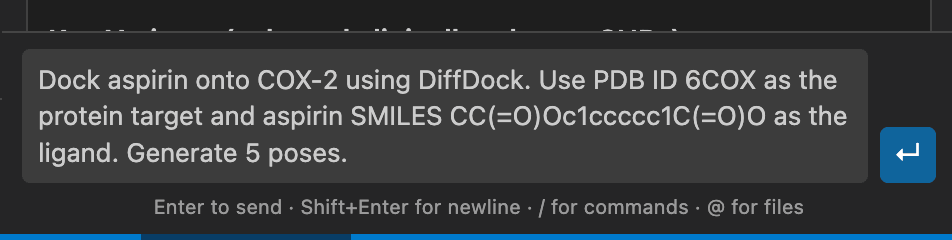
Example workflows:
- "BLAST this sequence against NCBI nt, then fetch the top 3 hits from GenBank and align them"
- "Explain the clinical significance of the variants in
cohort.vcf — focus on BRCA1 and TP53"
- "Fetch the crystal structure of human HBB from PDB, run a stability analysis on the sickle-cell mutation E6V, and visualize the result"
Type / to browse all available tools and pipelines with autocomplete.
3D structure viewer
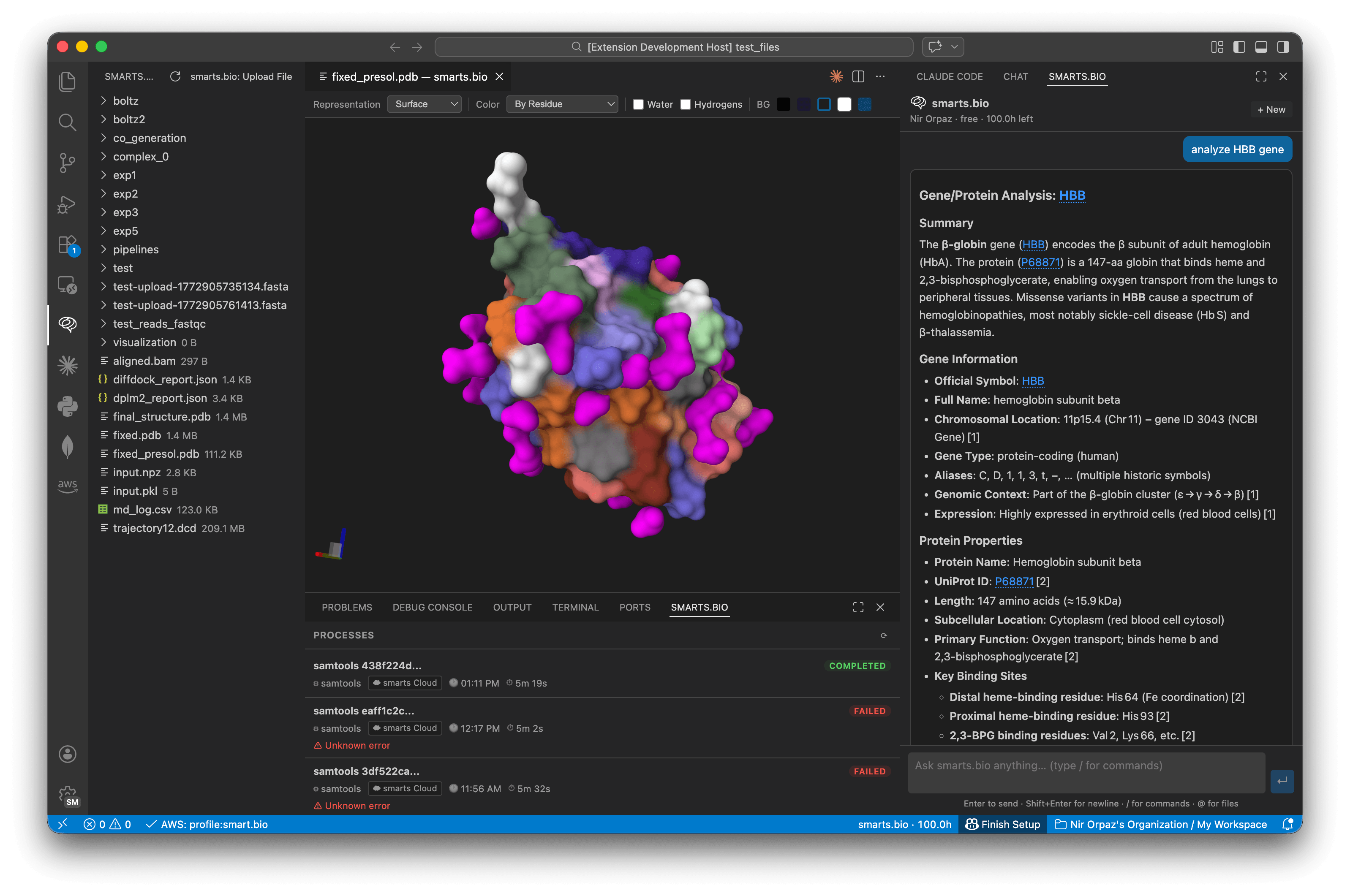
Open any .pdb or .mmcif file directly in VS Code. A full interactive Molstar viewer renders the structure with a toolbar for instant control — no browser tab required.
Controls:
- Representation — Cartoon, Ball & Stick, Surface, Spacefill, Backbone
- Color — By Chain, By Element, By Residue, Secondary Structure, Uniform
- Visibility — Toggle water molecules and hydrogens
- Background — Black, dark blue, VS Code dark, white, teal
Click Analyze with smarts.bio on any structure in the Files explorer to immediately send it to the chat for AI analysis. The first screenshot above shows the full experience — 3D viewer alongside the AI chat.
Sequence & genomics viewers
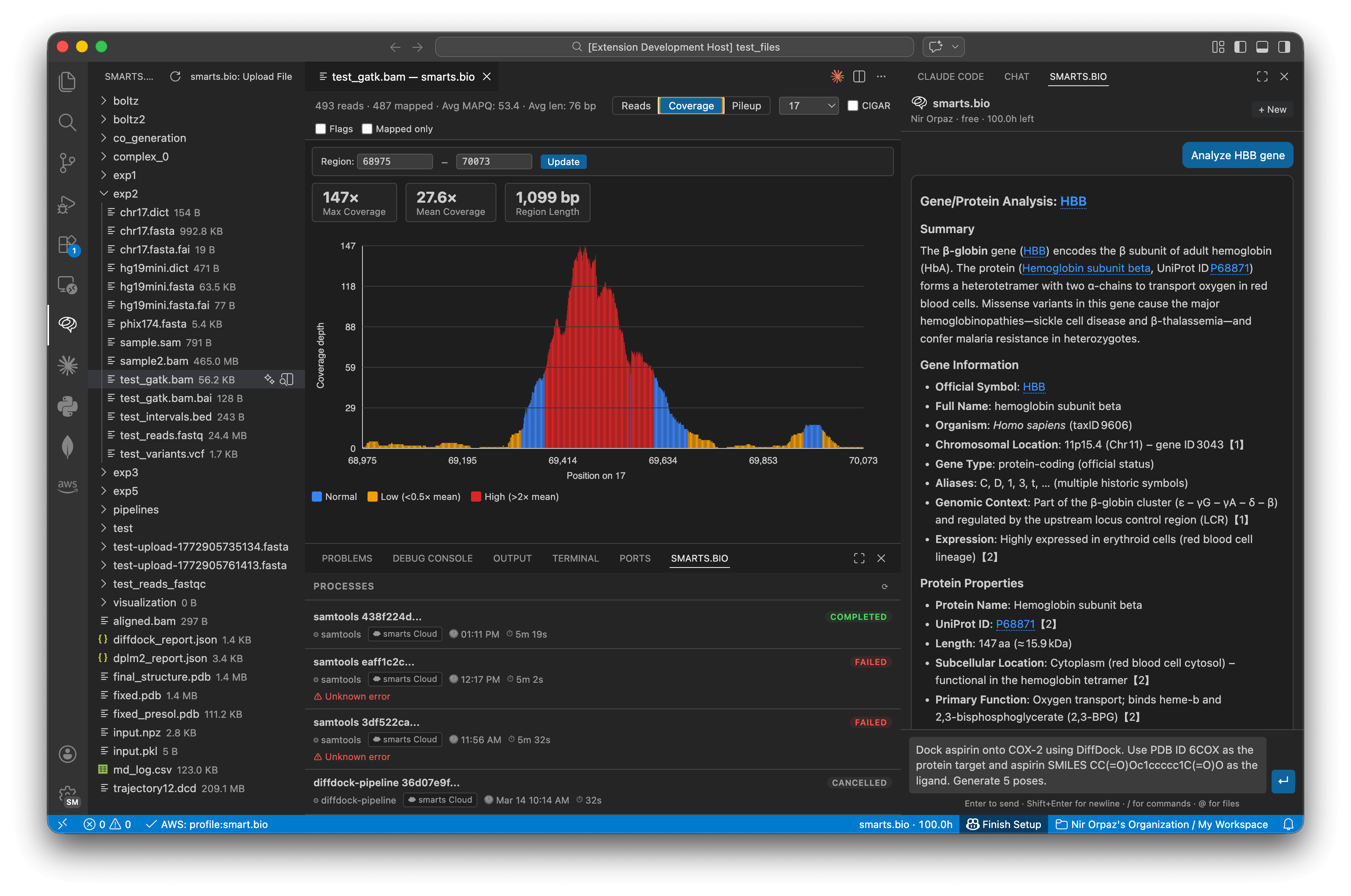
Open FASTA, FASTQ, BAM, SAM, CRAM, VCF, BED, GenBank, PDB, SDF, Newick, DICOM, and 70+ other formats natively. smarts.bio registers as the default viewer for all standard bioinformatics formats — including gzip-compressed files.
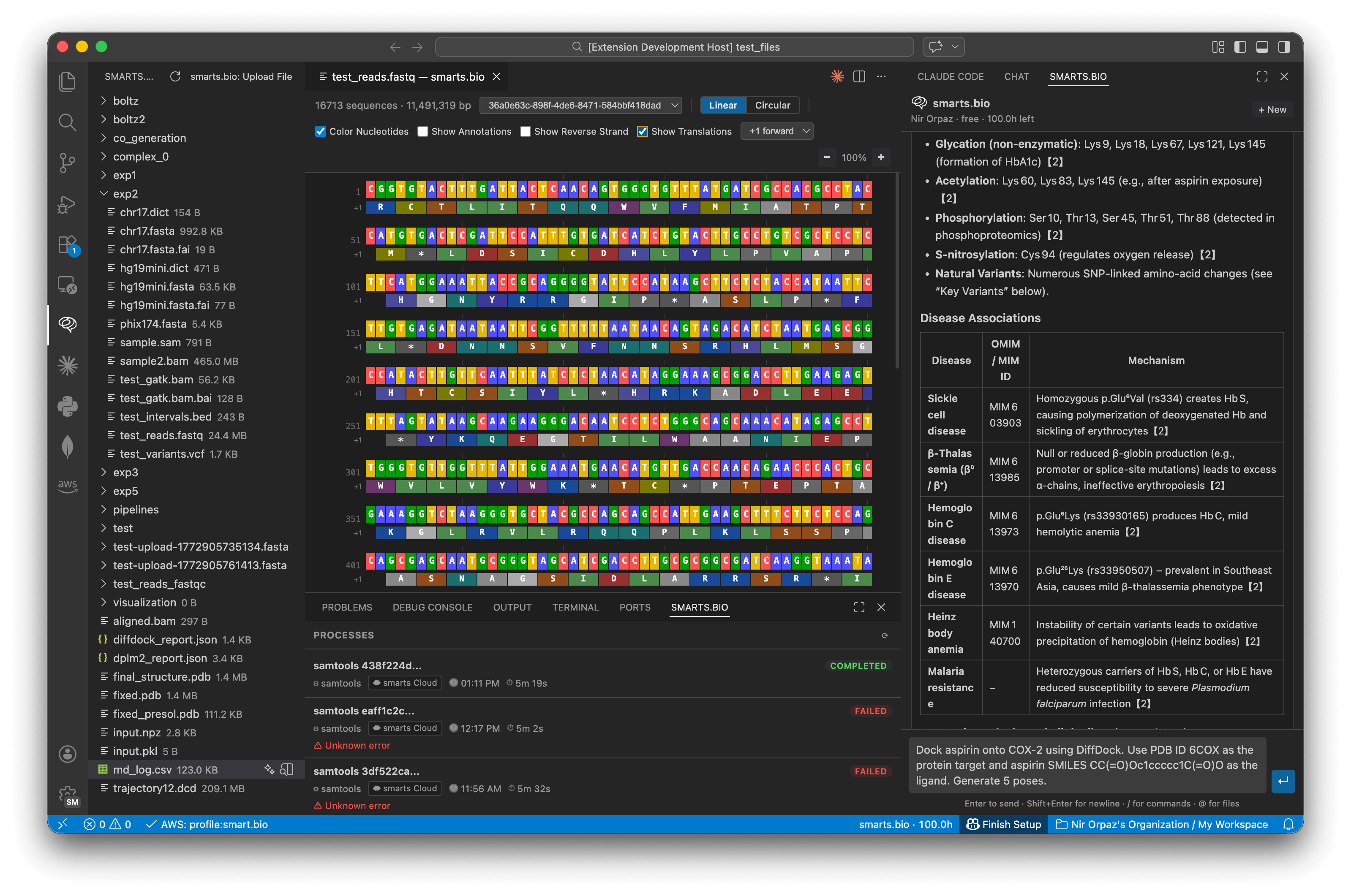
- Sequence viewer — Colorized nucleotide / amino acid display for FASTA and FASTQ, with linear and circular views, reverse strand, and translation tracks
- Alignment viewer — BAM/SAM/CRAM coverage histogram with per-base depth, mapped/unmapped read filtering, and region navigation
- Variant viewer — VCF/BCF/BED annotation with clinical context
- Structure viewer — Interactive Molstar 3D viewer for PDB and mmCIF files (see above)
- Molecule viewer — SDF, MOL2, SMILES, InChI, XYZ small molecule rendering
- Phylogenetic tree viewer — Newick, Nexus, and Phylip tree formats
- Medical imaging — DICOM and whole-slide imaging formats (SVS, NDPI, SCN)
- GenBank viewer —
.gb / .gbk / .gbff flat file rendering
- Table viewer — CSV/TSV/XLSX with sortable columns — useful for DESeq2 output, BLAST hit tables, and variant annotations
Processes panel — track long-running jobs
Submit GPU-heavy pipelines (RFdiffusion, Boltz, GATK, samtools, and more) and watch them run without blocking your editor. The Processes panel shows live status, execution time, and error details.
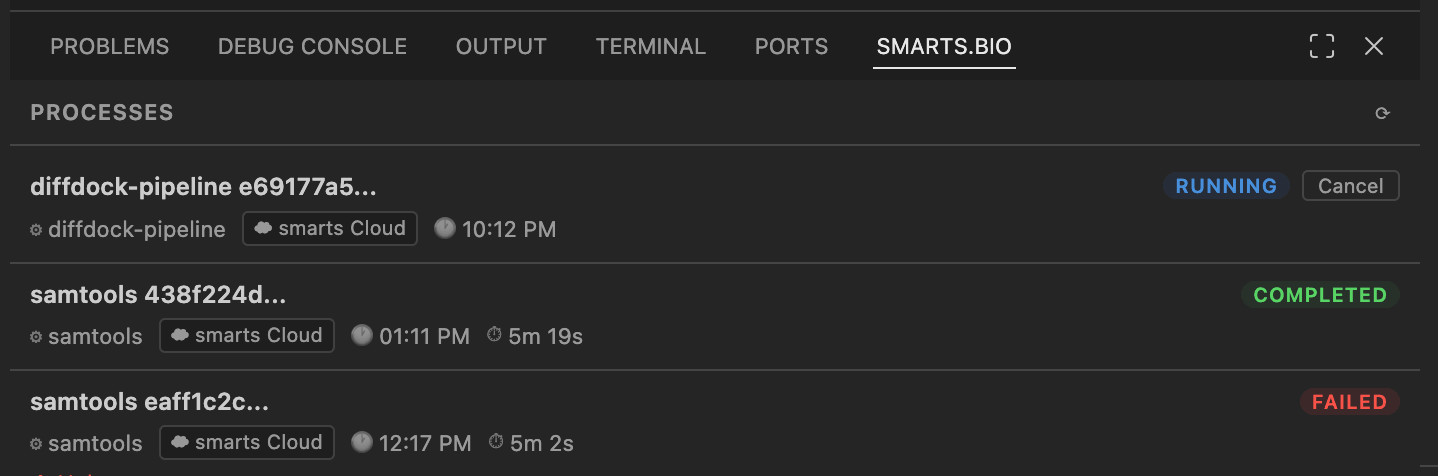
- Real-time status updates (queued → running → completed / failed)
- Job duration and timestamps
- VS Code notifications when jobs complete or fail
- Cancel any running job directly from the panel
Files explorer
A native VS Code tree view gives you full access to your smarts.bio workspace files — browse folders, upload, download, rename, move, and delete — all without leaving the editor.
Right-click any file to:
- Open in the built-in viewer
- Analyze with smarts.bio (sends the file as context to chat)
- Download, rename, move to a folder, or delete
Right-click any folder to:
- Upload files here
- Create a subfolder
- Rename or delete
Right-click sequence actions
Select any sequence in the editor and right-click to run actions instantly:
- Analyze with smarts.bio — attaches the selection to the chat as context
- BLAST this sequence — available on
.fasta, .fa, .fastq, .fq files; runs BLAST against NCBI and streams the top hits back
Code insertion
When the agent writes a script or code block, an Insert button appears inline. Click it to paste the code at your cursor position. If no editor is open, a new document is created automatically.
Getting started
1. Install
Search smarts.bio in the Extensions Marketplace, or:
ext install smarts-bio.smarts-bio
2. Sign in
Click the smarts.bio icon in the Activity Bar → Sign In. Your browser opens, you authenticate, and VS Code resumes automatically.
No account? Get started at chat.smarts.bio — includes compute credits to try GPU pipelines.
3. Ask something
Use Boltz to design a nanobody targeting human PD-L1.
Use my workspace file antigen.pdb as the target.
Give me 3 candidates ranked by pLDDT score.
Requirements
- VS Code 1.90 or later
- A smarts.bio account (get started at chat.smarts.bio)
- Internet connection (GPU pipelines and AI run on smarts.bio cloud infrastructure)
Commands
| Command |
Description |
smarts-bio.openChat |
Open the AI chat panel |
smarts-bio.newChat |
Start a new conversation |
smarts-bio.analyzeSelection |
Send editor selection to chat |
smarts-bio.blastSelection |
BLAST the selected sequence |
smarts-bio.uploadFile |
Upload files to your workspace |
smarts-bio.selectWorkspace |
Switch active workspace |
smarts-bio.signIn |
Sign in to smarts.bio |
smarts-bio.signOut |
Sign out |
smarts-bio.openSettings |
Open smarts.bio settings |
Settings
| Setting |
Default |
Description |
smarts-bio.sendOnEnter |
true |
Send message on Enter. Shift+Enter inserts a newline. |
smarts-bio.showJobNotifications |
true |
Notify when long-running jobs complete or fail. |
smarts-bio.defaultWorkspaceId |
"" |
Pin a workspace ID for this VS Code project. |
Privacy
Files and text you send to the agent are transmitted to smarts.bio servers for processing. The extension shows a one-time confirmation before uploading any file. Do not send files containing patient identifiers (PHI) unless your organization has a BAA with smarts.bio.
smarts.bio Privacy Policy
Feedback & support
| |

