CallFlow — REST client and HTTP debugger for VS Code, local only
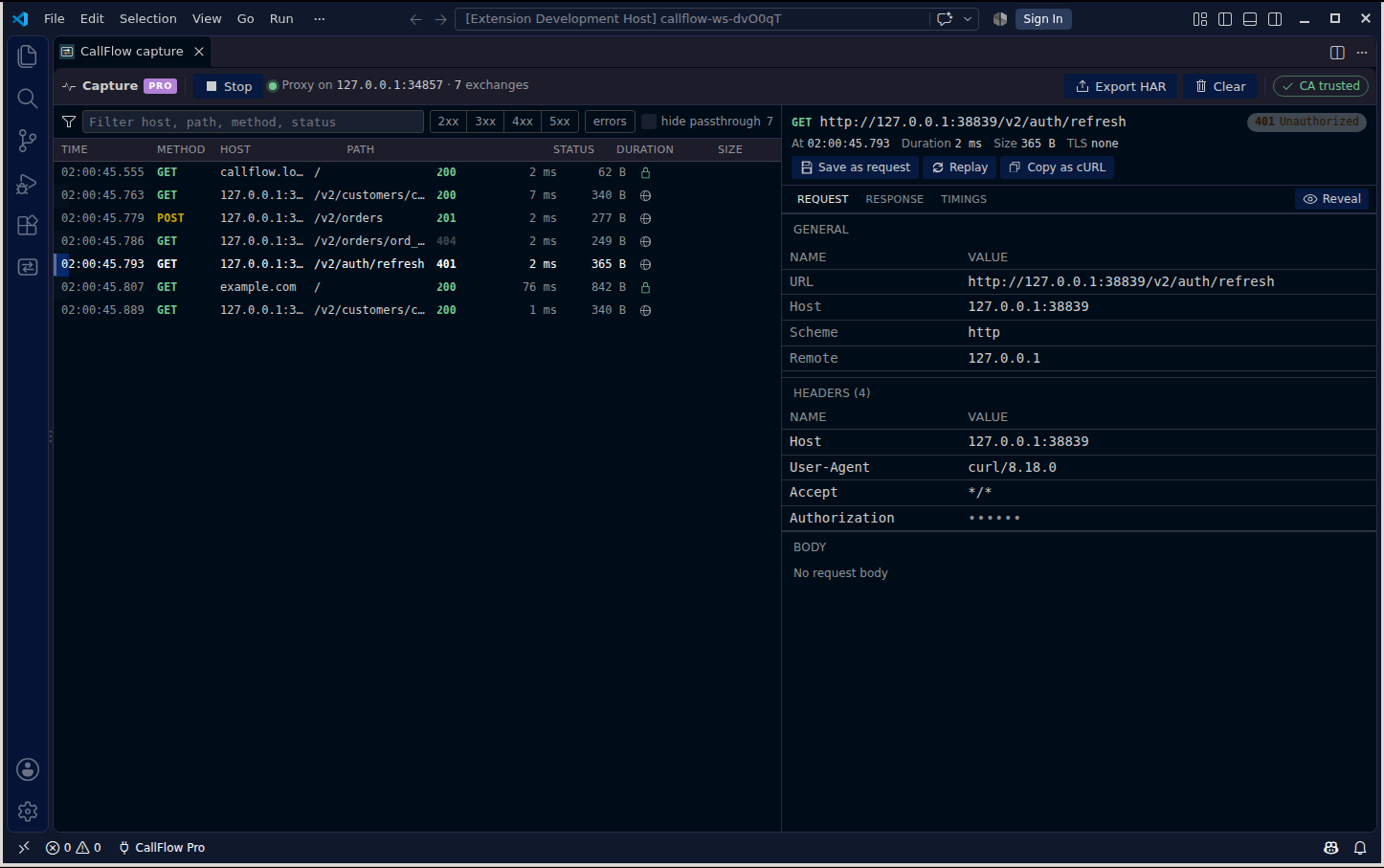
CallFlow sends requests and keeps them as plain .http files in your workspace. CallFlow Pro adds an HTTP debugger: capture the traffic of any terminal or debug session in the workspace, inspect it, turn any call into a saved request, and replay it.
No account. No server. No telemetry. The extension makes no network requests of its own; the only traffic is what you send on purpose. The licence check for Pro is offline.
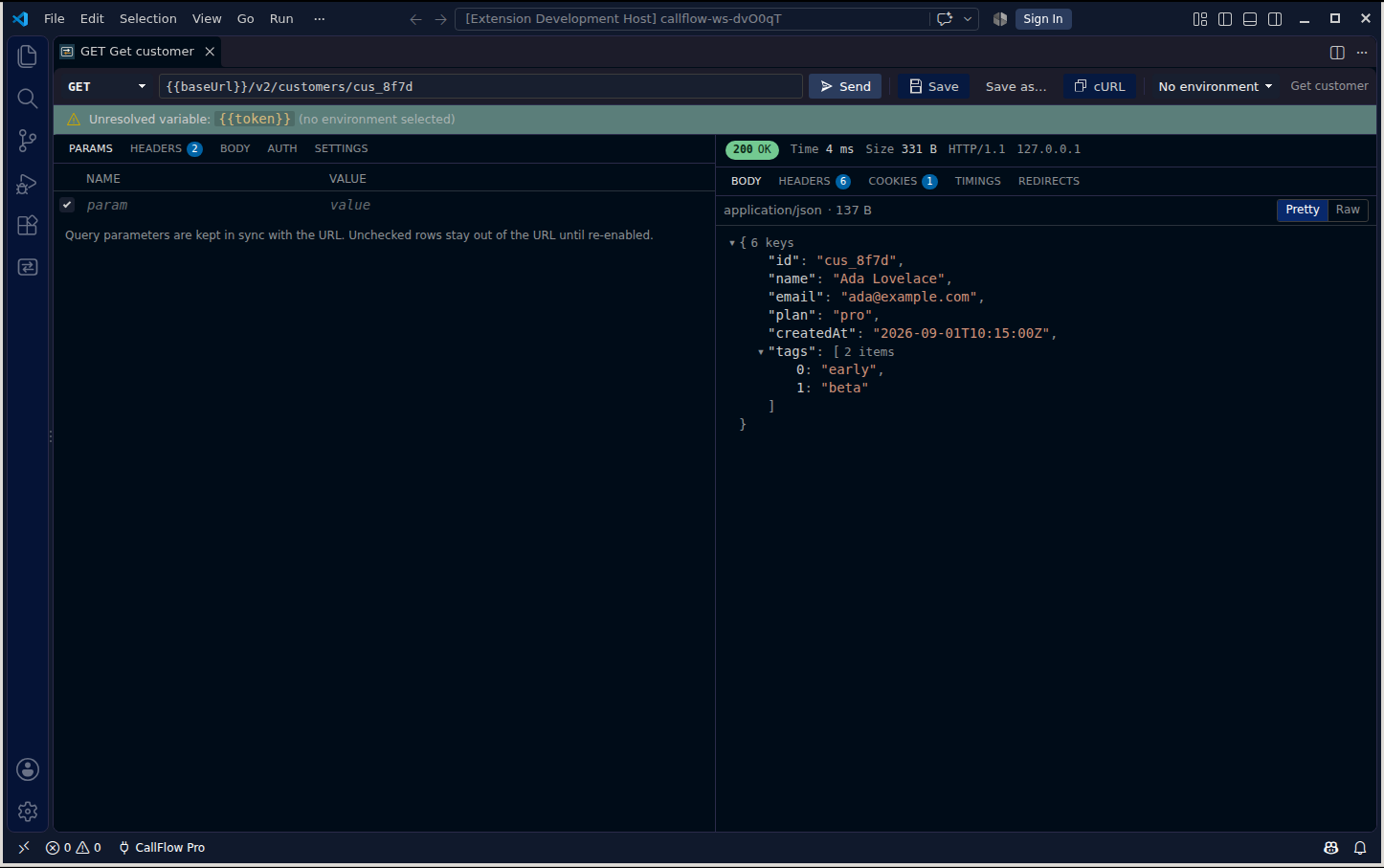
Free, forever
- Requests: method, URL, params, headers, body (raw, form, multipart, file), auth helpers (basic, bearer, API key), timeouts, redirects.
- Collections as files: every request is a block in an
.http file under .callflow/ in your workspace. Compatible with the REST Client format, so your collection diffs in git and opens anywhere.
- Environments:
.callflow/environments.json with {{variables}}, secrets kept in VS Code's secret storage (never in the file), dynamic values ({{$uuid}}, {{$timestamp}}), and chaining from earlier responses.
- History: the last 200 sends with full bodies, exportable as HAR.
- Import and export: cURL, Thunder Client collections, Postman v2.1 collections, HAR in; cURL and HAR out.
CallFlow Pro, $20 once
- Capture: start capture and every new terminal and debug session in the workspace is routed through a local proxy on 127.0.0.1 with a locally generated CA. Your Node, Python, Go, .NET, curl and Java programs are captured without code changes; a browser can be launched through the proxy too.
- Inspect: list, filter, and open any exchange with headers, bodies, timings and TLS details. Sensitive headers are masked until you reveal them.
- Save as request and replay: turn a captured call into a saved request, edit it, send it again.
- HAR export of captures, and history up to 20,000 entries.
- Coming in 0.2: scripting and tests, collection runner, response diff.
Buy at https://smallhours.works/callflow/. The key is shown after payment and works offline on any machine you use.
What CallFlow will never do
- Move export of your own data behind the paywall.
- Ask you to sign in.
- Send anything anywhere on its own.
Capture, honestly
Capture works by pointing programs at a local proxy through environment variables (HTTP_PROXY, HTTPS_PROXY, NODE_EXTRA_CA_CERTS, SSL_CERT_FILE and friends) that CallFlow injects into VS Code terminals and debug sessions while capture is on. Programs that ignore those variables, pin certificates, or use HTTP/3 are not captured; CallFlow records them as pass-through when it can. Browsers and GUI apps need the CallFlow CA trusted in the OS store; CallFlow shows the exact command and only runs it when you press the button.
Settings
callflow.collectionsRoot, callflow.maxStoredBodyBytes, callflow.redactHeaders, callflow.request.timeoutMs, callflow.request.followRedirects, callflow.capture.includeLocalhost, callflow.capture.passthroughHosts, callflow.capture.injectDebugSessions.
Support
hello@smallhours.works · https://smallhours.works/callflow/ · Terms, privacy and refunds: https://smallhours.works/backstop/terms
CallFlow respects VS Code's telemetry setting trivially: it has no telemetry to disable.
| |

