dbt-lineage for VS Code
See what your dbt change breaks before CI does. One command compares your working tree with the main branch and shows the downstream models, columns, dashboards and contracts your edit affects, plus the dbt build selector that rebuilds exactly those.
Nothing else to install: the dbt-lineage binary ships inside the extension. It reads your SQL and YAML directly, so there is no warehouse connection, no Python and no dbt compile.
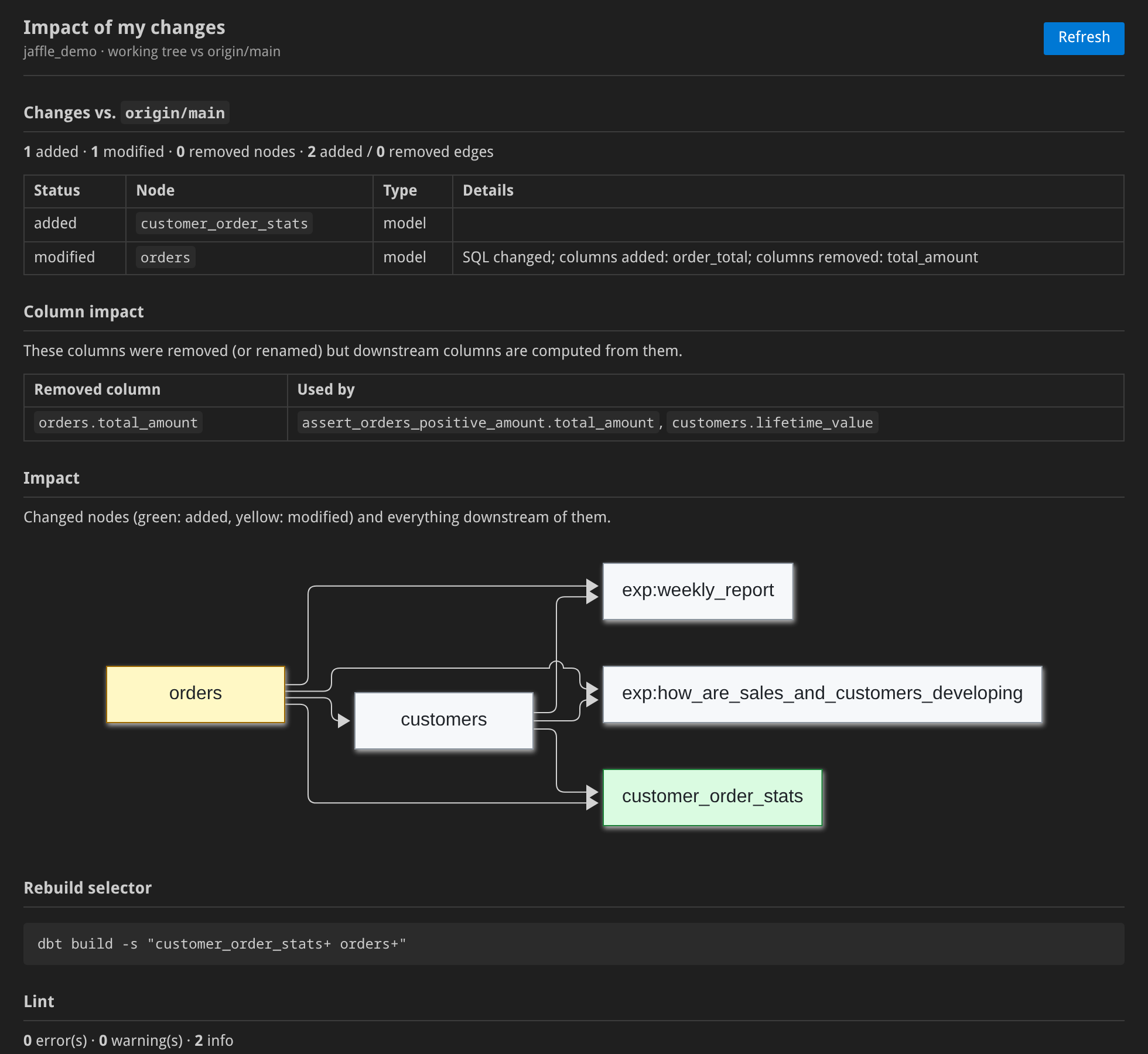
Impact of my changes
Run dbt-lineage: Show impact of my changes from the command palette, or click dbt impact in the status bar. The panel shows:
- Changes against the base branch: added, modified and removed models, sources, seeds and exposures, with added and removed columns.
- Column impact: removed or renamed columns that downstream columns are still computed from.
- Breaking changes on governed models (contracts,
access, versions).
- Impact graph: every changed node and everything downstream of it, down to exposures (dashboards).
- Rebuild selector:
dbt build -s "…" for exactly the affected nodes.
- Lint findings for the project.
The report is the same one dbt-lineage ci report posts as a pull-request comment, so what you see locally is what reviewers will see. Turn on dbtLineage.impactOnSave to refresh it on every save.
While you write SQL
- Hover on
ref('…') / source('…', '…'): node type, materialization, description, upstream/downstream counts, and the impact if it changes.
- Go to definition on
ref() → the model's SQL file; on source() → the table entry in its YAML.
- Code lens on every model:
N upstream · M downstream · impact: high. Click it to open the lineage graph.
- Diagnostics from
dbt-lineage lint: undefined refs and sources, dead-end models, missing descriptions. Refreshed on save.
- dbt-lineage: Show lineage: an interactive lineage graph of the current model in a side panel.
Settings
| Setting |
Default |
Description |
dbtLineage.baseRef |
auto |
Branch or ref the impact report compares against. auto: the remote's default branch (origin/HEAD), else main, else master |
dbtLineage.impactOnSave |
false |
Refresh the impact panel on save while it is open |
dbtLineage.path |
(empty) |
Use your own dbt-lineage binary instead of the bundled one |
dbtLineage.lineageDepth |
3 |
Levels up and down shown by Show lineage |
Notes
- The extension activates in workspaces containing a
dbt_project.yml. Projects in subfolders are found per file, so monorepos with several projects work.
- The impact report needs the project to be in a git repository with the base branch available locally or as
origin/<branch>.
- The graph is read from disk and rebuilt on save, so unsaved edits are not reflected until you save.
- Platform packages (bundled binary) exist for Linux x64/arm64, macOS Intel/Apple silicon and Windows x64. On other platforms the extension uses
dbt-lineage from your PATH (pip install dbt-lineage-cli, brew install sipemu/tap/dbt-lineage or cargo binstall dbt-lineage).
Source, CLI and CI integrations: github.com/sipemu/dbt-lineage-viewer.
| |

