WPML Viewer for DJI Pilot2Developer tools for DJI Pilot 2 mission files (KMZ/WPML viewer and utilities) Installation Launch VS Code Quick Open ( Ctrl+P), paste the following command, and press enter.Copied to clipboard |

DJI Pilot 2 Tools for VS Code
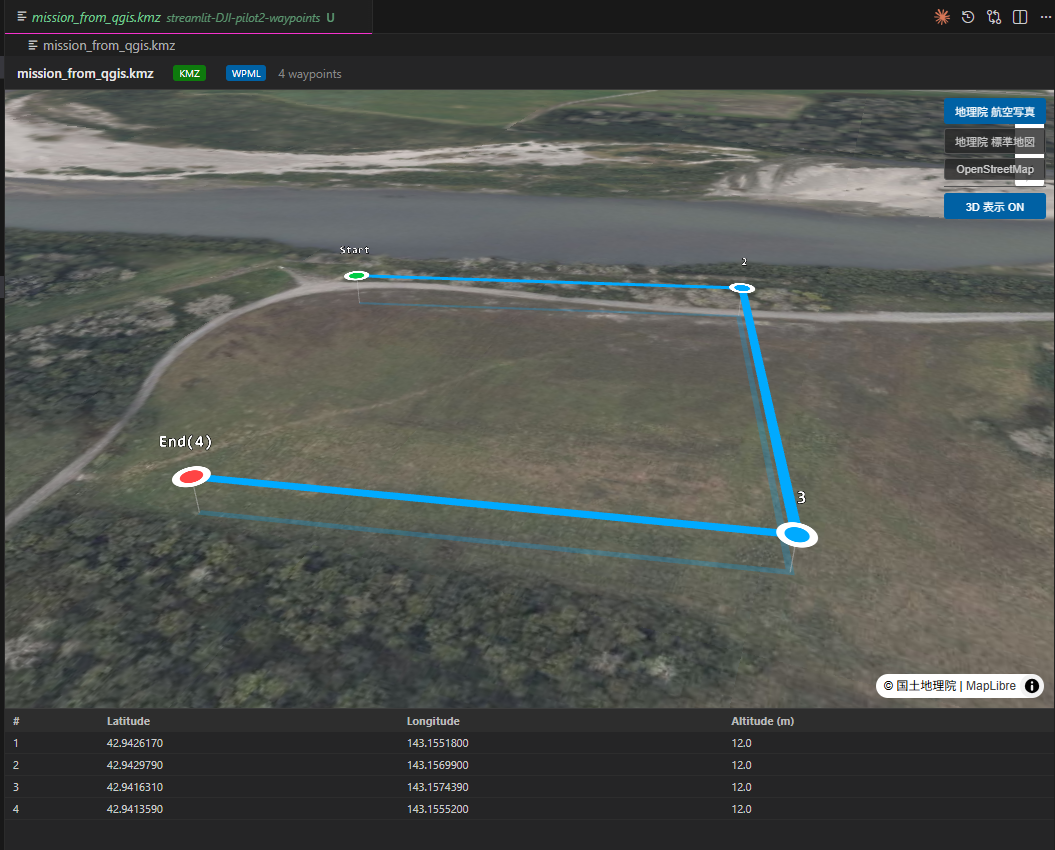
Visualize and inspect DJI Pilot 2 KMZ mission files directly in Visual Studio Code. Interactive 3D mission viewer powered by MapLibre GL JS and deck.gl. DJI Pilot 2 の KMZ ミッションファイルを VSCode 上で可視化・解析する開発支援ツールです。 MapLibre GL JS と deck.gl を使用した インタラクティブ 3D ミッションビューアを提供します。
✈️ FeaturesKMZ Mission ViewerVisualize DJI Pilot 2 DJI Pilot 2 の Capabilities
🚀 UsageOpen KMZ Viewer
VSCode 内のエクスプローラーで 📦 Supported Formats
🛠 DevelopmentRequirements
SetupLaunch Extension Development Host: Press F5 in VS Code. 📄 LicenseMIT |