English | 简体中文
LLM Translate
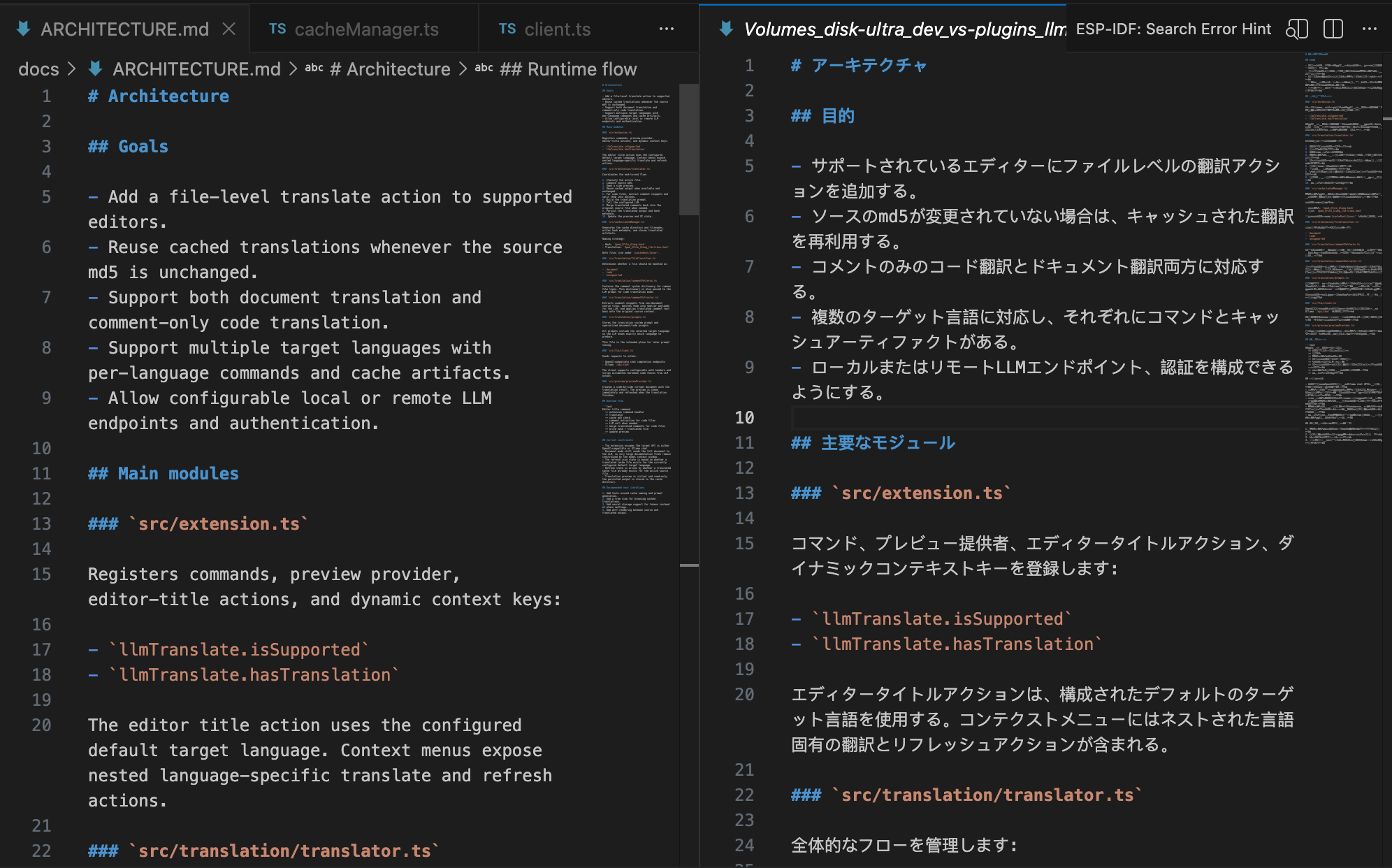
LLM Translate is a VS Code extension for translating workspace files with a configurable local or remote LLM service.
What it does
- Adds a translate icon to supported file editors.
- Uses the configured default target language when the editor title button cannot show a dropdown menu.
- Adds nested right-click menus for translating or refreshing to Simplified Chinese, English, German, French, Japanese, and Korean.
- Switches the icon to refresh when a translated cache already exists for the active file in the configured default target language.
- Translates documentation files such as Markdown, MDX, TXT, RST, and AsciiDoc as full documents.
- Translates code files by extracting comment blocks only, sending only those comment snippets to the LLM, and merging the translated comments back into the original source file while keeping them as valid comments.
- Stores md5 cache files and translated outputs under a user-configurable directory, defaulting to
~/llm-translate/<user>/.
- Opens a side-by-side preview document while the translation is running and updates the preview when the translation finishes.
Cache and output layout
For a source file inside the current workspace, the extension writes two files under the configured cache root:
$cacheRoot/$user/$pwd_$file_$lang.hash$cacheRoot/$user/$pwd_$file_$lang_llm-trans.$ext
The hash file contains the current source md5. If the md5 matches and a translated output exists, the extension reuses the cached translation instead of calling the LLM again.
Supported translation modes
Documentation mode
Full-file translation with format preservation.
Current extensions:
.md.markdown.mdx.txt.rst.adoc
Code mode
Comment-only translation using a built-in comment rule dictionary for common source files. The extension does not send the full code file to the LLM in this mode.
Current extensions include:
.c, .h, .cpp, .hpp, .cc, .hh.js, .jsx, .ts, .tsx.java, .go, .rs, .swift, .kt, .kts.py, .sh, .rb.sql, .lua.html, .xml, .svg, .vue.css, .scss, .less.yaml, .yml, .toml, .ini, .conf, .properties
Configuration
Open VS Code Settings and search for LLM Translate.
Required settings:
llmTranslate.endpoint: LLM HTTP endpoint.llmTranslate.model: model name.
Optional settings:
llmTranslate.provider: auto, openai-compatible, or ollama.llmTranslate.defaultTargetLanguage: zh-CN, en, de, fr, ja, or ko.llmTranslate.authMode: none, bearer, or header.llmTranslate.authTokenllmTranslate.authHeaderNamellmTranslate.authHeaderValuellmTranslate.cacheRootllmTranslate.requestTimeoutMsllmTranslate.temperature
Example user settings:
{
  "llmTranslate.provider": "openai-compatible",
  "llmTranslate.endpoint": "https://your-llm.example.com/v1/chat/completions",
  "llmTranslate.model": "gpt-4.1-mini",
  "llmTranslate.defaultTargetLanguage": "de",
  "llmTranslate.authMode": "bearer",
  "llmTranslate.authToken": "<token>",
  "llmTranslate.cacheRoot": "~/llm-translate"
}
Example Ollama settings:
{
  "llmTranslate.provider": "ollama",
  "llmTranslate.endpoint": "http://127.0.0.1:11434/api/chat",
  "llmTranslate.model": "qwen2.5:14b",
  "llmTranslate.cacheRoot": "~/llm-translate"
}
Development
pnpm install
pnpm exec tsc -p ./
Press F5 in VS Code to launch the Extension Development Host.
Quick Local Setup
- Install LM Studio or Ollama.
- Load and run a local model around 0.5B to 8B, for example
llama-translate 8B.
- Start the local API service.
- Open VS Code settings and fill in the matching endpoint, model name, and authentication mode for LLM Translate.
- Choose a default target language for the editor title button. Use the right-click
LLM Translate menu when you need a different target language for a specific file.
Example Ollama settings:
{
  "llmTranslate.provider": "ollama",
  "llmTranslate.endpoint": "http://127.0.0.1:11434/api/chat",
  "llmTranslate.model": "llama-translate:8b"
}
Example LM Studio settings:
{
  "llmTranslate.provider": "openai-compatible",
  "llmTranslate.endpoint": "http://127.0.0.1:1234/v1/chat/completions",
  "llmTranslate.model": "llama-translate-8b-instruct"
}
Packaging and publish
pnpm run package
Then publish with your publisher credentials:
npx vsce publish
Architecture
See docs/ARCHITECTURE.md for the module layout and flow.
Feedback
LLM Translate 中文说明
LLM Translate 是一个 VS Code 扩展,用于通过可配置的本地或远程 LLM 翻译工作区文件。
功能概览
- 为支持的文件类型在编辑器标题栏添加翻译图标。
- 如果当前文件已经存在翻译缓存,则图标切换为刷新。
- 对 Markdown、MDX、TXT、RST、AsciiDoc 等文档类文件执行全文翻译。
- 对代码类文件只提取注释和文档块内容,再分批发送给 LLM 翻译,最后回填到原文件中,并确保回填结果仍然保持为合法注释。
- 如果编辑器标题栏图标无法提供下拉菜单,则会使用配置中的默认目标语言。
- 右键菜单支持二级菜单,可按文件选择翻译到简体中文、英语、德语、法语、日语或韩语。
- 将 md5 缓存文件和翻译产物存放在可配置目录中,默认路径为
~/llm-translate/<user>/。
- 翻译执行期间会在侧边打开预览窗口,并在完成后刷新内容。
缓存和输出
对于工作区中的源文件,扩展会在配置的缓存目录下写入:
$cacheRoot/$user/$pwd_$file_$lang.hash$cacheRoot/$user/$pwd_$file_$lang_llm-trans.$ext
.hash 文件存储当前源文件内容的 md5。当 md5 未变化且翻译结果已存在时,扩展会直接复用缓存,不再请求 LLM。
翻译模式
文档模式
对整个文档做格式保持型翻译。
当前支持:
.md.markdown.mdx.txt.rst.adoc
代码模式
只抽取注释内容进行翻译,不会把整个源文件发给模型。扩展内置了常见文件类型的注释规则字典。
当前包括:
.c, .h, .cpp, .hpp, .cc, .hh.js, .jsx, .ts, .tsx.java, .go, .rs, .swift, .kt, .kts.py, .sh, .rb.sql, .lua.html, .xml, .svg, .vue.css, .scss, .less.yaml, .yml, .toml, .ini, .conf, .properties
配置
在 VS Code 设置中搜索 LLM Translate。
必填项:
llmTranslate.endpointllmTranslate.model
可选项:
llmTranslate.providerllmTranslate.defaultTargetLanguagellmTranslate.authModellmTranslate.authTokenllmTranslate.authHeaderNamellmTranslate.authHeaderValuellmTranslate.cacheRootllmTranslate.requestTimeoutMsllmTranslate.temperature
开发
pnpm install
pnpm exec tsc -p ./
在 VS Code 中按 F5 启动扩展开发宿主。
本地部署快速引导
- 安装 LM Studio 或 Ollama。
- 加载并运行一个 0.5B 到 8B 左右的模型,例如
llama-translate 8B。
- 启动本地 API 服务。
- 打开 VS Code 设置,在 LLM Translate 中填入对应的接口地址、模型名和鉴权方式。
- 为标题栏按钮设置默认目标语言;如果某个文件临时要翻译到别的语言,可以使用右键
LLM Translate 二级菜单。
Ollama 示例:
{
  "llmTranslate.provider": "ollama",
  "llmTranslate.endpoint": "http://127.0.0.1:11434/api/chat",
  "llmTranslate.model": "llama-translate:8b"
}
LM Studio 示例:
{
  "llmTranslate.provider": "openai-compatible",
  "llmTranslate.endpoint": "http://127.0.0.1:1234/v1/chat/completions",
  "llmTranslate.model": "llama-translate-8b-instruct"
}
打包与发布
pnpm run package
发布到 Marketplace:
npx vsce publish
联系方式
- 邮箱:hello@shezw.com
- X:https://x.com/shezw_cn
| |

