GAP Assist
GAP Assist brings syntax highlighting, static analysis, and debugging to GAP source files in VS Code.
What it includes
- GAP syntax highlighting for keywords, declarations, functions for GAP reference and all the official packages.
- A VS Code debugger for
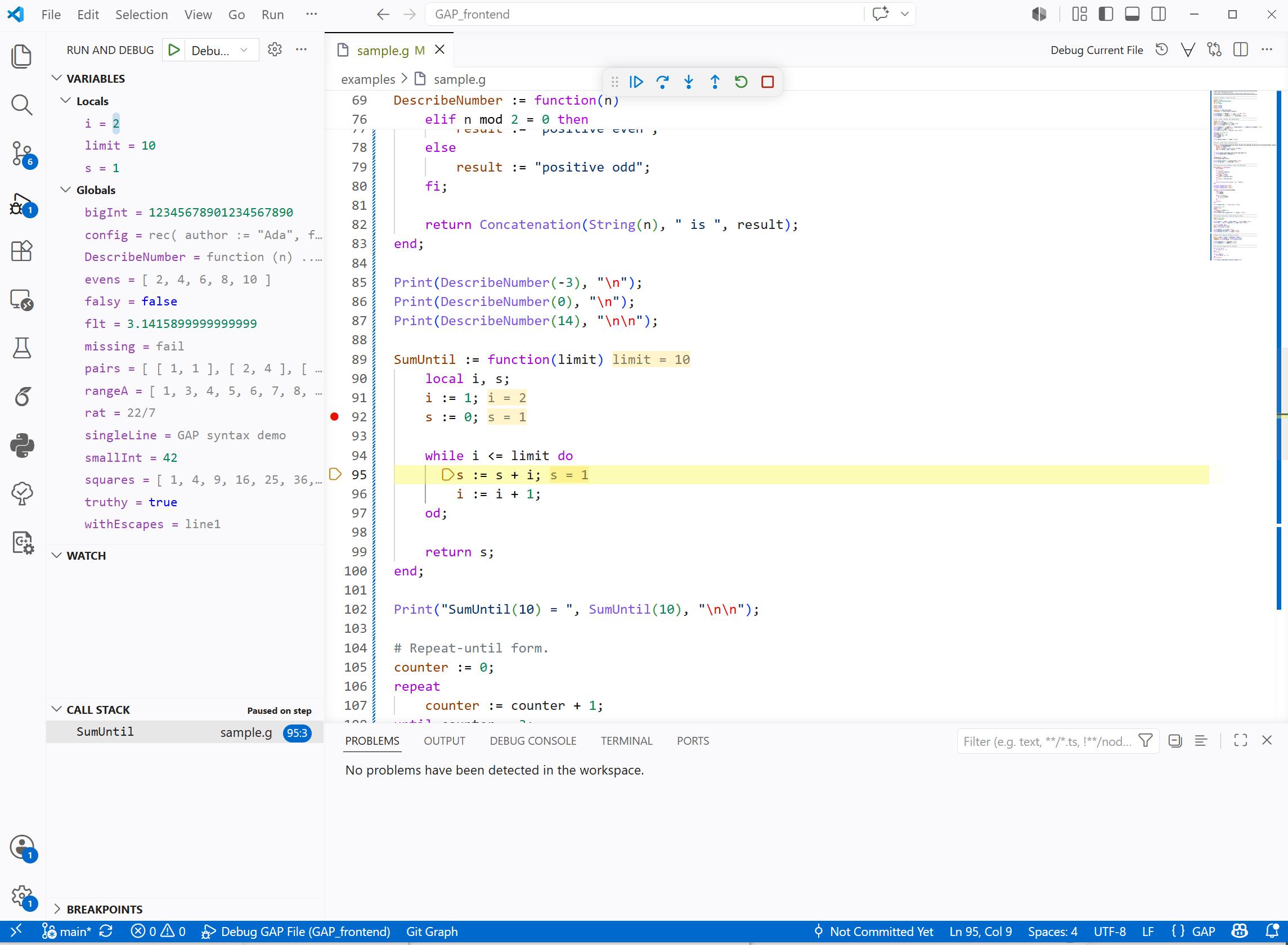
.g files with breakpoints, statement stepping, variables, hover/watch values, inline values, and mapped runtime errors.
- A GAP Objects inspector in the Run and Debug view with semantic cards for paused runtime values and lazy actions for richer mathematical computations.
- Intellisense
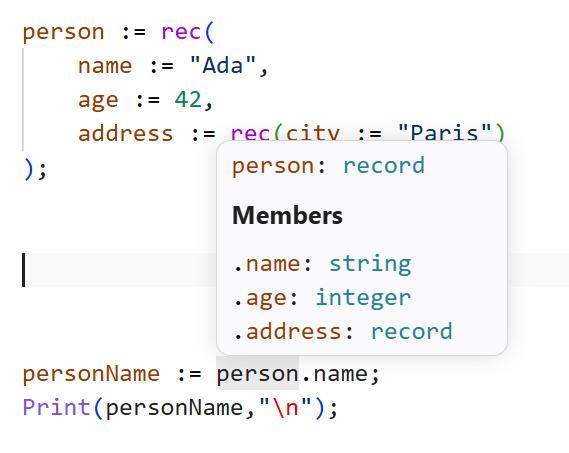
- Static inference for globals, locals, user functions, return values, records, lists, callback parameters, and container element types.
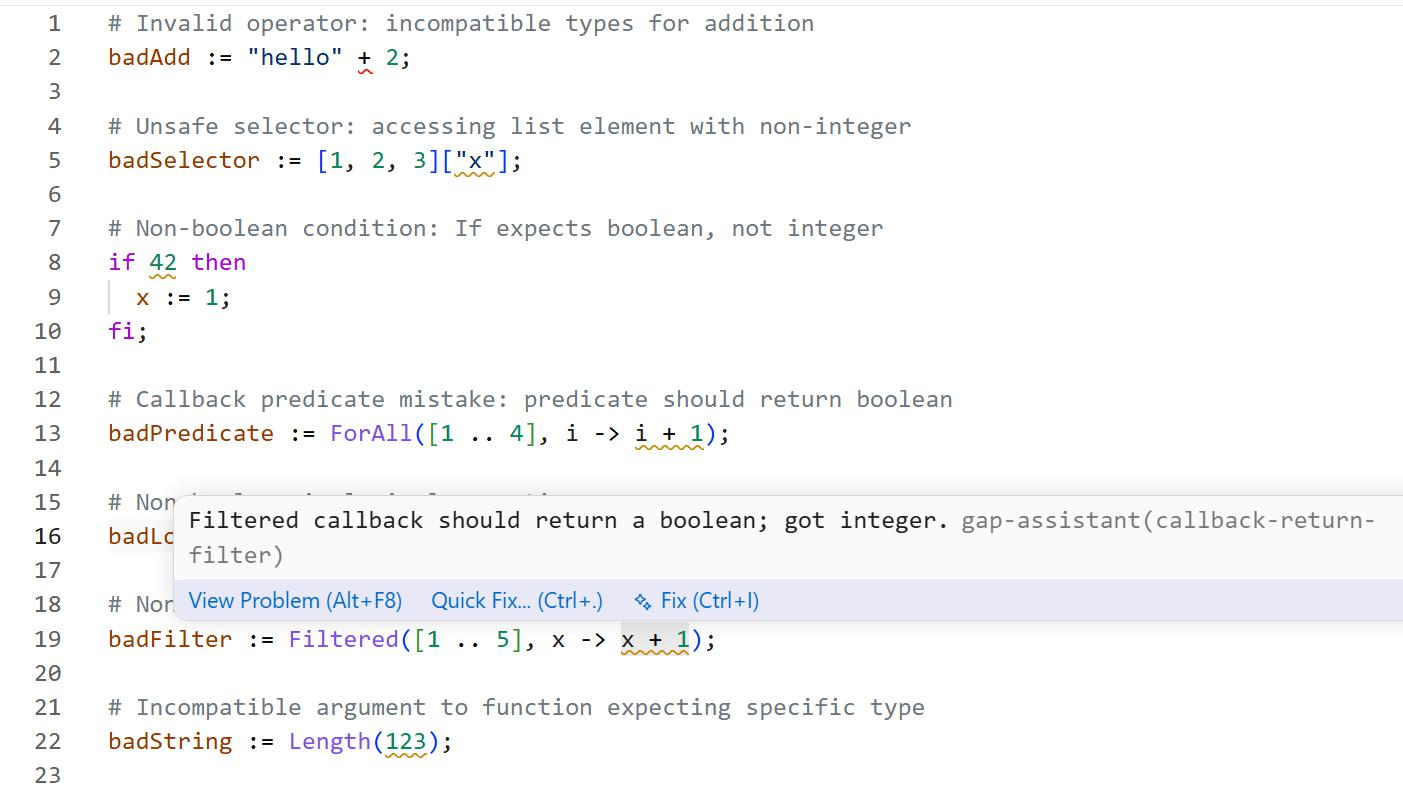
- Static diagnostics for likely GAP runtime errors, including invalid operators, non-boolean conditions, unsafe selectors, incompatible calls, unassigned locals, and callback predicate mistakes.
- Filter-aware reasoning for GAP objects, preserving facts such as
IsGroup, IsPermGroup, IsList, IsPerm, and IsMultiplicativeElementWithInverse.
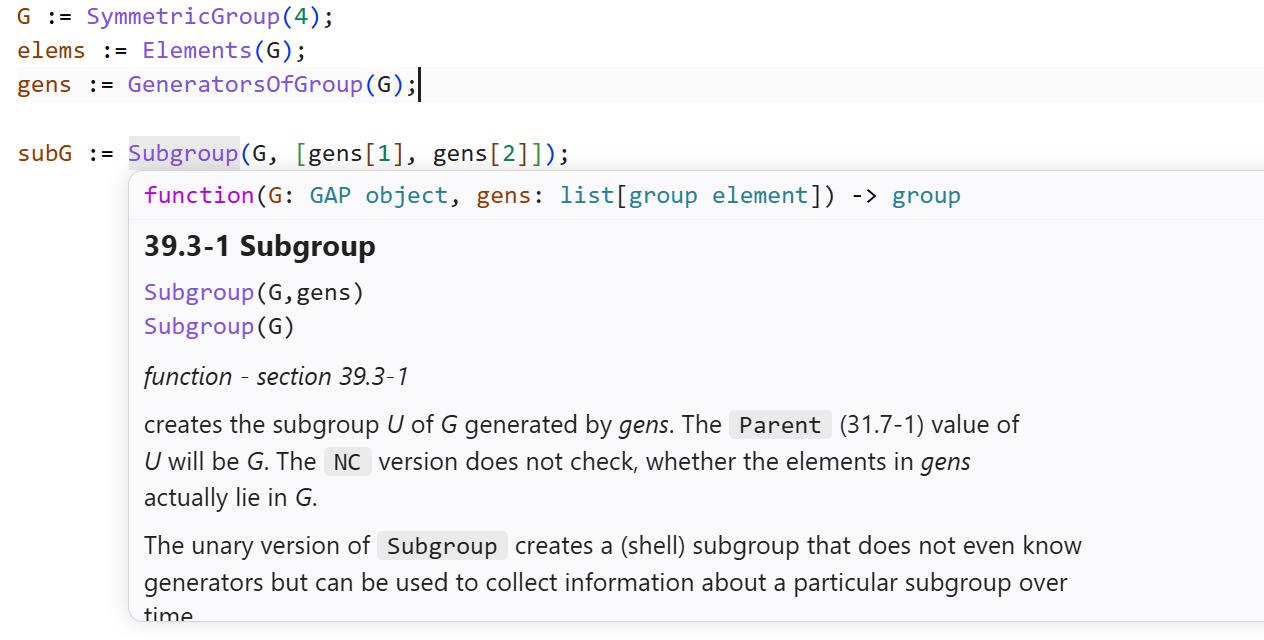
- Mouse hover info
- Reference manual generated from the GAP manual and installed package manuals, with grouped signatures, examples, and local manual links.
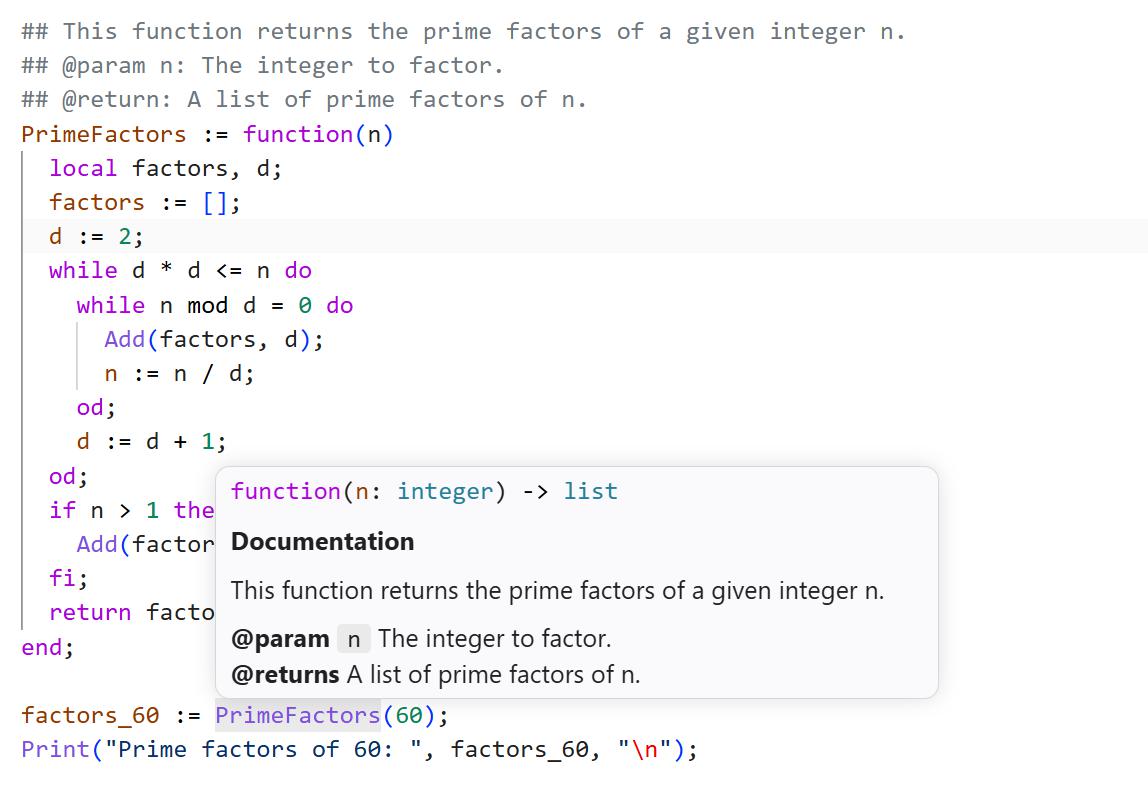
- User
## doc-comment hovers for user-defined functions, including @param and @returns.
Screenshots
Mouse Hovers
on GAP functions
on user-defined functions
on records and lists
Static Analysis
GAP Debugging
Static Analysis
GAP Assist models values by GAP filters rather than by a single OO-style type. For example, SymmetricGroup(4) is inferred as a group satisfying filters such as IsGroup, IsPermGroup, and IsFinite.
The analyzer understands common GAP forms:
- assignments, locals, user functions, returns, conditionals, and loops
- integers, rationals, booleans, strings, lists, records, and permutations
- list and record selectors such as
gens[1], values{[1, 2]}, and rec(...).field
- common constructors and operations such as
SymmetricGroup, Group, GeneratorsOfGroup, Elements, AsList, Size, Length, List, Filtered, and ForAll
- mapper and predicate callbacks such as
i -> Factorial(i)
- branch-sensitive filters from guards such as
if IsString(obj) then
- fallthrough narrowing after terminating guards such as
if not IsString(obj) then return fail; fi;
Examples of useful inference:
G := SymmetricGroup(4);
gens := GeneratorsOfGroup(G);      # list of group generators[group element]
first := gens[1];                  # group element

values := List([1 .. 5], i -> Factorial(i));
info := rec(count := Length(values), first := values[1]);
Permutation arithmetic is recognized:
perm1 := (1,2,3);
perm2 := (2,3,4);
product := perm1 * perm2;          # permutation
Clear mistakes are reported early:
badAdd := "hello" + 2;
badCondition := 3;
badPredicate := ForAll([1 .. 4], i -> i + 1);
Debugging GAP Files
Open a .g file, set breakpoints in the editor gutter, then run GAP: Debug Current File from the command palette, editor title run menu, or editor context menu.
For GAP code cells in notebooks with a GAP kernel selected, use Debug Cell from the run-button dropdown, the cell More Actions menu, or run GAP: Debug Current Notebook Cell from the command palette. The command writes the active cell to a temporary .g file, prepends earlier GAP cells as runtime context, launches the GAP debugger, and maps stack frames and breakpoints back to the notebook cell.
You can also use the Run and Debug view with this launch configuration:
{
  "type": "gap",
  "request": "launch",
  "name": "Debug GAP File",
  "program": "${file}",
  "stopOnEntry": false
}
On Windows, the debugger defaults to wsl gap -q -x 100000. On macOS and Linux, it defaults to gap -q -x 100000.
If GAP is installed somewhere else, set gapCommand and gapArgs in launch.json:
{
  "type": "gap",
  "request": "launch",
  "name": "Debug GAP File",
  "program": "${file}",
  "gapCommand": "gap",
  "gapArgs": ["-q", "-x", "100000"]
}
The debugger runs an instrumented temporary copy of the active source file. Breakpoints map back to the original file, stepping is statement-level for user .g code, and runtime errors are reported at the original source line where possible.
Semantic Object Inspector
When a GAP debug session is paused, open the GAP Objects view in Run and Debug. GAP Assist reads the current bound GAP variables, chooses a useful object to inspect, and renders one inspectable object card. Use the one-click variable buttons at the top of GAP Objects to switch the inspected local or global.
For example, after:
G := SymmetricGroup(4);
selecting G in GAP Objects shows a group card with the GAP view text, known representation, order, generator count, and buttons for lazy computations such as generators, conjugacy classes, character table data, subgroup classes, and elements.
The first semantic inspector supports:
- groups, including permutation groups, pc groups, matrix groups, and finitely presented groups
- permutations
- matrices
- fields, vector spaces, algebras, rings, monoids, and semigroups
- records, lists, strings, booleans, integers, rationals, cyclotomics, and finite-field elements
Expensive or bulky results are computed only when you click an action button. The same debugger-backed inspector also works when you use GAP: Debug Current Notebook Cell, because notebook cells are run through the GAP debugger with previous GAP cells as context.
Local Manual Links
Hover documentation works from bundled generated data. Opening the full local HTML manual requires a local GAP documentation path.
Set one of these VS Code settings:
{
  "gapReference.gapInstallationPath": "C:\\path\\to\\gap-4.15.1"
}
or:
{
  "gapReference.manualPath": "C:\\path\\to\\gap-4.15.1\\doc\\ref"
}
Use gapReference.manualPath when the reference manual is not under doc/ref inside the GAP installation directory. Package manual links use gapReference.gapInstallationPath plus each package manual's relative path, such as pkg/digraphs/doc or pkg/ace/htm.
Settings
gapReference.gapInstallationPath: Optional GAP installation directory for local manual links.gapReference.manualPath: Optional direct path to the GAP reference manual HTML directory.gapReference.hover.maxEntries: Maximum number of reference entries in one hover.gapReference.hover.maxDescriptionLength: Maximum hover description length before truncation.gapReference.hover.wrapColumn: Wrap width for hover paragraphs and signatures.gapReference.hover.maxExamples: Maximum number of manual examples in one hover.gapReference.hover.maxExampleLines: Maximum lines per manual example.gapReference.semanticHighlighting.enabled: Toggle semantic highlighting for documented GAP symbols.
Regenerating GAP Data
The checked-in documentation and declaration data are generated from a local GAP installation, but absolute installation paths are not stored in the packaged data.
Regenerate declaration data:
$env:GAP_ROOT = "C:\path\to\gap-4.15.1"
npm run extract-declarations
Regenerate reference and package documentation:
$env:GAP_ROOT = "C:\path\to\gap-4.15.1"
npm run extract-docs
You may also pass a GAP root or reference manual directory directly:
node scripts/extract-gap-docs.js "C:\path\to\gap-4.15.1"
node scripts/extract-gap-docs.js "C:\path\to\gap-4.15.1\doc\ref"
Set GAP_DOCS_INCLUDE_PACKAGES=0 before running extract-docs if you only want the core reference manual.
Development
Install dependencies, run validation, and package the extension:
npm install
npm run validate
npx @vscode/vsce package
Run the language server directly:
npm run language-server
Open this repository in VS Code and press F5 to launch an Extension Development Host.
Publishing
Create or choose a Visual Studio Marketplace publisher, then package and publish with vsce:
npm run validate
npx @vscode/vsce package
npx @vscode/vsce login shencebebetterme
npx @vscode/vsce publish
If your Marketplace publisher ID is not shencebebetterme, update the publisher field in package.json before packaging.
Notes
GAP Assist is a static helper and debugger integration. It does not replace GAP's own parser, evaluator, library, or method selection. Runtime debugging uses an instrumented temporary copy of the current file, so stepping is focused on user .g statements rather than GAP kernel internals.

