🍷 Design Concept & Philosophy
Burgundy Pro was engineered for developers who demand aesthetics, precision, and comfortable contrast during prolonged coding sessions.
Many red-based themes suffer from harshness and aggressive saturation that cause eye strain. Burgundy Pro avoids excessive red by anchoring the interface in deep charcoal-burgundy tones, layering wine-red interactive surfaces, and balancing syntax with soft rose blush, warm amber, pistachio sage, and gentle lavender.
Key Highlights
- Deep Burgundy Identity: Refined, bespoke background tones (
#1A1015 / #160D12).
- Wine-Red Accent System: Signature status bar (
#702D45), active tabs (#321923), and buttons.
- Superior Syntax Readability: Balanced semantic contrast tuned for 20+ programming languages.
- Zero Visual Fatigue: Validated with a 14.32:1 WCAG AAA contrast ratio.
- Two Tailored Variants: Choose between Burgundy Pro (deep & rich) and Burgundy Soft (velvety & gentle).
🎨 Theme Variants & Previews
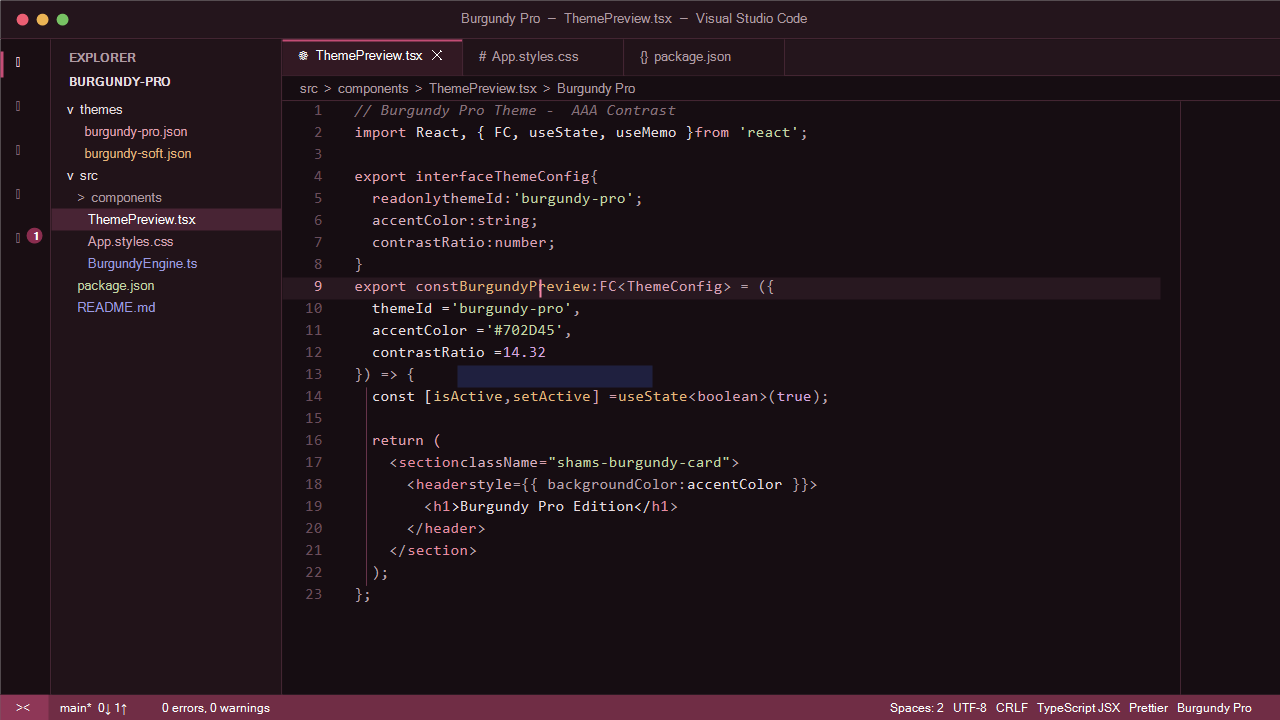
1. Burgundy Pro
The flagship edition with deep, rich burgundy contrast and glowing rose highlights.
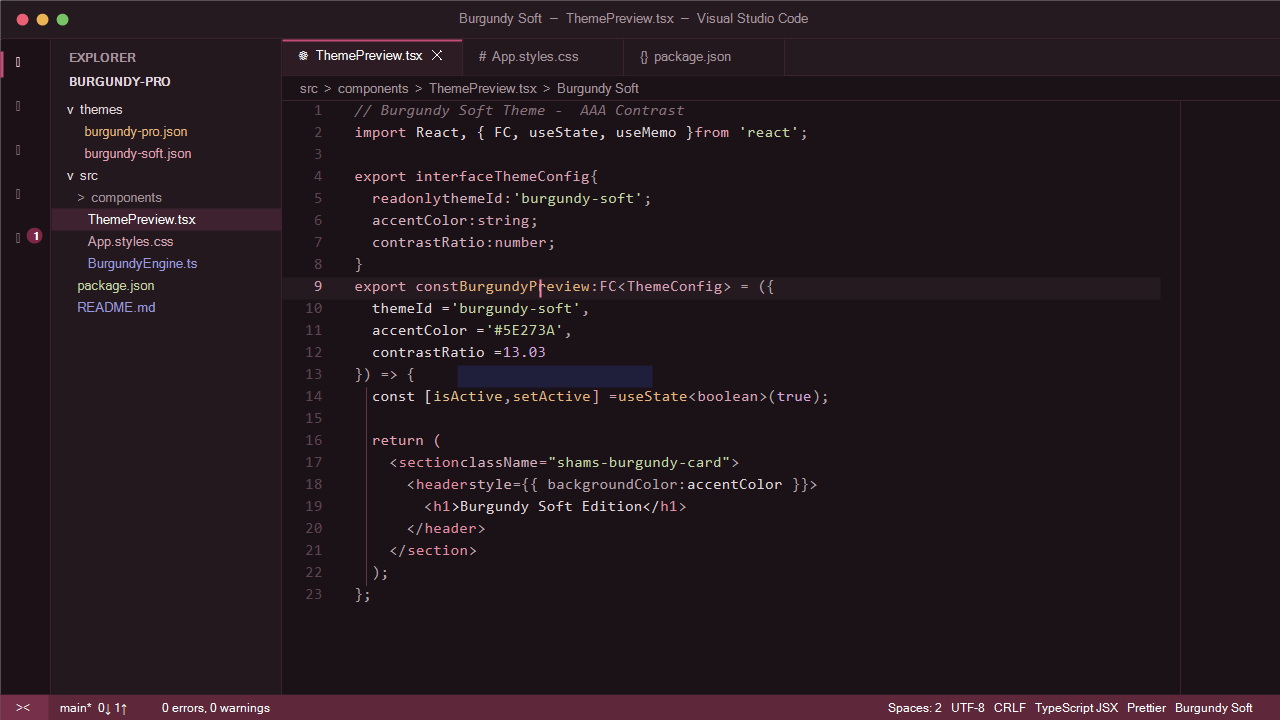
2. Burgundy Soft
A softer, muted charcoal-burgundy edition created specifically for extended, marathon coding sessions.
💎 The Color Palette
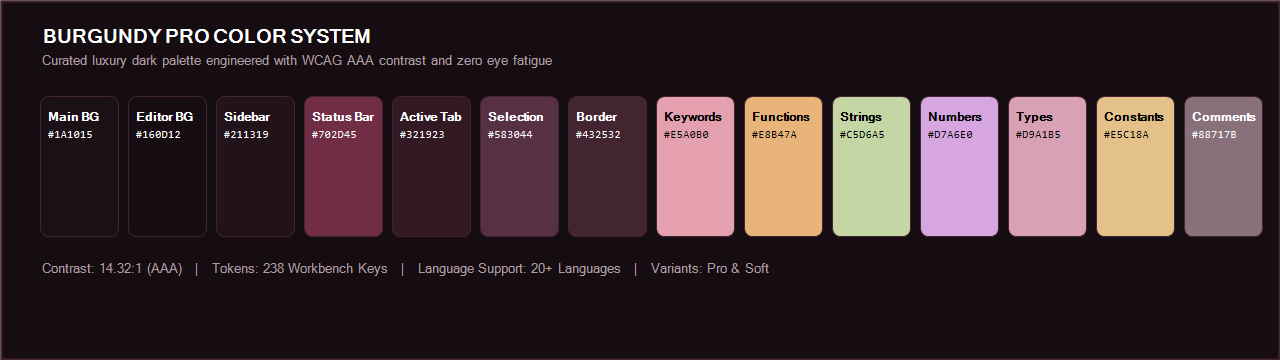
Core Workbench Surfaces
| UI Component |
Hex Code |
Description |
| Main Background |
#1A1015 |
Window & shell surface |
| Editor Background |
#160D12 |
Main coding area |
| Sidebar Background |
#211319 |
File explorer & primary sidebar |
| Activity Bar |
#190E13 |
Primary icon navigation bar |
| Panel Background |
#211319 |
Terminal, output & debug console |
| Title Bar |
#24151C |
Window top frame |
| Status Bar |
#702D45 |
Signature wine-red status bar |
| Active Tab |
#321923 |
Active document tab |
| Inactive Tab |
#211319 |
Inactive tabs |
| Active Line |
#281820 |
Subtle active line highlight |
| Selection |
#583044 |
Selected text highlight |
| Border |
#432532 |
Elegant component dividers |
| Main Text |
#E8DCE1 |
Crisp rose-white foreground |
| Muted Text |
#B09AA3 |
Secondary text & descriptions |
Syntax Highlighting System
| Token Category |
Hex Code |
Swatch |
Visual Role |
| Keywords & Control |
#E5A0B0 |
🌸 |
import, export, return, if, class |
| Functions & Methods |
#E8B47A |
🍯 |
useState, connect(), render() |
| Variables & Parameters |
#E8DCE1 |
🥛 |
channelId, options, response |
| Strings & Characters |
#C5D6A5 |
🍃 |
"https://...", 'application/json' |
| Numbers & Units |
#D7A6E0 |
🔮 |
14.32, 5000, true, false |
| Classes & Interfaces |
#E8B47A |
🏺 |
BurgundyEngine, ThemeProps, Controller |
| Types & Primitives |
#D9A1B5 |
🌷 |
string, number, boolean, Task<T> |
| Constants & Enums |
#E5C18A |
🌾 |
API_ENDPOINT, MAX_RETRIES, READONLY |
| Comments |
#88717B |
🍇 |
JSDoc, inline notes, explanations |
| Operators |
#D7A0AE |
🌺 |
=>, ===, &&, ||, + |
| HTML / XML Tags |
#E58BA2 |
🌹 |
<div>, <header>, <Button> |
| HTML Attributes |
#D6B0C0 |
🪷 |
className, style, onClick |
| CSS Properties |
#D6A4B5 |
🎀 |
background-color, border-radius, font-family |
| CSS Selectors |
#E5A0B0 |
🌸 |
.theme-card, #app, a:hover |
| SQL Keywords |
#D7A0AE |
🍷 |
SELECT, FROM, WHERE, JOIN, ORDER BY |
🚀 Language Support
Comprehensive, fine-tuned token and semantic styling is provided across:
- Web & JavaScript: JavaScript (ES6+), TypeScript, React (JSX / TSX), Vue, Svelte, JSON, YAML.
- Styling: HTML5, SVG, XML, CSS3, SCSS, SASS, PostCSS, Less.
- Backend & Enterprise: C#, ASP.NET Core, Razor, Blazor, PHP, WordPress, Python, Java, C++, Go, Rust.
- Data & Shell: SQL (PostgreSQL, MySQL, T-SQL), Bash, Zsh, PowerShell.
- Documentation: Markdown, MDX, LaTeX, Git Commit messages.
⚙️ Recommended VS Code Settings
For the ultimate Burgundy Pro experience, add the following to your settings.json:
{
  "workbench.colorTheme": "Burgundy Pro",
  "workbench.iconTheme": "vs-seti",
  "editor.fontFamily": "'JetBrains Mono', 'Fira Code', 'Cascadia Code', Consolas, monospace",
  "editor.fontSize": 14,
  "editor.lineHeight": 1.6,
  "editor.fontLigatures": true,
  "editor.bracketPairColorization.enabled": true,
  "editor.guides.bracketPairs": "active",
  "editor.cursorBlinking": "smooth",
  "editor.cursorSmoothCaretAnimation": "on",
  "editor.smoothScrolling": true,
  "editor.renderWhitespace": "selection"
}
📦 Installation
Option 1: Via VS Code Extension Marketplace
- Open Visual Studio Code.
- Press
Ctrl + Shift + X (or Cmd + Shift + X on macOS) to open the Extensions tab.
- Search for
Burgundy Pro.
- Click Install.
- Press
Ctrl + K, Ctrl + T to choose between Burgundy Pro and Burgundy Soft.
Option 2: Via Quick Open
- Press
Ctrl + P (or Cmd + P on macOS).
- Paste the command:
ext install shamsulhaq08.burgundy-pro
- Press
Enter.
Option 3: Manual VSIX Installation
- Download or build the
burgundy-pro-1.0.2.vsix package.
- In VS Code, open the Extensions view (
Ctrl + Shift + X).
- Click the
... menu (Views and More Actions) in the top-right corner.
- Select Install from VSIX... and select the
.vsix file.
Or install via terminal:
code --install-extension burgundy-pro-1.0.2.vsix
🛠️ Marketplace Publishing Guide
To publish or update this extension to the Visual Studio Marketplace:
Verify your Publisher Account:
Ensure you have created publisher shamsulhaq08 on marketplace.visualstudio.com/manage.
Generate a Personal Access Token (PAT):
- Go to dev.azure.com.
- Create a token under Personal Access Tokens with scope:
Marketplace (Manage).
Package the Production VSIX:
npm run package
Upload to Marketplace:
📄 License
This theme is licensed under the MIT License.
| |