3DView (VS Code extension)
View COLMAP reconstructions, 3D meshes, point clouds, 3D Gaussian
splats and 3D point tracks in one interactive Three.js scene, right in the
editor.
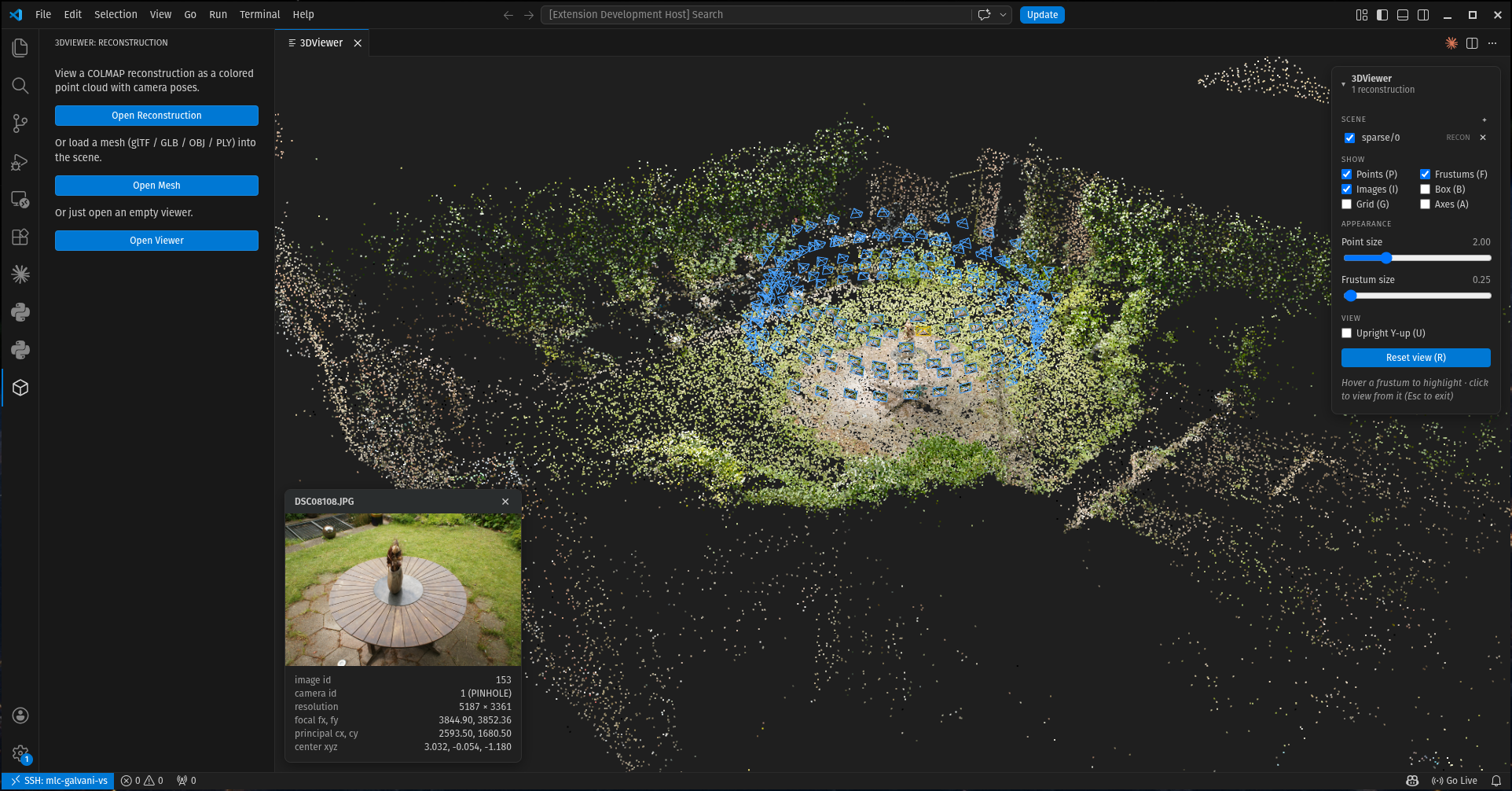
What it opens
- COLMAP reconstructions (
.bin / .txt) — colored point cloud plus camera
frustums, each textured with its source image. Click a frustum to fly into that
camera's point of view.
- Meshes — glTF / GLB / OBJ / PLY, lit and shaded by default, with unlit-albedo
and wireframe modes.
- Point clouds —
.ply without faces. One that carries no colors of its own is
drawn in a color from a shared palette, so several stay tellable apart.
- 3D Gaussian splats —
.ply / .splat / .spz / .ksplat, rendered as real
per-view-sorted splats, as solid ellipsoids, or as bare centers.
- 3D point tracks —
.npz / .npy trajectories, one polyline per tracked point,
with sliders for trail length, opacity, density, line width and temporal smoothing.
- Temporal (4D) items — open several reconstructions, meshes or splats as the
timesteps of one capture: one Scene row with a timeline to scrub or play back.
Open many of them together, then show/hide, rename, remove or nudge each one's
position and rotation from the Scene panel.
Usage
Use the 3DView icon in the Activity Bar (or the Command Palette) to Open
Reconstruction / Open Asset / Open Asset Folder / Open Empty Viewer, then the
Scene panel's + to add more. A COLMAP model is a folder of
cameras/images/points3D (e.g. sparse/0/); an asset is a single mesh, point
cloud, splat or point-track file. Open Asset Folder takes every asset file
directly inside a folder in one go — the way to load a per-frame capture, and the way
to open several files at once over a remote connection, where VS Code's file dialog
can only select one.
You can also drag & drop onto the viewer. Dragging out of VS Code's own Explorer
needs Shift held as you drop — without it VS Code routes the drop to the editor
area — or skip the drag and right-click the file(s) or folder in the Explorer →
Open in 3DView.
| Action |
Input |
| Orbit / zoom / pan |
drag / scroll / right‑drag |
| Fly to a camera's view |
click its frustum (Esc to exit) |
| Reset view |
R |
| Toggle points / frustums / images |
P / F / I |
| Toggle shaded / wireframe / box |
S / W / B |
| Toggle grid / axes / upright |
G / A / U |
| Cycle Gaussians: splats → ellipsoids → points |
E |
The 3DView panel holds the display controls — point size, frustum size / line
width / color, camera field of view and roll, a light / dark / dim theme, and
Render viewpoint, which saves a transparent PNG of the current view at 1× / 2× / 4×.
Elsewhere
Try it without installing anything at the
web demo. This extension is one host of a
shared viewer core; a PyCharm / JetBrains plugin is another. See the
project README for architecture and
development.
License: MIT.

