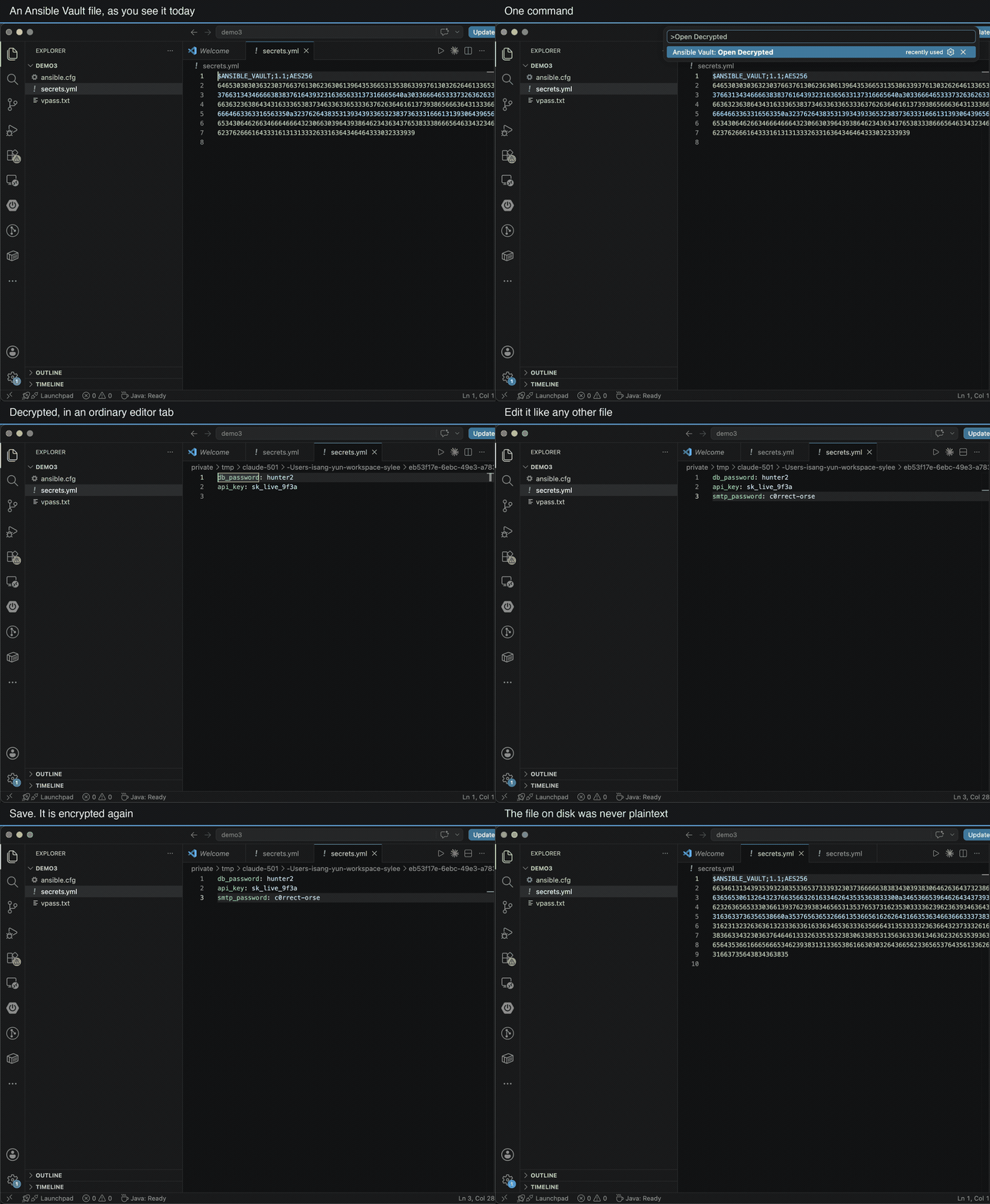
Ansible Vault & Project DoctorEdit encrypted files without a decrypted copy in your project.
Open a vault file, and it opens decrypted, as an ordinary editor tab. Type. Save. It is encrypted again. Your project folder never holds the plaintext, so there is nothing to forget and nothing to accidentally commit. That is the difference. Every other extension for this has you run a decrypt command, which rewrites the file in place and leaves real credentials sitting in your working tree until you remember to run encrypt again. People forget. Then production secrets are in a commit. One thing to knowWhile an editor tab has unsaved changes, VS Code keeps its own backup of the tab's contents so nothing is lost in a crash. For a decrypted vault file that backup contains the plaintext, and it lives in VS Code's storage, not in your project: VS Code removes it as soon as you save or close the tab. No extension can turn
this off for a normal text editor, and So: your repository never sees plaintext, which is the risk that actually bites people. An unsaved tab does leave a copy in VS Code's own folder until you save it. Save when you are done, and there is nothing left anywhere. What it doesOpen decrypted. Encrypt a selection in place. Select a value, and it becomes an inline
Read one value without decrypting the file. Put the cursor on an inline
It tells you when a setting is being ignored. It finds the password the way ansible does. No Python, no ansible, no subprocess. The vault format is implemented directly, so this works in a container, on a fresh laptop, and on Windows, where the others need an ansible on PATH to do anything at all. And: why will this module not resolve?
It resolves from the folder of the file you have open, not the first workspace folder, so the answer matches what you get in a terminal next to that playbook. What it will not doIt never runs a program. It reads and writes files, and that is all. It never deletes or renames a file of yours. A save is written to a temporary file beside the original and moved into place, so a save interrupted halfway cannot leave a broken payload where your secrets were. It keeps the permissions the file already had, rather than deciding for you what a secrets file should be. A file you have made read-only stays read-only, and the save is refused instead. Your password is held in memory for the window only. It is not written to VS Code's secret store, not synced, and not logged. Close the window and it is gone. A password file that is executable is reported, never run: running a program named in a config file, to get at a secret, is not an editor's job. Nothing happens at startup. There is no scan, no watcher, no subprocess. The extension is inert until you ask it for something. Is it right?Checked against ansible-core itself, not against its own idea of the rules:
Measured on ansible-core 2.19.12, against community.general, kubernetes.core,
ansible.posix, containers.podman and fedora.linux_system_roles. The comparison
is FreeFree, and there is nothing to buy inside it. |