Local Reviewer
VS Code extension for local code review with inline comments. Review git diffs, leave comments, hand them off to an AI agent — all without pushing to GitHub.
Note: this extension is my experiment on fully "vibe coding" an app. It is working and I have been using it. It is mostly based from https://github.com/microsoft/vscode-pull-request-github
see quick demo video below
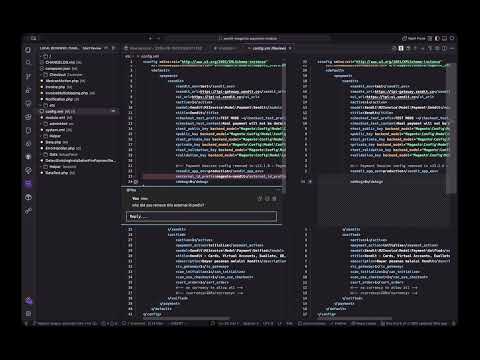
Install Locally
npm run package
code --install-extension local-reviewer-<version>.vsix   # VS Code
kiro --install-extension local-reviewer-<version>.vsix   # Kiro
Reload: Cmd+Shift+P → Developer: Reload Window
Scenarios
1. You review AI-generated code
The agent implemented a feature. You review its changes and give feedback.
Start Review
  → Dropdown: pick what to diff
      "All changes"       everything vs main/master
      "Staged changes"    only git add-ed files
      "Uncommitted"       working tree vs HEAD
      "Pick a commit"     one specific commit
      "Pick a base branch" diff vs another branch
  → First diff editor opens, file list appears in sidebar
Click any line → type comment → Save Comment
Submit Review → paste prompt into agent chat → agent applies feedback
2. AI agent reviews your code — one command
Quick Agent Review
  → Opens all changes diff + copies full context prompt to clipboard
Paste into agent → agent writes comment files → appear instantly in VS Code
Create tmp/review-guidelines.md once per project to set your review style.
3. Multi-round conversation
You comment → Submit → agent replies → reply appears in thread
You reply in thread → Copy Follow-up Prompt → paste → agent continues
4. Resume after restart
Extension auto-restores your session on startup. All comment threads re-appear.
5. Start fresh
New Review → confirm → pick new diff → clean slate
Commands
| Command |
What it does |
| Start Review |
Pick diff scope, open first diff editor + sidebar |
| Quick Agent Review |
All changes + copy full context prompt in one step |
| New Review |
Discard everything, start over |
| Show Changed Files |
Focus the sidebar file tree |
| Submit Review |
Copy feedback prompt to clipboard |
| Export Review |
Save tmp/review-<timestamp>.md |
| Copy Comment |
Copy single comment block |
Next Changed File (alt+]) |
Cycle through files, skipping already-viewed |
| Toggle File Viewed |
Mark/unmark a file as reviewed |
| Copy Review Prompt |
Agent mechanics + diff (for agent to review your code) |
| Copy Follow-up Prompt |
Short "continue the conversation" instruction |
| Copy Full Context Prompt |
Guidelines + mechanics + diff |
The $(comment-discussion) icon in the activity bar opens Local Reviewer. Shows:
- All changed files with M/A/D/R status badges
(N) comment count per file$(pass) icon for reviewed files- Click any file → opens its diff editor
Review Guidelines
Create tmp/review-guidelines.md to set your review style:
- Be strict about error handling — no silent catches
- Prefer explicit types over any
- Flag missing test coverage
- No console.log in production code
Included automatically with Copy Full Context Prompt and Quick Agent Review.
File Layout
tmp/
  local-review.json            ← review session (auto-saved, auto-restored)
  review-guidelines.md         ← your review preferences (you create this)
  review-<timestamp>.md        ← exported reviews
  agent-comments/              ← agent writes new comments here
  agent-replies/               ← agent writes replies here
Agent Protocol
Agent leaves comments by writing files:
New comment: tmp/agent-comments/<any-name>.json
{
  "filePath": "src/api.ts",
  "lineNumber": 41,
  "text": "No error handling here."
}
Reply to comment: tmp/agent-replies/<commentId>.json
{ "commentId": "<id>", "text": "Done. Added try/catch." }
Extension detects files instantly (file watcher) — no reload, no paste needed from the agent side.
How It Works
You                          Extension                        Agent
 │                              │                               │
 ├─ comment on line 42 ────────┤                               │
 │                              ├─ saves to local-review.json   │
 ├─ Submit Review ─────────────┤                               │
 │                              ├─ copies prompt to clipboard   │
 ├─ paste to agent ────────────┼──────────────────────────────►│
 │                              │                               ├─ applies feedback
 │                              │                               ├─ writes agent-replies/
 │  reply appears in thread ◄──┤── file watcher fires ◄────────┤
 │                              │                               │
 ├─ reply in thread ───────────┤                               │
 ├─ Copy Follow-up Prompt ─────┤                               │
 ├─ paste ─────────────────────┼──────────────────────────────►│
 │                              │                               ├─ re-reads, continues
Development
npm run compile     # type-check
npm run watch       # compile on save (use with F5)
npm test            # 131 tests via @vscode/test-electron
F5                  # launch Extension Development Host
See AGENTS.md for full dev/release process.
Roadmap
See docs/ROADMAP.md. Next major feature: MCP server for zero-copy-paste agent integration.


