BCPL Language Server
Language Server Protocol support for Martin Richards' BCPL in Visual Studio Code.
This extension is the successor to the original Python-based bcpl-lsp extension. The language server has been reimplemented in C# on .NET 10 and is bundled directly in the extension — no separate server install is needed.
Features
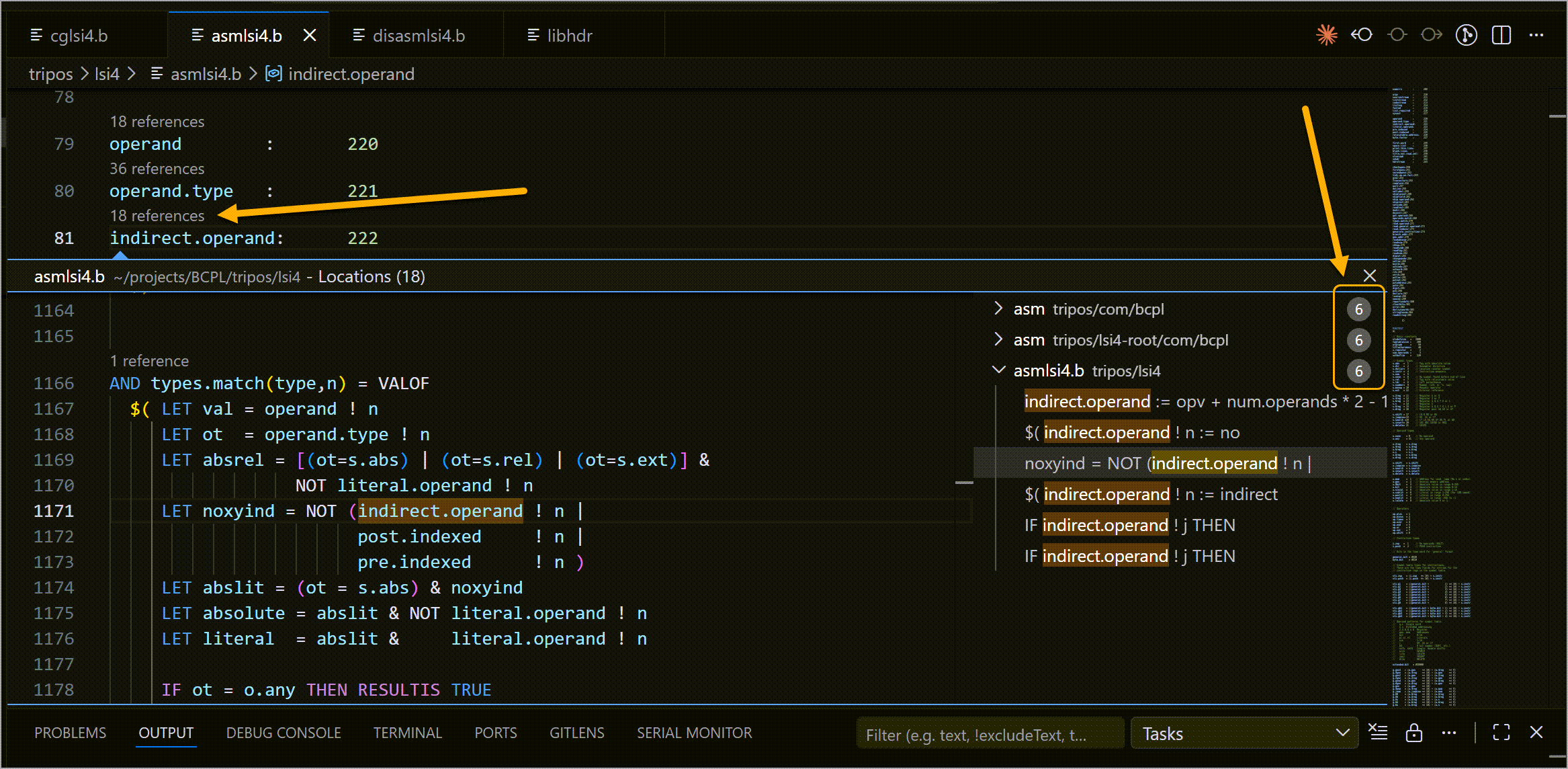
Function references
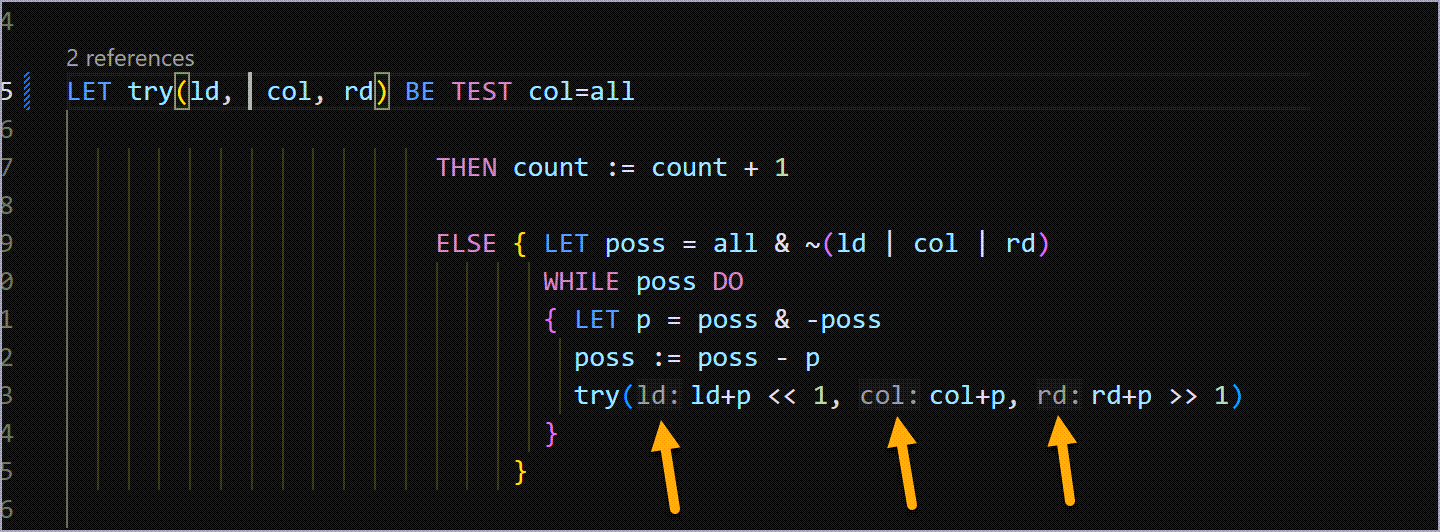
Inlay hints
Output window log

| LSP feature |
What the extension actually does |
| Syntax highlighting |
TextMate grammar for BCPL keywords, operators, strings, and comments. |
| Completion |
Keyword snippets plus identifiers from the current document and the workspace index. |
| Go to Definition |
Jumps to the declaring LET, GLOBAL, MANIFEST, or STATIC symbol across files reachable via GET. |
| Find References |
Lists textual references matched by the symbol resolver; name-based, not type-aware. |
| Hover |
Shows the declaring form of a symbol (LET foo(x,y) = ...) when one can be found. |
| Rename |
Renames the symbol at the cursor across files the resolver considers part of the same program. |
| Document Symbols |
Outline view of functions, globals, manifests, and statics declared in the current file. |
| Workspace Symbols |
Fuzzy search over the in-memory index built from .b / .bcpl files. |
| Signature Help |
Parameter hints for function calls when the declaration is in scope. |
| Call Hierarchy |
Incoming and outgoing call graph built from name-based resolution. |
| Semantic Tokens |
Context-aware highlighting for declarations, parameters, and references. |
| Inlay Hints |
Parameter-name hints at call sites when the callee declaration is in scope. |
| Code Lens |
Reference counts shown above function and variable declarations. |
Diagnostics
Diagnostics are produced by the parser and a small set of semantic checks. Nothing else is reported.
- Error — parser errors (best-effort recovery, so cascading is possible).
- Warning — unresolved symbol references.
- Warning — duplicate
GLOBAL slot numbers within a compilation unit.
- Hint — locals and parameters declared but never referenced (skipped when the same name is declared more than once in a file, to avoid false positives).
- Information — "symbol is defined in X; consider adding a
GET" when an unresolved reference matches a symbol known to the workspace index.
BCPL Dialect
Targets Martin Richards' canonical BCPL with uppercase keywords (LET, IF, THEN, GET, etc.). The parser has been exercised primarily against the Cintcode and TRIPOS sources; other dialects may expose parser gaps.
Requirements
On startup, the extension runs dotnet --list-runtimes and shows an actionable error if a suitable runtime is not found.
Install
Install from the VS Code Marketplace, or download the .vsix from the releases page and run:
code --install-extension bcpl-lsp-<version>.vsix
Upgrading from the Python extension
This extension has the same identifier (se9-solutions.bcpl-lsp) as the earlier Python version, so VS Code treats it as an in-place upgrade. Two things to know:
- The
bcpl.server.path setting has changed meaning. It used to point at the Python bcpl-lsp project directory; it now points at a local BCPL-LSP-CSHARP checkout, and is only needed for development. If you had it set, clear it.
- The Python runtime is no longer required. The .NET 10 runtime is, instead.
What this extension does not do
The language server implements only the features listed above. It does not provide:
- Type checking (BCPL is word-oriented and untyped, so there is no type system to check).
- Formatting, code actions, or folding ranges.
- Interpretation of conditional-compilation markers. The
/*<TAG ... /*TAG>*/ convention used by some BCPL distributions is treated as a plain block comment; symbols inside an inactive branch will still be indexed.
- Macro expansion beyond
MANIFEST constants.
- Precise multi-program disambiguation. When a workspace contains multiple BCPL systems (e.g. Cintcode plus TRIPOS), the server picks the nearest
g/ directory by directory proximity. Unusual layouts may need an explicit bcpl.searchPaths setting.
- Incremental re-indexing. Files are parsed in the background after startup; a large directory tree may take a few seconds to fully index on first open.
Bug reports and dialect samples that break the parser are welcome on the repository issue tracker.
Settings
| Setting |
Default |
Description |
bcpl.server.path |
"" |
Path to a local BCPL-LSP-CSHARP checkout, used to run a development build of the server instead of the bundled one. Leave empty for normal use. |
bcpl.searchPaths |
[] |
Extra directories to search for GET headers (e.g. a g/ directory containing libhdr). When empty, the server auto-discovers g/ directories in the workspace. |
bcpl.logLevel |
"info" |
Server log verbosity: debug, info, warning, or error. |
Commands
- BCPL: Language Server Menu — status-bar entry point for the commands below.
- BCPL: Restart Language Server — stops and restarts the server process.
- BCPL: Show Version — displays the current extension version.
File Associations
The extension associates .b and .bcpl files with BCPL. Extensionless files that open as plaintext are sniffed for BCPL constructs (GET, SECTION, LET, GLOBAL, $(, $)) in the first 4 KB and switched to the bcpl language mode if they match.
Using with Claude Code
The bundled language server also works with the Claude Code LSP plugin. Add a .lsp.json file to your project root pointing at the server DLL shipped with this extension (or a separate dotnet publish output):
{
  "bcpl": {
    "command": "dotnet",
    "args": ["/path/to/bcpl-lsp.dll", "--stdio"],
    "extensionToLanguage": { ".b": "bcpl", ".bcpl": "bcpl" },
    "initializationOptions": {
      "searchPaths": ["/path/to/bcpl-81/cintcode/g"]
    }
  }
}
searchPaths tells the server where to find GET headers (e.g. the g/ directory of a Cintcode tree). Without it the server auto-discovers g/ directories inside the workspace.
The .NET 10 runtime is required on whichever host runs the server.
Version History
| Version |
Highlights |
| 0.4.9 |
README screenshots now render on the marketplace; added Claude Code usage docs. |
| 0.4.8 |
Server reads searchPaths from initializationOptions so non-VS-Code clients can configure header search paths. |
| 0.4.7 |
Code lens click handler fixed; README updated with screenshots. |
| 0.4.6 |
CondExpr/Assignment range fix; postfix !/% after multi-line strings; lock-free workspace index. |
| 0.4.4 |
C# port replaces Python server. .NET 10 runtime required. Adds signature help, call hierarchy, bundled server. |
See CHANGELOG.md for full details.
License
MIT

