This is NOT a collection of VS Code snippets for Svelte.
The extension is a refactoring tool which extracts your selected template markup directly into a name Svelte 5 {#snippet ...} block and replaces the original markup, and other qualifying blocks with {@render ...}.
Simple Example - One prop, no typescript
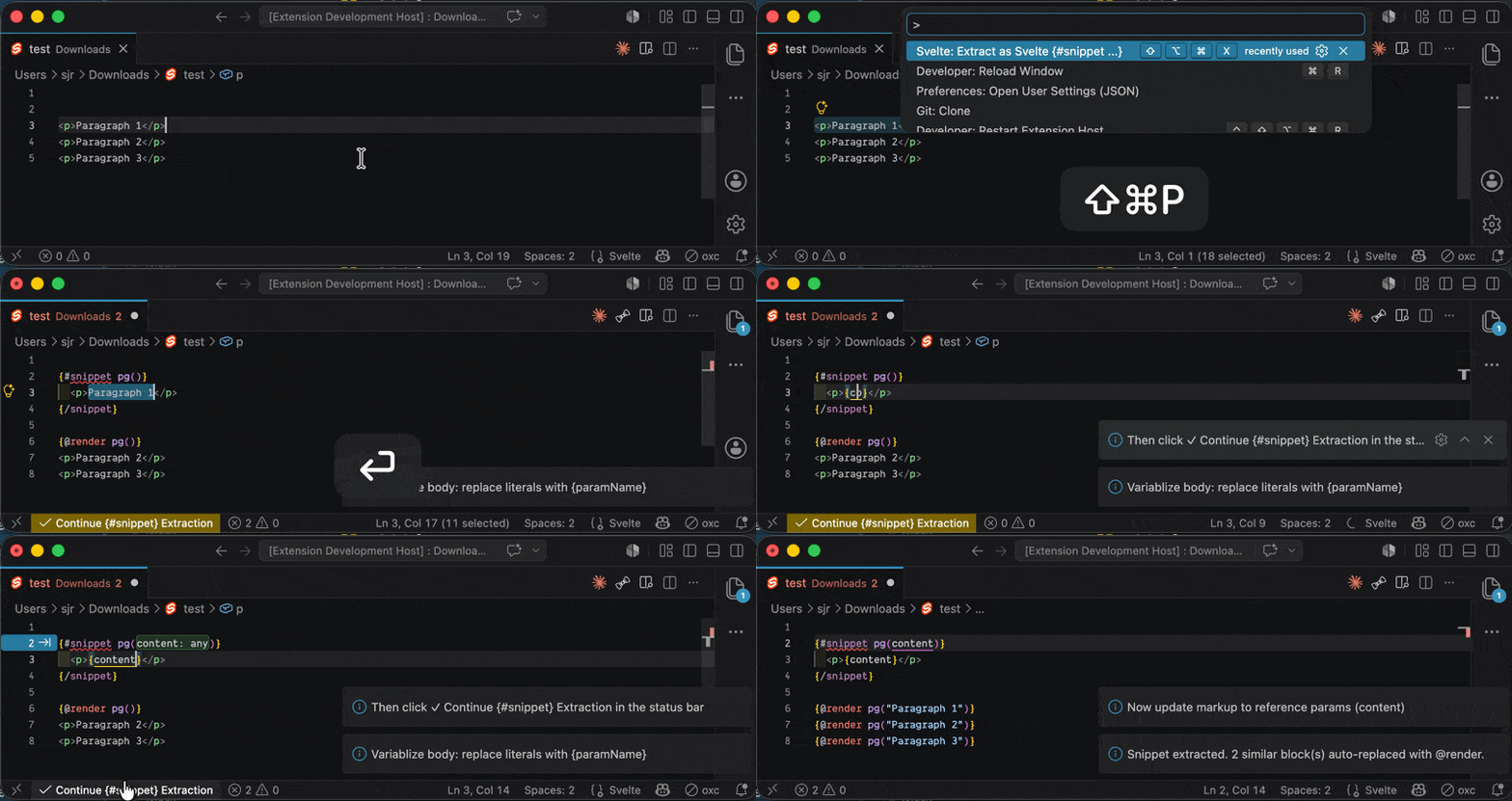
Usage
- You select template markup in a
.svelte file
- You trigger Extension
- Right-click → Select Svelte: Extract as {#snippet}
- or, open the Command Palette (Ctrl/Cmd+Shift+P) → Search for it
- or, trigger your chosen keyboard shortcut see below
- You enter a snippet name
- The #snippet is inserted and you are asked to replace literal values with
{paramName} expressions to variablize the body
- You click "✓ Continue {#snippet} Extraction" in the status bar
- The extension takes over again. The params in the #snippet body are recognized, and automatically added to the snippet signature
- The extension searches for structurally similar blocks (allowing for param differences) and auto-replace them with
{@render(paramName, ...)} with the appropriate arguments
Note: For TypeScript files where params are declared: the params are auto-typed as any.
Complex Example - Multiple props, typescript
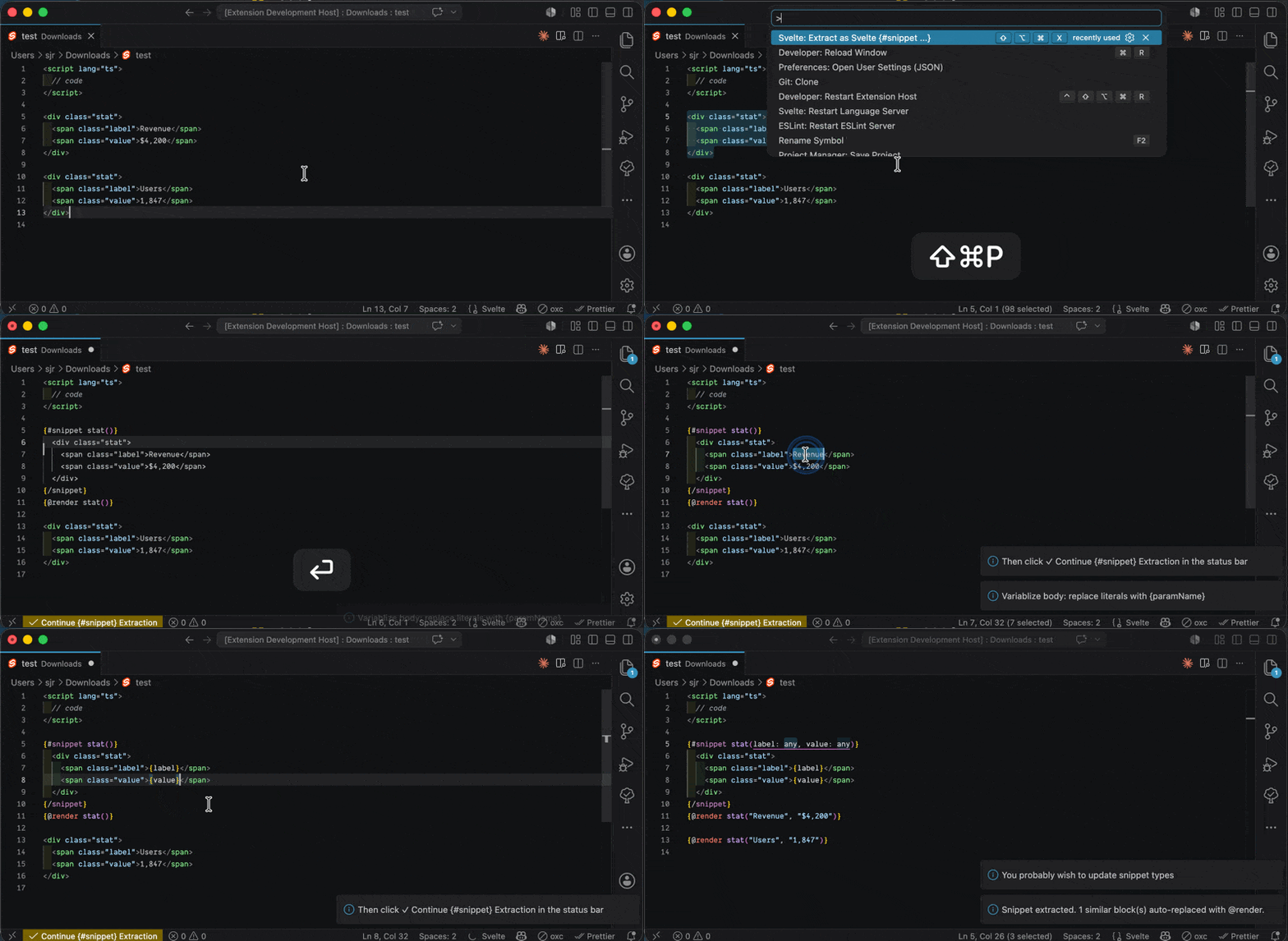
Example
Before — repeated stat blocks:
<div class="stat">
  <span class="label">Revenue</span>
  <span class="value">$4,200</span>
</div>

<div class="stat">
  <span class="label">Users</span>
  <span class="value">1,847</span>
</div>
You select the first <div class="stat"> block, run Extract as #Snippet, name it stat.
The extension inserts the snippet.
You replace Revenue with {label} and $4,200 with {value}
You click ✓ Continue #Snippet Extraction.
The extension updates the snippet call signature and replaces similar blocks with {@render stat(...)}.
After:
{#snippet stat(label: any, value: any)}
  <div class="stat">
    <span class="label">{label}</span>
    <span class="value">{value}</span>
  </div>
{/snippet}

{@render stat("Revenue", "$4,200")}
{@render stat("Users", "1,847")}
Assuming at TS file, the cursor lands on the first snippets param type any and is ready for you to update the types.
Keyboard Shortcut
No default binding is registered to avoid conflicts. Suggested binding:
- Mac:
Cmd+Alt+Shift+X
- Windows/Linux:
Ctrl+Alt+Shift+X
Add to your keybindings.json:
{
  "key": "cmd+alt+shift+x",
  "command": "svelte-extract-snippet.extract",
  "when": "editorHasSelection && resourceExtname == .svelte"
}
Requirements
- Svelte 5 (uses
{#snippet} / {@render} — not compatible with Svelte 4 <slot>)
- VS Code 1.95.0 or later
Notes
- TypeScript detection is based on
lang="ts" on the <script> tag
- Snippet is inserted after the last
</script> tag. Various orders of

