Skip to content
| Marketplace
Sign in
Visual Studio Code>Visualization>Clauswitch — Claude Code Account SwitcherNew to Visual Studio Code? Get it now.
Clauswitch — Claude Code Account Switcher

Clauswitch — Claude Code Account Switcher

Schizm

|
2 installs
| (0) | Free
Switch Claude Code accounts from the status bar, pin them to projects, always see the active one. Switching works for any number of accounts, Pro adds current usage display for all of them. No hidden telemetry. Not affiliated with Anthropic.
Installation
Launch VS Code Quick Open (Ctrl+P), paste the following command, and press enter.
Copied to clipboard
More Info

Clauswitch — Claude Code Account Switcher

Switch Claude Code accounts from the status bar, pin them to projects, and always see which one is active and why.

Part of the Schizm toolkit, developed for VS Code 1.94+ with the Claude Code extension.

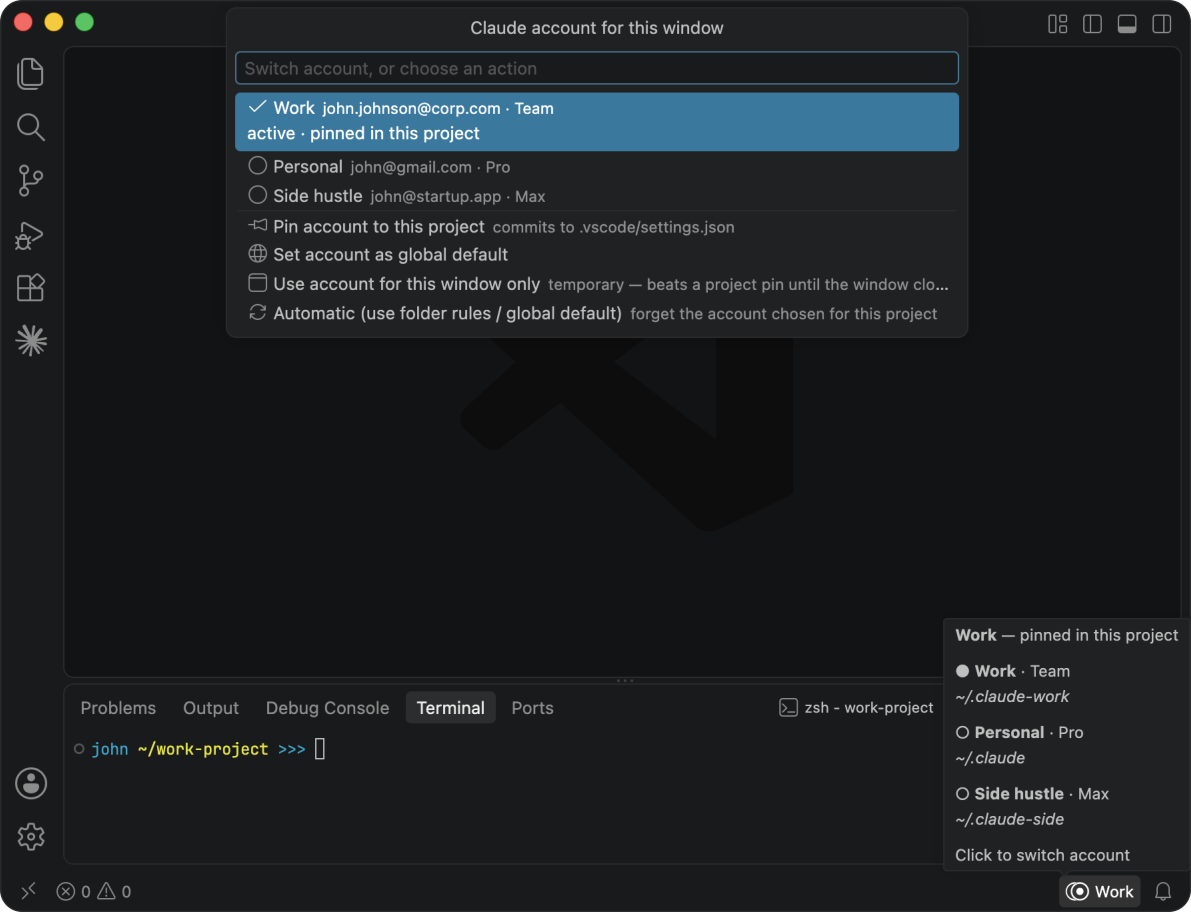
Clauswitch: a VS Code window with the switch picker open, accounts named Work, Personal and Side hustle, the pinned account named in the status bar, and no usage numbers anywhere (free)

How switching works

Claude Code keeps each sign-in in its own config directory, and the CLAUDE_CONFIG_DIR environment variable decides which of them a new session uses. Clauswitch handles the value of that variable for you, per window.

  • One Claude account per VS Code window. Click the status bar item, pick an account, and Claude Code in that window uses it, new terminals included.
  • Pin an account to a project (saved to the project's .vscode/settings.json), set folder rules that pick the account based on the path, keep a global default, or bind an account to this window only. The status bar always says which account is active and why (on hover).
  • Add a second sign-in without signing out of the first. Clauswitch: Set Up a New Claude Sign-in opens a terminal pointed at a fresh config directory and starts Claude Code in it. Run /login there and the new account appears in the picker.

Terminals

Your picks also bind the terminals you open. Terminals that are already open keep the account they started with and keep working with it. VS Code notices the change and offers to relaunch the open ones for you ("The following extensions want to relaunch the terminal to contribute to its environment: Clauswitch"). A claude session already running keeps working on its original account.

What Pro adds

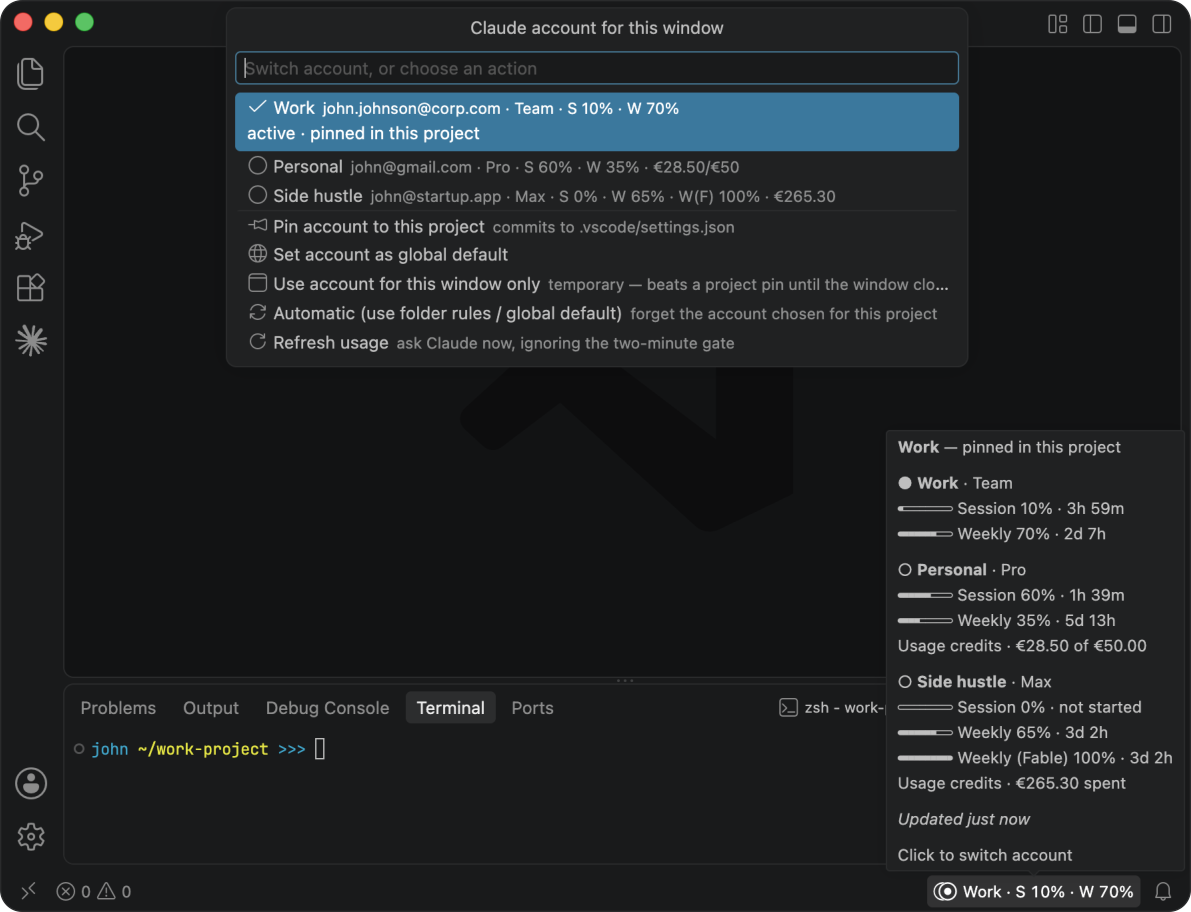
Pro adds up-to-date usage numbers and usage credits for every account:

Clauswitch Pro: the same window with session and weekly percentages beside every account in the picker, the same two numbers in the status bar, and the hover popup listing all three accounts with reset countdowns and usage credits on the two accounts that have them (Pro)

  • Status bar - the active account's session and weekly numbers, with an optional usage credits readout.
  • Hover - every account's limit windows, what is left, when it resets, and usage credits where they apply.
  • Picker - the same numbers beside each account while you choose, usage credits included.

Pro is a one-time purchase with a 30-day money-back guarantee, and one key covers both apps in the Schizm toolkit. Details and pricing at schizm.app/buy.

Support

schizm.app/support · support@schizm.app · FAQ · Changelog

License

Clauswitch is proprietary software and free to use. Use is governed by the Schizm Terms & License Agreement. Read more about the Privacy Policy and Refund Policy.

Not affiliated with, endorsed by, or sponsored by Anthropic. "Claude" and "Claude Code" are Anthropic's trademarks. Clauswitch is an independent tool.

  • Contact us
  • Jobs
  • Privacy
  • Manage cookies
  • Terms of use
  • Trademarks
  • Your Privacy Choices
  • Consumer Health Privacy
© 2026 Microsoft