JSON to Typed Code
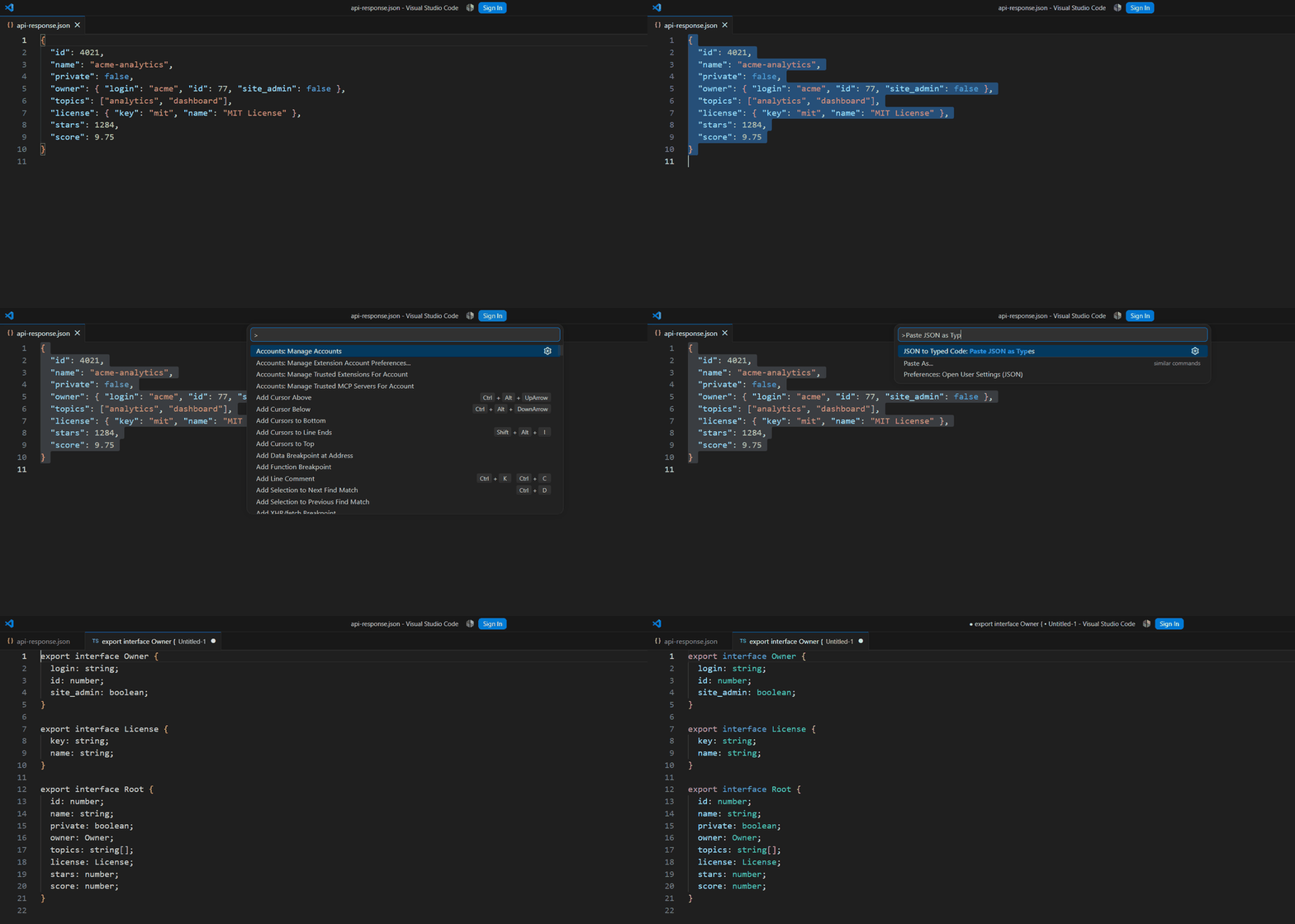
Paste or select JSON in VS Code, get real, idiomatic types back — TypeScript interfaces, Python
(@dataclass or Pydantic v2), Go structs, or Rust serde structs. Deterministic, offline codegen:
no network calls, no Large Language Model (LLM) in the loop, same input always produces the same
output.
Actively maintained, with four output languages kept current with the frameworks people actually
use today: Pydantic v2 (not v1), serde derives for Rust, and encoding/json tags for Go.
Features
- JSON to TypeScript — clean
interface declarations, no any unless the data genuinely
requires it.
- JSON to Python —
@dataclass (simple, stdlib-only) or Pydantic v2 BaseModel
(real runtime validation, Field(alias=...) for renamed keys).
- JSON to Go — structs with correct
encoding/json tags, pointer-wrapped optional fields.
- JSON to Rust — structs with
serde derive(Serialize, Deserialize), #[serde(rename = ...)]
where needed.
- Array unification — an array of objects with slightly different shapes (e.g. some elements
missing a field) is unified into one type, with the inconsistently-present fields marked
optional.
- Structural dedup — two differently-named JSON objects with the same shape (e.g.
billing_address and shipping_address) collapse into a single shared type instead of two
duplicate ones.
- Two naming conventions — idiomatic (each language's own casing convention —
snake_case in
Python/Rust, exported PascalCase fields in Go — with the original JSON key preserved via a
tag/alias) or preserve (keep the original JSON key casing wherever the target language allows
it).
- Handles messy real-world JSON — keys with spaces, hyphens, leading digits, unicode, and
reserved words (
type, class, …) are all sanitized into valid identifiers without losing the
original key.
Usage
Two commands, both available from the Command Palette (Ctrl+Shift+P / Cmd+Shift+P) and the
editor right-click context menu:
JSON to Typed Code: Paste JSON as Types — reads JSON from your clipboard, asks which
target language, and opens the generated code in a new untitled document.JSON to Typed Code: Convert Selection to Types — select a JSON snippet in any open file,
run the command, and the generated types are inserted right after your selection.
Pick your default target language and naming convention under
Settings → Extensions → JSON to Typed Code (jsonTypedCode.defaultLanguage,
jsonTypedCode.namingConvention).
Pricing
Free. Everything above — all five languages, array unification, structural dedup, both naming
conventions — with no account, sign-in, or license key.
How it works (no black box)
- Parse — the JSON text is parsed and validated; malformed JSON produces a clear inline error
message instead of a stack trace.
- Infer — the parsed value is walked into a tree of primitive/object/array/union type nodes.
Array elements are unified at this stage (mismatched fields across elements become optional;
mismatched primitive types become a union;
int + float widens to float rather than a
union).
- Dedupe — the tree is flattened into a registry of uniquely-named types. Two structurally
identical shapes anywhere in the document always collapse to one named type, and nested types
are registered child-before-parent (so a Python class body never references a class that
hasn't been defined yet).
- Emit — the resolved type registry is rendered into the target language's idiomatic syntax by
a per-language emitter (
src/core/emit/).
Every step above (src/core/) is pure, dependency-free TypeScript with no vscode import, so it's
unit-tested directly with Vitest — including tests that feed the generated code back through a
real tsc --strict compile, a real Python interpreter (dataclass) and the real pydantic library
(Pydantic v2), and cargo check against a real serde/serde_json project, not just string
assertions. src/extension.ts is the only file that touches the VS Code API; it's a thin adapter
over that core.
Development
npm install
npm test          # runs the full test suite (Vitest)
npm run typecheck  # tsc --noEmit
npm run build      # esbuild bundle -> dist/extension.js
npm run package    # build + vsce package -> .vsix
See test/ for the suite. Note: Go output is golden-string tested only (no go toolchain in the
CI/dev environment this was built in) — TypeScript, Python (dataclass + Pydantic), and Rust are all
validated by actually running the generated code through their real toolchains.
License
MIT — see LICENSE.

