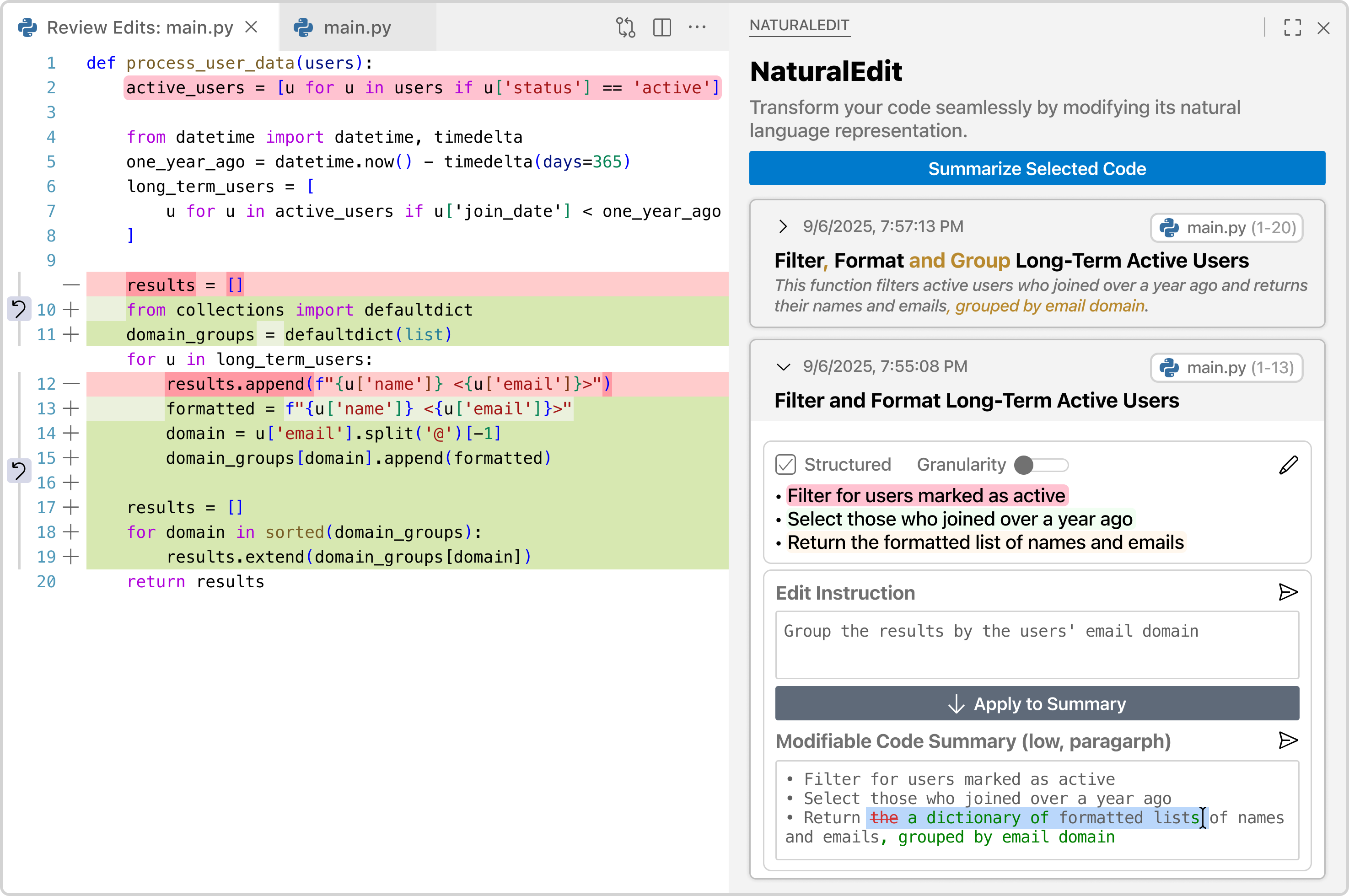
NaturalEdit turns natural language code summaries into a first-class interactive representation — tightly linked to your source code and bidirectionally synchronized with every edit. For detailed information, read our paper.
Features
Adaptive Code Summaries
Select any code region and generate a natural language summary. Adjust the view on the fly:
Structure: toggle between paragraph and bulleted list
Granularity: switch between a high-level overview, a procedural summary, or a line-by-line explanation
Interactive NL–Code Mapping
Hover over any sentence or bullet in the summary to highlight the corresponding code block. Click to navigate directly to that scope.
Intent-Driven Editing
Instead of editing code or the summary manually, describe what you want in plain language. NaturalEdit will:
Propose a summary diff showing exactly how it interprets your intent
Let you review and refine before anything is changed
Generate the code change once you approve
Auto-update the summary with an incremental diff so you can validate the result
Usage
Select a code region in the editor
Click Summarize Selected Code in the NaturalEdit panel
Use the structure toggle and granularity slider to explore the summary
Hover summary segments to trace them to code
Type an instruction and click Apply to Summary
Review the proposed NL diff → approve → inspect the synchronized code diff
Requirements
VS Code 1.89.0 or higher (compatible with Cursor and other VS Code forks)
OpenAI API key with access to gpt-4.1
Known Issues
Summary generation depends on LLM response time and may feel slow on large code blocks
At high granularity, summary diffs can be verbose — the most important changes may require careful reading
Release Notes
1.0.0
Initial release.
Adaptive multi-faceted code summaries
Interactive NL–code mapping with AST-based structural alignment
Intent-driven bidirectional synchronization with incremental diffs