Harbormaster
Every local server you have running, with the project it belongs to.
Other port viewers tell you node (pid 8231). That is the part you already knew.
Harbormaster tells you it is your-app on port 5173, up for three days, still answering.
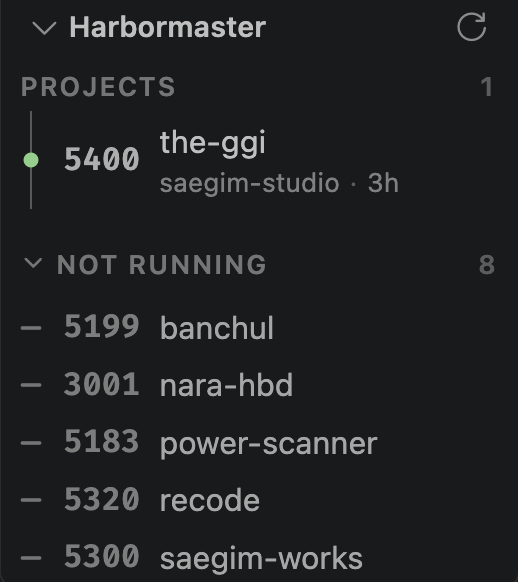
Dev servers used to be started by a person, and a person remembered them. Now a coding agent
starts one in the background and the session ends and the server does not. Three days later
npm run dev says the port is taken and you go looking for lsof -i :5173. That is the trip
this extension removes.
What it shows
One row per listening port:
|
|
| Port |
the port it is listening on |
| Project |
the repository (and folder) the process is actually running in |
| Process |
the executable behind it |
| Uptime |
how long it has been up, with long-running ones flagged |
| Alive |
whether an HTTP request to it actually gets a reply |
| Actions |
open it in the browser, or stop it |
Servers that resolve to a project sit at the top, expanded. Everything else, the system
services and background helpers, is folded away under Other until you ask for it.
How the project name is found
Harbormaster gathers every piece of evidence a process can offer, then reads them in order of
confidence and stops at the first answer.
- Working directory. The most reliable answer, where the operating system will give it.
- Executable path. A dev server usually runs from inside the project it belongs to
(
.../the-ggi/node_modules/.bin/vite).
- Command line. Paths passed as arguments, such as
node /home/me/dev/app/server.js.
- A port declared by an open workspace folder. The editor already knows which folders are
open. If one of them declares a port in
package.json scripts, a Vite or Next config, or a
.env file, the port is matched even when the process says nothing at all. Config files are
read, never executed, and if two folders declare the same port the match is dropped rather
than guessed.
From whichever path the evidence gives, Harbormaster walks up until it finds a .git directory
and uses that folder's name. In a monorepo the repository name alone would be the same for every
server, so the folder inside it is shown alongside (saegim-studio/the-ggi). If there is no
repository, the nearest package.json name is used. If nothing matches, the row stays unnamed
and is folded under Other.
System paths (/usr, /opt/homebrew, /Library, C:\Program Files, ...), your home directory
itself, editor extension folders and toolchain directories (~/.nvm, ~/.pyenv, ...) are never
treated as projects, and that rule applies to every kind of path evidence. Without it a
Homebrew-managed redis shows up as a project called homebrew, which is exactly the noise this
extension exists to remove.
Not running
The evidence above runs in both directions. Once Harbormaster knows which ports your open
folders declare, it also knows which of them nobody is serving, and those get their own
section.
Every other port extension reads the process table, so a project that is not running does not
exist as far as it is concerned. That is the difference between a list of processes and a board
showing where your projects stand.
Each row carries a start button when the folder that declared the port has a script to run: the
script itself if the port came from package.json, otherwise the folder's dev, start or
serve, whichever exists first. The package manager comes from the lock file. The button says
the exact command it will run, so nothing is started that you did not read, and it opens a real
terminal rather than hiding the output.
The section is capped at a few rows so it can never bury the servers that are actually up, and
ports that are already listening are never listed here. It starts open and folds away like
Other if you would rather not see it, and it remembers which way you left it.
Set harbormaster.showDeclared to false to turn the section off.
Is it alive?
An open port does not mean a working app. Harbormaster sends a short HTTP request and reports
one of three answers:
- up. HTTP responded, and the status code is shown.
- listening. The socket accepted the connection but no HTTP reply came, so it is a
non-HTTP server such as a database, or it is hung.
- not responding. The connection was refused.
A row never disappears because a probe failed. It just changes state.
By default only project servers are probed. Set harbormaster.probe.scope to all to probe
everything, or off to only list.
Stopping a server
On macOS and Linux, SIGTERM first so the process gets to clean up, then SIGKILL if it is still
there after a couple of seconds. Only that process is signalled.
Windows has no POSIX signals, so taskkill is used instead, and it ends the process together
with everything it started. A dev server launched through npm run dev therefore takes its child
with it there but not on the other two platforms. The confirmation dialog says which of the two is
about to happen rather than describing one and doing the other.
Stopping cannot be undone, so it passes four checks before a signal is sent. The row has to exist
in the list Harbormaster measured itself, rather than being taken from the panel on trust. It must
not be this editor or one of its parent processes, since the extension host listens on ports too
and would otherwise offer to kill itself. You confirm it. And the process start time is measured
again at that moment, because a dialog can stay open long enough for the pid to be recycled onto
something else.
If any of that cannot be established, Harbormaster refuses to stop rather than trying anyway.
|
Ports |
Process |
Project |
Stop |
| macOS |
yes (lsof) |
yes (ps) |
yes, all four kinds of evidence |
yes |
| Linux |
yes (lsof, falling back to ss) |
yes (ps, /proc) |
yes, all four kinds of evidence |
yes |
| Windows |
yes (netstat) |
yes (Win32_Process) |
yes, evidence 2 to 4 |
yes (taskkill) |
Windows has no standard way to read another process's working directory. That removes one kind of
evidence, not the feature: the executable path, the command line and ports declared by the open
workspace are all available there, and the resolver reads them the same way on every platform. The
Windows collection path has not yet been exercised on a Windows machine.
Settings
| Setting |
Default |
|
harbormaster.refreshInterval |
10 |
Seconds between scans. 0 disables automatic scanning |
harbormaster.probe.scope |
projects |
projects, all, or off |
harbormaster.probe.timeout |
1000 |
Milliseconds before a port counts as silent |
harbormaster.staleHours |
24 |
When to flag a server as long-running |
harbormaster.showDeclared |
true |
Show the Not running section |
harbormaster.statusBar.show |
true |
Show the project server count in the status bar |
Privacy
Harbormaster reads local process information and sends HTTP requests to localhost only.
Nothing leaves the machine. No dependencies, no telemetry.
License
MIT.

