Tidepool Color ThemeA calm, cool dark theme in greens, teals, and blues - built with red-green color blindness in mind. The editor and integrated terminal share one palette. Installation Launch VS Code Quick Open ( Ctrl+P), paste the following command, and press enter.Copied to clipboard |

TidepoolA calm, cool dark theme for VS Code — greens, teals, and blues from a single palette, built with red-green color blindness in mind. It ships in two depths, so you can pick the contrast that suits your screen:
Both share the same syntax colors, and the editor and integrated terminal draw from one palette so the two surfaces read as a single environment.
Install & activateSearch Tidepool Color Theme in the Extensions view ( Then pick a depth any time: Cmd/Ctrl+K Cmd/Ctrl+T → Tidepool or Tidepool Deep. Syntax at a glanceA deliberately restrained mapping — a blue family for structure, a green family for data:
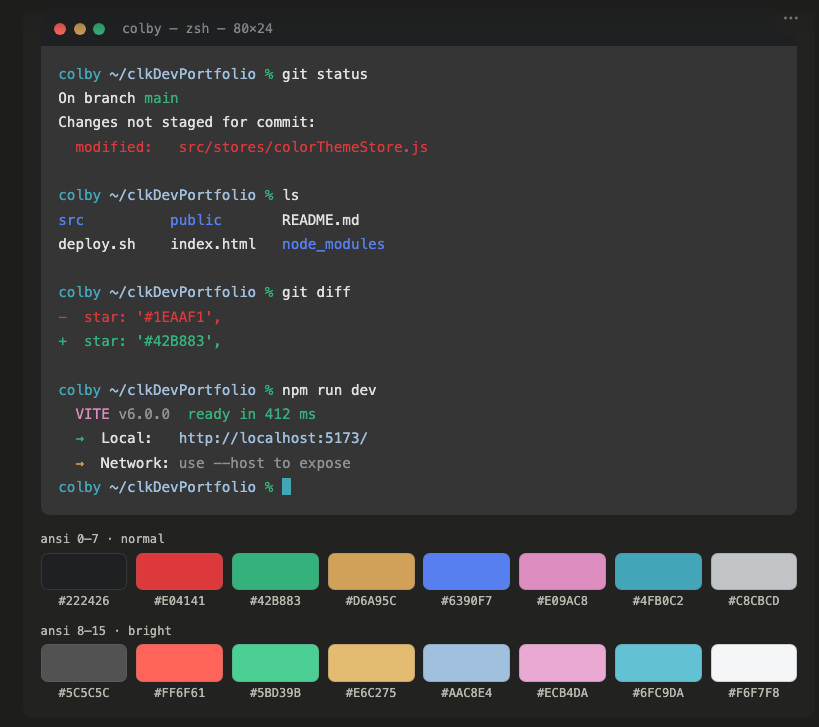
Warm tones stay out of your code: red and amber are reserved for errors and warnings, and the git colors live only in the gutter and diffs. AccessibilityTidepool is designed around red-green color blindness. Syntax meaning rests on brightness and the blue–yellow axis rather than a red-versus-green difference, and the core token colors clear WCAG 2.1 AA contrast against the editor background. Errors use a warm orange instead of pure red, so they stay visible to red-weak vision. Palette
The full 16-color ANSI set powers the integrated terminal. LicenseMIT © 2026 Colby Kauk Designed and built with the help of Claude. |