Gocpy for Visual Studio Code


The official extension for Gocpy, a
statically typed language with the simplicity of Go, the control of C and the
brevity of Python. Gocpy compiles to native code through C.
The extension provides syntax and semantic highlighting, IntelliSense, code
navigation, diagnostics while you type, snippets, run and build commands, and
the Gocpy Dark theme. Most language features come from the Gocpy language
server, gocpy lsp, which ships with the compiler.
Quick start
Install the Gocpy toolchain (0.3.0 or newer):
brew install --cask rusfort/tap/gocpy
# or
curl -fsSL https://raw.githubusercontent.com/rusfort/gocpy/HEAD/install.sh | sh
Linux packages (.deb, .rpm, .apk) are on the
releases page. Run
gocpy doctor to check the C compiler, libgc and the optional Go
toolchain.
Install this extension from a .vsix file: open the Extensions view,
choose ⋯ → Install from VSIX…, or run
code --install-extension gocpy-<version>.vsix.
Open a folder with .gocpy files, or create a new module:
mkdir hello && cd hello && gocpy init example.com/hello && code .
The language server starts automatically. If gocpy is not on your PATH,
set gocpy.path.
Features
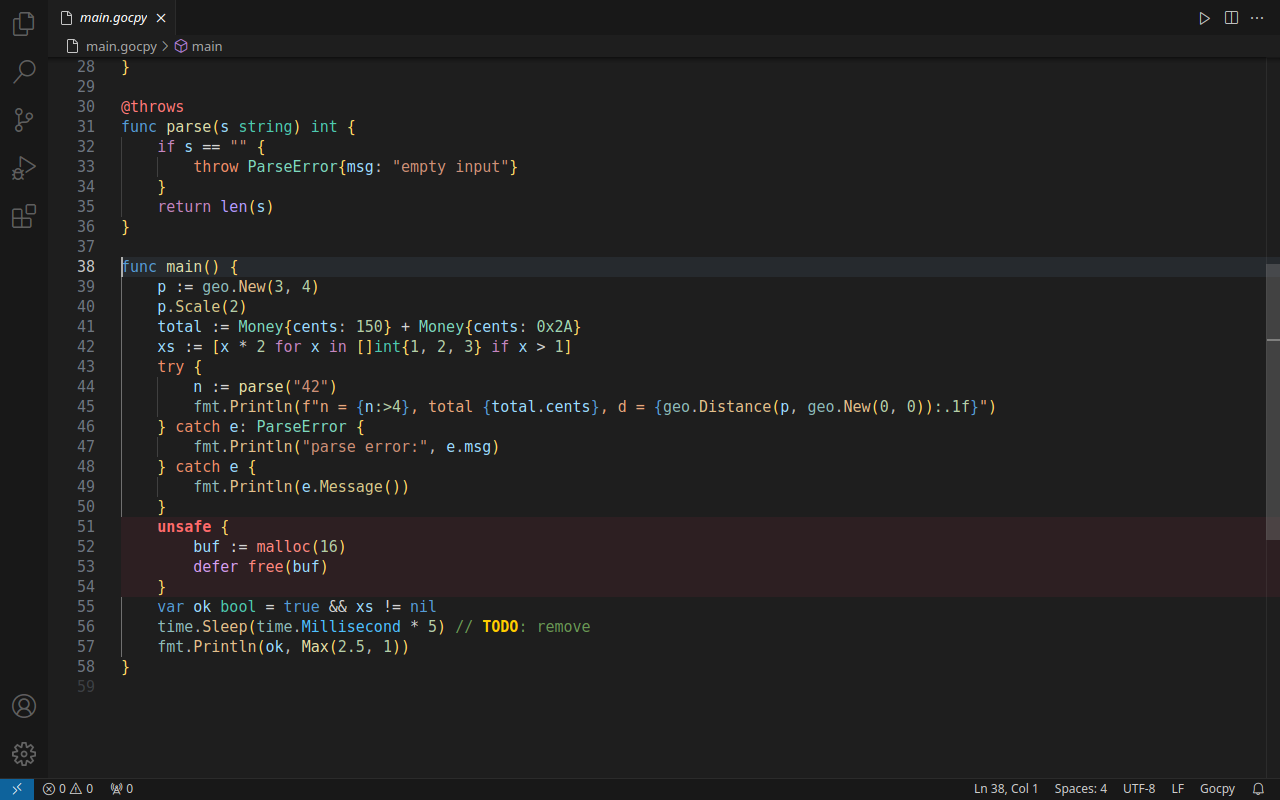
Syntax and semantic highlighting
- A TextMate grammar for keyword groups, f-strings with embedded expressions
and format specs, number literals, annotations and intrinsics,
//gocpy:
directives, and TODO / FIXME markers.
- Semantic highlighting from the language server distinguishes 25 token
types. Function declarations and calls, methods, operator methods,
package members, type parameters, constraints, fields, and pointer
operators each get their own color. So do functions available only in
unsafe blocks.
- The background of
unsafe { … } blocks is tinted, so manual memory
management stands out.
- The Gocpy Dark theme reproduces the colors of the Gocpy IDE. In other
themes, Gocpy tokens fall back to the standard semantic types, such as
function, type and namespace.
IntelliSense
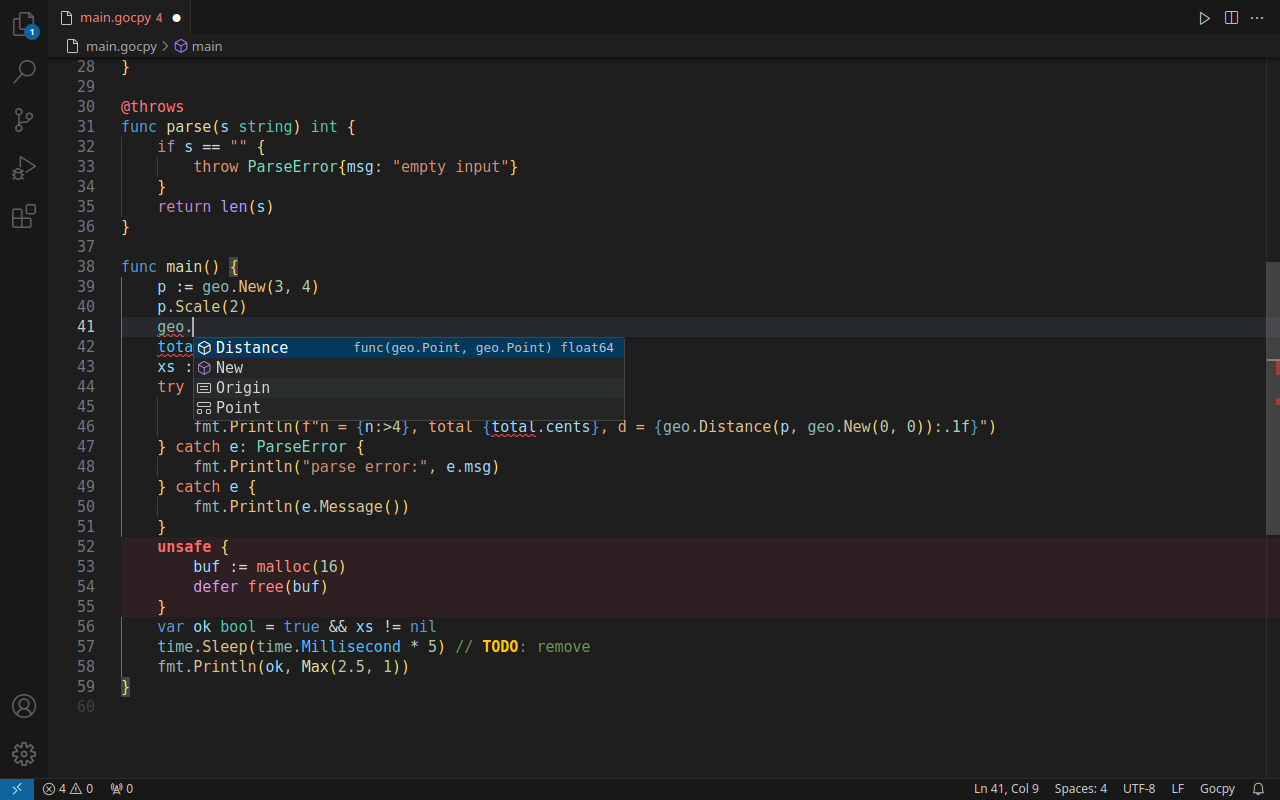
- Completion: all keywords with snippets, annotations after
@, built-in
types and functions, local names, members of packages and types after .,
and import paths (standard library, packages of the module, dependencies,
and Go files of the package directory). Functions that work only inside
unsafe are suggested only there.
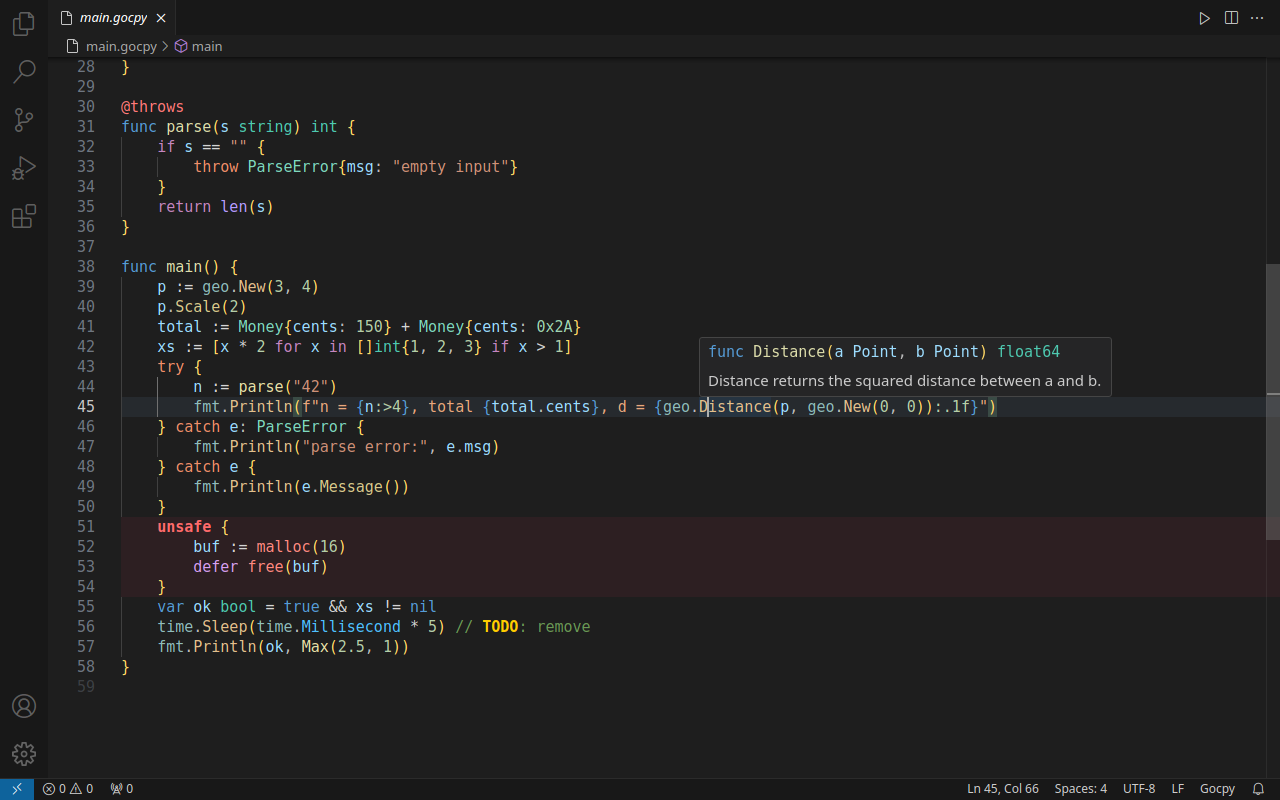
- Hover: signatures and documentation comments of Gocpy declarations and
of Go functions used through the Go bridge, plus reference documentation for
keywords, built-in types and functions, and annotations.
- Signature help: parameters of the current call, including every
variant of an
@overload set.
Code navigation
- Go to Definition and Go to Type Definition across packages of the
module and module dependencies. They also lead into Go sources: Go modules
from
require.go and Go files imported with import "./file.go".
- Find All References, document highlights and Rename Symbol
across the workspace, including struct fields in composite literals and
methods.
- Call Hierarchy: incoming and outgoing calls, across packages.
- Outline and Go to Symbol in Workspace.
Diagnostics
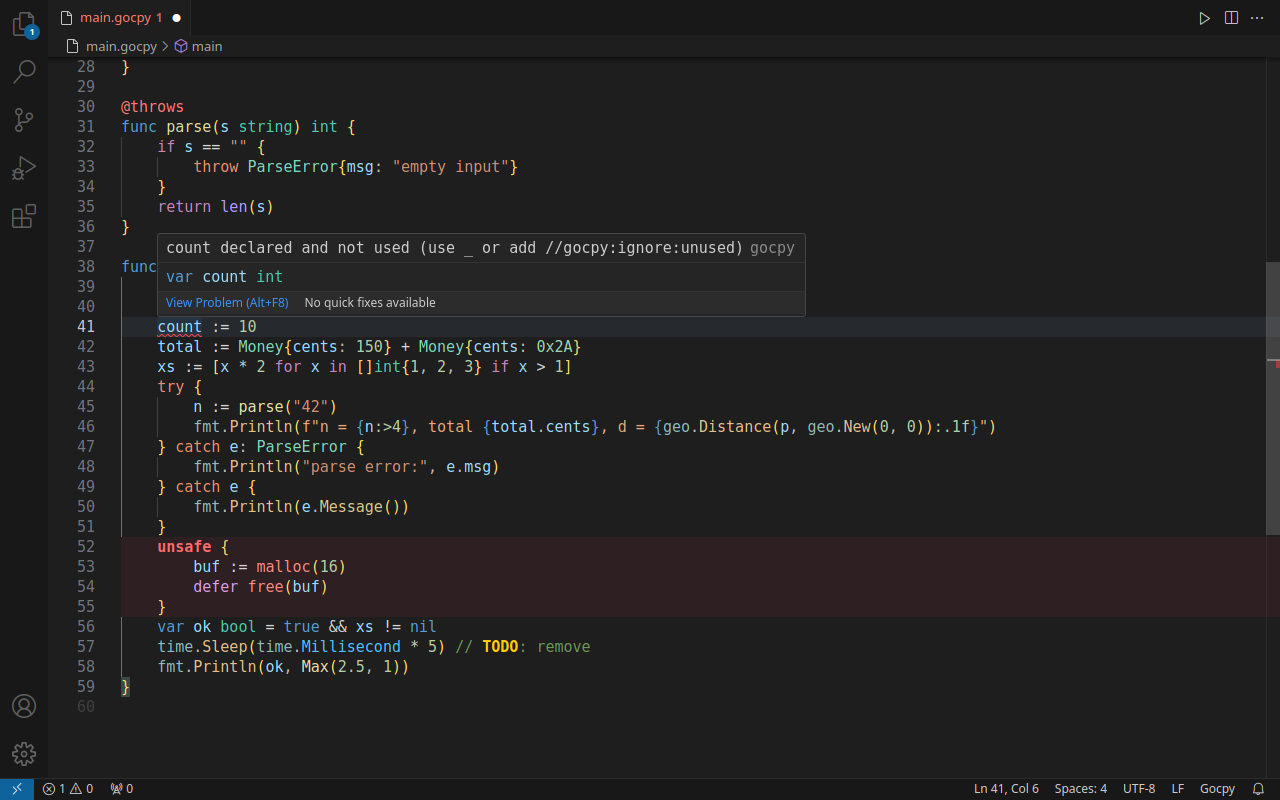
Errors appear while you type, not only on save. All errors in a file are
shown, not just the first one. The checks cover syntax, types, imports and
modules, and Gocpy's strict rules: no shadowing, no unused variables or
imports, mandatory @throws and @overload. Analysis is error-tolerant, so a
syntax error in one function does not break highlighting and navigation in
the rest of the file.
Run, build and check
The ▶ button in the editor title runs the current package. The commands
below run gocpy run, gocpy build and gocpy check for the package of the
active file in an integrated terminal named Gocpy.
Snippets
| Prefix |
Inserts |
main |
Package main with a main function |
meth, gfunc |
Method, generic function |
tfunc |
Function annotated with @throws |
ofunc, opfunc |
Overloaded function, operator method |
struct, iface |
Struct and interface types |
fori, forin |
Counted loop, for i, x in xs loop |
iferr |
if err != nil { … } |
tcf |
try / catch / finally |
comp |
List comprehension |
fs |
f-string |
ignore |
//gocpy:ignore:unused directive |
Keywords such as func, if, for, switch, select, try and unsafe also
expand into snippets from the completion list.
Requirements
- VS Code 1.82 or newer.
- gocpy 0.3.0 or newer for the language server. With an older version or
without
gocpy, the extension still provides the grammar, theme and
snippets.
- To build and run programs: a C compiler (gcc or clang) and the Boehm GC
(
libgc).
- For Go dependencies and Go files: the Go toolchain, version 1.21 or newer.
Commands
| Command |
Description |
| Gocpy: Run Package |
Build and run the package of the active file (gocpy run). |
| Gocpy: Build Package |
Build a native binary (gocpy build). |
| Gocpy: Check Package |
Parse and type-check without building (gocpy check). |
| Gocpy: Restart Language Server |
Restart gocpy lsp, for example after updating the compiler. |
| Gocpy: Use Gocpy Dark Theme |
Switch the color theme to Gocpy Dark. |
Settings
| Setting |
Default |
Description |
gocpy.path |
"" |
Path to the gocpy executable. When empty, it is looked up in PATH, /opt/homebrew/bin, /usr/local/bin and ~/go/bin. |
gocpy.languageServer.enabled |
true |
Enable the language server. |
gocpy.unsafeHighlight |
true |
Tint the background of unsafe { … } blocks. |
gocpy.suggestTheme |
true |
Offer the Gocpy Dark theme the first time a .gocpy file is opened. |
gocpy.trace.server |
off |
Trace the language server protocol: off, messages or verbose. |
Customizing colors
The color of unsafe blocks is a theme color:
"workbench.colorCustomizations": {
  "gocpy.unsafeBackground": "#3a1d2280"
}
Semantic token colors can be changed in any theme:
"editor.semanticTokenColorCustomizations": {
  "rules": {
    "funcCall:gocpy": "#dcdcaa",
    "typeParam:gocpy": { "foreground": "#e5c07b", "italic": true },
    "unsafeFunc:gocpy": "#f48771"
  }
}
The full list of token types is shown under Feature Contributions → Semantic
Token Types on the extension page.
Troubleshooting
- No completion or navigation. Check that
gocpy version prints 0.3.0 or
newer and that gocpy.path points to it. Then run Gocpy: Restart
Language Server.
- Logs. Open View → Output and select Gocpy. Set
gocpy.trace.server to verbose to log every request.
- Go packages are not resolved. Run
gocpy doctor and make sure Go 1.21+
is installed. The first analysis of Go dependencies builds the Go bridge
and may take a few seconds; later results are cached.
Known limitations
- The extension is distributed as a
.vsix file and is not yet published on
the Visual Studio Marketplace.
Feedback and contributing
Bug reports and feature requests are welcome in
GitHub Issues. The extension lives
in editors/vscode
of the Gocpy repository, and the language server is in
internal/lsp.
Release notes
See the CHANGELOG.
License
MIT
| |

