Codex Context Lens
Understand your Codex usage without leaving VS Code.
Local token counters, context insights, visible-content breakdowns and quota snapshots — with no API key or telemetry.
Status: early preview · Windows validated · MIT · Marketplace publication pending.
Independent community tool. Not affiliated with or endorsed by OpenAI.
中文说明 · Privacy · Support
See where your context goes
- Live dashboard: context gauge, input/output totals, cached input and request history.
- Visible content breakdown: history, file reads, tool output and other logged text.
- Quota snapshots: usage windows and reset times when Codex includes them in local logs.
- Local by design: no account sign-in, API key, network requests or telemetry from this extension.
The Explorer sidebar view updates existing numbers and chart elements. The status-bar hover automatically synchronizes changed data in a fixed five-second window. Identical content is not republished. Stable VS Code APIs do not expose a status-bar mouse-enter event: this is background synchronization, not an on-hover read. Native tooltip replacement may still redraw; the live sidebar updates individual elements. Set codexContextLens.autoRefreshHover to false only if you prefer a manual snapshot.
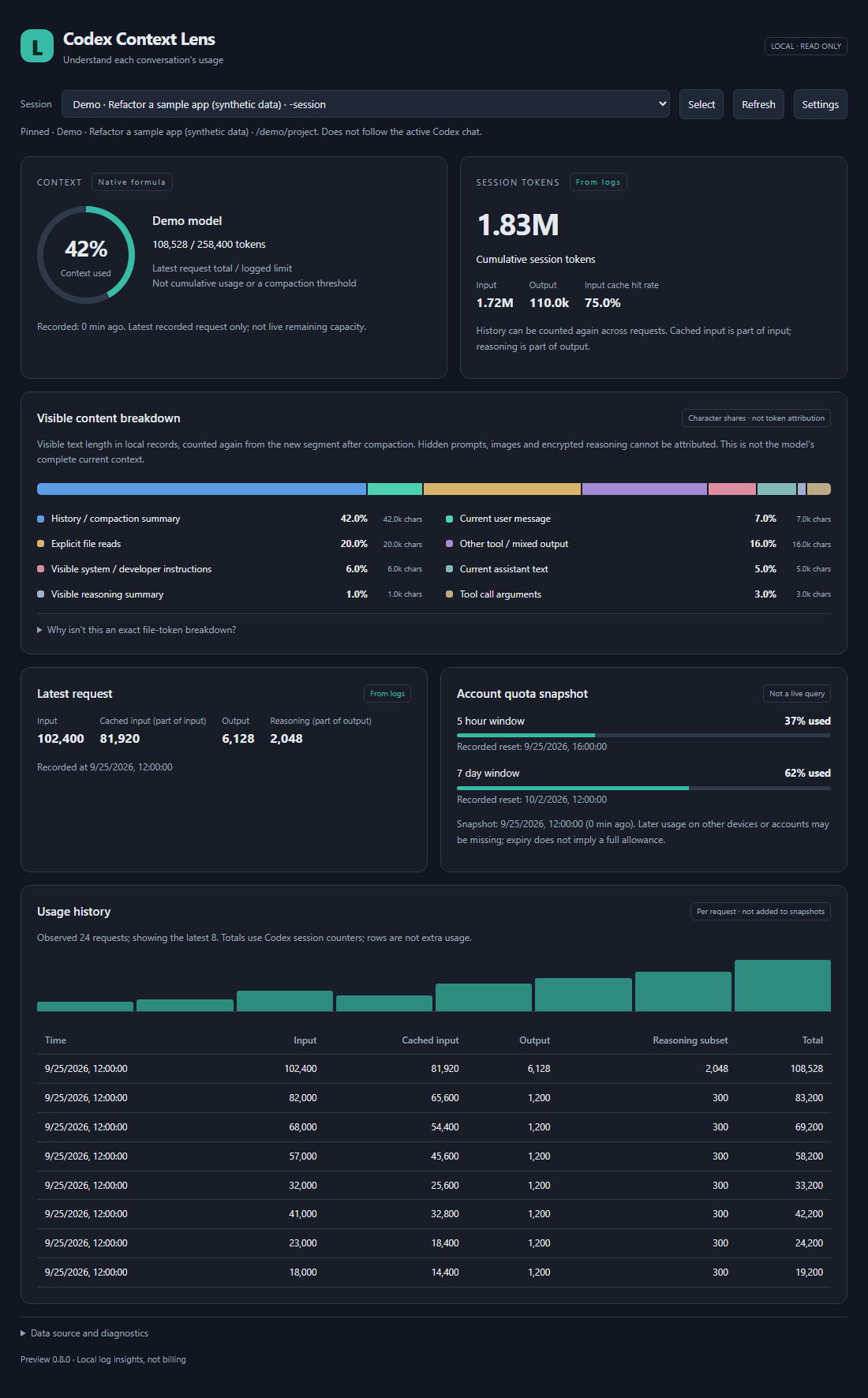
Illustrative data only. English interface shown; Chinese screenshots are available in the Chinese README.
Get started
- Build a VSIX from this repository using the development commands below, then run Extensions: Install from VSIX… in desktop VS Code. This repository has not yet been published to Marketplace.
- Click Codex Context Lens in the bottom status bar to open the Explorer sidebar view.
- For the larger dashboard, run Codex Context Lens: Open Usage Dashboard from the command palette.
- Use the session picker to pin a conversation when working with several chats.
Codex must have written local session logs. Startup reads existing logs; no new model request is needed. Automatic selection prefers the current workspace. If there is no matching conversation, the latest main conversation is shown with a source notice. It does not follow the official Codex chat selection. Background subagent sessions are excluded from automatic selection.
The interface supports English and Simplified Chinese. It follows the VS Code display language by default; other display languages use English. Set codexContextLens.language to en or zh-CN to override dashboard, picker and hover language. Command and settings labels follow the VS Code display language. Session titles and log content are never translated.
Upgrading from an earlier preview? Follow the installation and migration guide to avoid duplicate entries.
What the numbers mean
| Metric |
Interpretation |
| Context usage |
Latest recorded total tokens divided by the logged context window, capped at 100%. Matches the locally tested Codex indicator formula; not a live server reading. |
| Input, output and total tokens |
Counters recorded by Codex. Cached input is part of input; reasoning output is part of output. |
| Content breakdown |
Shares of visible text measured in UTF-16 units. Not per-source token accounting. |
| Account quota |
Last quota snapshot in the selected log. It can be stale and may omit other devices or accounts. |
Hidden instructions, images, server-side trimming and unlogged content cannot be reconstructed. Cumulative tokens are consumed across requests and are not the size of the current context. Log formats can change between Codex releases. See accuracy notes.
Configuration
| Setting |
Default |
Purpose |
codexContextLens.language |
auto |
Follow VS Code, or select en / zh-CN. Changes update open views without clearing the pinned session. |
codexContextLens.codexHome |
Empty |
Uses CODEX_HOME, otherwise ~/.codex. Set the parent of sessions, not the sessions directory itself. |
codexContextLens.refreshSeconds |
15 |
Fallback check interval when filesystem notifications are unavailable or missed. |
codexContextLens.autoRefreshHover |
true |
Automatically synchronize changed hover content in a five-second window. Disable for a manual snapshot; the sidebar stays live. |
codexContextLens.maxSessions |
80 |
Recent session list size. Workspace matching can search older main conversations. |
Only the selected log is parsed fully. File notifications are coalesced and reads are incremental. Archived sessions are not currently included. Select Auto to release a pinned session.
Compatibility
- Desktop VS Code 1.96 or later; no proposed API flags required.
- Windows: automated parser, lifecycle, filesystem and headless UI checks have been run. The maintainer has accepted the current preview experience, including the documented native-hover redraw limitation.
- macOS, Linux, WSL and SSH: designed for the remote/local extension-host filesystem, but not yet validated on real installations. Browser-only VS Code is not supported.
- In remote windows, install the extension on the remote host and configure the remote Codex home.
Troubleshooting
No data? Check the selected session, Codex home and the dashboard's diagnostics. This extension only sees local logs available to its extension host. Hide/show the bottom status bar through VS Code Appearance settings. After a local VSIX upgrade, use Developer: Reload Window.
No seven-day window? It must be present in the log. Window duration determines the label; primary and secondary are not hard-coded to five hours and seven days. Expired snapshots do not become a guessed fresh allowance.
More help: Troubleshooting · Report a bug · Request a feature.
Privacy and license
Session text is processed locally to compute statistics. The extension may display titles and paths; do not include those in public screenshots. It does not read auth.json, send requests to a model or alter Codex logs. See PRIVACY.md.
MIT license. OpenAI and Codex names identify the product this community extension observes.
Development
Node.js 22+ is recommended for development. Runtime has no third-party dependencies.
npm ci --ignore-scripts
npm test
npm run package:local
The package identity is ruoyu-li.codex-context-lens. Building does not publish or install the extension. See the contributor guide, release checklist and changelog. The repository name is CodexContextLens; the product name is Codex Context Lens.

