Time Tracker for Azure DevOps
Log hours against work items. See your month at a glance. Slice org-wide reports for billing and capacity, with role-based access you control from one settings page. All without leaving Azure DevOps and without paying per seat.
Built for two audiences
For developers
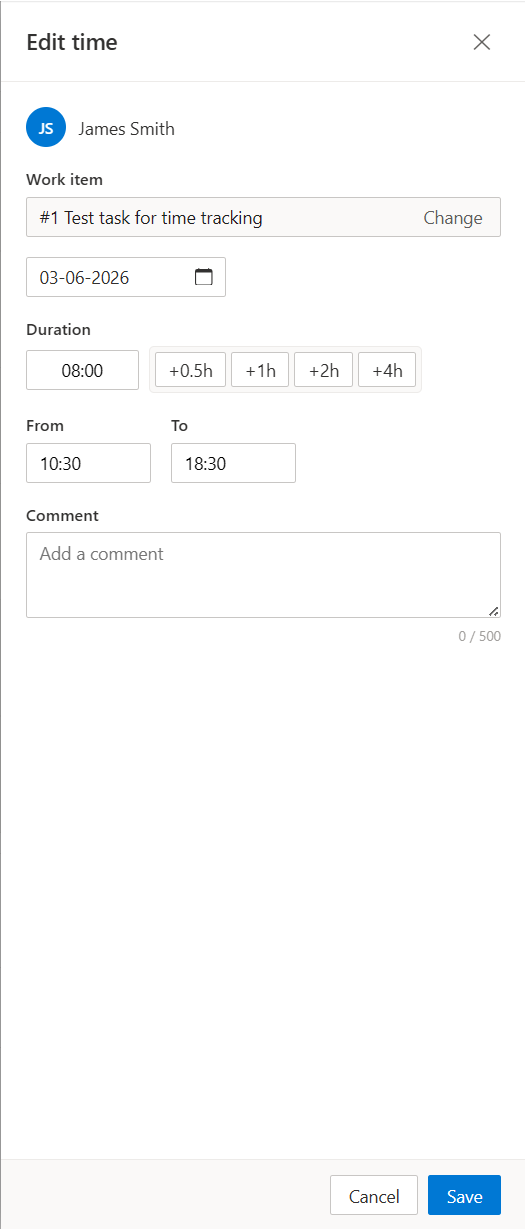
- One-click add on every work item. The "Time Tracking" panel slides in beside the description, so you log time where you already are — no separate timesheet app, no context switch.
- Quick-add buttons
+0.5h / +1h / +2h / +4h for common durations, plus precise From/To inputs that snap to 15-minute steps with arrow keys or scroll wheel.
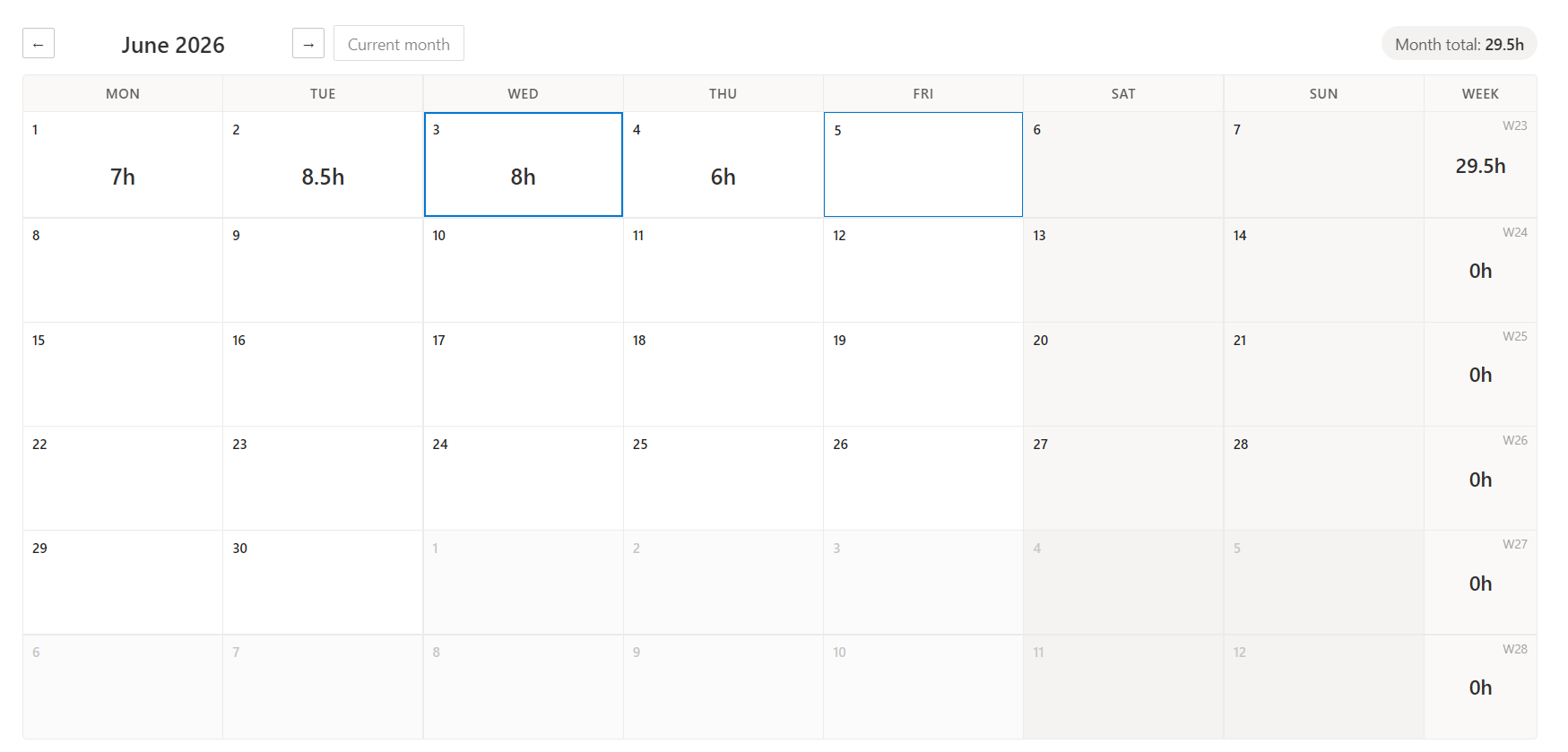
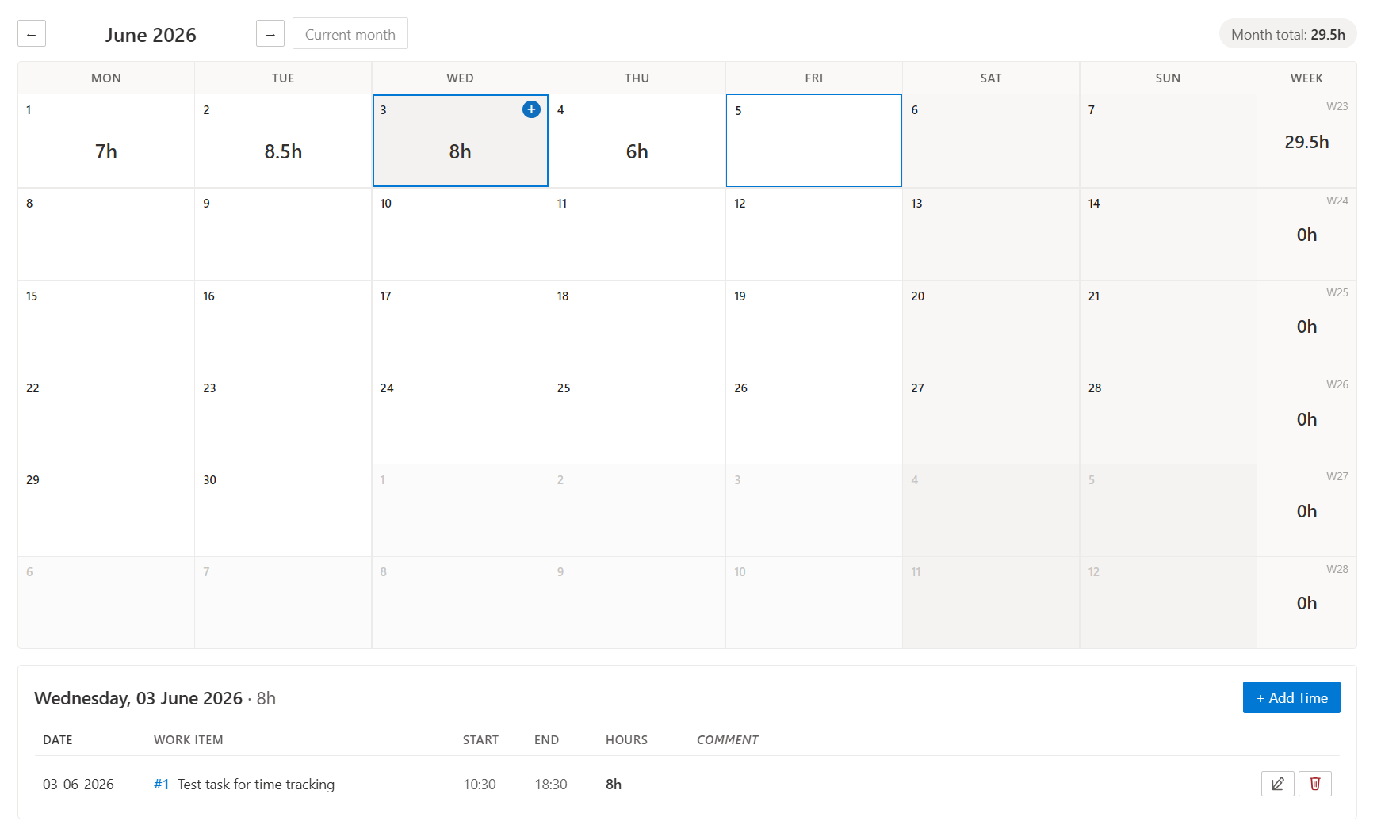
- Personal monthly calendar showing every day's total, your week, and your month — hover any cell to add time with a single click.
For project managers and admins
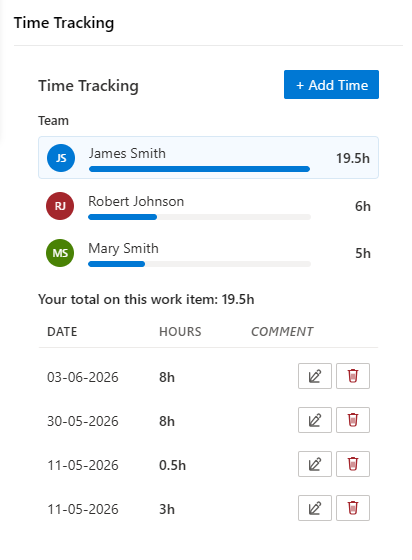
- Team breakdown on every ticket. See exactly who logged how much on this work item, with a proportional progress bar — without leaving the ticket.
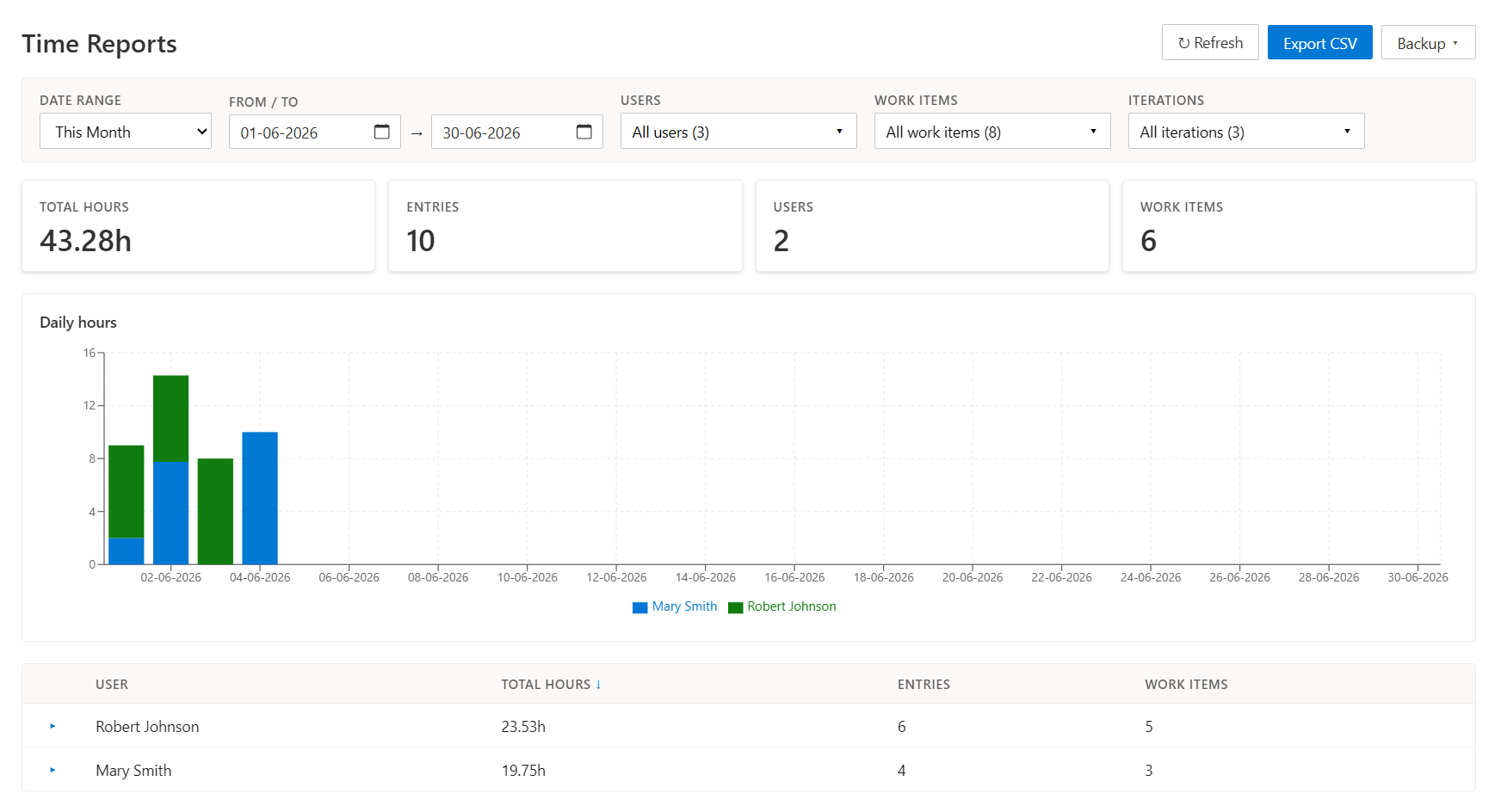
- Reports hub with daily stacked chart, summary cards, and a per-user table that expands into work-item-level detail. Filter by date range, users, projects, work items, or iteration.
- Org-wide roles — Admin, Manager (read-only view of everyone's time), Member, and No access, assigned per user on the Organization Settings page. Works out of the box: ADO administrators default to Admin, everyone else to Member.
- Cross-project reporting — an entry logged against a work item from another project lands in that project's collection, and Time Reports aggregates every project into one view with a Project column and filter.
- CSV export of any filtered view — drop into invoicing, capacity planning, or external dashboards.
- JSON backup & restore — snapshot all entries (or just the current filter) to a portable JSON file, then re-import on demand with a preview dialog that flags duplicates, phantom users, and missing work items before anything is written.
- Invalid-entry inspector — admin-only section that surfaces stale rows (deleted work items, phantom users, over-cap hours) with inline Edit / Delete on each, including reassigning an entry to another user.
- Iteration filter to slice reports per sprint.
Roles & the Organization Settings page
Who sees what is controlled by four org-wide roles, assigned per user in Organization Settings → Time Tracker:
| Role |
What the hubs show |
| Admin |
Everyone's time across all projects, plus the write surfaces: edit / delete / reassign others' entries, backup & restore, invalid-entry cleanup |
| Manager |
Everyone's time, strictly read-only (a "Read-only · all users" badge makes the scope explicit) |
| Member |
Own time only (a "Personal view" badge) — the default for everyone without an assignment |
| No access |
Time Tracker hides itself for that user: no panel on work items, a quiet note on the hubs |
The settings page lists every org user with their access level, current role, and last-accessed date. Rows of ADO administrators carry an ADO Admin badge, so group-derived defaults are easy to tell from explicit assignments.
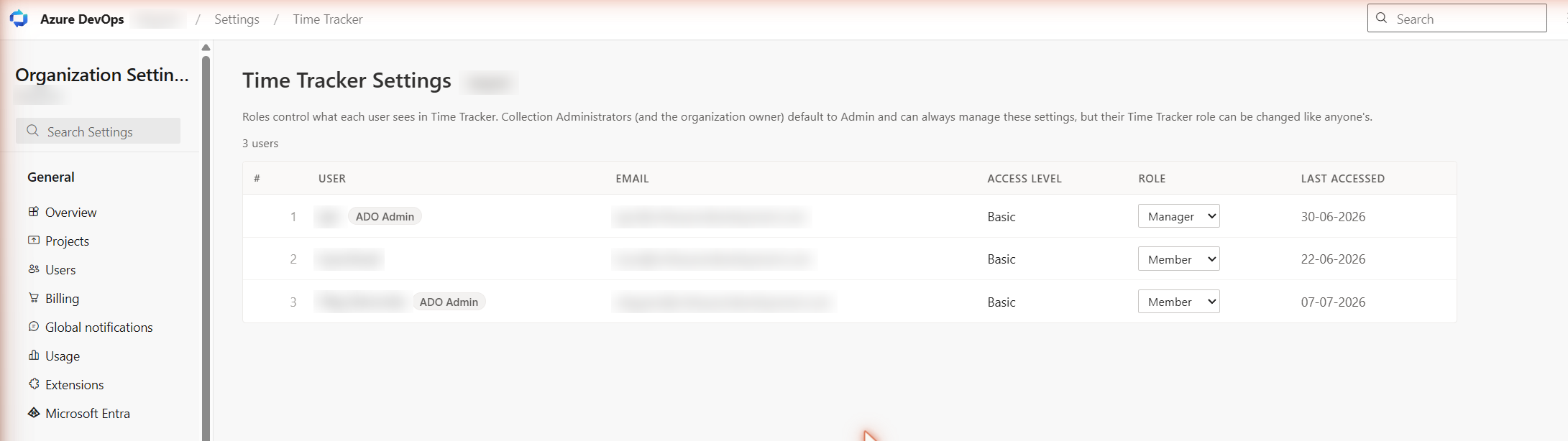
A few deliberate rules:
- Works with zero setup. With no assignments, Project Collection Administrators (including the organization owner) default to Admin and everyone else to Member — a fresh install behaves sensibly before anyone opens the settings page.
- An explicit assignment always wins — ADO administrators included. A Collection Administrator can set themselves Member and the tracker genuinely behaves like it does for a regular user until they switch the role back. ADO admin status governs settings management, never report visibility.
- No self-lockout. The right to manage roles is derived from ADO group membership, so a Collection Administrator can always open this page and fix any assignment — no stored role can lock the org out of role management. Delegation works too: anyone assigned the Admin role can manage roles as well.
- Entra ID groups are fully supported. Admins and project members are recognized even when their membership runs through nested Entra ID (Azure AD) groups — badges, defaults, and the report validators all see through the group nesting.
Backup & restore
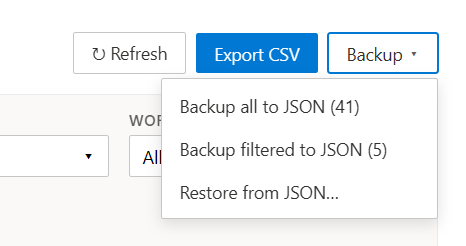
A single Backup menu in the Time Reports header covers both directions:
- Backup all to JSON — every entry in the current scope (admins: project-wide; non-admins: own).
- Backup filtered to JSON — only what matches the current FilterBar (date range, users, work items, iteration). Use this for per-sprint snapshots or per-user handoffs.
- Restore from JSON… — opens a preview dialog before writing anything.
Filenames embed project and timestamp, so backups are self-describing on disk.
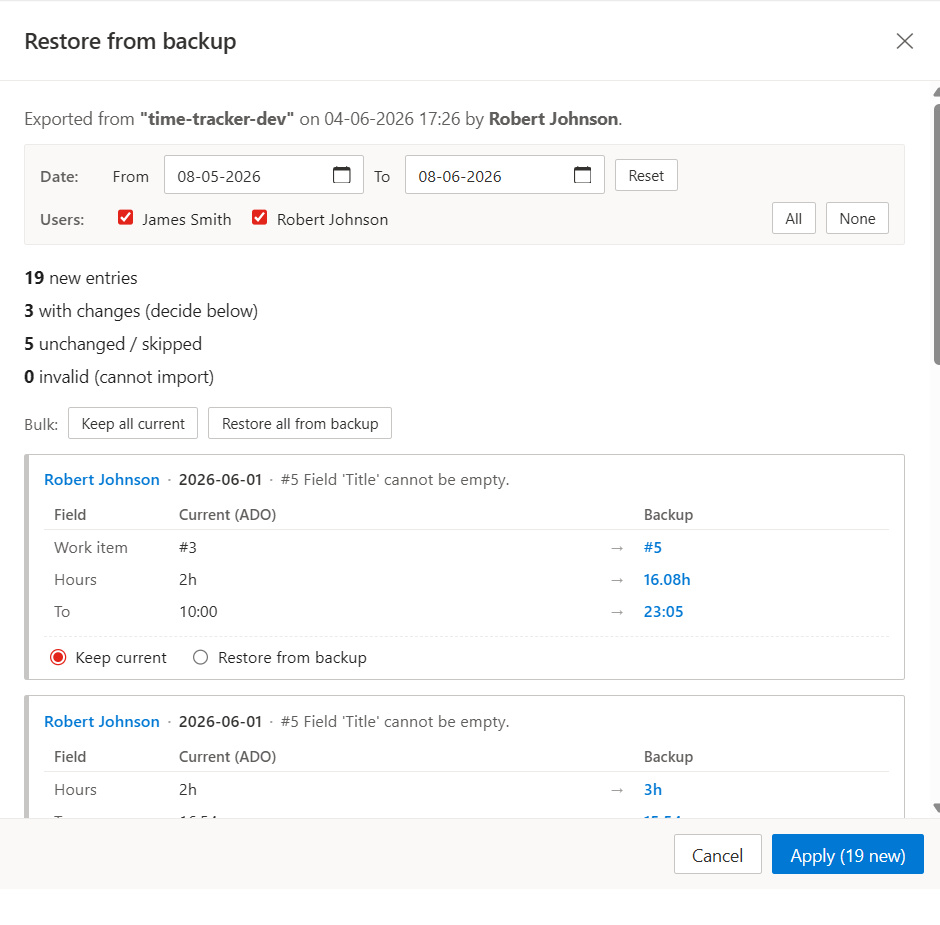
Restore preview is a dry-run. The dialog summarises new, changed, unchanged / skipped, and invalid entries up front, then lets you:
- Narrow the import by date range and user without re-exporting.
- Resolve conflicts field-by-field — for each changed entry, see Current (ADO) vs Backup side by side and choose Keep current or Restore from backup. Bulk shortcuts handle the whole list at once.
- Tick / untick individual new entries to import. Smart defaults pre-check entries that pass validation and pre-uncheck rows referencing phantom users, missing work items, or over-cap hours.
Nothing hits Extension Data Service until you click Apply — and the count on the button reflects exactly what's about to be written.
Invalid-entry inspector
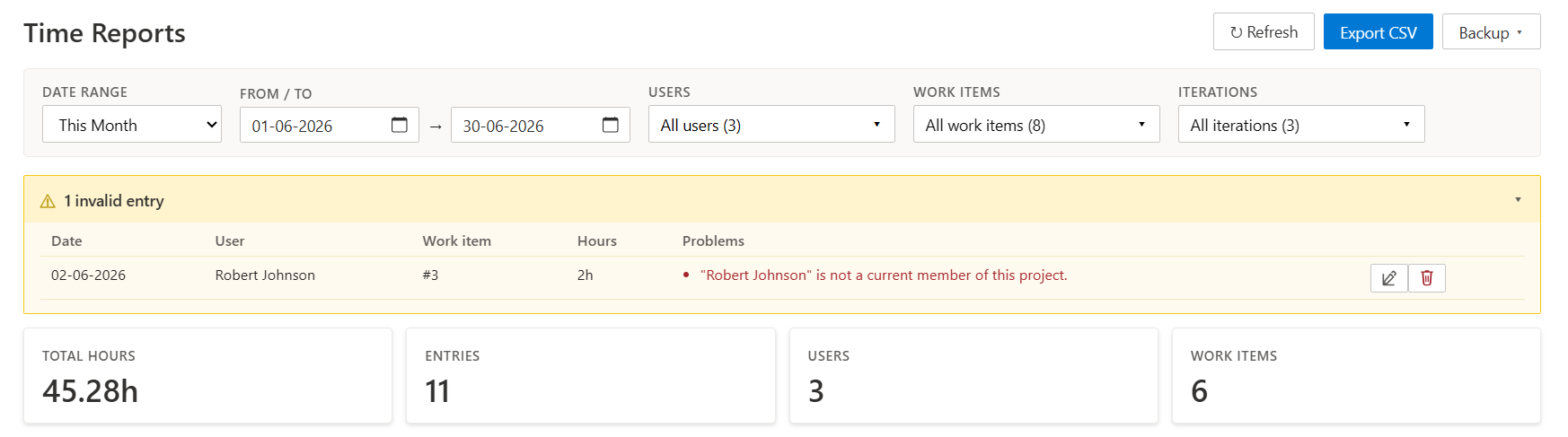
When the Project Members lookup is available, admins also see a collapsible N invalid entries banner above the summary cards. It lists every row that fails one of the integrity rules with the specific reason — "<userName>" is not a current member of this project., Work item #N doesn't exist or you have no read permission., Hours N exceeds the per-entry cap of M., etc. — and offers per-row Edit and Delete so you can clean things up without leaving the hub. Edit opens the full entry editor, where an admin can also point the entry at a different work item or reassign it to another user.
Membership checks follow nested Entra ID (Azure AD) groups, so a user whose project access comes through an AAD group is never falsely flagged as a phantom.
This is the same validator that powers the smart defaults in the restore preview, so the two features stay in sync: anything flagged here is exactly what restore will refuse to silently re-import later.
Why this extension
|
This extension |
Most alternatives |
| Hosting |
Lives entirely inside your Azure DevOps org |
Separate SaaS backend |
| Pricing |
Free, no per-seat licensing |
Monthly subscription per user |
| Privacy |
Time data stays in your ADO Extension Data Service |
Routes through a third-party server |
| Setup |
Install from Marketplace, done |
Auth flows, license keys, admin accounts |
| Permissions |
Reads work items + identity. Nothing else |
Often broad org-wide scopes |
If you need a heavyweight stand-alone product (invoicing, salary integration, time-off accrual, dozens of report views), this isn't it. If you need solid in-Azure-DevOps time logging that team members will actually use, this is it.
What's inside
| Feature |
What it does |
| Time Tracking panel (work item form) |
Per-user CRUD on time entries. Edit/Delete only on your own rows |
| Team widget (work item form) |
Per-user breakdown of who logged how much on the current ticket |
| Monthly hub |
Personal 6×7 calendar; click a day for an editable day-detail; hover for one-click add |
| Time Reports hub |
Role-based: Admins see and manage everyone's time, Managers see everyone read-only, Members see their own — filterable by date / users / projects / work items / iteration |
| Org-wide roles |
Admin / Manager / Member / No access per user, managed in Organization Settings → Time Tracker; ADO administrators default to Admin |
| Cross-project reporting |
Entries are stored in the work item's home project; Time Reports aggregates every project with a Project column and filter |
| CSV export |
Columns: Date, From, To, User, Project, Work Item ID, Work Item Title, Hours, Comment. Filename time-entries_{project}_{from}_to_{to}.csv |
| JSON backup / restore |
Full or filter-scoped backup; restore via preview dialog with conflict resolution, per-entry selection, and validation-aware smart defaults. Org-wide backups (one file covering every project) restore each entry into its own project |
| Invalid-entry inspector |
Admin-only banner listing rows that fail integrity rules (phantom user, missing work item, over-cap hours) with inline Edit / Delete / reassign |
| Entra ID (Azure AD) aware |
Admin detection and member validation see through nested Entra ID groups |
| Bidirectional Duration ↔ From/To |
Set any two of three and the third recomputes |
| Save & add another |
Log several entries in one flow — the modal stays open, keeps the work item, and prefills the next entry. Choose between next day at the same start time and same day, continuing where the last block ended — from the modal footer or from My preferences |
| Personal preferences |
Per-user settings in Organization Settings → Time Tracker, above the roles table. Every user edits their own; the values follow them to every device they sign in from |
| Midnight-crossing entries |
Auto-split into two records (day 1 ends 23:59, day 2 starts 00:00) on save |
| Locale-aware dates |
DD-MM-YYYY end-to-end, matching ADO's Work Items grid |
Day-detail view
Click any day in the Monthly hub for the full breakdown — entries listed latest-first, editable and deletable in place.
Privacy
Everything stays inside your Azure DevOps organization:
- Time entries are stored in Azure DevOps Extension Data Service (Microsoft-hosted, scoped to your org)
- No external API calls, no telemetry, no analytics
- Two scopes per entry: User (only the author reads) and Collection (project members read for aggregate views)
- Uninstalling the extension does not delete your data — it remains in your org's EDS until manually purged
OAuth scopes requested: vso.work (read work items so we can show titles next to entry IDs) and vso.identity (identities endpoint backing the role defaults for ADO administrators, the project-member validation behind the invalid-entry inspector, and the Entra ID group expansion — all read-only).
Install
- Open the Marketplace listing (or search for Time Tracker in your org's Extensions panel).
- Click Get it free and pick the target Azure DevOps organization.
- Project Collection Administrator rights are required to install. If you don't see the Install button, ask a PCA group member.
- Optional: open Organization Settings → Time Tracker to assign roles. Skipping this step is fine — ADO administrators start as Admins, everyone else as Members.
After install, Time Tracker appears as a top-level entry in every project's navigation (with Monthly and Time Reports under it), and Time Tracking appears as a section on every work item form.
Compatible with
- Azure DevOps Services (
dev.azure.com)
- Azure DevOps Server 2020+
Support & feedback
Questions, bug reports, and feature requests: info@rothausendevelopment.com.
You can also use the Marketplace listing's Q&A tab for public questions.
License
All rights reserved by Rothausen Development. Distributed via the Visual Studio Marketplace at no charge.
| |

