mdtoc VS Code Extension
mdtoc - generate and strip Markdown tables of contents
☰ with numbering and stable anchor links (configurable)

This is a thin VS Code extension around mdtoc and updates the active Markdown document in place.
Table of Contents (click to expand)
1. Features
- same binary in scripts, CI and as VS Code extension keeps workflow aligned
- easy to use with editor context menu:
- right-click inside an open Markdown editor and choose
mdtoc: Generate ToC
- configurable: edit the generated
mdtoc config block values directly to match your needs
on|off for numbering, anchor, link, toc- targets ATX headings (min
# to max ######)
- slug profiles:
github, gitlab, crossnote, #94
- auto or explicit (
*, -, +) ToC bullets style
- delete line
<!-- numbering=true min=2 max=4 slug=github anchor=true link=true toc=true bullets=auto --> for defaults only
- repeated headings support
- protects non-generated content inside ToC area
- generated content stays clearly separated from authored content
- deterministic and idempotent: updates existing ToC
- Intentionally ignored:
Setext headings:
IGNORED Heading 1
=========

IGNORED Heading 2
---------
fenced code blocks:
```
## IGNORED Heading 3
```
HTML comments:
<!--
## IGNORED Heading 4
-->
HTML syntax:
<h4>IGNORED Heading 5</h4>
exclusion regions:
<!-- mdtoc off -->
## IGNORED Heading 6
<!-- mdtoc on -->
starting space:
␠## IGNORED Heading 7
2. How to Use
Open a Markdown file in VS Code, then use one of these entry points:
- Command Palette:
Shift+Cmd+P on macOS or Ctrl+Shift+P on Windows/Linux, then run mdtoc: Generate ToC or mdtoc: Strip ToC
- Editor context menu: right-click inside an open Markdown editor and choose
mdtoc: Generate ToC or mdtoc: Strip ToC
The table of contents is initially created at the beginning of the document. You can then move the managed block to another place in the file and mdtoc: Generate ToC will update it there.
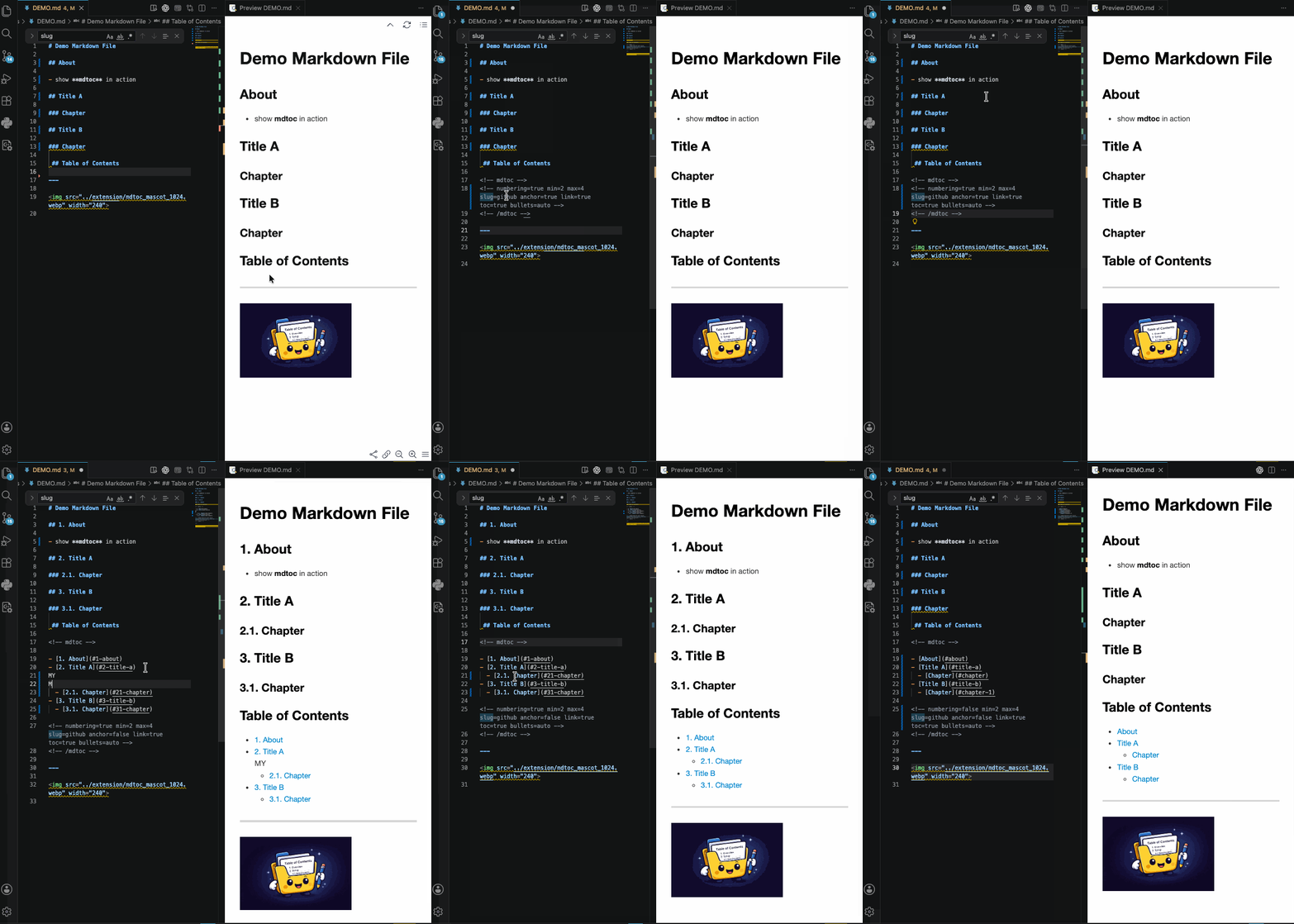
3.1. Behaviour
Generate ToC runs mdtoc in root mode:
if the document has no managed container yet, mdtoc creates one with its default settings (generate):
<!-- numbering=true min=2 max=4 slug=github anchor=true link=true toc=true bullets=auto -->
if the document already has a valid managed container, mdtoc regenerates it from the stored container config
- If the defaults are fine for you, you can delete the config block line.
- You may also rewrite that single-line config block as a valid multi-line config block:
<!--
numbering=true
min=2
max=4
slug=gitlab
anchor=false
link=true
toc=true
bullets=auto
-->
the document stays unchanged and the CLI error is shown if
- more than one managed container exists
- the managed container is invalid
if a managed container is broken beyond repair, you can delete it and run mdtoc: Generate ToC again to create a fresh one
Strip ToC runs the explicit strip subcommand and removes the generated ToC. If the CLI reports an error, the document stays unchanged. If non-generated lines are found inside the ToC area according to the current config block rules, they are preserved inside additional regions (protection). The same protection also applies to Generate ToC.
<!-- preserved by mdtoc
  * [3.1. Behaviour](#31-behaviour) accidentally entered text here
-->
3.2. Configuration
The extension supports one runtime setting:
{
  "mdtoc.executable.customPath": ""
}
If mdtoc.executable.customPath is set, the extension uses that absolute path. Otherwise it uses the bundled platform binary.
There is no automatic PATH lookup in the current extension.
3.3. Installation Alternative
Install the extension from a packaged .vsix file:
- Download the
.vsix that matches your platform.
- In VS Code, run
Extensions: Install from VSIX....
- Select the downloaded
.vsix file.
3.4. Continuous Integration
The underlying mdtoc binary is not limited to VS Code. You can use it directly in shell workflows, scripts, and CI, for example with mdtoc check README.md to fail a pipeline when a managed Markdown file is out of date. For CLI usage and the full feature set, see the repository README.
3.5. Troubleshooting: ToC links are changed after running mdtoc
If mdtoc: Generate Table of Contents creates the expected ToC, but the ToC changes again shortly afterwards, another VS Code Markdown extension may be rewriting the same ToC block.
A confirmed example is Markdown All in One.
3.5.1. Symptom
mdtoc first generates stable, unnumbered link targets:
- [1. Introduction](#introduction)

## 1. <a id="introduction"></a>Introduction
A moment later, the ToC is rewritten to use numbered link targets:
- [1. Introduction](#1-introduction)

## 1. <a id="introduction"></a>Introduction
The second form is wrong for mdtoc when anchor=true, because the ToC link no longer points to the explicit anchor ID generated by mdtoc.
3.5.2. Cause
Markdown All in One can automatically update Markdown tables of contents. When that feature is enabled, it may detect the mdtoc ToC block as a normal Markdown ToC and rewrite it using its own slug rules.
If numbering=true is enabled, the visible heading text contains section numbers. Markdown All in One may then derive ToC links from that numbered heading text, producing links such as:
[#1](https://github.com/rokath/mdtoc/issues/1)-introduction
[#478](https://github.com/rokath/mdtoc/issues/478)-example-scripts
However, with mdtoc anchor=true, the correct ToC link target is the explicit anchor ID:
#introduction
#example-scripts
3.5.3. Fix
Use only one extension to manage the ToC block.
If mdtoc should manage the ToC, disable automatic ToC updates in Markdown All in One.
Add this to your VS Code settings in .vscode/settings.json:
{
  "markdown.extension.toc.updateOnSave": false
}
For project-wide behavior, put it in:
.vscode/settings.json
Then reload the VS Code window and run:
mdtoc: Generate Table of Contents
again.
After this setting is disabled, mdtoc-generated ToC links should remain stable and unnumbered when anchor=true.
3.5.4. Notes
This is not a mdtoc CLI or pipe-mode issue. mdtoc writes the correct ToC first. The numbered slugs appear because another extension rewrites the ToC afterwards.
If the issue still occurs, temporarily disable other Markdown ToC extensions, reload VS Code, and regenerate the ToC.

