Skip to content
| Marketplace
Sign in
Visual Studio Code>SCM Providers>Git Revision GraphNew to Visual Studio Code? Get it now.
Git Revision Graph

Git Revision Graph

Marco Antonio Rodrigues

|
145 installs
| (1) | Free
Visualize Git revision graphs from VS Code Source Control and run compare, checkout, branch, merge, sync, delete, and diff workflows.
Installation
Launch VS Code Quick Open (Ctrl+P), paste the following command, and press enter.
Copied to clipboard
More Info

Git Revision Graph

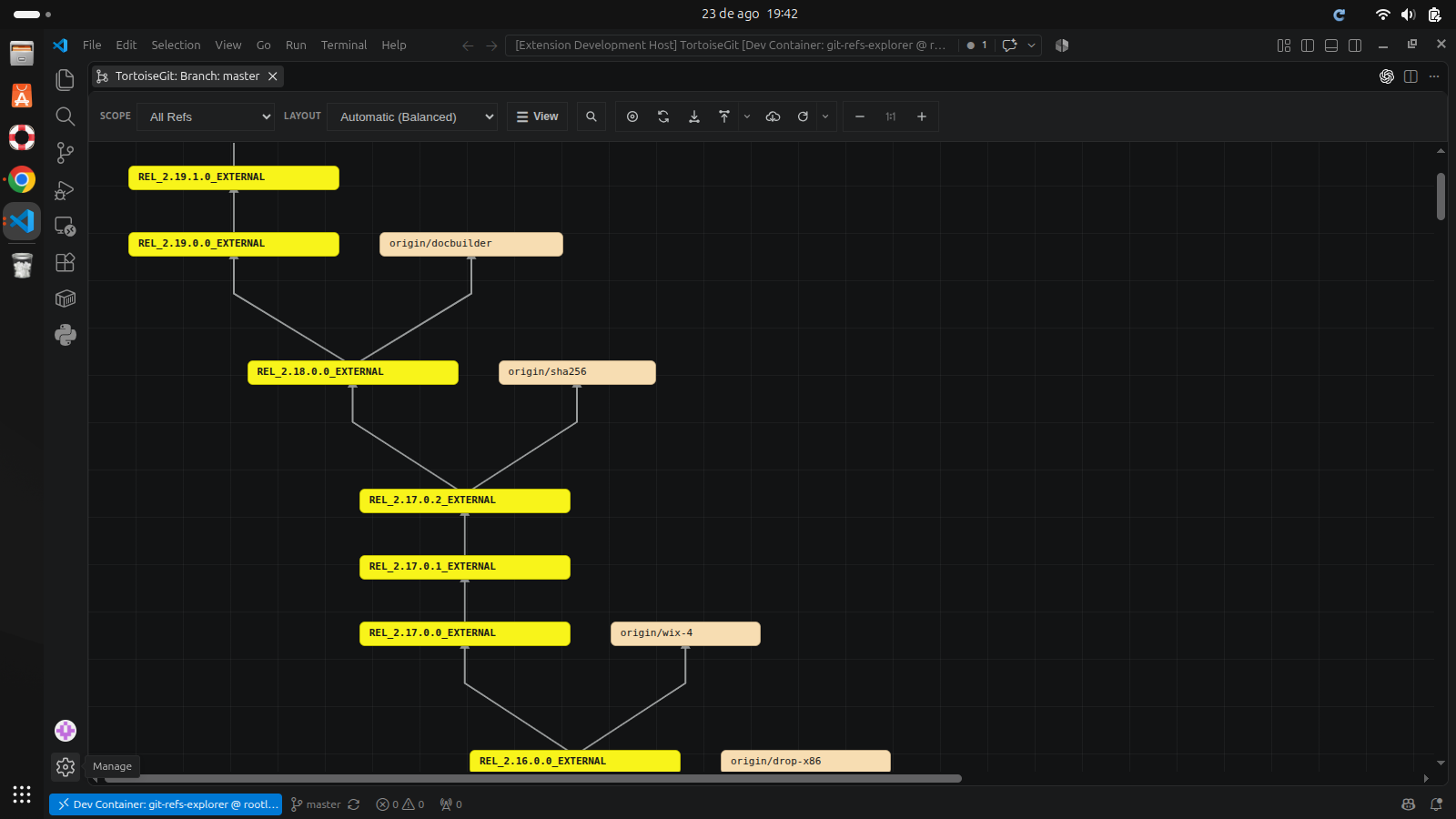
Git Revision Graph is a Visual Studio Code extension for browsing a Git revision graph from Source Control and running compare, checkout, branch, merge, sync, delete, and diff workflows in an editor panel.

It is built on top of the public API exposed by the built-in vscode.git extension and keeps the experience close to the native VS Code diff and Source Control workflows.

Install

  • From Marketplace: search for Git Revision Graph
  • From a package file: install the generated .vsix via Extensions: Install from VSIX...

Where To Find The Graph

Since 0.0.31, Git Revision Graph no longer opens from its own primary Activity Bar icon. Open the graph from VS Code Source Control instead:

  • Click View Git Revision Graph in the Source Control toolbar.
  • Or run View Git Revision Graph from the Command Palette.

The graph opens as a singleton editor panel. Compare Results and Show Log also open as on-demand editor panels when those workflows are active.

Goals

  • Visualize the Git revision graph and its references from VS Code Source Control
  • Group local branches, tags, and remote branches in a way that is easy to scan
  • Provide direct actions for compare, checkout, branch, merge, sync, and review workflows
  • Reuse VS Code's native Git and diff experience instead of re-implementing Git internals

Current Features

  • View Git Revision Graph command and Source Control toolbar button for opening a full-size graph in the editor area
  • Toolbar controls for reload with an empty-cache split option, push with split-button force options, scope (All Refs, Current Branch, origin/HEAD, Local Branches), compact view options, and in-graph search
  • Optional Flow Governance metadata overlay with compact, theme-adaptive Codicon branch-kind badges when enabled by settings or a repository flow file
  • Interactive contextual reference details with a neutral reference kind or Flow Governance badge, full ref name, optional local Git branch description, commit subject, author, date, on-demand change statistics, hash copying, and exact commit opening for supported GitHub, Azure DevOps, GitLab.com, and AWS CodeCommit remotes
  • Flow Governance context actions start releases and hotfixes from main, features from main or a classified release, tasks from features, and bugs from features or releases. Each path uses a fetch-first source preflight: untracked sources are checked on a configured remote and offer confirmed publication when absent; the main source for releases and hotfixes, and the selected main or release source for features, must exactly match their upstream; task and bug sources accept ahead-only work, synchronize behind-only sources after confirmation, and block divergence for manual reconciliation. Newly created branches offer optional confirmed publication.
  • Flow Governance also prepares local sync/* equalization of release or feature branches from main or an active release without automatic push. Before equalization, both the target and selected origin are fetched and checked: ahead-only local work is preserved, behind-only branches can be safely updated after confirmation, and divergence blocks the operation. Branch-description forms retain optional user-triggered AI improvement through an available GitHub Copilot language model.
  • Create Flow Governance Config command for creating the repository .git-revision-graph-flow.json template after confirmation
  • Fetch the active repository directly from the graph toolbar, with optional Prune and Tags flags per run
  • d3-dag Sugiyama graph layout over the major-operations projection, preserving important refs, merges, forks, roots, and tips while keeping descendants above visible parents
  • Virtualized graph rendering for large revision graphs, with only the visible node and edge window rendered into the webview DOM during navigation
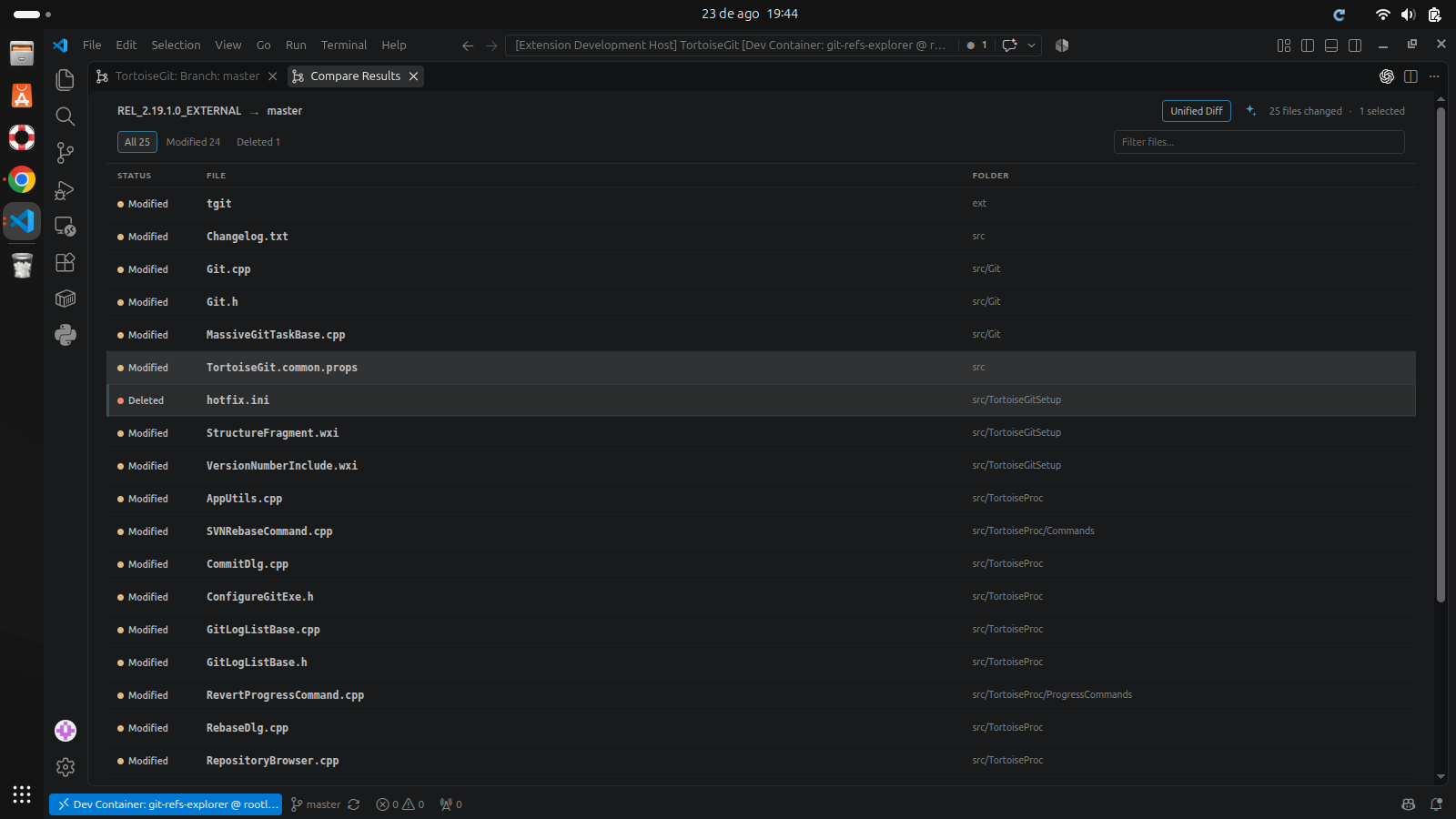
  • Compare between two selected references or visible unreferenced commits, including changed files, unified diff, and revision log actions
  • Reset the current branch to a selected non-HEAD graph reference or visible commit, using the target commit hash after confirmation
  • Focus the graph on a selected base..compare range from the two-reference context menu, with a removable range filter in the graph toolbar
  • Focus the graph on one visible revision and all loaded descendants from its single-revision context menu, excluding older and unrelated history through Git ancestry rather than visual position
  • Compare a selected reference or unreferenced commit against the current worktree
  • On-demand Compare Results editor panel that presents comparisons as a compact review queue with source/target context, status filters, rename paths, a Unified Diff action for ref-to-ref and ref-to-worktree comparisons, double-click file diff opening, context actions for compare with worktree and worktree restore flows, and an optional user-initiated, scrollable, and copyable AI Briefing generated through an available GitHub Copilot language model from bounded, path-filtered comparison context
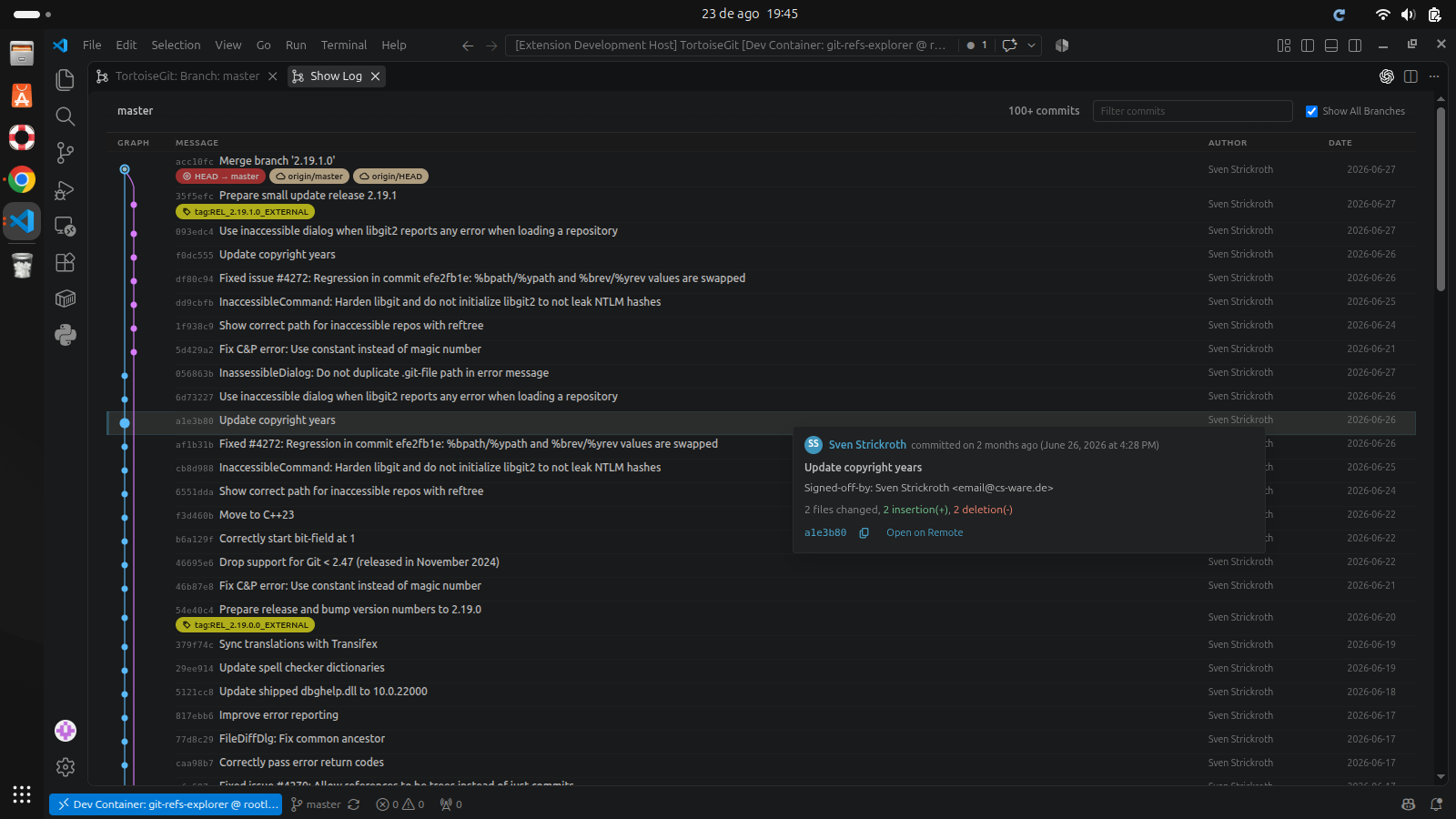
  • On-demand Show Log editor panel that appears from the graph context menu and renders a compact commit history for a selected ref/commit or an explicit base..compare range, with kind-aware reference badges, inline changed files, commit-to-worktree comparison, reset-to-commit, and double-click file diff opening for the expanded commit
  • Grouped graph context menu actions for any visible commit, including copying the full commit hash from referenced and unreferenced nodes, copying visible ref names, and consistent rounded menu-item highlighting across graph, Show Log, and Compare Results menus
  • Checkout of local and remote branch references
  • Guided checkout flow for remote branches with an explicit Override branch if exists option when the local branch name already exists or is currently checked out
  • Create a new local branch from a local branch, remote branch, tag, or visible unreferenced commit
  • Create a local tag from a branch, tag, remote branch, or visible unreferenced commit
  • Publish a local branch to a selected Git remote with upstream tracking
  • Push a local tag to a selected Git remote from the graph context menu when it is not already published
  • Delete a pushed tag from a selected Git remote while keeping the local tag unchanged
  • Pull, push, and sync the current tracked HEAD branch with its upstream remote branch from the Revision Graph, including confirmed force-push modes when intentionally rewriting remote history
  • Merge a selected reference into the current branch, with merge conflicts reported in a modal dialog before further repository operations continue
  • Abort a conflicted merge from the HEAD reference context menu after confirmation
  • Save workspace changes to a stash from the HEAD reference context menu and apply, pop, or remove the visible stash reference
  • Block workspace-changing actions while conflicts remain unresolved, and reveal Source Control to resolve them
  • Present operation-blocking Git precondition warnings as modal VS Code messages so aborted actions clearly explain what needs attention
  • Delete local branches, tags, and remote branches from the Revision Graph, with safe handling for tracked local branches
  • Selection highlighting for the primary ancestor and descendant path related to the first selected reference
  • Graphs load already organized by the extension host, with layout cache misses calculated in a worker thread plus a Center HEAD action and zoom reset controls in both the graph toolbar and minimap
  • Horizontal drag handles plus board and minimap controls for navigating and zooming the graph during a session
  • Minimap overview with visible viewport bounds, click/drag navigation for larger graphs, and a persisted Show Minimap view option
  • Client-side search across the loaded graph by branch, tag, hash, subject, and author
  • Actionable empty state for choosing a repository when a multi-repository workspace needs an explicit graph target
  • Automatic refresh when repository state changes
  • Multi-repository workspace support

Scope

The current scope is intentionally focused and centered on fast reference-based workflows.

Included in the MVP:

  • Reference discovery through the built-in Git extension API
  • Webview-based graph navigation
  • Source Control toolbar button for opening Git Revision Graph in the editor area
  • Toolbar and context menu actions inside the Revision Graph
  • Command Palette access to compare, compare-with-worktree, checkout, merge, and open graph actions
  • Command Palette access to View Git Revision Graph for opening or revealing the editor graph panel
  • Command Palette access to Create Flow Governance Config for bootstrapping the repository flow-file template
  • File-level diff opening through the native VS Code diff editor
  • Unified diff and revision log viewing for selected references
  • Local branch creation and reference deletion flows from the Revision Graph
  • Revision graph rendering through a dedicated webview panel

Not included yet:

  • Advanced merge conflict guidance
  • Rich search beyond the current loaded graph scope, plus more advanced saved ref and range filter combinations
  • Reference rename or general push workflows
  • Full-history graph rendering beyond the bounded recent-commit window

How It Works

The extension depends on the built-in vscode.git extension and uses its public API for repository access.

At a high level:

  1. The extension gets the Git API through vscode.git.
  2. It reads repositories from the current workspace.
  3. It loads references with getRefs(...).
  4. It projects the history into a major-operations graph and coordinates graph layout from the extension host, offloading expensive d3-dag cache misses to a worker thread.
  5. It renders the active repository through an editor WebviewPanel.
  6. It virtualizes the graph DOM so large scenes remain navigable while scrolling and zooming.
  7. It listens to repository open/close, checkout, and state-change events to keep the view synchronized.
  8. It executes workflows such as compare, checkout, branch creation, merge, sync, and deletion by using the Git API where available.

This approach keeps the extension lightweight for reference workflows. The revision graph view uses targeted git log, git diff, and git show calls only where the public vscode.git API does not expose enough commit graph or textual history data.

Settings

  • gitRevisionGraph.traceLoading
    • Enables graph loading diagnostics in the Git Revision Graph output channel.
  • gitRevisionGraph.graphCommandTimeoutMs
    • Controls the timeout for the revision graph git log command. The default is 60000 ms, with supported values from 5000 to 300000 ms.
  • gitRevisionGraph.flowGovernance.configPath
    • Repository-relative path for the Flow Governance configuration file. The default is .git-revision-graph-flow.json.

The graph's View menu always shows Flow Governance. Its checkbox reflects the repository flow file: a missing file is disabled, while a present valid file uses its enabled value. Enabling the checkbox creates the default file when needed; subsequent toggles persist enabled in that file.

From a branch classified as feature, Flow Governance offers Start New Package. The package is created from an exactly synchronized feature and can then consolidate and validate its task deliveries using the normal repository workflow.

Flow Governance repository configuration is deliberately bounded so a malformed repository cannot stall the extension host. The JSON file may be at most 64 KiB and 32 levels deep, with at most 64 top-level fields. mainBranches accepts at most 32 entries of 256 characters each. Classification patterns accept at most 256 characters and a safe JavaScript regular-expression subset: backreferences, oversized repeat counts, excessive quantifiers, adjacent potentially overlapping repetitions, and nested or ambiguous repeated groups are rejected. Within a deterministic start-anchored prefix, a two-letter case pair recognizes both spellings while its first member defines governed creation output. For example, ^Latam/[fF]eature/.+$ recognizes both Latam/feature/... and Latam/Feature/... and creates Latam/feature/...; [Ff] creates the uppercase spelling. This canonical rule applies to all configured Flow patterns, including generated sync names. Arbitrary character classes, ranges, groups, and alternatives remain classification expressions and are not treated as branch-name templates. An invalid configuration disables Flow Governance for that repository and reports a diagnostic while normal Git Revision Graph loading remains available.

Project Structure

.
├── .devcontainer/
│   └── devcontainer.json
├── media/
│   ├── icon.png
│   ├── icon-source.svg
│   ├── icon-source-dark.svg
│   └── icon-source-light.svg
├── src/
│   ├── extension.ts
│   └── git.ts
├── package.json
├── README.md
└── tsconfig.json

Main Files

  • src/extension.ts

    • extension activation and VS Code wiring
    • webview registration
    • command registration
    • adapters that bridge VS Code UI to the testable command layer
  • src/git.ts

    • minimal TypeScript interfaces for the Git extension API used by this project
  • src/refActions.ts, src/workbenchRefActionServices.ts

    • compare, checkout, branch, tag, sync, merge, delete, reset, and restore workflows
    • native VS Code UI adapters for QuickPick, confirmations, Source Control handoff, and diffs
  • src/revisionGraph/controller.ts, src/revisionGraphPanel.ts, src/revisionGraphWebview.ts

    • editor graph panel lifecycle
    • repository synchronization and webview message handling
    • persistent webview shell generation
  • src/revisionGraphData.ts, src/revisionGraph/layout/*, src/revisionGraph/projection/*

    • commit graph parsing, major-operations projection, layout cache, d3-dag layout, and worker-thread layout execution
  • src/revisionGraph/webview/script/*, src/revisionGraph/webview/shared.ts

    • browser-side graph rendering, virtualization, viewport behavior, minimap, search, selection, and context menus
  • test/*.test.ts

    • automated coverage for labels, compare flows, checkout behavior, merge protections, and empty states
  • package.json

    • extension metadata
    • Source Control toolbar contribution and on-demand editor review panels
    • commands and context menus
  • project-context/docs/revision-graph-parity-plan.md

    • architectural review distilled into a phased plan for reproducing the TortoiseGit Revision Graph in VS Code
    • target module boundaries, parity goals, and acceptance criteria

Architecture Plan

The current redesign roadmap lives in project-context/docs/revision-graph-parity-plan.md.

That document is the working reference for:

  • the architectural gap between the current prototype and TortoiseGit
  • the target commit-centric graph model
  • the phased migration plan toward functional parity
  • acceptance criteria for declaring the graph "faithful enough"

Development Requirements

To work on the extension locally, you need:

  • Visual Studio Code
  • Node.js
  • npm
  • Git

Recommended:

  • TypeScript familiarity
  • VS Code Extension Development Host workflow

Local Development

Install dependencies:

npm install

Build the extension:

npm run build

Run the automated test suite:

npm test

Run the Extension Host E2E baseline against an isolated VS Code installation:

npm run test:e2e -- --vscode-version 1.90.0
npm run test:e2e -- --vscode-version stable

The first command proves compatibility with the minimum engines.vscode release; the second detects forward-compatibility regressions against the current stable release. The E2E command defaults to stable, accepts an exact x.y.z version through --vscode-version or VSCODE_E2E_VERSION, and reuses downloads from .vscode-test. Linux environments require the desktop Electron libraries and an active display; the devcontainer installs those libraries and CI runs both versions through xvfb.

Run the production code-quality budget check:

npm run quality:check

The quality gate rejects new production TypeScript files above 500 lines and functions above cyclomatic complexity 15. Existing hotspots are recorded in scripts/code-quality-baseline.json; increasing a reviewed baseline requires an intentional code review, while reducing or removing one is always preferred.

Open the project in VS Code and run the extension:

  1. Open the repository in VS Code.
  2. Press F5.
  3. A new Extension Development Host window will open.
  4. Open a folder that contains a Git repository in that host window.
  5. Click View Git Revision Graph in the Source Control toolbar, or run View Git Revision Graph from the Command Palette.

Dev Container

The project includes a development container configuration in .devcontainer/devcontainer.json.

Base image:

  • mcr.microsoft.com/devcontainers/typescript-node:5-24-bookworm

This setup is intended to provide a consistent development environment with Node.js, npm, Python, and the latest available graphify CLI. The dev container loads environment variables from the repository .env file. During postCreateCommand, the container installs npm dependencies, upgrades graphifyy, installs the Graphify Codex skill, and installs the Graphify Git hook.

To use it:

  1. Add GEMINI_API_KEY to the repository .env file when Gemini-backed Graphify extraction is required.
  2. Open the project in VS Code.
  3. Run Dev Containers: Reopen in Container.
  4. Wait for the postCreateCommand to finish.
  5. Build and run the extension as usual.

Commands

The current extension contributes these Command Palette commands:

  • gitRefs.compareRefs
  • gitRefs.compareWithWorktree
  • gitRefs.checkout
  • gitRefs.merge
  • gitRefs.openRevisionGraphEditor

Additional actions are available directly inside the Revision Graph context menu:

  • Create a new branch from a selected reference
  • Create a local tag from a selected reference or visible commit
  • Publish a local branch to a selected Git remote
  • Push a local tag to a selected Git remote when the tag is not already published
  • Delete a remote tag from a selected Git remote
  • Delete a local branch, tag, or remote branch
  • Sync the current tracked HEAD branch with its upstream
  • Copy a selected reference name to the clipboard
  • Reset the current branch to a selected non-HEAD reference or visible commit
  • Focus the graph on a selected base..compare pair
  • Focus the graph on one selected revision and all of its loaded descendants
  • Show a compact log for a selected target or a selected base..compare pair
  • Open the unified diff between two selected references

The extension also includes two on-demand editor review panels:

  • Compare Results, which appears when a compare produces results and keeps the latest compare session available for multi-file review while the graph panel is open
  • Show Log, which appears from the graph context menu and shows a compact log for a selected target or range, with commit expansion inline while the graph panel is open

Closing the editor graph panel also closes these secondary review panels.

Known Limitations

  • Merge conflict resolution is delegated to the standard Source Control experience in VS Code; conflicted merges can be aborted from the HEAD reference context menu.
  • Remote branch deletion uses an explicit confirmation because it affects the remote repository and collaborators.
  • Binary files or unusual encodings may not render nicely in content-based diffs.
  • The UX for tags and detached HEAD workflows is intentionally minimal in the MVP.
  • The revision graph currently renders a bounded set of recent commits instead of the entire repository history.
  • The automated Extension Host baseline covers activation, zero/single-repository discovery through the real vscode.git extension, and singleton graph-panel launch. Manual verification remains recommended for visual behavior, multi-repository selection, native prompts, diffs, and mutations.

Next Steps

Potential improvements after the MVP:

  • Add saved graph filter combinations and richer range presets
  • Avoid full graph reloads for metadata-only local operations such as checkout and branch creation when the loaded commit window is unchanged
  • Preserve zoom, scroll, and selection context across lightweight refreshes
  • Add refresh profiling and caching for graph load, projection, and layout hot paths
  • Improve conflict guidance before checkout and merge
  • Add reference rename flows
  • Support richer branch metadata in the UI
  • Expand the revision graph with richer revision actions

Validation Strategy

Use both automated and manual checks when changing command behavior:

  1. Run npm test.
  2. Run npm run test:e2e for the isolated Extension Host baseline.
  3. Press F5 to launch the Extension Development Host.
  4. Open:
    • a workspace without a Git repository
    • a workspace with one repository
    • a workspace with multiple repositories
  5. Exercise:
    • compare between two references
    • compare a reference with the worktree
    • create a new local branch from a local branch, tag, and remote branch
    • checkout of a local branch and remote branch
    • sync the current tracked HEAD branch with its upstream
    • merge of a selected reference into the current branch
    • open Git Revision Graph from the Git Revision Graph title bar
    • Ctrl/Cmd-click two references and compare them
    • Ctrl/Cmd-click two references and open Show Log, Unified Diff, and Focus Range
    • clear the active range filter from the graph toolbar
    • open Focus Descendants from one visible reference or unreferenced commit and clear its active toolbar indicator
    • switch between Focus Range and Focus Descendants, then change graph scope and confirm active focus clears
    • select one reference and compare it with the worktree
    • select one reference and create a branch from it
    • select one reference and create a local tag from it
    • select one tag and push it to a remote
    • select one tag and delete it from a remote
    • delete a local branch, tag, and remote branch from the graph
    • change scope and visibility options from the graph toolbar
    • hover and keyboard-focus local, remote, tag, and stash references to verify the interactive reference tooltip, copy-hash action, remote-host action, and branch descriptions
    • open Show Log, verify reference badge colors/icons, toggle Show All Branches, and scroll far enough to trigger automatic next-page loading

The extension continues to rely on the public API of the built-in vscode.git extension for repository and ref operations, and uses targeted git commands only for graph/history data that the API does not expose.

License

MIT

Credits

This extension was inspired by and/or uses concepts from TortoiseGit.

TortoiseGit is an open-source Git client for Windows.

  • Contact us
  • Jobs
  • Privacy
  • Manage cookies
  • Terms of use
  • Trademarks
© 2026 Microsoft